
Village Scenery in 3D Modeling
Discover diverse resources and techniques for 3D village models and imagery
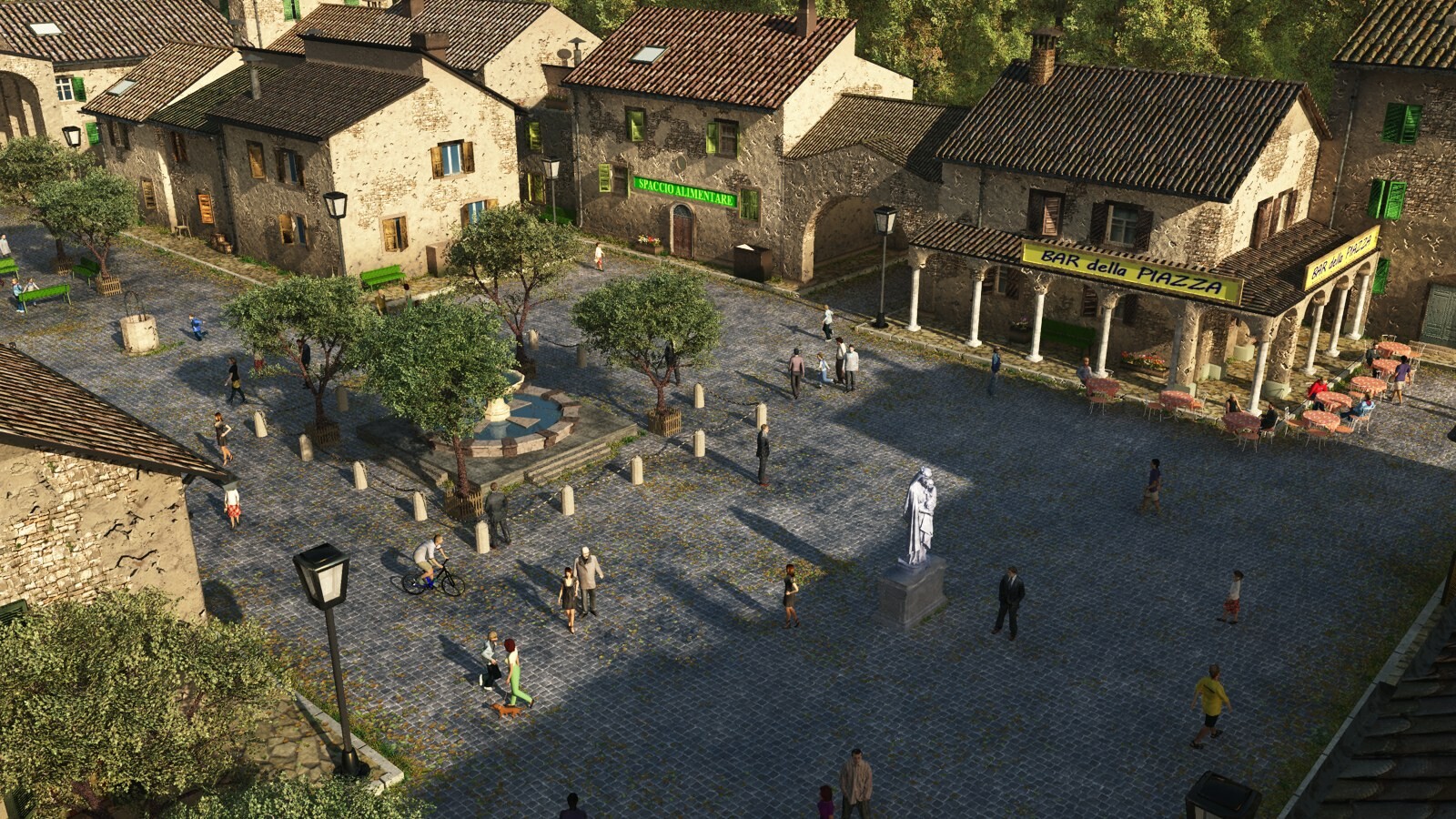
Key Highlights
- Wide Variety of Models: Numerous platforms offer free and premium 3D village models in several file formats.
- Versatile Usage: Available models are ideal for animation, games, VR/AR applications, and more.
- Detailed Resources: Many sites provide advanced filtering options to match your project needs.
Overview of 3D Village Scenery Resources
When embarking on a project that requires a village scenery in 3D modeling, it is important to explore multiple facets including models, images, and textures. A village scene typically includes intricate details such as buildings, vegetation, terrain, and additional scenery elements. Whether you are working on game development, architectural visualization, or a VR/AR experience, the versatility of available 3D models can accommodate your specific needs.
Many platforms cater to these diverse requirements by offering models in various file formats such as OBJ, FBX, 3DS, MAX, and C4D. This gives creators the flexibility to integrate models directly into their chosen software environments. Some platforms primarily focus on high polygon counts suitable for realistic renderings, while others provide simplified models more appropriate for real-time applications and mobile devices.
Primary Platforms for 3D Village Models and Images
Commercial and Free Resources
A number of popular websites offer comprehensive libraries of 3D village models and images, catering to both free and premium users. These websites are known for the quality and variety of their resources, ensuring that a wide range of artistic and technical needs are met.
Sketchfab
Sketchfab is a leading community and marketplace for 3D models. Among their extensive collections, you can find numerous detailed village models. The platform supports a variety of file formats and allows 3D previews directly in the browser, making it easier to assess the quality and details before downloading.
TurboSquid
With a vast repository that includes more than 7800 village models, TurboSquid provides options for both realistic imagery and abstract representations. Its models are designed for applications ranging from visual effects in films to real-time games. Although many models are premium, the quality control and detailed descriptions on TurboSquid make it a go-to resource.
CGTrader
CGTrader offers an impressive collection of 3D village models, including over 925 free models available in multiple file formats. The platform is especially popular among professionals due to its detailed model descriptions, polygon count specifications, and compatibility notes. Projects that involve simulation, architectural visualization, or VR benefit from the varied resource base offered by CGTrader.
Free3D
For those who are budget conscious, Free3D provides a significant amount of free village models. This resource is ideal for beginners or for rapid prototyping, as it frequently includes community-shared models that have a creative and sometimes experimental flair.
3DExport
3DExport offers a range of models suitable for different use cases. With a collection that features both free and paid options, the platform caters to users who need quick downloads for immediate projects or hobbyists looking for high-quality models with rich details.
Additional Resources for Enhanced Visual Elements
Stock Photos and Design Templates
In addition to 3D models, acquiring high-quality imagery of village scenes can be integral to design projects. These images might include isometric views, background illustrations, and high-resolution photos suitable for digital art, banners, and promotional material.
Platforms such as iStock, Freepik, Pikbest, and Pngtree offer diverse stock photos and design templates that provide vibrant visuals. This is particularly useful for projects where the intersect of 3D rendering and flat image design is crucial for establishing a unique aesthetic.
iStock
iStock is renowned for its extensive collection of stock images, including over 7,300 3D village scenes. The images typically feature cutting-edge isometric perspectives that capture detailed environments, making them ideal for both marketing materials and digital backgrounds.
Freepik and Pikbest
Freepik provides free graphic resources that include vectors, PSD files, and detailed illustrations of villages. It is highly frequented by graphic designers who need customizable elements for their projects. Pikbest similarly offers extensive design templates and stock images that are both creative and thematic, often incorporating cartoon-like and artistic interpretations of villages.
Pngtree rounds out this collection by offering high-definition backgrounds, ensuring that digital projects have access to publicity-quality images that can enhance narratives and provide deeper visual context.
Key Considerations for Selecting the Right Model
File Formats and Compatibility
Choosing the right file format is crucial for ensuring compatibility with your modeling software or game engine. Most professional platforms offer models in several formats:
- OBJ: Widely used and compatible with most 3D software, particularly useful for static models.
- FBX: Favored for animations and game development due to its support for skeletal and motion data.
- 3DS: A legacy format still used in certain projects, primarily in older software systems.
- MAX and C4D: Native to specific software packages, providing seamless integration into projects made with 3ds Max or Cinema 4D.
In many cases, platforms will offer multiple file formats for a single model, allowing you the flexibility to choose the one that best suits your project requirements. If you are working on a scenario that involves animations or real-time rendering, formats supporting rigging and detailed textures, such as FBX, can be a better fit.
Polygons Count, Textures, and Level of Detail
The level of detail and polygon count are critical factors to be considered depending on your project’s demands. Models with high polygon counts are ideal for close-up rendering and high-definition visuals; however, they might need optimization for real-time applications such as video games or VR experiences.
Many websites provide filtering options where you can specify your required polygon count, texture quality, and whether the model includes rigging or animation controls. Such options help streamline your search process and ensure that the chosen resource integrates smoothly into your project.
Licensing and Usage Rights
It is essential to thoroughly review licensing terms before downloading or incorporating a 3D model or imagery into your work. Models available on platforms like Free3D, CGTrader, Sketchfab, and TurboSquid come with varied licensing agreements—ranging from royalty-free to restrictive usage rights.
Be sure to read the license details provided on the download page to understand whether the resource can be used for commercial projects, how many copies can be distributed, and whether modifications are allowed. This due diligence is particularly important for professionals who require guaranteed rights for commercial applications.
A Comprehensive Resource Table
The following table provides a comparative overview of the key platforms where you can access 3D village models and images. This comparison includes details such as the type of files available, range of free versus premium options, and special features.
| Platform | File Formats | Resource Type | Special Features |
|---|---|---|---|
| Sketchfab | OBJ, FBX, 3DS, etc. | 3D Models & Views | Interactive 3D preview, diverse models |
| TurboSquid | Multiple formats (OBJ, FBX, MAX, C4D) | High-quality 3D models | High detail, premium & free options |
| CGTrader | OBJ, FBX, C4D, MAX | 3D Models, including free options | Filtering by poly count, rigged and animated variants |
| Free3D | Various formats | 3D Models | Budget-friendly, community-sourced |
| iStock / Freepik / Pikbest | JPG, PSD, Vector | Stock photos & design templates | High-resolution images, isometric views |
Techniques for Integrating 3D Village Models
Model Preparation and Optimization
Once you select the perfect 3D village model for your project, consider the necessary steps for preparation and optimization. Many models may initially arrive with a high polygon count that is ideal for detailed rendering but may require optimization if you are developing a real-time application.
Techniques such as mesh decimation, texture baking, and LOD (Level of Detail) configuration are integral to ensuring smoother performance without compromising visual fidelity. Software tools like Blender, 3ds Max, and Cinema 4D offer native support for these tasks, allowing you to adjust each model exactly to the requirements of your project.
Texture and Material Customization
In addition to geometrical adjustments, texture and material adjustments play a major role in customizing the look of a village model. High-resolution texture maps can be applied to create more realistic surfaces for buildings, roads, and vegetation. Advanced texturing techniques, including normal maps, bump maps, and specular maps, add layers of detail that enhance realism in both static renders and interactive scenes.
Tools such as Substance Painter and Adobe Photoshop are commonly utilized to adjust texture quality and color grading for final output consistency. Experimentation with these techniques allows for the creation of unique visual styles that align with the overall theme of your project, whether realistic, stylized, or even cartoonish.
Software Integration and Workflow
The chosen 3D model must integrate seamlessly into your existing workflow. This may involve re-importing models into your preferred 3D software and verifying compatibility with lighting setups, camera positions, and rendering engines.
In game development environments, verification within engines such as Unity or Unreal Engine ensures that the model can be rendered in real time and that all material properties are accurately represented. This step is crucial if the 3D model is part of a larger scene that interacts with dynamic lighting or environmental effects.
Community and Learning Resources
Tutorials and Documentation
In addition to acquiring models and images, there is much to learn from the community. Platforms like Sketchfab, CGTrader, and TurboSquid not only host models but also provide educational resources. Tutorials and documentation related to model integration, optimization, and texturing are widely available on these sites, allowing you to refine your skills in real time.
You can find step-by-step guides, video tutorials, and blog posts detailing the nuances of preparing 3D assets for various applications. By leveraging community forums and support channels, you can get personalized advice and suggestions to tackle specific challenges you might face during your project.
Forums and Collaborative Platforms
A wealth of knowledge is also available on community platforms such as Reddit, CGSociety, and specialized Facebook groups where artists, developers, and hobbyists share their experiences and showcase their work. Engaging with these communities can provide insights into best practices, emerging trends, and innovative techniques that are particularly useful for projects aiming for high levels of detail or artistic integrity.
Advanced Strategies for Customization
Combining Multiple Assets
As your project evolves, you might find value in combining different models and image resources to craft a more complex and immersive village scenery. This layering of assets, where individual models of houses, trees, and environmental details are assembled into a comprehensive scene, allows for dynamic storytelling and provides a deeply engaging user experience.
Advanced techniques include the integration of modular design principles, whereby repeated assets are combined with unique modifications to ensure your scene never looks overly repetitive. Utilizing software capabilities to import high-resolution textures and shaders further elevates the visual quality of the amalgamated scene.
Incorporating Dynamic Elements
For projects that require interactive and dynamic village scenes, consider incorporating elements like animated characters or environmental effects such as moving clouds, shifting shadows, or responsive weather conditions. In such cases, opting for models that come pre-rigged and animated simplifies integration into game engines or interactive applications.
Dynamic elements not only contribute to a richer user experience but also provide opportunities for creating more engaging and immersive scenes. By working with models that have built-in support for animation, you reduce the amount of custom work required during development, thereby streamlining the production process.
Quality Assurance and Final Adjustments
Rendering and Testing
Before finalizing your 3D village scene, thorough rendering tests and performance profiling should be conducted. Whether you're using offline rendering for high-quality still images or real-time rendering in a game engine, meticulous testing ensures that the final output meets both performance and aesthetic criteria.
Check for lighting consistency, texture alignment, and any possible artifacts that might appear after multiple renders. Addressing these issues in the early stages of testing will save time and ensure that your final project is both visually compelling and technically robust.
Feedback and Iteration
Feedback is an essential part of refining any creative project. Once your initial 3D village scene is assembled, soliciting feedback from peers or the broader community can reveal details you might have overlooked. Iterative improvements based on constructive criticism can elevate the quality of the scene state, ensuring that the final product resonates with your intended audience.
Tools such as shared online workspaces and collaboration platforms help streamline the review process. Continuous iteration based on thorough testing and community input is key to achieving a professional and polished final product.
References
Recommended Related Queries
Last updated March 10, 2025