
Creating a Mobile Sci-Fi Hacking Game with Vite React
An Example Project for a LARP-Inspired Hacking Mini-Game
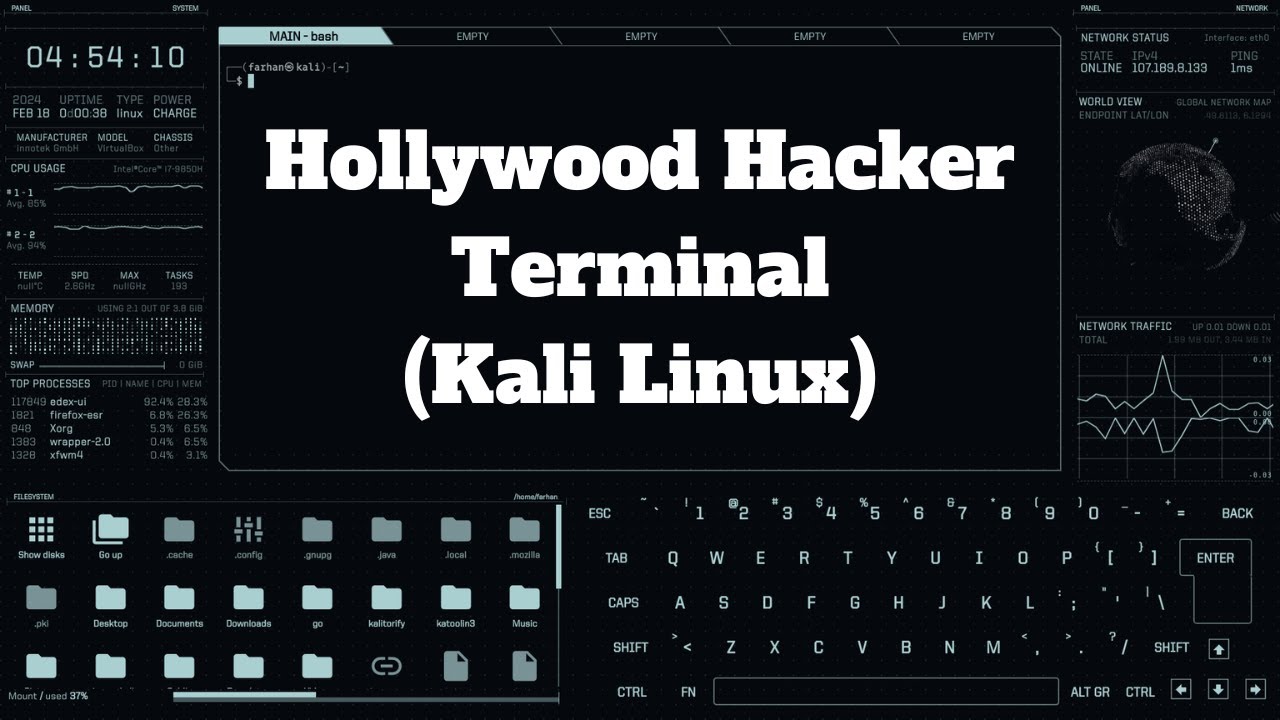
Highlights
- Rapid Setup with Vite: Enjoy the fast development and build optimization provided by Vite.
- Interactive Terminal Interface: A simulated command terminal creates an immersive hacking environment.
- Responsive and Mobile Friendly: Designed to run smoothly on phones with responsive design principles.
Overview and Project Concept
This guide demonstrates how to create a mini game suitable for a mobile environment using Vite and React. With a sci-fi theme tailored for a LARP (Live Action Role Playing) event, the game simulates a hacking scenario where players input commands into a virtual terminal to breach a secure system.
The idea is to let players experience the thrill of a hacking challenge by combining engaging user interface elements, time-sensitive feedback, and interactive elements derived from modern web technologies. The project emphasizes responsiveness and interactivity, making sure it works elegantly on smartphones.
Step-by-Step Implementation
Setting Up the Vite React Project
Begin by setting up a new Vite React project. Vite is a build tool that offers fast startup and optimized development cycles, making it ideal for fast prototyping and mobile development.
Using npm
Open your terminal and run the following commands to create your project:
  # Create a new Vite React project
  npm create vite@latest my-hacking-game --template react
  cd my-hacking-game
  npm install
  npm run dev
Upon running the above commands, you will have a basic React application set up with Vite.
Project Structure and File Setup
A typical Vite React project contains the following important files:
| File | Description |
|---|---|
src/App.jsx |
Main application component where you bootstrap your game interface |
vite.config.js |
Configuration file for customizing the build process |
src/components |
Folder to store additional components, such as your Terminal component |
The structure is customizable, and for our game we will create a dedicated component that handles our terminal-based game logic.
Coding the Hacking Game
The core of our hacking game is a simulated computer terminal where players enter commands to hack a system. The game will include:
- Displaying a welcome message and instructions
- Accepting user input and processing basic commands (e.g., "help", "hack")
- Feedback with animations/timers for hacking attempts
- Responsive design for mobile devices
Creating the Terminal Component
Create a new file called Terminal.jsx in the src/components folder. This file contains the logic and user interface for the hacking terminal.
  // Terminal.jsx
  import React, { useState, useEffect } from 'react';

  function Terminal() {
    const [input, setInput] = useState('');
    const [output, setOutput] = useState(['Welcome to the Sci-Fi Hacking Terminal']);
    const [commands] = useState({
      'help': 'List available commands',
      'hack': 'Attempt to breach the system'
    });
    const [isHacked, setIsHacked] = useState(false);

    const handleInput = (e) => {
      if (e.key === 'Enter') {
        processCommand(input.trim());
        setInput('');
      }
    };

    const processCommand = (cmd) => {
      let newOutputs = [...output];
      newOutputs.push(`> ${cmd}`);
      switch (cmd.toLowerCase()) {
        case 'help':
          newOutputs.push('Available commands: ' + Object.keys(commands).join(', '));
          break;
        case 'hack':
          newOutputs.push('Attempting to breach the system...');
          // Simulate network latency and hacking operation
          setTimeout(() => {
            newOutputs.push('Success! System breached.');
            setOutput(newOutputs);
            setIsHacked(true);
          }, 2000);
          break;
        default:
          newOutputs.push(`Unknown command: ${cmd}`);
      }
      setOutput(newOutputs);
    };

    return (
      <div className="terminal-container" style={{
        backgroundColor: '#000', color: '#0f0', padding: '20px', borderRadius: '8px', minHeight: '300px', overflowY: 'auto'
      }}>
        <div className="terminal-output" style={{ fontFamily: 'Courier New, monospace' }}>
          {output.map((line, index) => (
            <p key={index}>{line}</p>
          ))}
        </div>
        {!isHacked && (
          <input
            type="text"
            value={input}
            onChange={(e) => setInput(e.target.value)}
            onKeyDown={handleInput}
            placeholder="Enter command..."
            style={{ width: '100%', marginTop: '10px', backgroundColor: '#222', color: '#0f0', border: 'none', outline: 'none', padding: '10px' }}
          />
        )}
      </div>
    );
  }

  export default Terminal;
In the code above, the Terminal component processes user input and displays appropriate responses based on the command. The command “hack” simulates a breach attempt with a timeout function.
Integrating the Terminal in the App
Next, modify your main application file App.jsx to embed the Terminal component.
  // App.jsx
  import React from 'react';
  import Terminal from './components/Terminal';

  function App() {
    return (
      <div style={{
        backgroundColor: '#000', minHeight: '100vh', display: 'flex', flexDirection: 'column', justifyContent: 'center', alignItems: 'center'
      }}>
        <Terminal />
      </div>
    );
  }

  export default App;
This completes the basic integration. The App component sets a dark background common in sci-fi aesthetics and centers the Terminal on the screen.
Enhancing the Game with Additional Features
To make the game even more engaging, consider adding features such as:
- Dynamic Challenges: Create challenges by generating random codes or phrases that must be entered to complete the hack. This can be done by maintaining a list of hack sequences that change with each level.
- Timer and Score: Implement a timer for timed challenges and score tracking to add a competitive element. For example, reduce the score if the player takes too long or increment points on correct entries.
- Enhanced Visual Feedback: Use CSS animations and sound effects to provide feedback during hacking attempts. An animation might simulate code scrolling or network signals during a breach.
Adding a Timer and Score Tracker
Let’s expand our Terminal component to include a simple score and timer mechanism. This will encourage quick interaction and add urgency to the hacking challenge.
  // Enhanced Terminal.jsx with Timer and Score
  import React, { useState, useEffect } from 'react';

  function Terminal() {
    const [input, setInput] = useState('');
    const [output, setOutput] = useState(['Welcome to the Sci-Fi Hacking Terminal']);
    const [commands] = useState({
      'help': 'List available commands',
      'hack': 'Attempt to breach the system'
    });
    const [isHacked, setIsHacked] = useState(false);
    const [score, setScore] = useState(0);
    const [timeLeft, setTimeLeft] = useState(60);

    useEffect(() => {
      // Start a countdown timer when the component mounts
      const timer = setInterval(() => {
        setTimeLeft(prevTime => {
          if (prevTime <= 1) {
            clearInterval(timer);
            setOutput(oldOutput => [...oldOutput, 'Time up! Game over.']);
            return 0;
          }
          return prevTime - 1;
        });
      }, 1000);
      return () => clearInterval(timer);
    }, []);

    const handleInput = (e) => {
      if (e.key === 'Enter') {
        processCommand(input.trim());
        setInput('');
      }
    };

    const processCommand = (cmd) => {
      let newOutputs = [...output];
      newOutputs.push(`> ${cmd}`);
      switch(cmd.toLowerCase()) {
        case 'help':
          newOutputs.push('Available commands: ' + Object.keys(commands).join(', '));
          break;
        case 'hack':
          newOutputs.push('Attempting to breach the system...');
          setTimeout(() => {
            newOutputs.push('Success! System breached.');
            setScore(prevScore => prevScore + 10);
            setOutput(newOutputs);
            setIsHacked(true);
          }, 2000);
          break;
        default:
          newOutputs.push(`Unknown command: ${cmd}`);
      }
      setOutput(newOutputs);
    };

    return (
      <div className="terminal-container" style={{
        backgroundColor: '#000', color: '#0f0', padding: '20px', borderRadius: '8px', minHeight: '300px', width: '90%', maxWidth: '500px'
      }}>
        <div className="terminal-header" style={{ marginBottom: '10px' }}>
          <p>Score: {score} | Time Left: {timeLeft}s</p>
        </div>
        <div className="terminal-output" style={{
          fontFamily: 'Courier New, monospace', minHeight: '200px', overflowY: 'auto'
        }}>
          {output.map((line, index) => (
            <p key={index}>{line}</p>
          ))}
        </div>
        {!isHacked && timeLeft > 0 && (
          <input
            type="text"
            value={input}
            onChange={(e) => setInput(e.target.value)}
            onKeyDown={handleInput}
            placeholder="Enter command..."
            style={{ width: '100%', marginTop: '10px', backgroundColor: '#222', color: '#0f0', border: 'none', outline: 'none', padding: '10px' }}
          />
        )}
      </div>
    );
  }

  export default Terminal;
In this version, the timer is initialized with 60 seconds. Every second, it decrements the time. If time runs out, the game notifies the user that the session is over. The score increases upon successful hacking attempts.
Styling for a Sci-Fi Look
The visual style greatly contributes to the immersive experience. Using CSS (or Tailwind CSS for rapid development), you can style the terminal to have a futuristic, cyberpunk aesthetic.
Basic CSS Example
Create a file named Terminal.css and include the following styles:
  /* Terminal.css */
  .terminal-container {
    background-color: #000;
    color: #0f0;
    padding: 20px;
    border: 2px solid #0f0;
    border-radius: 8px;
  }

  .terminal-output {
    font-family: 'Courier New', monospace;
    height: 200px;
    overflow-y: auto;
    margin-bottom: 10px;
  }

  input {
    background-color: #222;
    color: #0f0;
    border: none;
    padding: 10px;
    width: 100%;
    outline: none;
  }
You can adjust these styles to better match your game’s narrative and overall design. For even richer aesthetics, consider using pre-built sci-fi UI kits or additional effects like glowing borders and pulsating animations.
Mobile Optimization Considerations
To provide a great experience on mobile devices, ensure that:
- The layout is responsive and scales appropriately on different screen sizes.
- Input areas are large enough for touch input.
- The game is lightweight and optimized for performance on mobile processors.
Implement media queries in your CSS to adjust font sizes and container widths as needed:
  @media (max-width: 600px) {
    .terminal-container {
      width: 100%;
      padding: 15px;
    }
    .terminal-output {
      font-size: 14px;
    }
  }
Advanced Enhancements and Future Considerations
Once you have the basic game framework, consider expanding the functionality with several advanced features that can enrich the user experience:
Enhancements
- Complex Command Parsing: Instead of simple string matching, create a more advanced parser to handle multiple commands and parameters. This can mimic more realistic terminal behavior.
- Multilevel Challenges: Introduce different levels or stages with increasing difficulty. For each stage, vary the hacking sequences or the types of challenges the player must complete.
- Sound and Visual Effects: Integrate visual feedback such as flashing lights, progress bars, or animations. Add sound effects using the Web Audio API to simulate system beeps and alerts.
- Leaderboard Integration: For a competitive edge, consider integrating a leaderboard to track high scores or fastest times. This is particularly engaging for LARP scenarios where participants can compete.
Expansion and Modular Design
To keep your code maintainable and scalable:
- Break down the game logic into smaller, reusable components. For example, separate components for the timer, score tracker, and command parser.
- Use state management libraries like Redux or context APIs if the game state becomes complex.
- Write unit tests for individual components to ensure stability as you add new features.
Using TypeScript for Enhanced Reliability
For larger projects and improved maintainability, consider using TypeScript instead of JavaScript. TypeScript can help catch errors during development and make your code more robust. To set up a TypeScript project with Vite and React, use the following command:
npm create vite@latest my-hacking-game --template react-ts
Then adapt your component files (e.g., rename them from .jsx to .tsx) and include type definitions for your state and functions.
Conclusion and Final Thoughts
By following the steps outlined in this guide, you have a comprehensive framework to build a sci-fi themed hacking mini-game with Vite and React. The example provided demonstrates how to create a terminal-based interface that is both interactive and responsive, ensuring a smooth gaming experience on mobile devices.
This project can be extended with more advanced features such as dynamic challenges, complex command parsing, and enhanced visual and audio feedback. The modular nature of the code and the versatility of React make it easier to iterate and add functionality over time.
Whether you are designing a game for a LARP event or merely exploring innovative web development techniques, this example provides a solid foundation. Experiment with additional aesthetics, gameplay mechanics, and state management techniques to bring your vision to life.
References
- Vite Official Guide - Vitejs
- React Documentation - React
- Tailwind CSS Documentation - TailwindCSS
- Hacker_Man Game Example - GitHub
- Sci-Fi Hacking Simulator Game - Itch.io
Recommended
Last updated February 26, 2025