
Comprehensive Guide to Watch Instruction Manuals
Your go-to resource for locating and understanding your watch manual
Key Takeaways
- Identify Your Watch Model: Knowing your watch model and serial number is crucial to locate the correct manual.
- Online Manufacturer Resources: Most reputable brands offer downloadable manuals on their official websites.
- Understanding Functions: Detailed manuals not only provide setup guidance but also explain additional features and troubleshooting tips.
Introduction
Finding the right instruction manual for your watch is pivotal in ensuring you understand all the functionalities, settings, and maintenance tips required for efficient use and longevity of your timepiece. This guide not only outlines how to locate the manual by identifying your model number but also explains the common sections found in most watch manuals and how these sections aid in maximizing the potential of your watch.
Identifying Your Watch Model
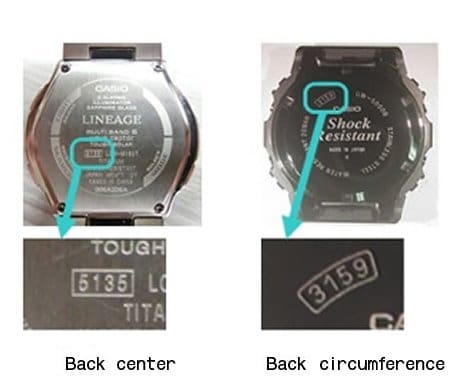
The first step in locating the instruction manual for your watch is identifying the specific model and series of your device. The model number is usually inscribed on the back of your watch or engraved on the case. This identifier is essential because:
- Ensures accuracy: A single digit change in the model number might represent a completely different set of instructions or features.
- Simplifies search: Manufacturer websites often have search functionality allowing input of the model number to display a list of downloadable resources.
- Avoids confusion: Especially useful when a brand has many models with slight variations in functions.
Finding the Manual Online
Many esteemed watch manufacturers have embraced digital formats and integrated their instruction manuals into their official websites. Here, you can often find detailed PDF manuals, troubleshooting guides, and even animated tutorials. Below, we detail established brands and steps to locate these manuals:
Manufacturer-Specific Resources
Apple Watch
Apple provides extensive support for their Apple Watch models through detailed guidelines on their support site. While Apple often includes technical specifications and setup instructions together, you can easily isolate the instructional content by searching with your watch model or serial number.
Casio
Casio’s support section allows you to search for user manuals and operation guides using the model name or module number. This centralized database is particularly useful due to the broad range of models available, ensuring you find the detailed instructions specific to your timepiece.
Citizen, Fossil, and Timex
It is common to find the manuals for popular brands like Citizen, Fossil, and Timex on their respective support sites. For example:
- Citizen: Navigate to the Citizen website to access setting instructions tailored to various models.
- Fossil: Fossil provides PDF versions of their manuals in multiple languages—simply select your watch model and language preference.
- Timex: Timex offers a robust database where you can search by the model number or product name to quickly locate the user guide for your watch.
Geneva Watch Group
The Geneva Watch Group represents a conglomerate of brands such as Kenneth Cole, Timberland, and Ted Baker London. Their online platform allows you to enter the watch’s model number, which then provides access to tailored instruction manuals that cover features, care, and additional functions.
Understanding Instruction Manual Content
Once you have successfully located and downloaded the instruction manual, it is important to understand that these manuals are structured to offer comprehensive information across several essential areas. Below is a detailed breakdown of common sections found in most watch manuals:
1. Introduction and Overview
This section acquaints you with your watch. It provides an overview of the design philosophy, unique features, and the intended use-cases for the timepiece.
2. Setting the Time
Perhaps the most important section, it outlines how to manually adjust the time. Typical instructions include:
- Pulling the crown to a “set” position.
- Turning the crown (clockwise for time changes, counterclockwise for date adjustments, or vice versa depending on the model).
- Returning the crown to the normal position to activate the watch functions.
3. Date and Day Functions
If your watch includes a day/date function, the manual will provide step-by-step instructions to accurately set these functions. The process is similar to setting the time but may require multiple adjustments and turns of the crown.
4. Alarm and Chronograph Functions
For watches equipped with additional features such as alarms or chronographs, the instructions involve multiple button presses or combinations:
- Alarm: Engage the alarm by pressing a dedicated button and use the mode switch to set the desired time. A confirmation step is often included.
- Chronograph: Initiating and resetting the stopwatch feature usually involves separate start/stop and reset buttons, thereby allowing you to time events precisely.
5. Additional Features
Many modern watches include additional features such as water resistance, luminous displays, and even smart connectivity options. Manuals in this section:
- Outline the level of water resistance (e.g., 30m, 50m, 100m) and necessary precautions to prevent damage.
- Discuss the care of luminous hands and indices, including optimal lighting conditions.
- Provide instructions for connecting the watch to other devices if applicable.
6. Maintenance and Care
To ensure longevity and optimal performance, a good manual will include detailed care instructions. Key tips include:
- Avoid extreme environments such as high temperatures or strong magnetic fields.
- Using gentle cleaning methods to prevent scratching or damage to the watch body.
- Periodic checks on critical components like the battery or mechanical parts to ensure timely maintenance.
7. Troubleshooting
When things don’t work as expected, the troubleshooting section is invaluable. Common troubleshooting guidelines address:
- Incorrect timekeeping due to battery issues or mechanical misalignment.
- Non-responsive buttons with suggestions for a reset procedure.
- Contact details for the manufacturer or authorized service centers.
Practical Steps to Download Your Watch Manual
Follow these structured steps to locate and download the correct instruction manual for your watch:
Step-by-Step Process
- Locate the Model Number: Examine the backside of your watch or the accompanying warranty card to find the model or serial number.
- Visit the Manufacturer's Website: Use your preferred search engine to navigate to your watch brand's official support page. For example, for Fossil, go to their support page and enter your model number.
- Search or Navigate to Manuals Section: Many websites have a dedicated section or a search bar for "Instruction Manuals" or "User Guides."
- Input the Model Number: Enter the model number in the search field to filter results.
- Select and Download: Choose the PDF version of the manual, ensuring it matches your variant and preferred language.
Comprehensive Manufacturer Resources Table
| Brand | Instruction Manual Link | Description |
|---|---|---|
| Fossil | Fossil Manual | Download PDF manuals in multiple languages and find customer support info. |
| Citizen | Citizen Instructions | Step-by-step setting guides and troubleshooting for Citizen watches. |
| Timex | Timex Manuals | Comprehensive user guides for various Timex models. |
| Casio | Casio Manuals | Searchable database for detailed operation guides of Casio watches. |
| Geneva Watch Group | Geneva Manuals | Instructions for multiple brands under Geneva Watch Group. |
Additional Online Resources
Besides manufacturer websites, there are web portals dedicated to hosting instruction manuals for a wide range of consumer products, including watches. One popular option is ManualsLib which aggregates manuals across various brands. Such sites can be especially useful when the manufacturer’s website falls short or if you are looking for legacy models.
Enhanced Troubleshooting and Maintenance
A key element in many instruction manuals is the section dedicated to troubleshooting and routine maintenance. Even if your watch is operating without apparent issues, understanding these guidelines can help prevent future problems:
Common Troubleshooting Steps
- Battery Replacement: If your watch fails to keep accurate time, check and replace the battery. Some manuals detail the exact battery type needed and step-by-step guidance for replacement.
- Button Responsiveness: Unresponsive buttons might need a reset or careful cleaning of the crown and linked mechanisms.
- Water Resistance Check: Make sure you are not exceeding the recommended water depth as detailed in your manual. This protects internal components from water damage.
- Smart Features: If you have a smartwatch or a watch with connectivity features, firmware or app updates might be necessary as outlined in the troubleshooting area.
Maintenance Best Practices
- Regular Cleaning: Clean your watch using a soft cloth and a dilution of mild soap, avoiding harsh chemicals which could damage the exterior.
- Avoid Extreme Conditions: Keep your watch away from extreme temperatures or strong magnetic fields to maintain its precision.
- Professional Servicing: When in doubt, especially for high-end watches, consult with authorized service centers recommended by the manufacturer.
Utilizing the Manual Effectively
Once you have your watch’s manual in hand or on your device, consider the manual as an ongoing interactive resource. Bookmark key sections such as "Setting the Time", "Maintenance", and "Troubleshooting" for quick reference in case of unexpected issues.
Detailed manuals can also introduce you to additional functions that you might not be aware of, such as the use of chronograph features or smart connectivity options. Taking the time to study these areas could enhance your user experience and help you unlock the full potential of your timepiece.
References
- Fossil Watch Instructions – Fossil
- Citizen Setting Instructions – Citizen
- Timex Instruction Manuals – Timex
- Casio Watch Manuals – Casio
- Geneva Watch Group Manuals – Geneva Watch Group
Recommended Queries for Further Exploration

Last updated March 21, 2025