
Unmasking the Deceiver: What Exactly is Phishing?
Dive deep into the world of phishing attacks, how they work, and how to protect yourself from this pervasive cyber threat.
Key Insights on Phishing
- Phishing is a cyberattack based on deception: Attackers impersonate trusted entities (like banks, companies, or colleagues) to trick victims into revealing sensitive information or downloading malware.
- It exploits human psychology: Rather than technical flaws, phishing relies on creating urgency, fear, or curiosity to manipulate users into making mistakes.
- Multiple channels are used: While email is most common, attacks also occur via SMS (Smishing), phone calls (Vishing), social media, and fake websites.
What Exactly is Phishing?
The Art of Deception
Phishing is a form of cybercrime where attackers employ social engineering—the psychological manipulation of people into performing actions or divulging confidential information—to achieve their malicious goals. They masquerade as a trustworthy entity or individual in digital communications, such as email, text messages, or phone calls. The primary objective is to steal sensitive data, including usernames, passwords, credit card numbers, bank account details, social security numbers, and other personally identifiable information (PII). This stolen data can then be used for identity theft, financial fraud, unauthorized access to systems, or sold on the dark web.
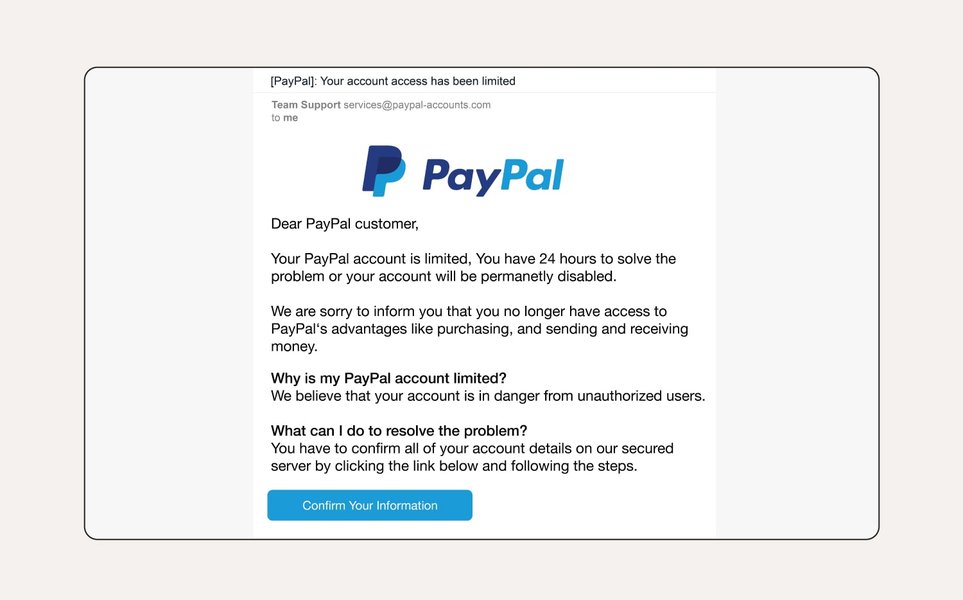
An example showing common elements of a phishing email designed to look legitimate.
Why it Works: Exploiting Human Psychology
Unlike attacks that exploit software vulnerabilities, phishing targets the human element. Attackers leverage psychological triggers to bypass critical thinking. They often create a compelling sense of urgency ("Your account will be closed unless you act now!"), fear ("Unauthorized access detected on your account!"), curiosity ("You've won a prize! Click here to claim."), or obligation ("Urgent invoice payment required."). By pressuring victims to act quickly without proper scrutiny, attackers increase their chances of success. This reliance on human error makes phishing a persistent and challenging threat to combat solely with technical solutions.
How Phishing Attacks Unfold
The Bait: Crafting the Lure
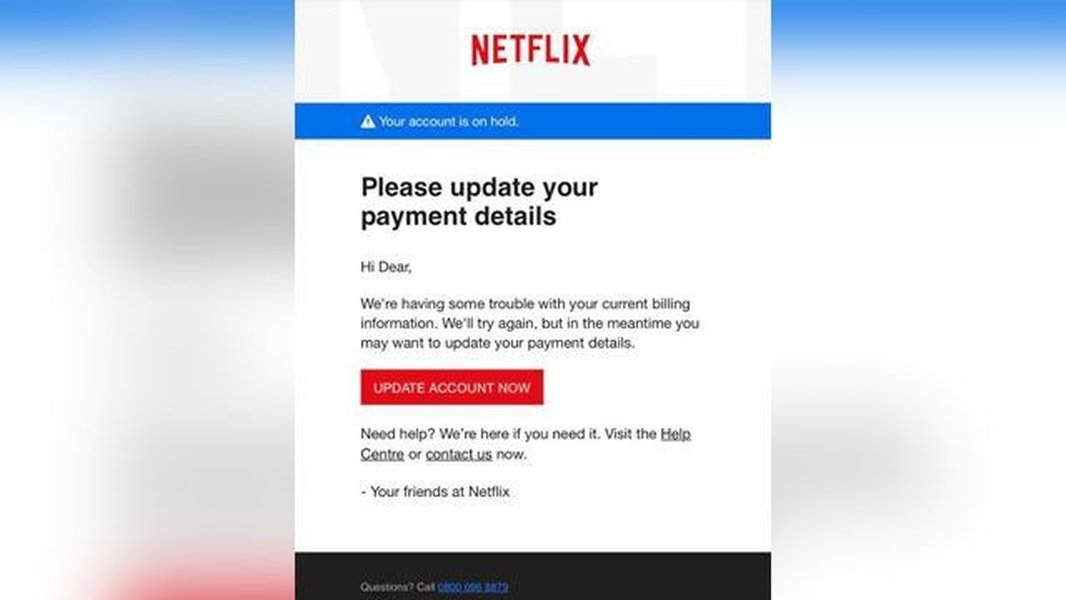
The attack begins with a "lure"—a deceptive message or communication designed to trick the recipient. Attackers meticulously craft these messages to appear legitimate, often copying logos, branding, language, and formatting from the organization they are impersonating. Common tactics include:
- Spoofed Sender Information: Email addresses, phone numbers, or social media profiles are made to look like they originate from a trusted source.
- Fake Websites: Links within the message direct victims to fraudulent websites that mirror legitimate login pages or forms, designed to capture entered credentials. These sites might even use HTTPS to appear secure.
- Malicious Attachments: Emails may contain attachments disguised as important documents (invoices, reports, shipping confirmations) that, when opened, install malware like ransomware, spyware, or viruses onto the victim's device.
- Obfuscated Links: Display text for a link might show a legitimate URL, but the actual destination points to a malicious site.
Common Lures Used in Phishing
- Urgent requests to verify account information due to "suspicious activity."
- Notifications about account suspension or password expiration.
- Fake invoices requiring immediate payment.
- Offers for unrealistic discounts, prizes, or refunds.
- Security alerts prompting software updates or credential checks.
- Requests for charitable donations, especially after disasters.
- Messages seemingly from HR or IT departments regarding internal policies or system changes.
The Hook: Harvesting Information
If the victim falls for the bait and interacts with the lure—by clicking a malicious link, opening an infected attachment, or replying with sensitive information—the attacker achieves their goal. On fake websites, any credentials or personal data entered are sent directly to the attacker. Malware installed via attachments can silently capture keystrokes, steal files, encrypt data for ransom, or provide the attacker with remote access to the compromised system.
The Payload: Malware and Data Theft
The "payload" of a phishing attack refers to the ultimate harm caused. This could be the direct theft of credentials leading to account takeover, financial information used for fraudulent transactions, or personal data exploited for identity theft. Alternatively, the payload might be the deployment of malware, which can lead to broader system compromises, network infiltration (especially in corporate environments), data breaches, or significant financial losses due to ransomware demands.
Common Channels and Types of Phishing
Delivery Methods: Beyond Email
While email remains the most prevalent channel for phishing attacks, cybercriminals utilize various platforms to reach potential victims:
- Email Phishing: Mass distribution of fraudulent emails or targeted campaigns.
- Smishing (SMS Phishing): Using text messages containing malicious links or deceptive requests.
- Vishing (Voice Phishing): Conducting scams over phone calls, often using automated voice systems or live callers impersonating support agents or officials.
- Social Media Phishing: Leveraging social networking sites through fake profiles, direct messages, or malicious posts/ads.
- Search Engine Phishing: Creating malicious websites that appear in search results for popular queries, tricking users seeking legitimate services.
- In-App Phishing: Displaying fake notifications or login prompts within legitimate mobile applications.
A Spectrum of Scams: Key Phishing Types
Phishing attacks vary in their targeting and sophistication:
Email Phishing (Bulk/Traditional)
The most common form, involving sending generic fraudulent emails to a large number of recipients, hoping a small percentage will fall victim. These often impersonate well-known banks, retailers, or service providers.
Spear Phishing
A highly targeted attack aimed at specific individuals or organizations. Attackers research their targets (using social media, company websites, etc.) to personalize the phishing message, making it appear much more credible. For example, referencing a real project, colleague, or recent event.
Whaling
A type of spear phishing specifically targeting high-profile individuals within an organization, such as CEOs, CFOs, or other senior executives ("whales"). The goal is often to gain access to sensitive corporate data or authorize large fraudulent transactions.
Smishing & Vishing
Phishing conducted via SMS (Smishing) or voice calls (Vishing). Smishing often involves texts about fake package deliveries or bank alerts with malicious links. Vishing uses phone calls, sometimes with caller ID spoofing, to impersonate banks, tech support, or government agencies to extract information directly.
Business Email Compromise (BEC)
A sophisticated scam targeting businesses. Attackers often impersonate executives or trusted partners via email (sometimes by hacking legitimate accounts) to trick employees into making wire transfers, changing payroll details, or revealing confidential information.
Clone Phishing
Attackers take a legitimate, previously delivered email, copy its content, and replace a link or attachment with a malicious version. They then resend the email from a spoofed address appearing to come from the original sender, often claiming it's an updated or resent version.
Social Media Phishing
Using social platforms to send malicious links via direct messages, create fake profiles impersonating individuals or brands, or run ads leading to phishing sites.
Visualizing Phishing Tactics and Impact
Common Phishing Themes Radar Chart
Phishing attacks often rely on recurring psychological themes to manipulate victims. This radar chart illustrates the relative prominence and perceived effectiveness of several common tactics used in phishing campaigns. Understanding these themes can help in recognizing potential threats. The scores (ranging from 2 to 10) are based on general observations of attack trends, where higher scores indicate greater prevalence or typical effectiveness.
Understanding the Phishing Ecosystem
Mindmap of Phishing Concepts
Phishing involves a complex interplay of actors, methods, targets, and consequences. This mindmap provides a visual overview of the phishing ecosystem, connecting the core concept to its various facets, including the motivations of attackers, the channels they use, the intended victims, the potential impacts, and essential defensive measures.
(Cyber Deception)"] id1["Attackers"] id1a["Cybercriminals"] id1b["State-Sponsored Groups"] id1c["Hacktivists"] id1d["Insider Threats"] id2["Methods"] id2a["Email Phishing"] id2b["Spear Phishing"] id2c["Whaling"] id2d["Smishing (SMS)"] id2e["Vishing (Voice)"] id2f["Social Media Phishing"] id2g["BEC (Business Email Compromise)"] id2h["Clone Phishing"] id2i["Fake Websites"] id2j["Malicious Attachments"] id3["Targets"] id3a["Individuals"] id3b["Organizations"] id3c["Specific Employees"] id3d["Executives (Whaling)"] id3e["Customers of Services"] id4["Goals"] id4a["Steal Credentials"] id4b["Financial Theft"] id4c["Identity Theft"] id4d["Install Malware (Ransomware, Spyware)"] id4e["Corporate Espionage"] id4f["Gain Network Access"] id5["Impacts"] id5a["Financial Losses"] id5b["Data Breach"] id5c["Reputational Damage"] id5d["Identity Theft Consequences"] id5e["Operational Disruption"] id5f["Legal/Regulatory Penalties"] id6["Prevention"] id6a["User Education & Awareness"] id6b["Vigilance & Skepticism"] id6c["Verify Requests Independently"] id6d["Check Links & Senders"] id6e["Multi-Factor Authentication (MFA)"] id6f["Security Software (Anti-phishing, Antivirus)"] id6g["Email Filtering & Gateways"] id6h["Regular Software Updates"] id6i["Incident Reporting"]
Historical Context: The Evolution of Phishing
Phishing isn't a new phenomenon. The term itself, a homophone of "fishing" (as in fishing for information), emerged in the mid-1990s within the hacker community. Early instances targeted users of America Online (AOL), with attackers using tools like "AOHell" to steal passwords and credit card details by posing as AOL staff. Since then, phishing has evolved dramatically alongside technology. Attackers have moved from simple, mass-emailed scams riddled with errors to highly sophisticated, personalized attacks often leveraging social engineering kits, automation, and even AI to craft convincing lures and evade detection systems. Despite advancements in security technology, phishing remains one of the most prevalent and effective cyber threats today due to its focus on exploiting the human element.
Recognizing and Protecting Against Phishing
Always hover over links (without clicking) to see the actual URL they lead to, a key step in identifying phishing attempts.
Red Flags: How to Spot a Phishing Attempt
Being vigilant and knowing what to look for are crucial defenses against phishing. Here are common red flags:
- Generic Greetings: Emails starting with "Dear Customer" or "Valued Member" instead of your name can be suspicious.
- Urgent Tone or Threats: Language demanding immediate action or threatening negative consequences (e.g., account closure).
- Poor Grammar and Spelling: While some attacks are sophisticated, many still contain noticeable errors.
- Mismatched URLs: Hovering over a link reveals a URL different from the displayed text or that leads to an unrelated or oddly spelled domain.
- Requests for Sensitive Information: Legitimate organizations rarely ask for passwords, credit card numbers, or PII via email or text.
- Unexpected Attachments: Be wary of attachments you weren't expecting, especially executable files (.exe) or archives (.zip).
- Suspicious Sender Address: The email address doesn't match the domain of the company it claims to be from (e.g., service@paypal-security.com instead of @paypal.com).
- Unusual Requests: Requests that seem out of character for the sender or organization, such as asking for gift card purchases or wire transfers.
Defense Strategies: Staying Safe Online
Protecting yourself and your organization requires a multi-layered approach:
Individual Protection
- Be Skeptical: Treat unsolicited emails, texts, and calls with caution, especially those requesting action or information.
- Verify Independently: If a message seems suspicious, contact the organization directly using a known phone number or website address (don't use contact info from the suspicious message).
- Inspect Links and Senders: Carefully examine URLs and sender addresses before clicking or replying.
- Use Strong, Unique Passwords: Employ complex passwords and avoid reusing them across different accounts. Use a password manager.
- Enable Multi-Factor Authentication (MFA): MFA adds a critical layer of security that can block attackers even if they steal your password.
- Limit Information Sharing: Be mindful of the personal information you share online.
- Keep Software Updated: Regularly update your operating system, browser, and security software to patch vulnerabilities.
- Use Security Software: Install reputable antivirus and anti-malware software, and consider browser extensions that block known phishing sites.
Organizational Protection
- Employee Training: Conduct regular security awareness training to educate employees about phishing tactics and red flags.
- Security Policies: Implement clear policies regarding data handling, password security, and incident reporting.
- Email Security Solutions: Deploy advanced email filtering systems, spam blockers, and anti-phishing gateways.
- Endpoint Security: Protect devices with robust endpoint detection and response (EDR) solutions.
- Access Control: Implement the principle of least privilege, granting employees access only to the resources necessary for their roles.
- Incident Response Plan: Have a plan in place to quickly detect, respond to, and recover from phishing incidents.
This table summarizes common phishing tactics and corresponding prevention strategies:
| Phishing Tactic | Prevention Strategy |
|---|---|
| Impersonating trusted brands/people | Verify sender identity independently; check sender details carefully. |
| Creating a sense of urgency or fear | Pause and think before acting; be skeptical of urgent demands. |
| Using malicious links to fake websites | Hover over links to preview URL; type known URLs directly into browser. |
| Sending malicious attachments | Do not open unexpected attachments; use antivirus software to scan files. |
| Requesting sensitive information | Never provide passwords or financial details via email/text/unsolicited calls. |
| Targeting specific individuals (Spear Phishing) | Be cautious with personalized emails asking for action/info; verify unusual requests via another channel. |
| Using SMS or Voice Calls (Smishing/Vishing) | Do not click links in suspicious texts; do not provide info over unsolicited calls; hang up and call back using official numbers. |
See Phishing in Action (Video Example)
Understanding phishing theoretically is important, but seeing how it works can make the threat more tangible. This short animated video from the Local Government Association provides a clear and concise explanation of what phishing is and highlights common tactics used by attackers. It's a helpful visual aid for grasping the core concepts discussed.
Frequently Asked Questions (FAQ)
What happens if I click a phishing link?
Clicking a phishing link can have several outcomes. It might redirect you to a fake website designed to steal your login credentials or personal information if you enter it. Alternatively, the link itself could trigger a "drive-by download," attempting to automatically install malware on your device without further action. Even if you don't enter information or download anything, simply visiting the malicious site could potentially expose your system to vulnerabilities. If you suspect you've clicked a phishing link, it's best to run an antivirus scan, change potentially compromised passwords, and monitor your accounts closely.
Is phishing illegal?
Yes, phishing is illegal in most countries. It falls under various laws related to fraud, identity theft, computer misuse, and electronic communications. Engaging in phishing activities can lead to severe penalties, including hefty fines and imprisonment. Laws like the CAN-SPAM Act in the US, the Computer Misuse Act in the UK, and similar legislation worldwide criminalize the deceptive practices used in phishing attacks.
Can phishing happen on mobile devices?
Absolutely. Phishing attacks frequently target mobile users through various channels. Smishing (SMS phishing) uses text messages, while vishing (voice phishing) occurs via phone calls. Malicious apps disguised as legitimate ones can contain phishing elements, and users can encounter phishing links through email, social media apps, or even QR codes scanned by their mobile device. The smaller screen size and different interface on mobile devices can sometimes make it harder to spot red flags like full URLs.
How do attackers get my email address or phone number?
Attackers obtain contact information through various means. Data breaches at companies you do business with often expose large lists of emails and phone numbers, which are then sold or traded on the dark web. Publicly available sources like social media profiles, personal websites, or company directories can also be scraped for contact details. Sometimes, attackers simply guess common email formats (e.g., firstname.lastname@company.com) or use software to generate vast lists of potential phone numbers or email addresses.
What's the difference between phishing and spam?
While both are types of unwanted electronic messages, their intent differs. Spam typically refers to unsolicited bulk messages, often commercial advertising, sent indiscriminately. While annoying, spam isn't always malicious. Phishing, however, is specifically designed to deceive the recipient into revealing sensitive information or performing a harmful action (like downloading malware). Phishing messages often impersonate trusted entities and use social engineering tactics. While a phishing email is a form of spam, not all spam is phishing.
Recommended Reading
- How can I specifically identify targeted spear phishing attacks?
- What are the potential consequences if I fall victim to a phishing scam?
- How effective is multi-factor authentication in protecting against phishing attacks?
- What are the latest trends and most sophisticated methods used in modern phishing attacks?
References
Last updated April 26, 2025