
Unlocking Subscriber Success: Mastering the WhatsApp Business API for Subscription Services
Elevate your subscription management with powerful communication strategies on WhatsApp.
The WhatsApp Business API offers a transformative channel for businesses managing subscription services. By leveraging its capabilities for direct, personalized, and automated communication, companies can significantly enhance customer engagement, streamline operations, and improve subscriber retention. This guide delves into the best practices to effectively use the WhatsApp Business API for your subscription-based model as of May 08, 2025.
Key Insights for Subscription Excellence
- Prioritize Explicit Consent: Always secure clear, explicit opt-ins from users before sending any subscription-related messages. This is foundational for compliance with WhatsApp's policies and data privacy regulations like GDPR, and crucial for building trust.
- Automate and Personalize Strategically: Leverage the API's automation capabilities for timely and relevant communications such as renewal reminders, payment confirmations, and service updates. Personalize these messages using subscriber data to enhance engagement and reduce churn.
- Master Compliance and Security: Strictly adhere to WhatsApp's Business Messaging Policies and all applicable data privacy laws. Implement robust security measures to protect sensitive subscriber information, ensuring the integrity and trustworthiness of your service.
Laying the Foundation: Consent and Compliance
Securing Explicit User Opt-Ins
The cornerstone of any successful WhatsApp communication strategy, especially for subscriptions, is obtaining explicit user consent. This isn't just a best practice; it's a mandatory requirement by WhatsApp.
Methods for Obtaining Opt-In:
- Keywords: Encourage users to send a specific keyword (e.g., "SUBSCRIBE," "STARTUPDATES") to your WhatsApp number.
- Web Forms: Integrate an opt-in checkbox on your website during the subscription signup process or within user account settings. Ensure the language clearly states they are agreeing to receive WhatsApp messages.
- In-App Prompts: If you have a mobile application, prompt users to opt-in for WhatsApp notifications regarding their subscription.
Clarity and Documentation:
Your opt-in process must be transparent. Users should clearly understand what types of messages they will receive (e.g., renewal alerts, payment reminders, service announcements) and the approximate frequency. Crucially, you must securely store records of these opt-ins as proof of consent, which may be required for audits or to address disputes.
Navigating WhatsApp's Policies and Data Privacy
Adherence to WhatsApp's Business Messaging Policy is non-negotiable. Violations can lead to message blocking or even account suspension. Familiarize yourself with these policies, particularly regarding unsolicited messages, promotional content, and data handling.
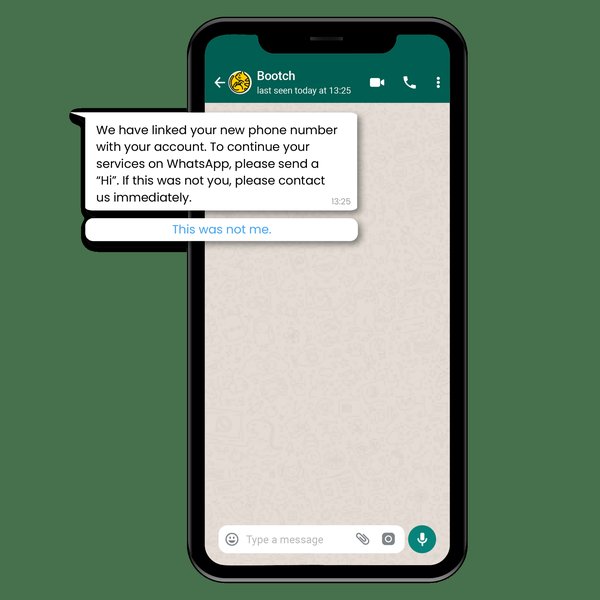
A clear and concise WhatsApp notification enhances user experience.
Key Policy Considerations:
- Avoid Spam: Messages should provide genuine value to the subscriber. Overly promotional or irrelevant content is likely to be reported.
- Data Protection: Comply with international and local data privacy regulations such as GDPR (General Data Protection Regulation) and CCPA (California Consumer Privacy Act). This includes transparency about data usage and providing clear opt-out mechanisms.
- Security: While WhatsApp provides end-to-end encryption for messages in transit, ensure you implement strong security measures for data at rest within your systems.
Crafting Your Communication Strategy
Utilizing Approved Message Templates
For any business-initiated conversation (i.e., messages sent outside the 24-hour customer service window), you must use Message Templates pre-approved by WhatsApp. For subscription services, these are vital for sending:
- Subscription renewal reminders
- Payment confirmations and failure alerts
- Service activation notifications
- Important updates regarding the subscription
Design your templates to be clear, concise, and highly relevant. They can include placeholders for personalization (e.g., customer name, subscription details, renewal date).
Segmentation and Personalization: The Keys to Relevance
Generic messages are far less effective. Segment your subscriber base to deliver highly targeted and personalized communications. Segmentation can be based on:
- Subscription tier (e.g., basic, premium)
- Renewal date
- Payment status
- Engagement level or service usage
- User preferences
Personalized messages, addressing the user by name and referencing their specific subscription details, significantly improve open rates, engagement, and overall customer satisfaction, ultimately helping to reduce churn.
Optimizing Message Quality and Frequency
While WhatsApp is a direct channel, it's crucial not to overwhelm subscribers. Respect their attention by:
- Focusing on Value: Ensure every message provides clear benefit to the recipient.
- Maintaining Brevity: Keep messages concise and to the point.
- Controlling Frequency: Avoid sending too many messages in a short period. Plan a communication calendar that aligns with key subscription lifecycle events.
- Timing: Schedule messages during times when users are most likely to be active and receptive, based on analytics if available.
Periodically solicit feedback on your messaging to ensure it remains relevant and helpful.
Leveraging Interactive Messages and CTAs
WhatsApp Business API supports interactive message features that can significantly enhance user experience and drive action. These include:
- Quick Reply Buttons: Allow users to respond with a single tap (e.g., "Renew Now," "Update Payment," "Contact Support").
- Call-to-Action (CTA) Buttons: Direct users to a specific URL (e.g., a payment gateway, subscription management portal) or initiate a phone call.
- List Messages: Present users with a menu of up to 10 options.
Using these features makes it easier for subscribers to manage their subscriptions or take desired actions directly within the WhatsApp chat, reducing friction.
Understanding Conversation-Based Pricing
It's essential to grasp WhatsApp's conversation-based pricing model. Businesses are charged per 24-hour conversation session, with rates varying based on the conversation category (initiated by the business or the user) and the user's country code. There are typically three main categories for business-initiated conversations:
- Utility: Facilitate a specific, agreed-upon request or transaction, or update a customer about an ongoing transaction (e.g., subscription confirmations, payment reminders). These are often priced lower.
- Marketing: Include promotions or offers, brand announcements, or invitations to respond/act.
- Authentication: Enable users to authenticate with one-time passcodes.
User-initiated conversations are generally categorized as 'Service' conversations and allow free-form responses within the 24-hour window. Plan your messaging strategy to optimize costs while ensuring you are delivering value and using the correct conversation category for your messages.
Operational Excellence: Automation and Integration
Automating Key Subscription Communications
Automation is a key benefit of the WhatsApp Business API, especially for managing subscriptions at scale. Automate routine communications like:
- Welcome messages for new subscribers.
- Renewal reminders sent at predefined intervals (e.g., 7 days before, 3 days before, on expiry date).
- Payment success confirmations.
- Alerts for failed payments, with instructions to update payment methods.
- Service activation/deactivation notifications.
You can also set up automated drip campaigns for nurturing leads or re-engaging lapsed subscribers. Chatbots can be deployed to handle common FAQs about subscriptions, freeing up human agents for more complex issues.
Seamless Integration with Your Existing Systems
To maximize efficiency and enable true personalization, integrate the WhatsApp Business API with your core business systems, such as:
- Customer Relationship Management (CRM) system: For a unified view of customer interactions and data-driven segmentation.
- Billing and Subscription Management Platform: To trigger messages based on payment status, renewal dates, and subscription changes automatically.
- E-commerce Platform: If your subscriptions are sold via an online store.
This integration ensures data consistency and allows for real-time, context-aware messaging.
Providing Stellar Customer Support
WhatsApp is an excellent channel for providing real-time customer support related to subscriptions. The 24-hour customer service window allows for free-form messaging once a user initiates a conversation. Use this to:
- Promptly answer questions about billing, service features, or account management.
- Assist users with upgrading, downgrading, or cancelling their subscriptions.
- Resolve issues quickly to maintain customer satisfaction.
Ensure your support team is trained to handle subscription-related inquiries effectively via WhatsApp.
Visualizing Your WhatsApp Subscription Strategy
This radar chart illustrates key performance indicators and best practice adherence for a successful WhatsApp Business API subscription service strategy. Aim for higher scores across all axes for optimal results. The axes represent different facets of a robust strategy: 'Opt-In Clarity' (how clear your consent process is), 'Personalization Depth' (how tailored your messages are), 'Automation Efficiency' (how well you've automated routine tasks), 'Compliance Rigor' (adherence to policies), 'Support Responsiveness' (speed and quality of customer service), and 'Integration Seamlessness' (how well WhatsApp connects with other systems).
Understanding the Ecosystem: Key Components for Subscription Management via WhatsApp
This mindmap visualizes the interconnected components crucial for effectively using the WhatsApp Business API for subscription services. It highlights the central role of the API in orchestrating customer interactions, managing data, and ensuring a smooth subscriber lifecycle, from initial opt-in to ongoing engagement and support.
(Keywords, Forms, In-App)"] id1b["Subscription Preference Center"] id1c["Secure Consent Documentation"] id2["Message Templates (Pre-Approved)"] id2a["Renewal Reminders"] id2b["Payment Confirmations/Failures"] id2c["Service Updates & Alerts"] id2d["Welcome Messages"] id3["Automation Workflows"] id3a["Scheduled Reminders"] id3b["Trigger-Based Notifications
(e.g., payment status)"] id3c["Chatbots for FAQs"] id3d["Drip Campaigns"] id4["CRM & Billing Integration"] id4a["Real-time Data Sync"] id4b["Personalization Tokens"] id4c["Automated List Segmentation"] id5["Customer Support"] id5a["24-Hour Service Window"] id5b["Handling Subscription Queries"] id5c["Issue Escalation Path"] id6["Analytics & Reporting"] id6a["Delivery & Read Rates"] id6b["Click-Through Rates (CTRs)"] id6c["Conversion Tracking (Renewals)"] id6d["Opt-Out Monitoring"] id7["Compliance & Security"] id7a["WhatsApp Policy Adherence"] id7b["Data Privacy Regulations (GDPR, CCPA)"] id7c["Secure Data Handling"] id7d["Regular Audits"]
Choosing the Right Tools and Partners
Selecting a Reliable API Provider (Business Solution Provider - BSP)
Access to the WhatsApp Business API is typically facilitated through official Meta Business Solution Providers (BSPs). Choosing the right BSP is crucial for a smooth implementation and ongoing success. When evaluating BSPs, consider:
- Reliability and Scalability: Ensure they can handle your message volume and offer robust uptime.
- Feature Set: Look for features relevant to subscription services, such as advanced automation tools, chatbot builders, template management interfaces, and detailed analytics.
- Integration Capabilities: Check their ability to integrate with your existing CRM, billing, and other business systems.
- Pricing Structure: Understand their fees on top of WhatsApp's conversation charges.
- Support: Evaluate the quality and responsiveness of their customer support.
- Official Meta Partnership: Prioritize official partners for compliance and direct access to the latest API features.
Some BSPs offer additional value-added services like SMS fallback or voice messaging capabilities, which might be beneficial for your overall communication strategy.
Monitoring, Testing, and Refinement
The Importance of Thorough Testing
Before launching any new messaging campaign or automation workflow for your subscription services, thorough testing is essential. Utilize sandbox environments provided by WhatsApp or your BSP to:
- Test message template rendering and personalization.
- Verify conversation flows and chatbot logic.
- Ensure integrations are working correctly.
- Check for any errors or unexpected behavior.
Catching issues early through rigorous testing prevents a poor customer experience and potential compliance problems.
Tracking Analytics and Performance
Continuously monitor the performance of your WhatsApp communications. Key metrics to track include:
- Message Delivery Rates: The percentage of messages successfully delivered.
- Open Rates (Read Receipts): The percentage of delivered messages that are read by users (requires users to have read receipts enabled).
- Click-Through Rates (CTRs): For messages containing links, the percentage of users who click them.
- Response Rates: For interactive messages, how many users engage with buttons or reply.
- Conversion Rates: Specifically for subscription services, track how many reminders lead to successful renewals or payments.
- Opt-Out Rates: Monitor how many users choose to stop receiving messages.
Analyze this data to understand what's working, identify areas for improvement, and refine your messaging strategy for better engagement and higher retention of your subscribers.
Managing Subscription Controls
Make it easy for subscribers to manage their subscriptions directly via WhatsApp if feasible, or provide clear guidance on how to do so. This includes options to:
- Pause or resume a subscription.
- Upgrade or downgrade their plan.
- Update payment information.
- Cancel their subscription.
Providing clear and accessible subscription management options enhances user autonomy and satisfaction.
Subscription Use Case Examples
The WhatsApp Business API can be applied to various stages of the subscription lifecycle. Here’s a table illustrating common use cases, example message snippets, and their key benefits for subscription services:
| Use Case | Example Message Snippet (Illustrative) | Key Benefit |
|---|---|---|
| Welcome & Onboarding | "Welcome to [Your Service], [Customer Name]! 🎉 Your subscription is active. Explore your benefits here: [Link to Guide]" | Sets expectations, improves initial engagement. |
| Renewal Reminder | "Hi [Customer Name], your [Service Plan] subscription for [Service Name] is due for renewal on [Date]. Renew easily: [Link to Renew]" | Proactive communication, reduces involuntary churn. |
| Payment Confirmation | "Great news, [Customer Name]! We've successfully processed your payment for the [Service Plan] subscription. Your next billing date is [Next Billing Date]." | Reassurance, provides transaction record. |
| Payment Failure Alert | "Uh oh, [Customer Name]. It seems there was an issue with your payment for [Service Name]. Please update your payment details to continue enjoying your service: [Link to Payment Update]" | Minimizes service disruption, facilitates quick resolution. |
| Subscription Upgrade Offer | "Hi [Customer Name], as a valued subscriber, unlock exclusive features by upgrading your [Current Plan] to our [Premium Plan]! Learn more: [Link to Upgrade Offer]" | Increases ARPU, provides personalized value. |
| Service Update/New Feature | "Exciting news, [Customer Name]! We've just launched [New Feature] for your [Service Name] subscription. Check it out: [Link to Feature Info]" | Adds value, keeps subscribers engaged. |
| Feedback Request | "Hi [Customer Name], we'd love to hear about your experience with [Service Name]. Could you spare a moment for a quick survey? [Link to Survey]" | Gathers insights for improvement, shows customers you value their opinion. |
Further Insights: WhatsApp Business API Features
Understanding the breadth of features available through the WhatsApp Business API can help you leverage it more effectively for your subscription services. The following video provides an overview of key functionalities that can significantly enhance customer communication and streamline your operations.
This video highlights some of the powerful features of the WhatsApp Business API.
Frequently Asked Questions (FAQ)
What is the absolute first step to using WhatsApp Business API for subscriptions?
Obtaining explicit, clear user opt-in is the non-negotiable first step. You must have a user's permission before sending them any messages via the WhatsApp Business API, especially for ongoing communications like subscription updates. This ensures compliance with WhatsApp policies and data privacy laws.
Can I send promotional offers for new subscription tiers via WhatsApp API?
Yes, you can send promotional offers, but they must comply with WhatsApp's policies. Such messages are typically classified as "Marketing Conversations." Users must have opted in to receive such communications, and the content should be relevant and provide value. Avoid sending unsolicited spam.
How does pricing work for WhatsApp Business API in the context of subscription services?
WhatsApp uses a conversation-based pricing model. You are charged per 24-hour conversation session. The rates vary depending on whether the conversation was initiated by your business or the user, and by the user's country code. Business-initiated conversations are categorized (e.g., Utility, Marketing, Authentication), often with different price points. For subscription services, "Utility" conversations (like payment reminders or confirmations) are common and may be priced lower than "Marketing" conversations (like promotional offers).
What happens if I send business-initiated messages without using pre-approved templates?
If you attempt to send business-initiated messages outside the 24-hour customer service window without using a pre-approved message template, the messages will likely fail to deliver. Repeated attempts to violate this policy can lead to restrictions on your message quality rating, temporary sending blocks, or even suspension of your WhatsApp Business API account.
How can I measure the success of my WhatsApp messaging for subscription services?
Success can be measured using several metrics provided by the API and your BSP. Key indicators include message delivery rates, open/read rates, click-through rates (CTRs) on links in your messages, and response rates to interactive elements. For subscription services, the most critical metric is often the conversion rate – for example, the percentage of renewal reminders that result in a successful subscription renewal. Also, monitor opt-out rates to gauge message relevance and user satisfaction.
Recommended Further Exploration
- How to design effective WhatsApp message templates for subscription renewals?
- What are the top considerations when comparing WhatsApp Business API providers for small subscription businesses?
- What are effective strategies for automating customer support for subscription services using WhatsApp chatbots?
- How can I ensure GDPR compliance when using the WhatsApp Business API for customer communications related to subscriptions in Europe?
References
Last updated May 8, 2025