
Unraveling the "ng" Mystery: The Origins and Power of Angular CLI
Exploring the Naming Convention and Capabilities of Angular's Command-Line Interface
Key Insights into the "ng" Naming
- Historical Abbreviation: The "ng" prefix in Angular, and specifically in the Angular CLI, primarily stands for "Angular." This naming convention originated with AngularJS (Angular 1) and was carried forward.
- Command-Line Efficiency: The choice of "ng" as the binary name for the Angular CLI (e.g.,
ng new,ng serve) offers a concise and memorable way for developers to interact with the framework through the command shell, streamlining development workflows. - Distinguishing Framework Versions: While "ng" is used for both AngularJS and current Angular versions, it's important to remember that "AngularJS" refers to the older 1.x versions, while "Angular" (without "JS") refers to versions 2 and beyond, which are complete rewrites.
The Genesis of "ng": A Nod to Angular's Roots
The "ng" prefix, ubiquitous across Angular's directives and the Angular CLI, isn't a random choice. Its origin traces back to the very beginning of the framework, then known as AngularJS. The simplest and most widely accepted explanation for "ng" is that it is an abbreviation for "Angular." This ties into the historical context where HTML uses "angular brackets" (< >), and "ng" was conceived to sound like "AngularJS" or "Angular."
Initially, this prefix was extensively used for built-in directives in AngularJS, such as ng-app, ng-model, and ng-bind, which extended HTML with dynamic functionalities. When Google undertook a complete rewrite of AngularJS, resulting in Angular (versions 2 and above), the team retained the "ng" prefix as a familiar identifier for commands and core functionalities, even though the underlying architecture changed significantly. This continuity helps bridge the gap between the two distinct frameworks, acknowledging their shared lineage while emphasizing the advancements of the newer Angular.
AngularJS vs. Angular: A Crucial Distinction
It's vital to differentiate between "AngularJS" and "Angular." AngularJS, often referred to as Angular 1, was a JavaScript-based web framework for single-page applications, developed by Google and first released in 2010. It introduced concepts like directives with the "ng-" prefix and two-way data binding.
Angular, on the other hand, is a complete rewrite built on TypeScript, starting with Angular 2 and continuing through subsequent versions. It introduced a component-based architecture, which fundamentally changed how applications are structured and developed. Despite the architectural differences, the "ng" prefix remained a consistent element, primarily for the Angular CLI commands, signaling its association with the Angular ecosystem.
The radar chart above illustrates key characteristics and their perceived strengths for AngularJS (Angular 1) and modern Angular (Angular 2+). My analysis, based on a broad understanding of both frameworks, highlights their evolution. AngularJS, while revolutionary for its time, eventually faced challenges in terms of scalability and performance compared to its successor. Modern Angular, a complete rewrite, excels in areas like component-based architecture, TypeScript integration, and modularity, leading to more maintainable and performant applications. The Angular CLI significantly enhances developer productivity for modern Angular by automating many tasks, making it easier to scaffold, develop, and deploy applications. The "ng" prefix ties both frameworks together historically, but their technical capabilities have diverged significantly.
The Indispensable Angular CLI
The Angular CLI (Command Line Interface) is a powerful tool for developing, scaffolding, testing, and deploying Angular applications. It's published on npm as the @angular/cli package and includes a binary named ng. This binary is what developers use to invoke Angular CLI commands directly from a command shell.
Streamlining Development with CLI Commands
The Angular CLI automates many repetitive and tedious tasks in the development workflow, significantly boosting developer productivity. Instead of manually creating files, configuring build processes, or setting up testing environments, developers can use simple ng commands to perform these actions.
Here are some of the core functionalities provided by the Angular CLI:
- Project Initialization: The
ng new <project-name>command quickly sets up a new Angular project with a standardized structure, including all necessary configurations and dependencies. This boilerplate code saves immense time and ensures adherence to best practices. - Component and Service Generation: Commands like
ng generate component <name>(orng g c <name>) andng generate service <name>automate the creation of various Angular building blocks (components, services, modules, directives, pipes, etc.). The CLI generates the necessary files (e.g., HTML, CSS, TypeScript, spec files) and updates the relevant Angular modules. - Local Development Server: The
ng servecommand compiles the application and launches a local development server, often with live-reloading capabilities, allowing developers to see changes instantly in the browser. This command can also be configured with proxy settings to handle cross-origin resource sharing (CORS) issues during development. - Building for Production: The
ng buildcommand compiles the application for deployment, optimizing it for production environments by performing tasks like tree-shaking, minification, and Ahead-of-Time (AOT) compilation. The output is typically placed in adistfolder. - Testing: The CLI facilitates running unit tests (e.g., with Karma) and end-to-end tests (e.g., with Protractor) using commands like
ng testandng e2e. - Updating Angular: The
ng updatecommand simplifies the process of updating Angular itself and its related packages to the latest stable versions, ensuring developers benefit from the latest bug fixes, performance improvements, and features.
How the CLI Works Behind the Scenes
When you execute an ng command, the Angular CLI interacts with Node.js and npm (Node Package Manager). It leverages various tools and configurations to perform its tasks. For instance, when generating files, it follows the official Angular style guide, ensuring consistent naming patterns and folder structures.
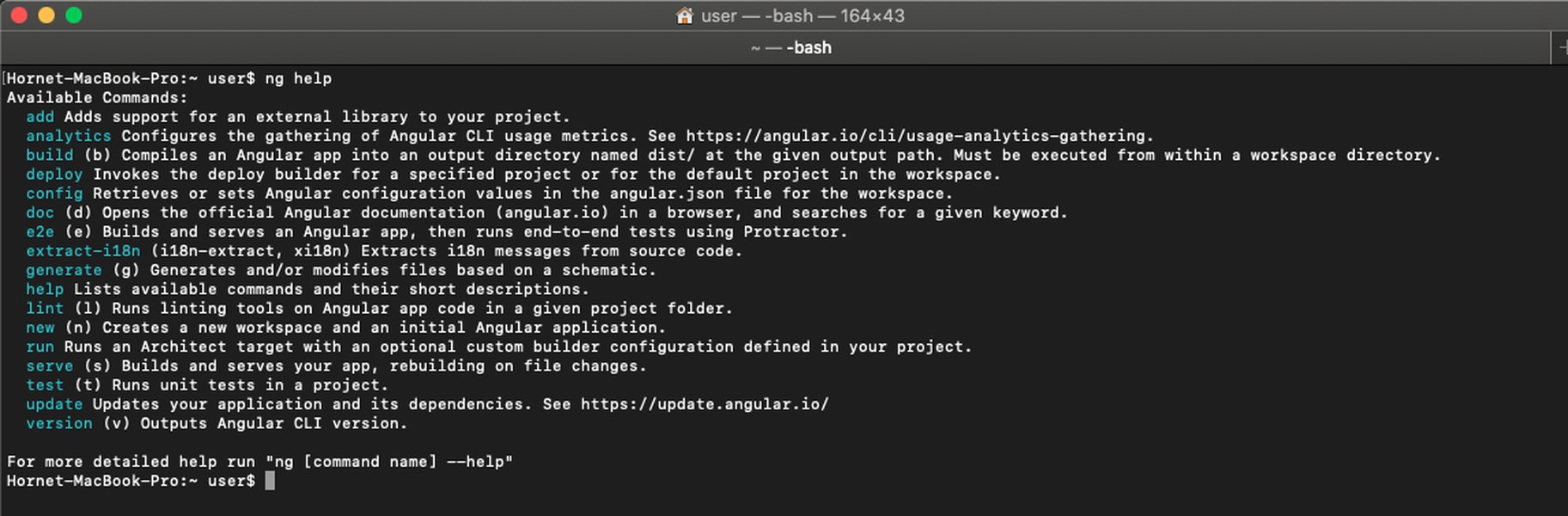
An example of Angular CLI commands being executed in a command prompt.
The "ng" Prefix in Angular's Directives and Core Concepts
Beyond the CLI, the "ng" prefix is deeply embedded in Angular's core. While the framework has evolved, many fundamental building blocks still bear this signature.
Consider the role of directives. In Angular, directives are classes that add extra behavior to elements in your application. Many built-in directives continue to use the "ng" prefix, even if the implementation details differ from AngularJS.
For example, ngIf, ngFor, and ngSwitch are structural directives in modern Angular that manipulate the DOM by adding, removing, or replacing elements. Similarly, ngModel is a common directive for two-way data binding, connecting form controls to component properties.
This video provides a concise explanation of what "ng" stands for in Angular, clarifying its historical significance and ongoing use within the framework. It's a great resource for quickly grasping the fundamental meaning behind the prefix.
The persistence of "ng" as a naming convention for directives and the CLI commands underscores its role as a consistent identifier across different iterations of the Angular framework, offering a recognizable signature for developers.
Understanding Angular's Evolution Through "ng"
The journey from AngularJS to Angular, marked by the consistent "ng" prefix, highlights Google's commitment to evolving the framework while maintaining a recognizable brand identity. This evolution has led to a more robust, performant, and scalable platform suitable for complex enterprise-level applications.
The table below summarizes key differences and similarities between AngularJS and Angular, emphasizing aspects related to the "ng" prefix and CLI functionality:
| Feature/Aspect | AngularJS (Angular 1.x) | Angular (Angular 2+) |
|---|---|---|
| "ng" Prefix Meaning | Abbreviation for "AngularJS" in directives (e.g., ng-app) | Abbreviation for "Angular" in CLI commands (e.g., ng new) and core directives |
| Core Language | JavaScript | TypeScript |
| Architecture | MVC (Model-View-Controller) with concepts like scopes and controllers | Component-based architecture (hierarchy of components) |
| Data Binding | Two-way data binding using ngModel, specific expression syntax |
Two-way data binding ([(ngModel)]), property binding [ ], event binding ( ) |
| Directives | Extensive use of "ng-" prefixed directives for DOM manipulation and behavior | "ng-" prefixed structural and attribute directives, also custom directives |
| CLI Tool | No official CLI; third-party tools or manual setup | Angular CLI (ng command) for scaffolding, development, testing, deployment |
| Performance & Scalability | Can struggle with large applications due to complexity | Optimized for performance and scalability, suitable for enterprise apps |
| Development Workflow | Manual setup, less automation | Highly automated and streamlined with Angular CLI |
FAQ: Deep Dive into "ng" and Angular
What does "ng" stand for in Angular?
ng new or ng serve.Is Angular CLI the same as AngularJS?
Why is the CLI command simply "ng" instead of "angular-cli"?
Can I use Angular CLI with AngularJS projects?
Conclusion
The "ng" prefix in Angular, and particularly in the Angular CLI, serves as a concise and historical identifier for the framework. Originating from "AngularJS" to denote its HTML "angular brackets" and sounding like "Angular," it was carried forward into modern Angular's command-line interface. The Angular CLI, invoked via the ng command, is an indispensable tool that automates crucial development tasks, from project scaffolding and component generation to building and deploying applications. This powerful tool significantly enhances developer productivity, allowing for rapid and consistent Angular application development, solidifying "ng" as a symbol of efficiency and continuity within the Angular ecosystem.
Recommended Further Queries
- How to install and use Angular CLI?
- What are the key differences between Angular and AngularJS?
- Explore common Angular CLI commands for efficient development.
- Understand the various Angular directives that use the "ng" prefix.