
Optimizing Your Home Network: Understanding Wi-Fi vs. ISP Speeds
Unlocking Your Full Internet Potential Beyond Advertised Speeds
It is a common scenario to observe Wi-Fi speeds that are significantly lower than the advertised speeds from your Internet Service Provider (ISP). While a quarter of your incoming ISP speed might seem drastic, it's often an expected behavior due to a combination of factors related to wireless technology limitations, environmental interference, and network configuration. Understanding the interplay between your ISP's promised speed and your actual Wi-Fi performance is key to optimizing your home network.
Key Insights into Wi-Fi Speed Discrepancies
- Wireless vs. Wired Limitations: Wi-Fi inherently operates at slower speeds and is more susceptible to interference and signal degradation than a direct Ethernet connection.
- Environmental and Positional Impact: The physical placement of your router, obstacles like walls and furniture, and interference from other devices significantly reduce Wi-Fi signal strength and speed.
- Network Optimization is Crucial: Simple adjustments, firmware updates, and strategic equipment upgrades can dramatically improve your Wi-Fi performance, bringing it closer to your ISP's promised speeds.
Decoding the Speed Disparity: Why Wi-Fi Falls Short of ISP Promises
Your ISP speed refers to the maximum data transfer rate from the internet to your modem, typically measured in megabits per second (Mbps) or gigabits per second (Gbps). This is the "pipe" size your ISP provides. Wi-Fi speed, on the other hand, refers to the speed of your local wireless network—the connection between your router and your devices. These two speeds are interconnected but distinct. Even with a high-speed internet plan, your Wi-Fi performance can be bottlenecked by various factors, leading to a noticeable drop in speed compared to a wired connection.
The Fundamental Difference: Wi-Fi vs. Ethernet
Ethernet connections, which use physical cables, provide the most stable and often the fastest speeds. They bypass many of the limitations inherent in wireless communication. Wi-Fi utilizes radio waves, which are prone to signal degradation, interference, and range limitations. It's generally accepted that Wi-Fi works at about half its advertised speed in a real-world situation due to these interference issues and protocol overhead. In many cases, Wi-Fi speeds can be 10-20 times slower than Ethernet, making a quarter of your ISP speed a plausible, though not ideal, outcome.
Signal Degradation and Latency in Wireless Networks
Wi-Fi signals can be easily affected by distance, physical obstructions (like walls, floors, and even water in aquariums), and electromagnetic interference from other electronic devices (microwaves, cordless phones, neighbor's Wi-Fi). This degradation leads to slower transfer speeds and increased latency—the time it takes for your router to respond to a request. High latency can make your internet feel sluggish, even if the raw bandwidth is high.
Factors Influencing Your Wi-Fi Performance
Several elements contribute to the gap between your ISP speed and your actual Wi-Fi experience. Addressing these can significantly bridge the gap and boost your wireless performance.
Optimal Router Placement for Enhanced Wi-Fi Signal
Router Placement and Environment
The location of your router is paramount. Placing it in a central, open area, off the floor, and away from walls, furniture, and major appliances can significantly improve signal strength and coverage. Objects can dampen or block Wi-Fi signals, creating "dead zones" where speeds are drastically reduced.

The Impact of Obstructions on Wi-Fi Signal Strength
Interference and Channel Congestion
Wi-Fi operates on specific channels. In densely populated areas, multiple routers from neighbors might be using the same channels, leading to congestion and interference. Switching to a less crowded Wi-Fi channel or utilizing the 5GHz or 6GHz bands (which offer faster speeds and less interference, though with shorter range) can provide a noticeable boost. Tools like Wi-Fi Analyzer apps can help identify less congested channels.
Outdated Equipment and Firmware
An older router or network adapter may not be able to handle the speeds your ISP provides, creating a bottleneck. Upgrading to a newer router, especially one that supports the latest Wi-Fi standards (like Wi-Fi 6 or Wi-Fi 7), can offer faster speeds, better range, and improved resistance to interference. Regularly updating your router's firmware and your device's network drivers is also crucial for optimal performance and reliability.
Device Limitations and Network Load
The capabilities of your individual devices also play a role. Older smartphones, laptops, or smart home devices might have older Wi-Fi adapters that cannot achieve the same speeds as newer ones. Furthermore, Wi-Fi is a shared medium; the more devices connected and actively using the network, the more the available bandwidth is divided, potentially slowing down all connections. Heavy internet usage activities like 4K streaming or online gaming consume significant bandwidth.
Strategies for Boosting Your Wi-Fi Speed
There are numerous actionable steps you can take to improve your Wi-Fi performance and get closer to your ISP's promised speeds.
The radar chart above visualizes how different factors contribute to your Wi-Fi performance. "Current Wi-Fi Performance Factors" represents a common baseline where several aspects might be underperforming, leading to slower speeds. "Optimized Wi-Fi Performance Potential" shows the significant improvements achievable by actively managing these factors. For instance, moving your router to a central location (Router Placement) or regularly updating its software (Firmware Updates) can drastically enhance your overall wireless experience.
Practical Steps for Improvement
- Relocate Your Router: Place your router in a central, elevated, and open location in your home, away from thick walls, large metal objects, and major appliances.
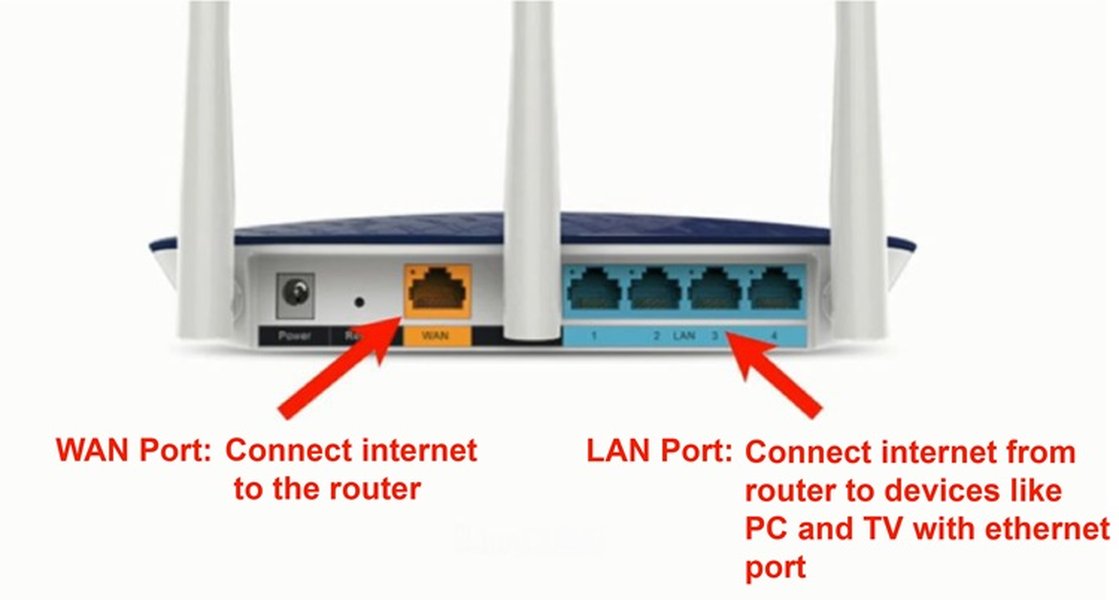
- Use Ethernet for Static Devices: For devices that don't require mobility (e.g., desktop PCs, gaming consoles, smart TVs, streaming boxes), use an Ethernet cable. This frees up Wi-Fi bandwidth for mobile devices and ensures a faster, more reliable connection for static ones.
- Switch Wi-Fi Bands and Channels: If you have a dual-band router, prioritize the 5GHz band for devices that need faster speeds and are closer to the router, as it offers less interference. For 2.4GHz, use a Wi-Fi analyzer to find the least congested channel (usually 1, 6, or 11).
- Update Firmware and Drivers: Regularly check for and install firmware updates for your router and network adapter drivers for your devices. Manufacturers often release updates that improve performance and security.
- Consider a Router Upgrade or Mesh Network: If your router is old, upgrading to a newer model with Wi-Fi 6/7 technology will offer significant performance improvements. For larger homes or those with many dead zones, a mesh Wi-Fi system provides seamless, strong coverage throughout.
- Disconnect Unused Devices: Reduce network congestion by disconnecting devices that are not actively in use.
- Secure Your Wi-Fi: Ensure your Wi-Fi network is secured with a strong password to prevent unauthorized access, which can consume your bandwidth.
Understanding Network Speeds and Bandwidth
It's important to differentiate between internet speed and Wi-Fi speed. Internet speed is what your ISP delivers, measured in Mbps or Gbps, representing the maximum rate data can travel to and from the internet. Wi-Fi speed is the local wireless connection speed between your devices and your router. The slowest component in your network chain (whether it's your ISP's bandwidth or your router's capability) will be the limiting factor for your internet experience.
This video, "Why is My Wi-Fi Speed Slower than Ethernet? Why You Really Want that Wired Connection," delves into the fundamental reasons behind Wi-Fi's performance limitations compared to wired connections. It highlights how factors like interference, signal strength, and latency inherently affect wireless speeds, making a wired connection generally superior for demanding tasks. This explanation is crucial for understanding why your Wi-Fi speeds might be a fraction of your incoming ISP speed and why leveraging Ethernet can be beneficial for specific devices.
Advertised vs. Actual Speeds
ISPs advertise "up to" speeds, which are theoretical maximums under ideal conditions. Actual speeds can vary due to network congestion, the distance from your ISP's infrastructure, and the type of connection (fiber, cable, DSL). Some ISPs may even "over-provision" links, meaning they provide slightly more bandwidth than advertised, which can sometimes result in speeds higher than your service tier.
How Internet Speed is Measured
Internet speed is measured in bits per second (bps), with common units being kilobits per second (Kbps), megabits per second (Mbps), and gigabits per second (Gbps). Download speed refers to how quickly data is transferred from the internet to your device, while upload speed is the rate data is sent from your device to the internet. Understanding these metrics helps you assess your actual internet performance.
Common Scenarios and Solutions for Wi-Fi Speed Discrepancies
Let's look at a table summarizing common reasons for Wi-Fi being slower than ISP speed and their corresponding solutions.
| Reason for Slower Wi-Fi | Explanation | Recommended Solution |
|---|---|---|
| Router Placement | Obstructions (walls, furniture, appliances) and distance degrade signal. | Move router to a central, open, elevated location. |
| Wireless Interference | Other Wi-Fi networks, electronics (microwaves, cordless phones) cause signal noise. | Change Wi-Fi channel, switch to 5GHz/6GHz band. |
| Outdated Hardware | Old router or device Wi-Fi adapters can't support modern speeds. | Upgrade router to Wi-Fi 6/7, update device drivers, consider mesh network. |
| Network Congestion | Too many devices on Wi-Fi, or heavy bandwidth usage (streaming, gaming). | Use Ethernet for static devices, disconnect unused devices, prioritize traffic (QoS). |
| Router Firmware Issues | Outdated or buggy router software. | Check for and install the latest router firmware updates. |
| Wi-Fi Standard Overhead | Wireless protocols have inherent overhead, reducing effective speeds. | This is a fundamental limitation; minimize other factors to maximize efficiency. |
| Cable Quality (for modem-router) | Damaged or low-grade Ethernet cable between modem and router. | Ensure high-quality, undamaged Ethernet cable (Cat5e or Cat6) is used. |
| ISP Bottleneck | Actual ISP delivery is lower than advertised or experiencing issues. | Perform speed tests directly from modem, contact ISP if speeds are consistently below plan. |
Frequently Asked Questions (FAQ)
Is a wired Ethernet connection always faster than Wi-Fi?
How can I check my actual internet speed?
What is the difference between 2.4GHz and 5GHz Wi-Fi bands?
Do Wi-Fi extenders or mesh systems help improve speed?
How many devices can my Wi-Fi network handle before it slows down?
Conclusion
While seeing your Wi-Fi speed at a quarter of your incoming ISP speed can be disheartening, it is not uncommon due to the inherent differences between wired and wireless connections, coupled with environmental and equipment factors. Wi-Fi's convenience comes with trade-offs in raw speed and stability compared to Ethernet. However, by strategically optimizing your router's placement, managing interference, keeping your equipment updated, and selectively using wired connections for high-demand devices, you can significantly improve your wireless experience. Understanding these dynamics empowers you to troubleshoot effectively and ensure your home network performs closer to its full potential, maximizing the value of your internet plan.
Recommended Further Exploration
- How to choose the best mesh Wi-Fi system for a large home?
- Understanding Wi-Fi 6 and Wi-Fi 7 technologies and their benefits.
- Advanced router settings to optimize network performance.
- Troubleshooting common internet speed issues with your ISP.
Referenced Search Results
 amazonforum.com