
Understanding Identity-Based Wireless Network Authentication
Exploring the Role of Identities in Wi-Fi and Cellular Connectivity
Key Insights into Identity-Based Wireless Networks
- Identity is paramount: Wireless networks leverage various forms of identity to authenticate users and devices, ensuring secure access and control.
- Protocols provide the framework: Standards like 802.1X and EAP are fundamental for identity-based authentication, enabling secure communication between devices and authentication servers.
- Domain names reveal network affiliations: Understanding the structure of domain names like
wlan.mncXXX.mccYYY.3gppnetwork.orgprovides crucial clues about the network type, operator, and associated cellular system.
Wireless networks, whether Wi-Fi or cellular, rely heavily on establishing and verifying the identity of connecting devices and users. This process, known as authentication, is a critical security measure that prevents unauthorized access and protects the integrity and confidentiality of data. Unlike traditional wired networks where physical connections can provide a basic level of access control, the open nature of wireless communication necessitates robust authentication mechanisms.
The concept of using "identities" to connect is central to modern wireless security. Instead of relying solely on shared passwords or simple network keys, which can be vulnerable, identity-based authentication uses unique credentials or certificates tied to individual users or devices. This allows for more granular control over network access and provides better accountability.
Decoding the Domain: USER@wlan.mnc410.mcc310.3gppnetwork.org
Unpacking a Network Identifier
Let's dissect the provided example: USER@wlan.mnc410.mcc310.3gppnetwork.org. This string is a form of Network Access Identifier (NAI), commonly used in protocols like 802.1X and EAP to identify a user or device attempting to access a network. Analyzing its components can reveal significant information about the network, authentication type, and underlying system.
The User or Device Identity
The portion before the "@" symbol, "USER" in this case, represents the identity of the individual or device attempting to connect. This could be a username, a device identifier, or a more complex credential.
The Realm: wlan.mnc410.mcc310.3gppnetwork.org
The part after the "@" symbol is known as the realm. It helps the authentication system route the authentication request to the appropriate server. The structure of this realm provides valuable clues:
wlan: This prefix strongly suggests a Wireless Local Area Network (WLAN) or Wi-Fi connection.mnc410.mcc310: These codes refer to the Mobile Network Code (MNC) and Mobile Country Code (MCC). MCC 310 is assigned to the United States, and MNC 410 is associated with AT&T. This indicates that the network is affiliated with a specific mobile carrier, even if the connection is currently over Wi-Fi.3gppnetwork.org: This domain suffix is standardized by the 3GPP (3rd Generation Partnership Project), the body responsible for cellular telecommunications standards. Its presence signifies that this network is integrated with or part of a cellular network infrastructure (specifically, a 3GPP system), likely for services like Wi-Fi calling or seamless handoff between Wi-Fi and cellular networks.
Therefore, this NAI suggests a user is attempting to authenticate to a Wi-Fi network that is integrated with AT&T's cellular network infrastructure, potentially for services like Wi-Fi calling or seamless mobility.
Authentication Types and Protocols
Securing Wireless Connections
Wireless authentication relies on various protocols and methods to verify identities. Understanding these is key to troubleshooting and securing wireless networks.
802.1X and EAP
IEEE 802.1X is a port-based network access control standard that provides an authentication framework. It doesn't define the authentication method itself but uses the Extensible Authentication Protocol (EAP) to carry authentication information between the client (supplicant), the access point (authenticator), and an authentication server.
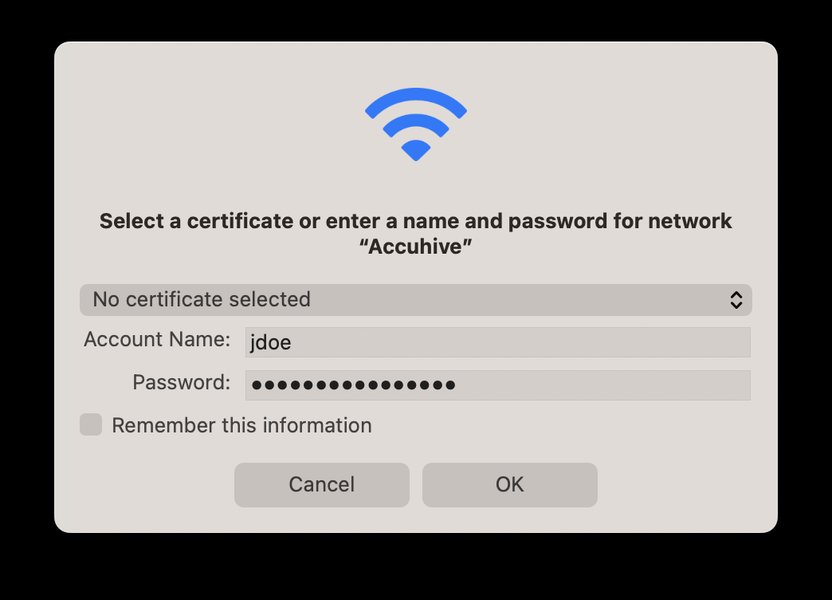
A visual representation of the 802.1X authentication process.
EAP supports numerous authentication methods, each offering different levels of security. Some common EAP types include:
- EAP-TLS: Uses digital certificates for mutual authentication between the client and the server. Considered highly secure.
- PEAP (Protected EAP): Creates a secure tunnel for authenticating with password-based protocols like MSCHAPv2. Requires a server certificate.
- EAP-FAST: Similar to PEAP but uses a Protected Access Credential (PAC) instead of a certificate for the outer authentication.
- EAP-SIM and EAP-AKA: Used in cellular networks for authentication based on the Subscriber Identity Module (SIM) or Universal Mobile Telecommunications System (UMTS) Subscriber Identity Module (USIM).
In the context of USER@wlan.mnc410.mcc310.3gppnetwork.org, the use of an NAI strongly suggests that 802.1X and EAP are being utilized for authentication. The specific EAP method would determine how the 'USER' identity is verified.
Wi-Fi Security Protocols (WEP, WPA, WPA2, WPA3)
While 802.1X/EAP handles the authentication process (verifying identity), Wi-Fi security protocols like WEP, WPA, WPA2, and WPA3 handle the encryption of data transmitted over the wireless network. WPA2-Enterprise and WPA3-Enterprise often utilize 802.1X/EAP for robust authentication in enterprise environments.
- WEP (Wired Equivalent Privacy): An older, insecure protocol.
- WPA (Wi-Fi Protected Access): Introduced to address WEP vulnerabilities.
- WPA2 (Wi-Fi Protected Access II): A significant improvement over WPA, offering stronger encryption. WPA2-Enterprise is commonly used with 802.1X.
- WPA3 (Wi-Fi Protected Access 3): The latest standard, providing enhanced security features, including improved protection against offline password attacks. WPA3-Enterprise continues to use 802.1X/EAP.
Cellular Network Authentication
Cellular networks (like 4G and 5G) also employ strong authentication mechanisms. Authentication in cellular networks typically involves the SIM card, which contains unique identification information. Protocols like EAP-SIM and EAP-AKA are used when a cellular identity is leveraged for authentication, sometimes even when accessing a network via Wi-Fi (as suggested by the .3gppnetwork.org domain).
Network Systems and Interworking
Bridging Wi-Fi and Cellular Worlds
The domain .3gppnetwork.org points towards the integration of the Wi-Fi network with a 3GPP cellular system. This interworking allows for features like:
- Wi-Fi Calling: Enabling voice calls over a Wi-Fi network using a cellular subscription.
- Seamless Mobility: Allowing devices to transition smoothly between Wi-Fi and cellular networks without dropping connections.
- Unified Authentication: Using the same cellular identity and credentials to authenticate on both cellular and trusted Wi-Fi networks.
This integration is facilitated by specific network functions within the cellular core network that handle authentication and traffic routing for devices connected via non-3GPP access networks like Wi-Fi.
Troubleshooting Insights from the NAI
Diagnosing Connectivity Issues
For a troubleshooter, the NAI USER@wlan.mnc410.mcc310.3gppnetwork.org provides a starting point for diagnosing connectivity issues:
- Identity Verification: The troubleshooter knows that the issue relates to authenticating the user or device identified as "USER". They would check if this identity is correctly registered in the authentication server (likely a RADIUS server integrated with the cellular provider's identity store).
- Authentication Protocol: The structure suggests 802.1X/EAP authentication. The troubleshooter would verify the EAP type configured on the client device and the access point, and ensure they are compatible.
- Network Type and Affiliation: The
wlanandmnc/mcccodes indicate a Wi-Fi network linked to AT&T's cellular network. This helps narrow down the potential source of the problem – it could be an issue with the Wi-Fi infrastructure, the connection to the cellular core network, or the authentication server managed by the carrier. - Roaming and Interworking: The
.3gppnetwork.orgdomain highlights the interworking aspect. Issues could arise from the communication between the Wi-Fi access point and the cellular network's authentication infrastructure.
Comparing Authentication Methods
A Look at Different Approaches
Wireless networks employ various authentication methods, each with its own characteristics and suitability for different environments. Here's a comparison of some common methods:
| Method | Description | Security Level | Complexity | Typical Use Case |
|---|---|---|---|---|
| Open Authentication | No authentication required; anyone can connect. | Very Low | Very Low | Public hotspots (often with a captive portal for later authentication) |
| PSK (Pre-Shared Key) | Uses a shared password for all users. | Moderate (depends on password strength) | Low | Home and small office networks (WPA2-PSK, WPA3-PSK) |
| MAC Address Filtering | Grants access based on a device's unique MAC address. | Low (MAC addresses can be spoofed) | Moderate (requires manual list management) | Limited use, often as a secondary layer |
| 802.1X/EAP | Framework for port-based authentication using various EAP methods. | High (depends on EAP method) | High (requires authentication server) | Enterprise networks (WPA2/WPA3-Enterprise) |
| Certificate Authentication | Uses digital certificates to verify identity. | Very High | High (requires PKI infrastructure) | Enterprise networks (EAP-TLS) |
The Role of RADIUS Servers
Centralized Authentication Management
In enterprise and carrier-integrated wireless networks using 802.1X/EAP, a RADIUS (Remote Authentication Dial-In User Service) server plays a crucial role. The access point forwards the authentication request from the client to the RADIUS server. The RADIUS server then verifies the user's or device's credentials against an identity source (like Active Directory, a dedicated user database, or a cellular network's subscriber database).
Modern RADIUS implementations can integrate with cloud identity providers and support features like multi-factor authentication, further enhancing security.
Visualizing Wireless Authentication Complexity
A Radar Chart Analysis
To further illustrate the characteristics of different wireless authentication methods, consider the following radar chart. This chart provides an opinionated view of various methods based on factors like security strength, ease of setup, compatibility, and reliance on external infrastructure.
As you can see from the chart, methods like WPA3-Enterprise with EAP-TLS offer high security and scalability but require significant infrastructure. PSK is easier to set up but less secure and less scalable. Cellular authentication is generally secure and highly scalable due to the nature of cellular networks but relies entirely on the mobile carrier's infrastructure.
Further Considerations for Identity-Based Networks
Ensuring Robust Security
Implementing identity-based authentication effectively requires more than just configuring protocols. Other important considerations include:
- Certificate Management: For methods like EAP-TLS, a robust Public Key Infrastructure (PKI) is necessary for issuing and managing digital certificates for users and devices.
- Identity Source Integration: Seamless integration with existing identity stores (like Active Directory, LDAP, or cloud identity providers) is crucial for centralized user management.
- Monitoring and Auditing: Implementing logging and monitoring of authentication attempts helps detect and respond to suspicious activity.
- Mutual Authentication: Ensuring both the client and the network authenticate each other is vital to prevent man-in-the-middle attacks.
- Passwordless Authentication: Exploring passwordless approaches using certificates or other secure methods can further enhance security by removing the vulnerability associated with passwords.
Frequently Asked Questions
Recommended Further Exploration
- Explore a detailed comparison of various EAP methods and their security implications.
- Understand the technical mechanisms behind cellular and Wi-Fi network interworking.
- Learn the steps involved in implementing WPA3-Enterprise authentication in an organization.
- Investigate historical and current security vulnerabilities in wireless authentication protocols.
References
 higherlogicdownload.s3.amazonaws.com
Last updated May 21, 2025