
Fortifying Your WordPress Site: A Deep Dive into Wordfence, Sucuri, and Solid Security
Unlock the ultimate protection for your WordPress ecosystem with comprehensive insights into leading security solutions.
Key Takeaways for WordPress Security
- Cloud-based vs. Server-side Firewalls: Understand the fundamental difference between Sucuri's performance-boosting cloud-based WAF and Wordfence's deeply integrated server-side firewall to choose the best fit for your site's traffic and resource availability.
- Malware Detection & Cleanup: Evaluate the varying approaches to malware, from Wordfence's extensive signature database and local scanning to Sucuri's unlimited expert manual removal service, and Solid Security's user-friendly built-in scanning.
- Balancing Features and Usability: Discover how Solid Security (formerly iThemes Security) excels in user-friendliness and essential features for bloggers and small businesses, while Wordfence offers granular control, and Sucuri provides a comprehensive cloud solution with CDN and DDoS protection.
Understanding the WordPress Security Landscape
WordPress, powering a vast portion of the internet, is an attractive target for malicious actors. Safeguarding your website is paramount, and security plugins serve as the first line of defense. These tools offer crucial features such as firewalls, malware scanning, brute-force protection, two-factor authentication (2FA), and vulnerability monitoring. This comprehensive analysis delves into three of the most prominent WordPress security plugins: Wordfence, Sucuri, and iThemes Security (now rebranded as Solid Security by SolidWP), providing a detailed comparison to help you make an informed decision for your site's specific needs.
Why Security Plugins Are Essential for WordPress
The open-source nature and widespread adoption of WordPress make it a frequent target for various cyber threats. Without robust security measures, websites risk falling victim to malware infections, brute-force login attempts, SQL injections, cross-site scripting (XSS), and data breaches. Security plugins automate many of these protections, offering specialized defenses that would otherwise require significant technical expertise and constant vigilance. They provide peace of mind by actively monitoring, detecting, and mitigating threats, ensuring the integrity and availability of your website.
Wordfence Security: In-Depth Protection from Within
Wordfence stands as one of the most widely recognized and utilized WordPress security plugins, known for its comprehensive, all-in-one approach. With millions of active installations, it offers a robust suite of features designed to protect WordPress sites from a variety of threats. Wordfence operates directly on your server, providing deep integration with your WordPress installation.
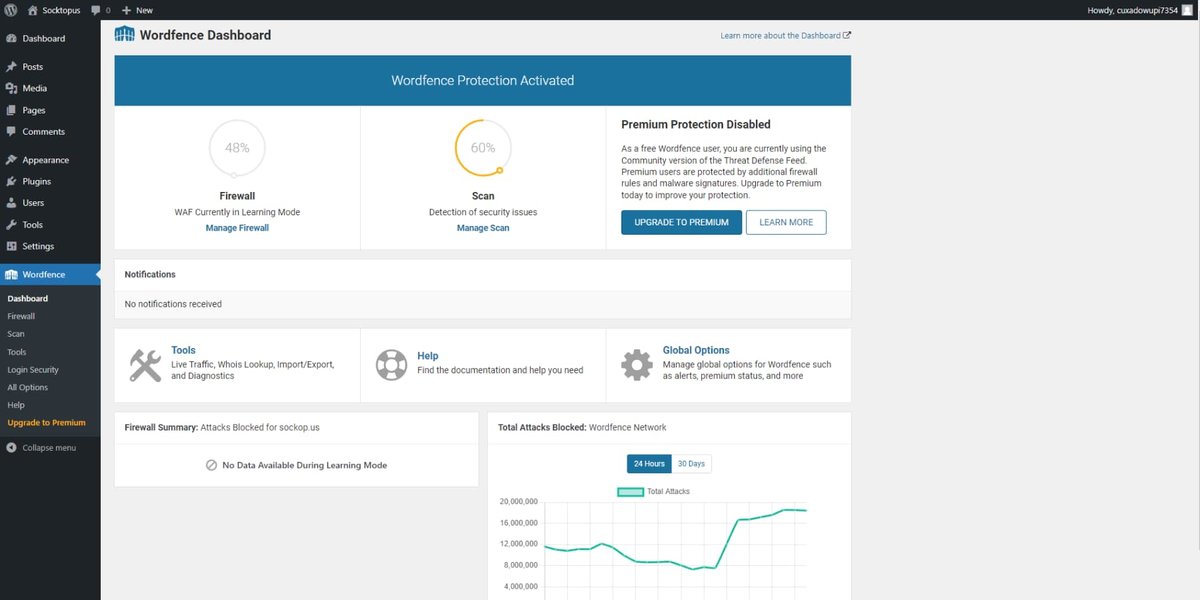
Wordfence's user interface displaying activity logs and security alerts.
Core Strengths and Features
Robust Web Application Firewall (WAF)
Wordfence's WAF is a PHP-based, server-side firewall that operates as an endpoint firewall. This means it runs on your web server, offering a deep level of integration and visibility into your site's traffic. In its free version, the WAF is a core feature that intelligently blocks suspicious traffic and malicious entry attempts. The premium version provides real-time updates to firewall rules, offering proactive protection against the latest threats and zero-day exploits. While effective, its server-side nature can be more resource-intensive, potentially impacting performance on shared or low-resource hosting environments compared to cloud-based solutions.
Comprehensive Malware Scanning and Detection
Wordfence excels in malware detection with an extensive, frequently updated signature database. Its scanner checks all core WordPress files, themes, and plugins for known malware, suspicious code, and backdoors. It alerts you upon detection and even offers an auto-repair feature for common infections. For more complex malware, Wordfence provides a premium manual malware removal service, though this can be expensive ($490 per site for a one-time cleanup, as noted in some reports).
Login Security and Brute-Force Protection
To combat unauthorized access, Wordfence includes robust login protection features. These include two-factor authentication (2FA), reCAPTCHA on login forms to deter bots, and the enforcement of strong password policies. It actively monitors and blocks brute-force attacks by limiting failed login attempts, significantly reducing the risk of compromised credentials.
Real-time Threat Intelligence and Monitoring
Wordfence offers real-time threat intelligence, providing up-to-the-minute information on emerging threats. Premium users benefit from instant firewall rule updates based on this intelligence. Additionally, its activity monitoring and audit logs track user actions, site changes, and security events, offering detailed insights for forensic analysis.
Sucuri Security: Cloud-Powered Defense and Performance
Sucuri differentiates itself as a comprehensive, cloud-based website security platform. Unlike Wordfence, Sucuri processes traffic before it even reaches your hosting server, effectively acting as an external shield. This approach offers significant advantages in terms of performance and advanced threat mitigation.
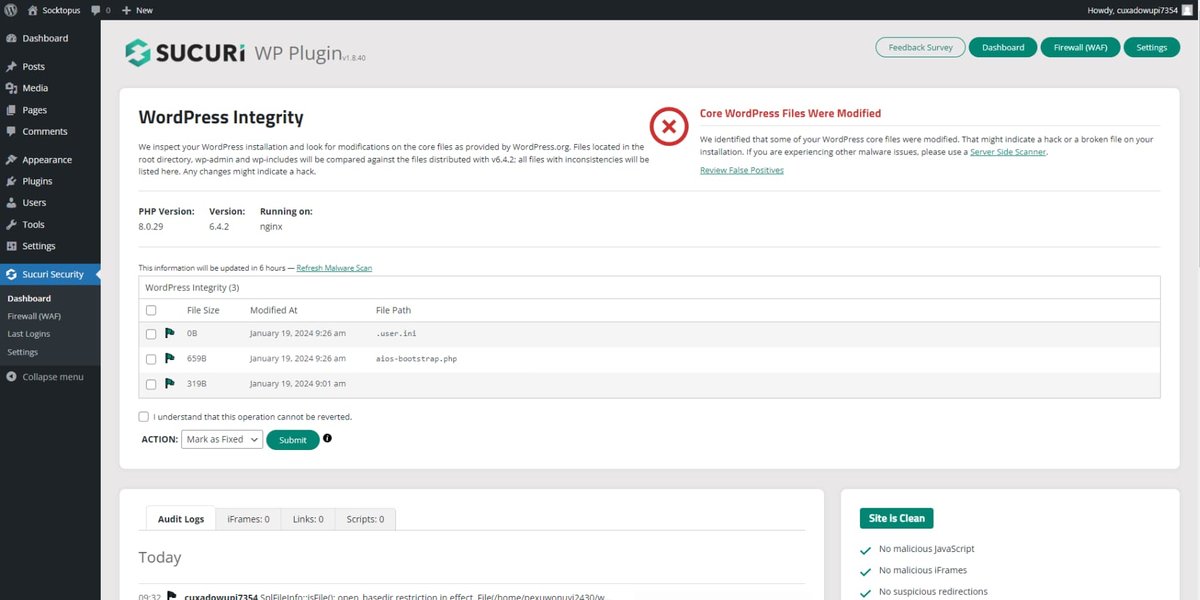
Sucuri's dashboard showcasing an overview of website security status.
Core Strengths and Features
Cloud-Based Web Application Firewall (WAF)
Sucuri's primary strength is its cloud-based WAF, which filters all incoming traffic before it reaches your website. This offloads security checks from your server, improving site performance and preventing malicious requests from ever consuming your server resources. This external layer of defense is generally considered superior for efficiency and reliability, offering faster response times and more robust protection against high-volume attacks like DDoS.
Unlimited Malware Removal and Incident Response
A standout feature of Sucuri is its included unlimited manual malware cleaning service across all its premium plans. If your site gets infected, Sucuri's security experts will clean it, regardless of the complexity or frequency of reinfections. This contrasts sharply with Wordfence's potentially expensive one-time cleanup service and is a major advantage for businesses where uptime and swift recovery are critical.
DDoS Mitigation and Content Delivery Network (CDN)
Sucuri integrates DDoS mitigation as part of its cloud platform, protecting your site from overwhelming traffic attacks. Furthermore, it includes a global Anycast CDN service, which caches website content and serves it from the nearest geographical server to your visitors. This not only enhances security by routing traffic through Sucuri's infrastructure but also significantly improves website loading speeds, often by over 70%.
Vulnerability Patching and Blacklist Monitoring
Sucuri offers virtual patching for vulnerabilities, which can immediately protect against newly discovered exploits even before a permanent fix is applied. It also continuously monitors your website for blacklisting by search engines like Google, ensuring your site's reputation remains untarnished.
iThemes Security (Solid Security): User-Friendly and Comprehensive
iThemes Security, now rebranded as Solid Security by SolidWP, is another formidable contender in the WordPress security arena. It aims to provide a comprehensive yet user-friendly security solution, particularly appealing to bloggers and small to medium-sized businesses looking for essential protections without overwhelming complexity.
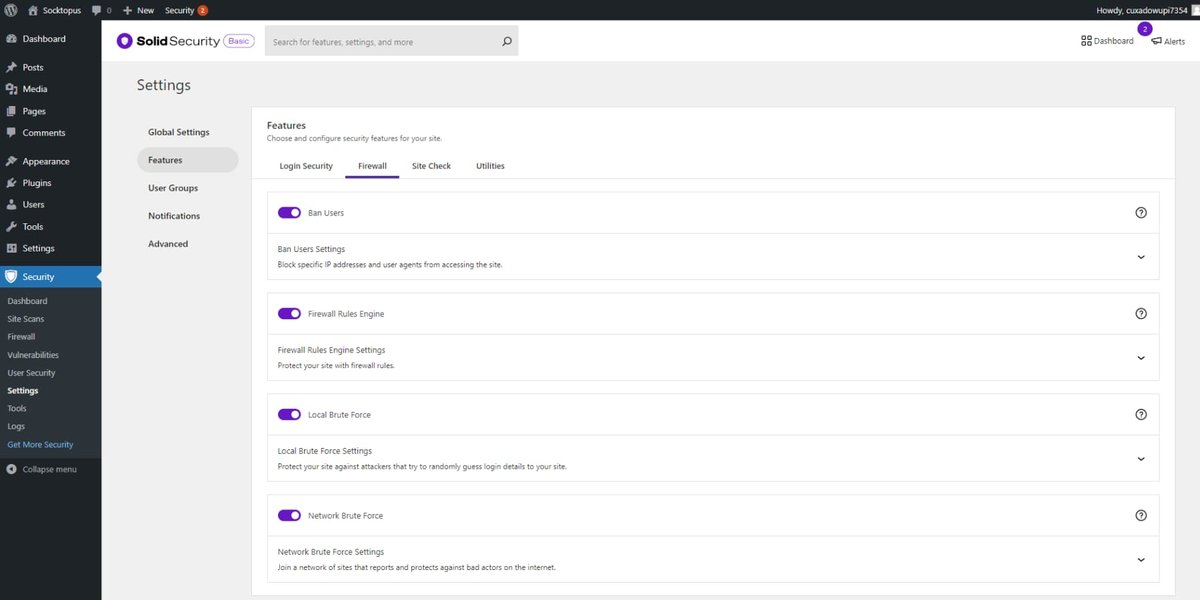
Solid Security's user interface showing security status and options.
Core Strengths and Features
Integrated Security Dashboard and User-Friendliness
Solid Security is designed for ease of use, featuring an intuitive dashboard and an accessible setup process. It provides clear recommendations for security options and aims to simplify complex security configurations. This makes it an excellent choice for users who might not have extensive technical expertise but still require robust protection.
Comprehensive Protection Suite
Solid Security offers a 3-in-1 approach, combining site security, backups, and management features. It includes firewall protection, malware scanning, and two-factor authentication (2FA) support with popular apps like Google Authenticator and Duo Mobile. It also provides anti-spam protection and robust brute-force attack prevention by limiting failed login attempts.
Site Monitoring and Database Security
The plugin includes powerful monitoring capabilities to track user logins, detect file changes, and check for malware. It sends notifications for suspicious activities, allowing for early detection of malicious behavior. Additionally, Solid Security Pro offers advanced database security features, including database backups, which are crucial for quick recovery in case of an attack.
Balance of Features and Performance
Solid Security is noted for its balance of strong security features and minimal performance impact. It's often described as lighter than some of its competitors, making it suitable for sites on shared hosting environments or those with limited resources, without compromising essential security measures.
Comparative Analysis: Wordfence vs. Sucuri vs. Solid Security
Choosing the "best" security plugin depends heavily on your specific website's needs, budget, technical expertise, and preferred security architecture. Here’s a comparative breakdown of how these three leading solutions stack up against each other:
| Feature/Aspect | Wordfence | Sucuri | iThemes Security (Solid Security) |
|---|---|---|---|
| Firewall Type | Server-based endpoint firewall (PHP-based) | Cloud-based WAF (external, processes traffic before reaching server) | Plugin-based firewall (on-site) |
| Malware Scanning | Extensive signature-based local scanning, auto-repair for common issues. | Remote and server-side scanning, effective but can miss some deeply embedded malware. | Local scanning, monitors for malware and vulnerabilities. |
| Malware Removal | Limited automatic repair; premium manual service is expensive and one-time. | Unlimited manual malware removal included in premium plans by experts. | Basic cleanup; less robust than dedicated removal services. |
| Performance Impact | Can be resource-intensive, potentially slowing down sites on low-resource hosts. | Generally lower impact due to cloud-based filtering, includes CDN for speed. | Lightweight, minimal performance hit, good for small sites. |
| Key Extra Features | Real-time threat intelligence, live traffic monitoring, detailed audit logs, Wordfence Central for multiple sites. | CDN, DDoS mitigation, virtual patching, blacklist monitoring, cross-platform support. | Database backups, file change detection, anti-spam, site monitoring, integrated bundles. |
| Ease of Use | Moderate complexity, offers granular control; simpler after initial setup. | User-friendly UI, clear setup with API keys; simpler options for strengthening security. | Simple and intuitive setup, good for beginners; less "non-sense notifications." |
| Pricing Structure | Free version is robust; Premium ($99+/year/site) for real-time updates and advanced features. | Paid plans starting around $199.99/year for unlimited cleanups and WAF (premium only). | Free version for basics; Pro version is recommended and generally more affordable than competitors. |
| Best For | Users wanting deep, in-depth WordPress-specific security and granular control. | Mission-critical sites needing strong cloud protection, performance boosts, and expert cleanup. | Bloggers and small to medium businesses desiring essential, user-friendly security with integrated backups. |
Understanding Core Security Capabilities
Each plugin provides a robust set of security features. To better visualize their core capabilities, here's a radar chart comparing their strengths across key security domains. This chart reflects an opinionated analysis based on their typical performance and feature set.
This radar chart illustrates the perceived strengths of each security plugin across critical security dimensions. Higher values indicate stronger performance or more comprehensive features in that area. It helps visualize how each plugin balances its offerings, from firewall robustness to ease of use and specific threat protections.
Strategic Considerations for Your WordPress Security
Selecting the right security plugin is a strategic decision that should align with your website's specific characteristics and your technical comfort level. Here's a mindmap to summarize the decision-making factors and key aspects of each plugin:
This mindmap provides a visual representation of the key features and considerations for each security plugin, organizing them into a hierarchical structure to facilitate a clearer understanding of their differences and how they align with various website needs.
Beyond the Plugins: Layered Security
While these plugins offer robust protection, true WordPress security is a multi-layered approach. Complementary measures such as choosing a reputable hosting provider with strong server-side security, always using SSL certificates, regularly updating WordPress core, themes, and plugins, and implementing strong password policies are equally vital. For mission-critical sites, consider combining a cloud-based WAF like Sucuri with an on-site plugin like Wordfence or Solid Security for a truly comprehensive defense strategy.
Explore Further: Expert Insights on WordPress Security Plugins
To provide a deeper understanding and contextualize the technical aspects, here's a relevant video that delves into a comparison of WordPress security plugins, offering visual demonstrations and expert opinions:
This video provides a comparison of Wordfence, Sucuri, iThemes, and MalCare, offering valuable insights into their real-world performance and suitability for different WordPress websites. It helps visualize the differences and benefits of each plugin discussed in this comprehensive guide.
Frequently Asked Questions (FAQ)
What is the main difference between Wordfence and Sucuri's firewalls?
Is iThemes Security (Solid Security) suitable for large enterprise websites?
Which plugin offers the best malware removal service?
Do these plugins impact website performance?
Recommended Further Reading
- How can security plugins affect my WordPress website's performance and speed?
- What are the best advanced techniques to harden WordPress security beyond plugins?
- What are the pros and cons of cloud-based WAFs compared to endpoint firewalls for WordPress?
- Is investing in a premium WordPress security plugin truly worth the cost for small businesses?

