
Using Spreadsheets to Manage Workout Links
Harness the power of customizable spreadsheets for organizing your fitness journey efficiently
Key Highlights
- Comprehensive Organization: Use spreadsheets to compile and categorize workout links efficiently.
- Dynamic Tracking & Analysis: Leverage formulas, data validation, and charts to monitor and enhance your workout progress.
- Collaboration & Automation: Easily share, collaborate, and automate aspects of your workout management using tools like Google Sheets and Excel.
Introduction
In today's digital age, managing your workout routines and planning fitness strategies has become more efficient with modern technology. One innovative approach involves using spreadsheets like Microsoft Excel and Google Sheets for consolidating and tracking workout links, exercise routines, and progression statistics. This method not only helps you store multiple resources in one place but also provides an effective way to analyze and visualize your fitness journey. In this comprehensive guide, we detail how you can use spreadsheets as a powerful tool for managing workout links by exploring customization features, dynamic tracking capabilities, collaborative functions, and automation options.
Organizing Workout Links
A well-structured spreadsheet can help you maintain a detailed database of various workout resources available online. This includes links to video guides, exercise descriptions, routines, and even articles related to workout techniques. By compiling these resources within a spreadsheet, you ensure that you have ready access to a wealth of fitness information anywhere, anytime.
Creating an Effective Database
The first step in managing workout links is to set up an organized database. To achieve this, create columns for key attributes. These attributes might include:
- Workout Name: A clear and concise name for each workout routine.
- Link URL: Hyperlinks to instructional videos or detailed descriptions.
- Date Added: Tracking when the workout was integrated into your regimen.
- Category/Type: Designate the type of workout such as cardio, strength training, flexibility, etc.
- Notes: Any personal observations or important details regarding the workout.
An organized spreadsheet not only makes it easier to find the right workout at the right time but also facilitates planning when different types of workouts are required throughout the week.
Utilizing Data Validation and Dropdowns
One of the best ways to enhance your spreadsheet is by using data validation. This enables you to create dropdown menus that allow for easy selection of pre-defined values. For instance, when categorizing workouts, data validation can ensure that each entry in the category column conforms to standard choices like Upper Body, Lower Body, Cardio, or Flexibility. By doing so, you maintain consistency and can easily filter workouts by type.
In Google Sheets, this feature is available directly in the menu and is instrumental in reducing errors. Excel offers a similar capability which can be applied using the data validation tool. The benefits of data validation include minimizing manual input errors and streamlining your data analysis process.
Hyperlinks and Multimedia Integration
For workout management, having hyperlinks that directly lead to demonstration videos or webpages can significantly enhance your routine. Rather than bookmarking pages separately, integrating them within your spreadsheet under a dedicated column allows you quick access to multimedia resources.
Adding hyperlinks is a simple process that involves using the "Insert Link" feature in Google Sheets or Excel, which turns plain text into clickable links. Additionally, you can incorporate images or icons next to each workout link for visual appeal, ensuring that your database is both informative and aesthetically pleasing.
Tracking and Logging Your Workouts
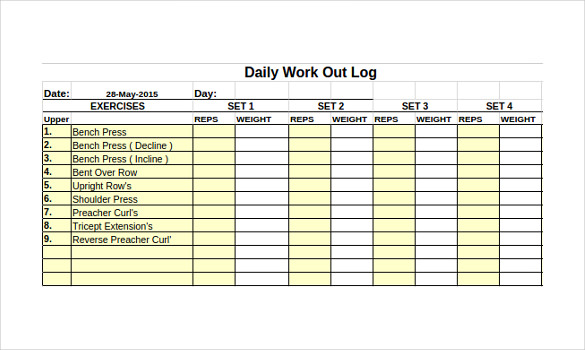
Beyond merely organizing links, spreadsheets serve as an excellent tool for tracking the actual workouts you perform. By logging workout data such as dates, exercises performed, number of sets, repetitions, and weight used, you can track your progress over time. These logs not only serve as a motivational record but also facilitate the identification of performance trends.
Workout Logging Structure
A robust logging system should include dedicated tabs or sheets for different types of workouts. For instance, one tab might detail cardio sessions while another records strength training exercises. Each log should have the following columns:
- Date: Record the specific date and time of the workout.
- Exercise Name: The name of the exercise as listed in your exercise database.
- Sets & Reps: Number of sets and repetitions performed.
- Weight/Resistance: The weight or resistance level used.
- Duration: Especially for cardio workouts, recording the length of time can be crucial.
- Notes: Include any feedback, challenges faced during the workout, or adjustments to the plan.
This comprehensive logging system allows you to monitor gradual improvements in your fitness, track consistency, and make informed decisions based on historical performance.
Visualization Through Charts and Graphs
One of the most compelling features of spreadsheets is the ability to create charts and graphs. Visual dashboards provide a quick overview of data trends such as total workout volume, progression in weights, and frequency of workouts. For example, you can construct a line graph that represents weight progression over weeks or months, showcasing clear trends of improvement.
Visual representation not only makes data easier to interpret at a glance but also provides an instant feedback loop. These visuals can be created using built-in tools in both Excel and Google Sheets, ensuring that the information is both accessible and intuitive.
Sample Spreadsheet Layout
| Workout Name | Link URL | Category | Date Added | Notes |
|---|---|---|---|---|
| HIIT Cardio Blast | Video Guide | Cardio | 2025-01-15 | High intensity, short duration |
| Upper Body Strength | Exercise Routine | Upper Body | 2025-01-20 | Focus on compound movements |
| Core and Stability | Detailed Plan | Strength | 2025-01-25 | Improve balance and core strength |
The table above provides an example of how to structure your workout links database, complete with essential details that make navigation and referencing simple and efficient.
Advanced Spreadsheet Features for Enhanced Management
Beyond basic database management and logging, spreadsheets offer advanced functionalities that can greatly enhance your workout tracking system. Advanced users can integrate automation, dynamic filtering, and even scripting to reduce manual input and error.
Conditional Formatting and Highlighting
Conditional formatting in spreadsheets is a powerful feature that allows you to highlight specific cells based on predetermined conditions. For instance, you might highlight workouts that have not been completed yet, or use color gradients to indicate progression levels in weight training. By applying conditional formatting, you can quickly identify trends or potential areas for improvement by visually differentiating between various performance metrics.
Automation with Macros and Scripts
Both Excel and Google Sheets allow users to implement automation in their workflows. In Excel, VBA (Visual Basic for Applications) can be used to create macros that automate repetitive tasks such as updating logs, generating periodic reports, or even sending notifications. Similarly, Google Sheets supports the use of Google Apps Script to perform automated routines like sending email reminders for scheduled workouts, dynamically updating charts, or pulling data from external APIs.
Automation not only saves time but also reduces the risk of manual errors, ensuring that your workout data is always accurate and up-to-date. For example, you might set up a macro that calculates the total tonnage lifted in a session by multiplying the weight, sets, and reps automatically each time new data is added.
Dynamic Reporting and Data Analysis
Spreadsheets excel at enabling dynamic data analysis. With built-in functions like SUM, AVERAGE, COUNTIF, and even more complex ones such as SUMPRODUCT, it is possible to conduct in-depth performance analyses. Suppose you wish to assess your progress over a month; you can set a dashboard to automatically generate weekly summaries, display trends in your workout frequency, and even highlight your personal bests.
The analytical capabilities of spreadsheets allow you to not only retain historical records but also forecast future performance based on current trends. This will often provide insights into where adjustments are necessary for your workout plan, enabling you to implement a progressive overload strategy or introduce variations to prevent plateaus.
Dynamic Summary Table Example
| Week | Total Workouts | Total Weight Lifted (kg) | Average Duration (mins) |
|---|---|---|---|
| Week 1 | 5 | 1500 | 45 |
| Week 2 | 6 | 1650 | 50 |
| Week 3 | 4 | 1400 | 40 |
| Week 4 | 7 | 1800 | 55 |
The table above exemplifies how you can summarize workout performance on a weekly basis. It provides a clear snapshot of your progress, highlighting key parameters that can be tracked over time to gauge effectiveness and consistency.
Customization and Personalization
One of the prime advantages of using spreadsheets for managing workout links is the flexibility they offer. You can customize every aspect of your workout tracker to suit your personal fitness goals, personal style, and specific needs. Customization may include:
- Template Adaptation: Modify pre-existing free templates or create one from scratch tailored to your workout regimen. Customization may involve adjusting columns, adding new sections for specific data points, or incorporating additional tabs for tracking nutrition, rest days, or mood.
- Design Elements: You can include color coding, icons, and even conditional graphical elements to make the spreadsheet visually appealing and easy to understand. This visual customization makes the data easier to interpret and adds an element of motivation when you see your progress.
- Advanced Calculations: Incorporate complex formulas to handle calculations like progressive overload metrics, estimates of calorie burn, or predictions for upcoming cycles. Advanced users might integrate custom formulas to automatically adjust training loads based on logged performance.
By investing time in personalizing your workout management spreadsheet, you build a system that not only serves as a repository of links and data but also aligns with your fitness philosophy and goals in a way that paper logs or apps might not offer.
Sharing and Collaboration
Another significant advantage is the ease of sharing and real-time collaboration. Using cloud-based solutions such as Google Sheets, you can share your workout database with your personal trainer, workout partner, or even fitness community members. Real-time collaboration allows for immediate feedback on your workout plans, suggestions for modifications, and even communal motivation.
Whether you are an online coach or just someone looking to stay motivated, collaborating on a live document makes it easier to incorporate expert advice directly into your routine without the need for multiple platforms.
Integration with Other Fitness Tools
While spreadsheets are robust on their own, many fitness enthusiasts prefer to integrate them with other digital applications. For example, you can connect your spreadsheet with various fitness apps or wearables that automatically export your exercise data. Integrations can be achieved through:
- API Integration: Some advanced users may develop scripts that fetch data from fitness tracking apps directly into the spreadsheet. This eliminates double entry and ensures that performance metrics are updated continuously.
- Export/Import Options: Numerous fitness apps provide the option to export data, which can then be imported into your custom-built workout spreadsheet on a weekly or monthly basis. This keeps your workout history centralized and easily accessible for trend analysis.
- Wearable Devices: Modern wearable devices generate significant amounts of workout data, including heart rate, calories burned, and step count. By syncing these devices with spreadsheet tools, you can enrich your workout logs with comprehensive data, making your analysis more detailed and helpful.
Integrations further enhance the usefulness of your spreadsheet by automating data collection and allowing for more comprehensive analysis without manual intervention.
Case Study: A Day in the Life of a Spreadsheet-User
Consider a fitness enthusiast named Alex who utilizes a spreadsheet for managing his workout links and tracking his progress. Every morning, Alex starts by opening his personalized Google Sheet that houses a “Workout Links” tab. Each entry in the list is equipped with a hyperlink to a video tutorial or detailed exercise description.
Alex's spreadsheet is divided into multiple sheets:
- Workout Links: Contains a curated list of workouts from different online platforms, sorted into categories like cardio, strength, and flexibility.
- Daily Logs: Here, he records his workout details—dates, number of sets, repetitions, weights, and his subjective notes regarding each session.
- Progress Dashboard: Summarizes data with dynamic charts that update in real time. Alex tracks his performance metrics over weeks and months, which include total weight lifted and improvements in cardio endurance.
- Automated Alerts: Alex has set up conditional formatting to alert him when it’s time for a recovery day, based on the intensity and frequency of his recent workouts.
Every workout session is logged, and the information is later analyzed to adjust training loads and modify upcoming exercise routines. Alex’s system also includes a dedicated section for meal planning and nutrition, ensuring that his fitness goals are met holistically. His collaborative spreadsheet is occasionally shared with his personal trainer, who provides comments and adjustments through the integrated comment feature.
Challenges and Considerations
While spreadsheets offer immense flexibility and power, there are a few challenges that users might face. One of the primary challenges is ensuring data accuracy, as the effectiveness of the spreadsheet depends largely on how accurately the information is recorded. Users should implement measures such as automated formulas and regular data backups to mitigate risks of data loss or errors.
Another consideration is the learning curve associated with advanced features such as scripting or conditional formatting. Beginners might need extra time to familiarize themselves with these functionalities, but the online availability of tutorials and free templates can ease this process considerably. Additionally, maintaining multiple sheets can become complex if not organized properly; hence, it is advisable to simplify and keep a clear structure throughout your spreadsheet.
Benefits of Using Spreadsheets for Workout Link Management
The benefits of using spreadsheets to manage workout links extend far beyond basic organization. Here are some of the key advantages:
- Personalization: Customize every aspect to create an environment that best suits your personal fitness journey.
- Efficiency: Centralize all workout-related links and data into one easy-to-manage location, reducing time spent searching for resources.
- Motivation: Visual representations of your workout progress, including charts and graphs, motivate you to achieve further milestones.
- Data-Driven Decisions: Use analytical insights from your logged data to make informed decisions about adjustments in your training regimen.
- Collaboration: Share and work on your workout plan with trainers or friends in real time, fostering a supportive fitness community.
- Cost-Effective: Spreadsheets are a free and highly accessible tool available on multiple platforms, eliminating the need for expensive software.
Overall, using spreadsheets for managing workout links not only organizes your fitness resources but also empowers you with data-driven insights, ensuring you stay on track with your goals.
Conclusion
In conclusion, spreadsheets provide an exceptionally versatile and dynamic platform for managing workout links and tracking your fitness journey. By utilizing spreadsheets such as Google Sheets or Microsoft Excel, you gain the power to organize diverse workout resources, log and analyze your performance, and even integrate advanced automation to streamline your fitness data. The capability to customize your tracking system allows you to align it precisely with your personal fitness objectives, ensuring that every workout contributes effectively to your overall progress.
From creating a meticulously organized workout database to implementing advanced features such as conditional formatting, automation, and data visualization, spreadsheets offer unparalleled control over your workout management strategy. Whether you are a novice fitness enthusiast or an experienced athlete, these digital tools can adapt to your needs and evolve along with your evolving fitness goals.
Embracing this technology not only maximizes your efficiency in managing workout links but also opens up avenues for collaborative planning and real-time data analysis, ensuring that you remain motivated and informed about your progress. The benefits of centralized data, enhanced tracking capabilities, and the ease of customization make spreadsheets an indispensable resource for anyone serious about fitness. As you integrate these tools into your daily routine, you will find that every recorded session and every link stored contributes directly to a well-rounded and successful fitness journey.
References
- Track Your Health and Fitness Goals in Excel - Microsoft Support
- Track Your Strength Gains with a Spreadsheet - Stay Fit Central
- Track Your Fitness Journey with Free Google Sheets Templates - The Goodocs
- Workout Log Templates - Template Archive
- Workout Templates - Spreadsheet Daddy
Recommended
Last updated February 23, 2025