
Comprehensive Guide to Writing Effective User Stories
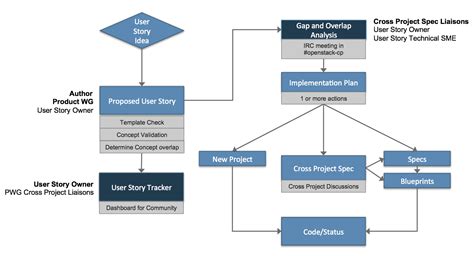
User stories are fundamental tools in agile methodologies, capturing requirements from the perspective of end users. They facilitate clear communication among team members and ensure that the development process remains user-centric. This guide provides a detailed approach to crafting effective user stories, enriched with examples and best practices.
Understanding User Stories
A user story is a brief, simple description of a feature or functionality from the perspective of the user who desires it. It focuses on the value or benefit that the user gains, ensuring that the development aligns with user needs and expectations.
Key Components of a Good User Story
1. Clear Actor/Persona
Identify who the user is. This can range from a specific type of user to a general persona representing a group of users.
2. Specific Desired Action
Describe the action the user wants to perform. This should be a clear and actionable task.
3. Intended Benefit or Outcome
Explain why the user wants to perform this action. Understanding the benefit ensures that the feature delivers real value.
Typically, user stories are formatted as:
As a [type of user], I want to [perform some action] so that [achieve some goal].
Steps to Writing User Stories
-
Decide What “Done” Will Look Like
Define the end-state of the task or goal. This ensures that your team knows when the development work is complete. Clear criteria for completion help in maintaining quality and meeting user expectations.
-
Document Tasks and Subtasks
While the main user story statement is concise, outlining specific steps and responsibilities for each task ensures clarity in execution. Breaking down tasks aids in better planning and resource allocation.
-
Determine Your User Personas
Identify who the user is and what their needs are. Understanding user personas helps in creating targeted and relevant stories that resonate with actual user behaviors and preferences.
-
Create Stories as Ordered Steps
Think of your product as a series of tasks or jobs the product helps users complete. Writing each self-contained step as a story ensures that each feature delivers incremental value.
-
Seek User Feedback
Engage with users and customers to understand their priorities and needs. Feedback ensures that your stories align with market requirements and user expectations.
-
Draft Stories That Can Be Completed in One Sprint
Break down larger tasks into smaller, manageable stories that can be completed within a single sprint (typically two weeks). This practice enhances focus and facilitates regular progress assessments.
Best Practices for Writing User Stories
1. Follow the INVEST Criteria
- Independent: Stories should be self-contained, avoiding dependencies that complicate scheduling and prioritization.
- Negotiable: They should serve as a starting point for conversations, not as rigid contracts.
- Valuable: Each story must deliver value to the user or customer.
- Estimable: Teams should be able to estimate the effort required to implement the story.
- Small: Stories should be concise enough to be completed within a sprint.
- Testable: There should be clear criteria to verify the story's completion and correctness.
2. Use Clear and Concise Language
Avoid technical jargon unless it's appropriate for the user persona. The language should be easily understandable by all stakeholders, including non-technical members.
3. Prioritize User Stories
Not all stories are equal. Prioritize them based on user needs, business value, and dependencies to ensure that the most critical features are developed first.
4. Collaborate with Stakeholders
Involve users, customers, and team members in the story-writing process. Collaborative efforts ensure that multiple perspectives are considered, enhancing the quality and relevance of the stories.
Examples of User Stories
General Format Examples
-
As a customer, I want to be able to track my order so that I know when to expect delivery.
-
As a login user, I want to reset my password so that I can regain access to my account if I forget my password.
-
As a project manager, I want to view dashboard reports so that I can monitor team performance and project status.
-
As an admin, I want to manage user permissions so that I can ensure that users have the appropriate access levels within the application.
Application-Specific Examples
E-commerce Website
- As a customer, I want to browse products by category so that I can easily find items I'm interested in.
- As a shopper, I want to add items to my cart and save them for later so I can complete my purchase when convenient.
- As a registered user, I want to view my order history so I can track previous purchases.
Project Management App
- As a team member, I want to create and assign tasks to colleagues so we can track project progress.
- As a project manager, I want to set priority levels for tasks so I can manage team workload effectively.
- As a team lead, I want to generate reports on project completion and team productivity.
Banking App
- As a customer, I want to transfer money between my accounts quickly and securely.
- As a user, I want to receive transaction notifications so I can monitor my spending.
- As a bank customer, I want to set up automatic bill payments to avoid missing deadlines.
Templates and Resources
For more detailed examples and templates, refer to reputable resources:
Common Pitfalls to Avoid
1. Being Too Vague
Ambiguous user stories can lead to misunderstandings and mismatched expectations. Ensure each story is specific and clearly defines the desired functionality and outcome.
2. Overloading Stories with Multiple Requirements
Combining several functionalities in a single user story complicates implementation and testing. Keep stories focused on one feature or action to maintain clarity and manageability.
3. Ignoring the User’s Perspective
Stories should always reflect the user's needs and benefits. Avoid technical descriptions or solutions-centric narratives that do not convey user value.
4. Not Including Acceptance Criteria
Acceptance criteria define the conditions that must be met for the story to be considered complete. Without them, it's challenging to determine when a story is done and whether it meets the desired requirements.
Enhancing User Stories with Acceptance Criteria
Acceptance criteria provide a clear scope for user stories, outlining the conditions that must be satisfied for the story to be accepted. They serve as a reference for developers and testers, ensuring that the functionality meets user expectations.
Example:
- User Story: As a customer, I want to track my order so that I know when to expect delivery.
-
Acceptance Criteria:
-
The customer can view the current status of their order (e.g., Processing, Shipped, Delivered).
-
The system displays an estimated delivery date based on the shipping method.
-
Customers receive email notifications at each status update.
-
The order tracking page is accessible through the user's account dashboard.
-
Integrating User Stories into the Development Process
1. Backlog Refinement
Regularly review and prioritize user stories in the product backlog to ensure that the most valuable features are addressed first. This process involves clarification, estimation, and prioritization.
2. Sprint Planning
During sprint planning, select the highest-priority user stories from the backlog that can be completed within the sprint. Ensure that each story is well-understood by the team and that acceptance criteria are clear.
3. Development and Testing
Developers implement the features described in the user stories, adhering to the acceptance criteria. Quality assurance teams test the functionality to verify that it meets the defined requirements.
4. Review and Retrospective
At the end of each sprint, review completed user stories with stakeholders to gather feedback. Conduct retrospectives to discuss what went well and identify areas for improvement in the story-writing and development processes.
Advanced Techniques for Writing User Stories
1. Story Mapping
Story mapping is a visual exercise that helps teams organize and prioritize user stories based on their user journey. It provides a holistic view of the product, ensuring that all necessary functionalities are covered.
2. Personas and Scenarios
Develop detailed personas and scenarios to create more realistic and relatable user stories. Understanding different user types and their interactions with the product leads to more effective and targeted stories.
3. Role-Playing
Engage in role-playing sessions where team members act out the user stories. This helps in identifying potential issues, improving understanding, and fostering empathy towards users.
Tools to Facilitate User Story Management
- Jira: A popular tool for agile project management, offering robust features for creating, organizing, and tracking user stories.
- Trello: A flexible, card-based system that allows teams to visually manage user stories and workflows.
- Asana: Provides comprehensive task management features, including user story creation and tracking capabilities.
- Azure DevOps: Integrates development and project management, facilitating seamless user story management.
Conclusion
Writing effective user stories is crucial for aligning development efforts with user needs and business objectives. By following structured steps, adhering to best practices, and utilizing appropriate tools, teams can create clear, actionable, and valuable user stories that drive successful project outcomes. Remember to continuously refine and prioritize your user stories, engage with stakeholders, and adapt to feedback to maintain a user-centric development approach.
Last updated January 2, 2025