
Unlock Precision Power Forecasting: Your Minute-by-Minute XGBoost Guide
Master XGBoost to predict power values with minute-level accuracy for the week ahead, incorporating all necessary features and safeguards.
Forecasting power values with high precision, especially at a minute-level resolution, requires a robust approach. XGBoost, a powerful gradient boosting algorithm, is well-suited for such time series tasks. This guide will walk you through the essential steps, from data preparation to making and refining predictions for your specific scenario: forecasting power values for every minute from November 1st, 2023, to November 7th, 2023, based on your 10 months of 2023 data.
Key Highlights for Your Forecasting Success
- Feature Engineering is Crucial: Learn to create impactful les lag features and les caractéristiques temporelles nécessaires to capture historical dependencies and cyclical patterns in your power data.
- Recursive Forecasting for Precision: Understand how to implement a minute-by-minute recursive prediction strategy, ensuring that your forecasts adapt dynamically and maintain high precision, even for values after the decimal point.
- Robust Prediction Handling: Discover techniques to manage and mitigate any incorrect or illogical predictions, ensuring the reliability and practical applicability of your forecasts.
Understanding Your Data and the Goal
You have minute-level power value data spanning the first 10 months of 2023 (January 1st to October 31st). Your objective is to predict these power values for every minute of the following week, from November 1st, 2023, 00:00, to November 7th, 2023, 23:59. This involves making 7 days * 24 hours/day * 60 minutes/hour = 10,080 individual predictions. XGBoost excels in such regression tasks due to its ability to model complex relationships and handle various data types.
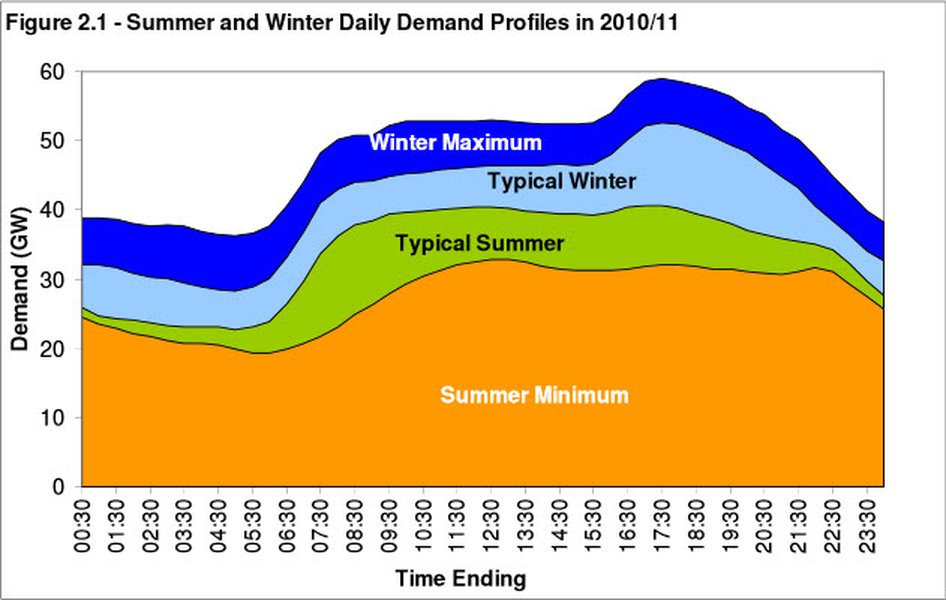
A typical daily energy demand curve, illustrating cyclical patterns your model will learn.
Step-by-Step XGBoost Forecasting Implementation
1. Data Preparation and Preprocessing
The foundation of any good model is well-prepared data. This involves loading, cleaning, and structuring your time series data.
Loading and Initial Cleaning
Your data, presumably in a CSV or similar format, should have at least two columns: one for the timestamp (at minute resolution) and one for the power value. Ensure timestamps are parsed correctly.
- Handle Missing Values: Check for any missing power values. Common strategies include forward-fill, backward-fill, or interpolation. Given the minute-level frequency, interpolation might be suitable.
- Address Outliers: Extreme or erroneous values can skew model training. Identify outliers (e.g., using statistical methods or domain knowledge) and decide whether to cap, remove, or transform them.
- Ensure Consistent Intervals: Verify that your data truly has one-minute intervals without gaps or duplicates.
2. Feature Engineering: The Core of Time Series Modeling
XGBoost, like other machine learning models, doesn't inherently understand the temporal sequence of data. We need to create features that explicitly provide this information.
A. Les Lag Features (Lagged Features)
Lag features are past values of the target variable (power value). They help the model understand auto-correlation – how a current value depends on previous values. For minute-level data, you might include lags from recent minutes, hours, or even the same time on previous days.
- Examples: Power value 1 minute ago (
lag_1), 5 minutes ago (lag_5), 60 minutes ago (lag_60- 1 hour), 1440 minutes ago (lag_1440- 1 day). - The choice of lags depends on the data's characteristics; experimentation is often needed.
B. Les Caractéristiques Temporelles Nécessaires (Necessary Temporal Features)
These features are derived from the timestamp itself and help the model capture seasonality, trends, and cyclical patterns.
- Minute of the hour (0-59)
- Hour of the day (0-23)
- Day of the week (0-6, e.g., Monday=0)
- Day of the month (1-31)
- Day of the year (1-366)
- Week of the year (1-53)
- Month (1-12)
- Year (useful if data spans multiple years, but constant for your 2023 training data)
- Weekend indicator (e.g., 1 if weekend, 0 if weekday)
- Cyclical features: For features like hour or month, sine and cosine transformations can help models understand their cyclical nature (e.g., hour 23 is close to hour 0).
C. Rolling Window Features
These are statistics (e.g., mean, standard deviation, min, max) calculated over a moving window of past data. They can help smooth out noise and capture recent trends.
- Example: Rolling mean of power values over the last 60 minutes.
3. Data Splitting
For time series data, splitting must be chronological to prevent data leakage (using future information to predict the past). You cannot use random splits.
- Training Data: January 1st, 2023, to October 31st, 2023 (after feature engineering, some initial rows might be dropped due to lag creation).
- Prediction Data (Future): You'll generate features for November 1st, 2023, to November 7th, 2023.
- Validation Set (Optional but Recommended): Before predicting the future, it's good practice to hold out a recent portion of your training data (e.g., October 2023) as a validation set to tune hyperparameters and evaluate model performance on unseen data.
4. Data Scaling
While XGBoost can be robust to feature scaling, normalizing or standardizing features, especially those with different ranges (like 'hour' vs. 'lag_1440'), can sometimes improve performance and convergence. `MinMaxScaler` from scikit-learn is a common choice, scaling features to a range like [0, 1]. This is particularly relevant given your concern about the precision of numbers after the decimal point.
5. Model Training
You'll use `XGBRegressor` for this regression task.
Key XGBoost Parameters:
objective='reg:squarederror': For regression tasks, minimizes mean squared error.n_estimators: The number of boosting rounds or trees to build.learning_rate: Step size shrinkage to prevent overfitting. Smaller values generally require more estimators.max_depth: Maximum depth of individual trees. Controls model complexity.subsample: Fraction of samples used to train each tree.colsample_bytree: Fraction of features used to train each tree.random_state: For reproducibility.n_jobs=-1: Use all available CPU cores for faster training.
Hyperparameter tuning (e.g., using GridSearchCV or RandomizedSearchCV with time series cross-validation) is crucial for optimal performance.
6. Making Predictions: Recursive Forecasting
To predict for each minute of the week from November 1st to November 7th, you cannot simply predict all 10,080 steps at once directly if your model uses lag features that would become unknown. A recursive (or iterative) forecasting strategy is required:
- Train your XGBoost model on data up to October 31st, 2023.
- To predict for November 1st, 2023, 00:00:
- Construct the features for this timestamp. Lag features will come from actual data on October 31st. Temporal features are known.
- Make a prediction for this single minute.
- To predict for November 1st, 2023, 00:01:
- Construct features. The `lag_1` feature will be the prediction you just made for 00:00. Other lags will shift accordingly (some from actual data, some from previous predictions). Temporal features are known.
- Make a prediction for this minute.
- Repeat this process for all 10,080 minutes. Each prediction uses previously predicted values as inputs for its lag features.
This approach ensures that predictions change every minute and reflect the evolving state, accurately handling the "numbers after ','" as new information (the previous minute's prediction) is fed into the model.
7. Handling Incorrect or Illogical Predictions
Forecasts can sometimes yield values that are unrealistic (e.g., negative power values if not physically possible, or values far exceeding historical maximums).
- Post-processing Constraints: Apply logical bounds to your predictions. For example, clip predictions to be non-negative. You can also cap them based on historical min/max values observed during similar conditions (e.g., same hour and day of the week), perhaps with some margin (e.g.,
train_data['power_value'].min()andtrain_data['power_value'].max()). - Model Evaluation on a Validation Set: Before forecasting the future, thoroughly evaluate your model on a hold-out validation set using metrics like Mean Absolute Error (MAE), Mean Squared Error (MSE), or Root Mean Squared Error (RMSE). This helps identify systematic biases or poor performance.
- Analyze Feature Importance: XGBoost can provide feature importance scores. This helps understand what drives predictions and can guide feature selection or engineering.
- Residual Analysis: Examine the errors (residuals) on your validation set. Patterns in residuals might indicate aspects your model isn't capturing.
- Consider Ensembling: Combining XGBoost with other models (though this adds complexity) can sometimes improve robustness.
- Regular Retraining: As new actual data becomes available, periodically retrain your model to keep it up-to-date with any evolving patterns.
Python Code Example Outline
Below is a conceptual Python code structure demonstrating the key steps. You'll need to adapt it to your specific data file and environment.
import pandas as pd
import numpy as np
import xgboost as xgb
from sklearn.model_selection import train_test_split # For initial split if using validation
from sklearn.preprocessing import MinMaxScaler
from sklearn.metrics import mean_squared_error
import matplotlib.pyplot as plt

# --- 1. Load Data ---
# df = pd.read_csv('your_power_data_2023.csv', parse_dates=['timestamp_column'])
# df = df.set_index('timestamp_column')
# df = df.rename(columns={'power_value_column': 'power_value'})
# df = df.asfreq('min') # Ensure minute frequency, fill gaps if necessary
# df['power_value'] = df['power_value'].interpolate(method='linear') # Example: linear interpolation

# --- Placeholder for demonstration: Creating dummy data ---
date_rng = pd.date_range(start='2023-01-01', end='2023-10-31 23:59:00', freq='min')
df = pd.DataFrame(date_rng, columns=['timestamp'])
df['power_value'] = np.random.rand(len(df)) * 100 + np.sin(np.arange(len(df)) / (24*60)) * 50 # Dummy data
df = df.set_index('timestamp')
# --- End of placeholder ---

# --- 2. Feature Engineering ---
def create_features(df_in, target_col='power_value'):
    df = df_in.copy()
    # Lag features
    lags = [1, 5, 10, 60, 1440, 7*1440] # Up to 1 week lag
    for lag in lags:
        if target_col in df.columns: # Only create lags if target_col exists (for future df)
            df[f'lag_{lag}'] = df[target_col].shift(lag)

    # Time-based features
    df['hour'] = df.index.hour
    df['dayofweek'] = df.index.dayofweek
    df['dayofmonth'] = df.index.day
    df['dayofyear'] = df.index.dayofyear
    df['month'] = df.index.month
    df['weekofyear'] = df.index.isocalendar().week.astype(int)
    df['is_weekend'] = (df.index.dayofweek >= 5).astype(int)

    # Rolling window features (example)
    if target_col in df.columns:
        df['rolling_mean_60'] = df[target_col].rolling(window=60).mean()
        df['rolling_std_60'] = df[target_col].rolling(window=60).std()

    return df

df_featured = create_features(df)
df_featured = df_featured.dropna() # Drop rows with NaNs from lags/rolling features

# --- 3. Data Splitting ---
# Training data is all data up to Oct 31, 2023
train_df = df_featured.copy()

TARGET = 'power_value'
FEATURES = [col for col in train_df.columns if col != TARGET]

X_train = train_df[FEATURES]
y_train = train_df[TARGET]

# --- 4. Data Scaling (Optional but often helpful) ---
# scaler = MinMaxScaler()
# X_train_scaled = scaler.fit_transform(X_train)
# X_train = pd.DataFrame(X_train_scaled, columns=X_train.columns, index=X_train.index)
# For simplicity in this example, skipping scaling, but consider it.

# --- 5. Model Training ---
model = xgb.XGBRegressor(
    objective='reg:squarederror',
    n_estimators=500, # Adjust based on validation
    learning_rate=0.05, # Adjust
    max_depth=7,        # Adjust
    subsample=0.8,
    colsample_bytree=0.8,
    random_state=42,
    n_jobs=-1
)

# print("Training XGBoost model...")
# model.fit(X_train, y_train)
# print("Model training complete.")

# --- For demonstration, let's assume a model is trained ---
# To run this example quickly, we'll mock the fit
# In a real scenario, the model.fit(X_train, y_train) line above would be executed.
# For now, we need `model` to be defined for the prediction loop.
# If you run this code, uncomment the model.fit line and ensure you have enough data.
# For now, let's define a dummy model if fit is not run:
try:
    model.get_params() # Check if model is initialized
    if not hasattr(model, 'feature_importances_'): # A simple check if it's "fitted"
        print("Mocking model training for example speed. Uncomment model.fit() for actual training.")
        # Create a dummy fitted model for prediction structure to work
        if not X_train.empty and not y_train.empty:
             model.fit(X_train.head(100), y_train.head(100)) # Fit on a tiny subset for structure
        else:
            print("X_train or y_train is empty. Cannot mock fit.")
            raise ValueError("Training data is empty, cannot proceed.")

except NameError: # If model was not even initialized
    print("Model not initialized. Cannot proceed with prediction.")
    raise
# --- End of model training/mocking ---


# --- 6. Recursive Forecasting for Nov 1st - Nov 7th, 2023 ---
start_pred_date = pd.to_datetime('2023-11-01 00:00:00')
end_pred_date = pd.to_datetime('2023-11-07 23:59:00')
prediction_dates = pd.date_range(start=start_pred_date, end=end_pred_date, freq='min')

# Prepare a DataFrame for future predictions, initially with no target values
future_df_template = pd.DataFrame(index=prediction_dates)
future_df_template = create_features(future_df_template, target_col=None) # Create time features

# We need the last known actual data to seed the first set of lags for predictions
history_for_lags = df[TARGET].copy() # Start with all historical actuals

predictions_list = []

print(f"Starting recursive forecasting for {len(prediction_dates)} minutes...")
for current_ts in prediction_dates:
    # Create features for the current timestamp
    current_features_df = pd.DataFrame(index=[current_ts])

    # Add time-based features (already in future_df_template)
    for col in ['hour', 'dayofweek', 'dayofmonth', 'dayofyear', 'month', 'weekofyear', 'is_weekend']:
        current_features_df[col] = future_df_template.loc[current_ts, col]

    # Add lag features using 'history_for_lags'
    for lag in [1, 5, 10, 60, 1440, 7*1440]: # Must match lags used in training
        lag_ts = current_ts - pd.Timedelta(minutes=lag)
        if lag_ts in history_for_lags.index:
            current_features_df[f'lag_{lag}'] = history_for_lags.loc[lag_ts]
        else:
            current_features_df[f'lag_{lag}'] = np.nan # Or some imputation if preferred

    # Add rolling features using 'history_for_lags'
    # For simplicity, we'll make sure enough history exists for rolling window.
    # If history is short, these might be NaN.
    window_60_data = history_for_lags[history_for_lags.index < current_ts].tail(60)
    if len(window_60_data) == 60:
        current_features_df['rolling_mean_60'] = window_60_data.mean()
        current_features_df['rolling_std_60'] = window_60_data.std()
    else: # Fill with a fallback if not enough data, e.g., overall mean/std or last valid
        current_features_df['rolling_mean_60'] = history_for_lags.mean() # fallback
        current_features_df['rolling_std_60'] = history_for_lags.std()   # fallback

    # Ensure all feature columns are present and in correct order, handle NaNs
    current_features_ordered = current_features_df.reindex(columns=FEATURES).fillna(method='ffill').fillna(method='bfill')
    if current_features_ordered.isnull().values.any(): # Final check for NaNs
        print(f"Warning: NaNs still present in features for {current_ts}. Filling with 0.")
        current_features_ordered = current_features_ordered.fillna(0)


    # Scale if scaler was used (using the SAME scaler fitted on X_train)
    # current_features_scaled = scaler.transform(current_features_ordered)
    # pred_input = current_features_scaled
    pred_input = current_features_ordered # If not scaled

    # Make prediction
    prediction = model.predict(pred_input)[0]

    # --- 7. Handle Illogical Predictions (Post-processing) ---
    min_power_val = df[TARGET].min() # From historical data
    max_power_val = df[TARGET].max() # From historical data
    prediction_clipped = np.clip(prediction, min_power_val * 0.8, max_power_val * 1.2) # Example: clip with some margin
    # A more robust approach for min_power_val could be 0 if power cannot be negative.

    predictions_list.append(prediction_clipped)

    # Add this prediction to our 'history_for_lags' to be used for subsequent lag features
    history_for_lags.loc[current_ts] = prediction_clipped

print("Recursive forecasting complete.")

# Create a DataFrame for the results
forecast_results = pd.DataFrame({'timestamp': prediction_dates, 'predicted_power_value': predictions_list})
forecast_results = forecast_results.set_index('timestamp')

# --- Display results (optional) ---
print(forecast_results.head())

# Plotting a sample of predictions
plt.figure(figsize=(15, 7))
# Plot some actual data if available for context
# df[TARGET]['2023-10-25':'2023-10-31'].plot(label='Historical Actual Power', style='.-')
forecast_results['predicted_power_value'].plot(label='Predicted Power (Nov 1-7)', style='.-')
plt.title('Power Value Forecast')
plt.xlabel('Timestamp')
plt.ylabel('Power Value')
plt.legend()
plt.grid(True)
plt.show()

# forecast_results.to_csv('power_predictions_nov_1_to_7_2023.csv')
Note: The code above is a comprehensive outline. For it to run, you'll need to replace placeholder data loading with your actual data and potentially uncomment the model fitting part. The recursive loop requires careful handling of feature generation for each new timestamp.
Visualizing the Forecasting Workflow
This mindmap illustrates the structured approach to forecasting power values using XGBoost, from initial data handling to the final prediction and refinement stages.
(e.g., t-1, t-60, t-1440 min)"] id2b["Les Caractéristiques Temporelles
(Hour, DayOfWeek, Month, Weekend etc.)"] id2c["Rolling Statistics
(Mean, Std over window)"] id2d["Cyclical Encoding (Sine/Cosine for Hour/Month)"] id3["3. Data Splitting (Chronological)"] id3a["Training Set (e.g., Jan-Oct 2023)"] id3b["Validation Set (Optional, e.g., last part of train)"] id3c["Prediction Period (Nov 1-7, 2023)"] id4["4. Data Scaling (Optional)"] id4a["MinMaxScaler / StandardScaler"] id5["5. XGBoost Model Training"] id5a["Initialize XGBRegressor"] id5b["Hyperparameter Tuning
(n_estimators, learning_rate, max_depth)"] id5c["Fit Model on Training Data"] id6["6. Prediction Strategy"] id6a["Recursive (Iterative) Forecasting"] id6b["Generate Features for Each Future Minute"] id6c["Predict One Step Ahead"] id6d["Update Lag Features with Prediction"] id7["7. Post-processing & Evaluation"] id7a["Handle Illogical Predictions (Clipping, Constraints)"] id7b["Evaluate on Validation Set (MAE, MSE, RMSE)"] id7c["Analyze Feature Importance & Residuals"] id7d["Iterate and Refine Model"]
This systematic process helps in building a reliable forecasting model tailored to your high-frequency power data.
Key Factors Influencing XGBoost Forecasting Performance
The performance of your XGBoost time series model depends on several interacting factors. The radar chart below visualizes how different aspects contribute to overall success. Optimizing these factors involves trade-offs, for instance, more complex features might improve accuracy but increase computational cost and risk of overfitting.
Striving for a balance, as represented by the 'Well-Optimized Model', typically yields the best results. This involves careful feature engineering, appropriate hyperparameter tuning, and robust data handling without excessive complexity that could lead to high computational costs or overfitting.
Illustrative Table: Feature Engineering Summary
This table summarizes the types of features commonly engineered for time series forecasting with XGBoost and their purpose. The specific features and their parameters (e.g., lag lengths, window sizes) should be adapted based on your data's characteristics and insights gained during model development.
| Feature Type | Examples | Purpose | Considerations for Power Forecasting |
|---|---|---|---|
| Les Lag Features | power_value.shift(1) (t-1 min)power_value.shift(60) (t-1 hour)power_value.shift(1440) (t-1 day)power_value.shift(10080) (t-1 week) |
Capture auto-correlation and short-term dependencies. | Recent minutes are highly influential; daily and weekly patterns also critical for power demand. |
| Les Caractéristiques Temporelles | Minute of hour, Hour of day Day of week, Day of month Month, Week of year Weekend indicator, Holiday indicator |
Model seasonality (intraday, weekly, yearly cycles) and calendar effects. | Power usage strongly follows time-of-day, day-of-week, and seasonal trends. Holidays can significantly alter patterns. |
| Cyclical Temporal Features | sin(hour * 2 * pi / 24)cos(month * 2 * pi / 12) |
Represent cyclical nature of time features (e.g., hour 23 is close to hour 0). | Helps model smooth transitions in cyclical patterns like daily demand. |
| Rolling Window Statistics | power_value.rolling(window=60).mean()power_value.rolling(window=60).std() |
Capture recent trends, volatility, and smooth out noise. | Useful for identifying recent shifts in consumption levels or stability. |
| Interaction Features | hour * dayofweek (if encoded numerically)One-hot encoded (Hour_X_DayOfWeek_Y) |
Capture combined effects (e.g., peak hours might differ on weekends vs. weekdays). | Power demand patterns often vary based on combinations of time features. |
| External Regressors (if available) | Temperature, Weather conditions Special events, Economic indicators |
Incorporate external factors known to influence power consumption. | Temperature is a major driver for heating/cooling demand. Events can cause unusual spikes or dips. |
Further Learning: XGBoost for Time Series
For a practical walkthrough of using XGBoost for energy prediction, including feature creation and model training in Python, the following video provides a helpful visual guide and coding examples. It reinforces many of the concepts discussed, such as creating lag and time-based features for energy consumption forecasting.
Video tutorial on time series forecasting using XGBoost to predict energy consumption.
Frequently Asked Questions (FAQ)
How many lag features should I include?
The optimal number and specific lags depend on your data's autocorrelation. Start with a range of lags (e.g., recent minutes, hours, daily, weekly lags as shown in the code example: 1, 5, 10, 60, 1440, 10080 minutes). Analyze autocorrelation plots (ACF/PACF) of your time series for guidance. Feature importance from an initial XGBoost model can also help identify influential lags. Too many irrelevant lags can add noise and computational overhead.
How does XGBoost handle the precision of my power values (numbers after the comma)?
XGBoost inherently works with floating-point numbers for both features and target variables. It will try to predict the continuous power values, including their decimal parts, as accurately as possible by minimizing the specified loss function (e.g., 'reg:squarederror'). The recursive forecasting approach, where each new prediction (with its full precision) is used to generate lags for the next step, ensures that these minute changes after the decimal point are propagated and influence subsequent predictions.
What if my predictions look too noisy or erratic?
If predictions are overly noisy:
1. Review Feature Engineering: Ensure your lag and temporal features adequately capture the underlying patterns. Rolling window features can help smooth inputs.
2. Hyperparameter Tuning: Parameters like `learning_rate` (smaller can be smoother), `max_depth`, `min_child_weight`, and regularization parameters (`lambda`, `alpha`) can impact smoothness.
3. Data Cleaning: Re-check for outliers or noise in the training data that might be learned.
4. Post-processing: You could apply a light moving average to the final predictions if slight smoothing is acceptable and aligns with domain knowledge, but this should be done cautiously as it can also dampen true sharp changes.
5. More Data: Sometimes, more historical data can help the model learn more stable patterns.
How do I choose the right XGBoost hyperparameters?
Hyperparameter tuning is crucial. Use techniques like:
1. Grid Search CV: Exhaustively searches a predefined grid of parameters.
2. Randomized Search CV: Samples a fixed number of parameter combinations from specified distributions. Often more efficient.
3. Bayesian Optimization: Uses probabilistic models to select promising parameters to evaluate.
For time series, ensure your cross-validation strategy is time-aware (e.g., `TimeSeriesSplit` in scikit-learn, or a walk-forward validation scheme) to prevent data leakage. Start with common ranges for parameters like `n_estimators` (100-2000), `learning_rate` (0.01-0.3), `max_depth` (3-10).
Recommended Next Steps & Deeper Insights
- How can I implement time series cross-validation for XGBoost hyperparameter tuning for power forecasting?
- What are advanced techniques for handling concept drift in minute-level power forecasting models like XGBoost?
- How can I incorporate external regressors like weather data into my XGBoost power forecasting model effectively?
- What are the best methods for visualizing and interpreting XGBoost feature importance for time series power predictions?
References
Last updated May 12, 2025