
Extending Linux Functionality: Adding New Interfaces with sd-bus in C
A Comprehensive Guide to D-Bus Interface Development for System Services
Adding a new interface in Linux C for sd-bus involves defining and exposing custom D-Bus objects, methods, signals, and properties. sd-bus is a lightweight and efficient C library that serves as a modern D-Bus implementation, often preferred over libdbus for its integration with systemd and its performance advantages. This guide will walk you through the process, covering essential D-Bus concepts and providing practical steps for implementation.
Key Insights for sd-bus Interface Development
- D-Bus is a powerful Inter-Process Communication (IPC) mechanism, crucial for communication between processes in Linux, including system services and desktop applications.
- sd-bus, part of the systemd suite, provides a robust and efficient C API for D-Bus communication, simplifying the creation of D-Bus clients and services.
- Defining a D-Bus interface involves specifying its members: methods (functions that can be called), signals (events that can be broadcast), and properties (data that can be read or written).
Understanding D-Bus and sd-bus Fundamentals
D-Bus acts as a message bus system, allowing different applications and system components to communicate with each other. It operates on concepts like buses (system bus for system-wide communication, session bus for user-specific applications), objects, interfaces, methods, signals, and properties.
sd-bus is systemd's minimal D-Bus IPC C library, designed to be efficient and integrate seamlessly with the Linux platform. It supports both the classic socket-based D-Bus and kdbus back-ends, offering a more modern and performant alternative to the traditional libdbus for many use cases, especially within systemd environments.
Core D-Bus Concepts
- Bus: The central communication channel. Linux typically has a system bus (for system services) and a session bus (for user applications).
- Object Path: A hierarchical name identifying an object on the bus (e.g.,
/org/example/Calculator). - Interface: A collection of methods, signals, and properties that an object exposes (e.g.,
org.example.Calculator). Interfaces are similar to interfaces in object-oriented programming languages. - Method: A function that can be called on an object, taking parameters and returning values.
- Signal: An event that an object can emit to notify other interested processes. Signals are broadcast messages.
- Property: Data exposed by an object that can be read or, if writable, modified.
The flexibility of D-Bus allows for a structured and modular approach to IPC, where services define their capabilities through well-defined interfaces and objects. sd-bus builds upon these principles, providing a C API that allows developers to implement and interact with these D-Bus components efficiently.
Designing Your New D-Bus Interface
Before diving into code, it's crucial to design your D-Bus interface. This involves defining the object path, interface name, and the methods, signals, and properties it will expose. Consider what functionality your new interface will provide and how other applications will interact with it.
Defining Interface Members
Each member (method, signal, or property) needs a name and defined argument types. D-Bus uses a type system similar to basic C types, allowing for type-safe data transmission.
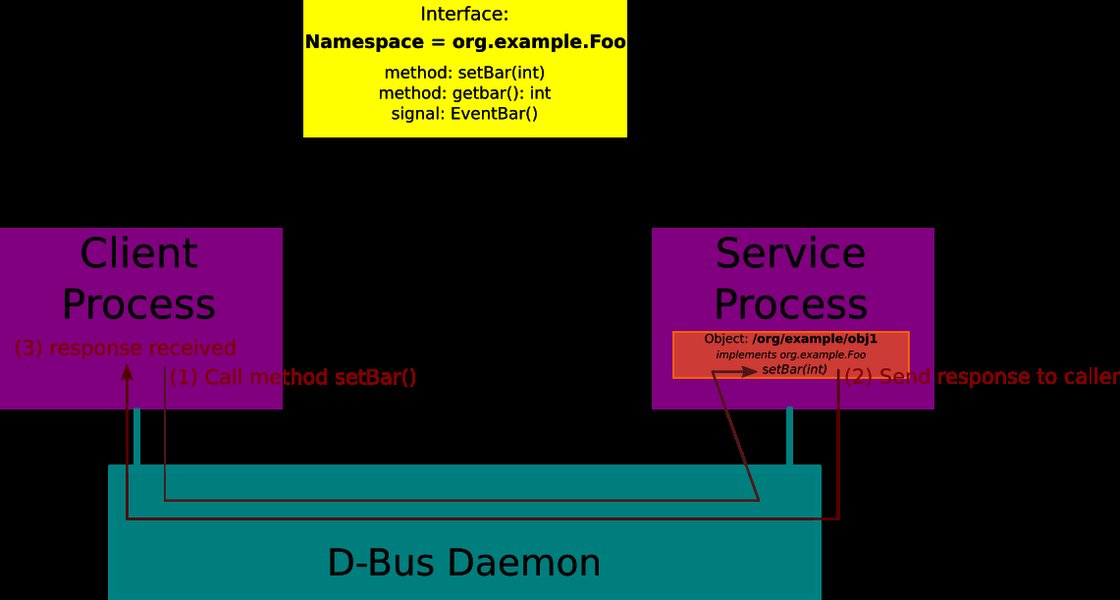
Illustration of a D-Bus method invocation, showcasing the flow of communication.
Implementing a D-Bus Service with sd-bus in C
To add a new interface, you essentially create a D-Bus service that exposes objects implementing that interface. Here's a structured approach:
1. Initialize the Bus Connection
The first step is to establish a connection to the D-Bus system bus. This connection object will be used for all subsequent D-Bus operations.
#include <systemd/sd-bus.h>
#include <stdio.h>
#include <errno.h>

sd_bus *bus = NULL;
int r;

/* Connect to the system bus */
r = sd_bus_open_system(&bus);
if (r < 0) {
    fprintf(stderr, "Failed to connect to system bus: %s\n", strerror(-r));
    return 1;
}
2. Define the Interface Vtable
sd-bus uses "vtables" (virtual tables) to define the methods, properties, and signals an object exposes. These tables map D-Bus member names to C callback functions.
/* Define a simple method: multiply two integers */
static int calculator_multiply(sd_bus_message *m, void *userdata, sd_bus_error *ret_error) {
    int64_t x, y, result;
    int r;

    /* Read the input parameters */
    r = sd_bus_message_read(m, "xx", &x, &y);
    if (r < 0) {
        sd_bus_error_set_errnof(ret_error, -r, "Failed to parse parameters");
        return r;
    }

    result = x * y;

    /* Reply with the result */
    return sd_bus_reply_method_return(m, "x", result);
}

/* Define the D-Bus vtable for our interface */
static const sd_bus_vtable calculator_vtable[] = {
    SD_BUS_VTABLE_START(0),
    SD_BUS_METHOD("Multiply", "xx", "x", calculator_multiply, SD_BUS_VTABLE_UNPRIVILEGED),
    SD_BUS_VTABLE_END
};
In this example, SD_BUS_METHOD defines a method named "Multiply" that takes two 64-bit integers ("xx") and returns one 64-bit integer ("x"). The calculator_multiply function is the C callback that handles the method call.
3. Register the Object Path and Interface
After defining the vtable, you need to register the object path and interface with the D-Bus. This makes your service discoverable and its methods callable by other D-Bus clients.
sd_bus_slot *slot = NULL;
const char *object_path = "/org/example/Calculator";
const char *interface_name = "org.example.CalculatorInterface";

/* Add the object vtable to the bus */
r = sd_bus_add_object_vtable(bus,
                             &slot,
                             object_path,
                             interface_name,
                             calculator_vtable,
                             NULL); /* No userdata */
if (r < 0) {
    fprintf(stderr, "Failed to add object vtable: %s\n", strerror(-r));
    goto finish;
}
sd_bus_add_object_vtable associates your vtable with a specific object path and interface name on the bus.
4. Acquire a Well-Known Name (Optional but Recommended)
To make your service easily identifiable, you can acquire a well-known bus name (e.g., org.example.CalculatorService). This allows clients to address your service by a human-readable name instead of its unique connection name.
const char *service_name = "org.example.CalculatorService";

/* Request a well-known name for the service */
r = sd_bus_request_name(bus, service_name, SD_BUS_NAME_ALLOW_REPLACEMENT | SD_BUS_NAME_REPLACE_EXISTING);
if (r < 0) {
    fprintf(stderr, "Failed to acquire service name: %s\n", strerror(-r));
    goto finish;
}
5. Enter the Event Loop
Your service needs to continuously listen for incoming D-Bus messages. This is typically done by entering an event loop that dispatches messages to the appropriate handlers.
while (1) {
    /* Process incoming messages */
    r = sd_bus_process(bus, NULL);
    if (r < 0) {
        fprintf(stderr, "Failed to process bus: %s\n", strerror(-r));
        goto finish;
    }
    if (r == 0) {
        /* Wait for new messages if no more messages are pending */
        r = sd_bus_wait(bus, (uint64_t) -1);
        if (r < 0) {
            fprintf(stderr, "Failed to wait on bus: %s\n", strerror(-r));
            goto finish;
        }
    }
}

finish:
/* Clean up */
sd_bus_slot_unref(slot);
sd_bus_unref(bus);
return r < 0 ? EXIT_FAILURE : EXIT_SUCCESS;
Advanced sd-bus Features and Considerations
Handling Properties and Signals
Beyond methods, D-Bus interfaces can expose properties (read/writeable data) and signals (event notifications). sd-bus provides specific macros for defining these in your vtables:
SD_BUS_PROPERTYandSD_BUS_WRITABLE_PROPERTYfor properties.SD_BUS_SIGNALandSD_BUS_SIGNAL_WITH_NAMESfor signals.
Emitting a signal involves creating a new signal message using functions like sd_bus_message_new_signal and then sending it with sd_bus_send or sd_bus_call_method.
/* Example: Emitting a signal */
sd_bus_message *signal_msg = NULL;
r = sd_bus_message_new_signal(bus, object_path, interface_name, "OperationCompleted", &signal_msg);
if (r >= 0) {
    r = sd_bus_message_append(signal_msg, "s", "Multiply operation finished");
    if (r >= 0) {
        r = sd_bus_send(bus, signal_msg, NULL);
    }
}
sd_bus_message_unref(signal_msg);
Interfacing with SD Cards and Other Hardware
While the sd-bus library itself is for inter-process communication, the term "SD bus" also refers to the Secure Digital (SD) bus interface for memory cards. If your application needs to interact with an actual SD card, this involves a completely different set of drivers and low-level communication protocols like SPI or SDIO, not the sd-bus D-Bus library. For instance, interfacing an SD card with a microcontroller like an ATmega328P or STM32 typically uses SPI mode for initialization and data transfer. For Windows systems, the SD Bus Driver Design Guide outlines how device drivers open and initialize an SD bus interface using functions like SdBusOpenInterface.
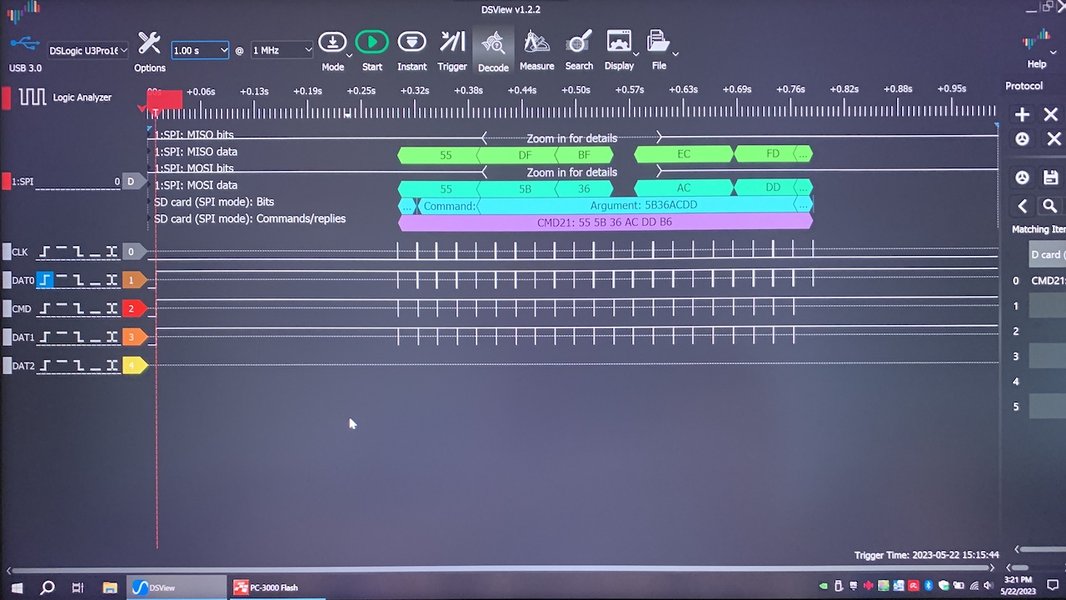
An example of SPI decoding, often used for low-level communication with SD cards.
Comparing sd-bus with Other D-Bus Libraries
Several libraries implement the D-Bus specification, each with its strengths:
| Library | Description | Use Case | Key Features |
|---|---|---|---|
| libdbus | The low-level reference implementation of the D-Bus wire protocol. | Bare-metal D-Bus communication, foundational for other libraries. | Low-level API, requires manual memory management, can be complex. |
| sd-bus | Part of systemd, minimal C library for D-Bus IPC. | System services, embedded Linux, when performance and systemd integration are priorities. | Efficient, lightweight, integrated with systemd's event loop, modern C API (with sdbus-c++). |
| GDBus | High-level D-Bus API within GLib/GIO framework. | GNOME desktop applications, general-purpose D-Bus development in GTK environments. | Asynchronous operations, object introspection, easier to use than libdbus. |
| QtDBus | Qt-specific D-Bus bindings. | KDE desktop applications, Qt-based applications. | Seamless integration with Qt's signal/slot mechanism, automatic code generation. |
| sdbus-c++ | High-level C++ library built atop sd-bus. | Modern C++ applications needing expressive and easy-to-use D-Bus API. | Type-safe, compile-time checks, memory leak protection, utilizes C++ features like coroutines. |
The choice of library often depends on the project's requirements, target environment, and language preferences. For Linux system services, especially those interacting with systemd components, sd-bus (or sdbus-c++ for C++) is a strong contender.
Performance and Usage Metrics
When evaluating sd-bus for a new interface, its performance characteristics are important. Here's a conceptual radar chart comparing sd-bus with other D-Bus implementations based on typical characteristics:
This radar chart provides a comparative overview of sd-bus relative to other D-Bus implementations across several key characteristics. sd-bus excels in performance, systemd integration, and having a low memory footprint, making it ideal for system-level programming. While its raw C API might have a steeper learning curve compared to higher-level abstractions like GDBus or QtDBus, the existence of sdbus-c++ significantly improves its ease of use for C++ developers.
Practical Example: Monitoring systemd Services
A common application for sd-bus is interacting with systemd services. You can query, monitor, and even change the state of services. For example, to get the state of a service, you would typically call a method on the org.freedesktop.systemd1.Manager interface, which is exposed by systemd via D-Bus.
This video, "Uplift your Linux systems programming skills with systemd and D-Bus," provides practical examples and best practices for leveraging systemd and D-Bus. It's highly relevant to understanding how to interact with system services using sd-bus, including querying and managing their states. The presentation covers the fundamental concepts of systemd as a process manager and D-Bus as the primary inter-process communication mechanism, offering valuable insights for developers looking to extend system functionality.
Conclusion
Adding a new interface in Linux C using sd-bus is a powerful way to extend system functionality and enable inter-process communication. By understanding D-Bus concepts—objects, interfaces, methods, signals, and properties—and leveraging the sd-bus API, developers can create robust and efficient services. While the initial setup involves defining vtables and managing the bus connection, the flexibility and performance of sd-bus make it an excellent choice for system-level programming, especially when integrated with systemd.
Frequently Asked Questions (FAQ)
What is D-Bus primarily used for in Linux?
What are the advantages of using sd-bus over libdbus?
Can I use C++ with sd-bus?
How do I define a new method in an sd-bus interface?
SD_BUS_METHOD macro within your D-Bus vtable. This macro specifies the method name, input types, output types, and the C callback function that will handle the method call.Is sd-bus related to SD cards?
Recommended Further Exploration
- How to debug D-Bus services using busctl?
- Implementing asynchronous D-Bus operations in C.
- Advanced D-Bus signal handling and matching.
- Integrating custom D-Bus services with systemd unit files.
References
Last updated May 21, 2025