
Unlock Anime Highlights: Build Your AI Video Analyzer with Free Tools
Leverage Python, VLMs, and open-source libraries to automatically extract the best scenes from any Japanese anime episode.
Creating an AI that can watch a full episode of Japanese anime, understand both the visuals and dialogue, and automatically clip the top two most significant scenes is an ambitious but achievable goal using freely available technology. This guide details how you can build such an analyzer using open-source tools, Python libraries, and cutting-edge Visual Language Models (VLMs).
Highlights
- Multimodal Understanding: Combine visual analysis from video frames with textual analysis from transcripts using VLMs and NLP techniques to identify key scenes based on action, dialogue, and plot significance.
- Open-Source Powerhouse: Utilize a stack of free Python libraries like OpenCV, PySceneDetect, Whisper, Transformers (Hugging Face), and MoviePy for video processing, transcription, AI analysis, and video editing.
- Automated Workflow: Develop a pipeline that takes a full anime episode as input, automatically processes it, ranks scenes based on importance, and outputs precisely cropped short videos of the highlights.
Understanding the Workflow: From Episode to Highlight Reel
The process involves several interconnected stages, starting from ingesting the raw video file to outputting the final highlight clips. An AI video analyzer needs to systematically break down the episode, analyze its components, and make informed decisions about which parts constitute a "top scene."
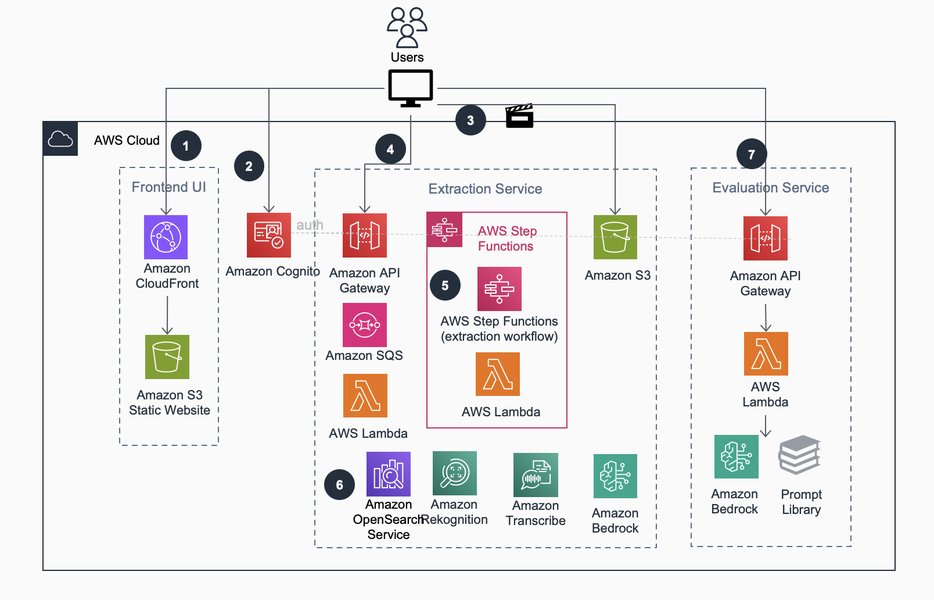
Conceptual architecture for an AI-driven video analysis workflow, similar to what's needed for anime scene extraction.
Here’s a breakdown of the typical workflow:
- Input & Preprocessing: Load the full anime episode. Extract audio and video frames. Optionally, use tools to clean up the video (e.g., remove static frames).
- Transcription: Convert the Japanese dialogue into text using a speech-to-text model.
- Scene Segmentation: Divide the episode into logical scenes or shots using visual change detection.
- Multimodal Analysis: Analyze each scene using VLMs (processing key frames) and NLP models (processing the corresponding transcript segment).
- Importance Scoring: Assign a relevance score to each scene based on the combined visual and textual analysis. Factors might include action intensity, character presence, emotional keywords, or plot-advancing dialogue.
- Scene Selection: Identify the scenes with the highest scores (e.g., the top 2).
- Optimal Cropping: Determine the best start and end timestamps for the selected scenes, potentially adding padding or aligning with shot boundaries.
- Output Generation: Use video editing libraries to extract the selected segments and save them as separate video files.
Core Components and Tools
Building this analyzer requires integrating several specialized tools and libraries, almost all of which are available for free and are open-source.
Step 1: Setting Up Your Lab - Environment and Libraries
Start by creating a Python environment (e.g., using venv or conda). Install the necessary libraries via pip. These form the backbone of your analyzer.
pip install opencv-python moviepy scenedetect openai-whisper transformers torch clip-openai pysrt pandasThis command installs libraries for video handling (OpenCV, MoviePy), scene detection (PySceneDetect), transcription (Whisper), AI models (Transformers, PyTorch, CLIP), and subtitle parsing (pysrt, optional).
Step 2: Ingesting the Source Material - Video Input and Preprocessing
Loading the Video
Your script needs to load the anime episode file. Libraries like MoviePy or OpenCV can handle this.
from moviepy.editor import VideoFileClip

video_path = "your_anime_episode.mp4"
video = VideoFileClip(video_path)
duration = video.duration # Get video length in seconds
Preprocessing Steps
- Audio Extraction: Extract the audio track for transcription.
MoviePymakes this straightforward.audio_path = "episode_audio.mp3" video.audio.write_audiofile(audio_path) - Frame Extraction (for VLM): Sample frames at intervals (e.g., every few seconds or keyframes) for visual analysis using
OpenCVorMoviePy. - Scene Detection: Use
PySceneDetectto automatically identify scene boundaries based on visual changes. This breaks the episode into manageable chunks for analysis.from scenedetect import VideoManager, SceneManager from scenedetect.detectors import ContentDetector video_manager = VideoManager([video_path]) scene_manager = SceneManager() scene_manager.add_detector(ContentDetector(threshold=27.0)) # Adjust threshold as needed video_manager.set_downscale_factor(2) # Process faster at lower resolution video_manager.start() scene_manager.detect_scenes(frame_source=video_manager) scene_list = scene_manager.get_scene_list() # List of (StartTimecode, EndTimecode) - (Optional) Anime Optimization: Tools like
AFOptimizercan remove static or redundant frames common in anime, potentially improving processing efficiency, though it requires separate installation and integration.
Step 3: Listening In - Accurate Transcription with Whisper
Accurate transcription is crucial for understanding the dialogue. OpenAI's Whisper model is state-of-the-art, open-source, and supports Japanese well.
import whisper

model = whisper.load_model("base") # Or "small", "medium" for better accuracy
# Ensure ffmpeg is installed and in PATH for Whisper
result = model.transcribe(audio_path, language="ja") # Specify Japanese
transcript_text = result["text"]
# For timestamped words/segments, access result['segments']
# This allows aligning dialogue with video scenes
The result['segments'] provides detailed timing information, which is essential for linking specific lines of dialogue to the video scenes detected earlier.
Step 4: The AI's Eyes and Ears - Multimodal Analysis with VLMs
This is where the "intelligence" lies. You need to analyze both the visual content (frames) and the textual content (transcript segments) for each scene.
Visual Analysis
Use models that understand image content. CLIP is excellent for getting embeddings that relate images to text concepts (like "action scene," "emotional moment," "character face"). More advanced VLMs (potentially accessible via Hugging Face's transformers library, possibly based on architectures like Llama Vision) might offer richer descriptions or Q&A capabilities on frames.
import clip
import torch
from PIL import Image

device = "cuda" if torch.cuda.is_available() else "cpu"
clip_model, preprocess = clip.load("ViT-B/32", device=device)

def analyze_frame_visuals(frame_image):
    image_input = preprocess(Image.fromarray(frame_image)).unsqueeze(0).to(device)
    text_prompts = ["action scene", "important dialogue", "emotional moment", "main character", "climax"]
    text_inputs = clip.tokenize(text_prompts).to(device)

    with torch.no_grad():
        image_features = clip_model.encode_image(image_input)
        text_features = clip_model.encode_text(text_inputs)
        logits_per_image, _ = clip_model(image_input, text_inputs)
        probs = logits_per_image.softmax(dim=-1).cpu().numpy()

    # Return scores for each concept
    return dict(zip(text_prompts, probs[0]))
Textual Analysis
Analyze the transcript portion corresponding to each scene. Use NLP techniques or simpler keyword analysis to identify important dialogue, emotional language, or plot-relevant terms. Pre-trained models like BERT-Japanese (from Hugging Face) could be used for sentiment analysis or topic modeling if needed, though simpler methods might suffice.
Combining Modalities
Develop a scoring function that integrates visual scores (e.g., high probability of "action scene" from CLIP) and textual scores (e.g., presence of important character names or keywords in the transcript segment for that scene). This combined score represents the overall importance of the scene.
Step 5: Identifying the Gems - Scene Detection and Ranking
Using the scores generated in the previous step, rank all detected scenes from the episode. Select the top 2 scenes based on your defined importance criteria.
scene_scores = []
for i, (start_time, end_time) in enumerate(scene_list):
    # 1. Get keyframes within this scene's time range
    # 2. Analyze keyframes using analyze_frame_visuals() -> avg visual score
    # 3. Get transcript segment for this time range
    # 4. Analyze transcript segment -> textual score
    # 5. Calculate combined_score = weight_visual * visual_score + weight_textual * textual_score
    scene_scores.append({
        "scene_index": i,
        "start_time": start_time.get_seconds(),
        "end_time": end_time.get_seconds(),
        "score": combined_score
    })

# Sort scenes by score and get top 2
top_scenes = sorted(scene_scores, key=lambda x: x['score'], reverse=True)[:2]
Step 6: Precision Cutting - Cropping and Exporting Scenes
Finally, use MoviePy to extract the selected scenes from the original video file. Determining the "best" start and end points might involve adding a small buffer (e.g., 1-2 seconds) before the detected start and after the detected end, or snapping to the precise PySceneDetect boundaries.
from moviepy.editor import VideoFileClip

original_video = VideoFileClip(video_path)

for i, scene_info in enumerate(top_scenes):
    start_sec = scene_info['start_time']
    end_sec = scene_info['end_time']

    # Add optional buffer for smoother cuts
    buffer = 1.0 # seconds
    clip_start = max(0, start_sec - buffer)
    clip_end = min(original_video.duration, end_sec + buffer)

    # Create subclip
    highlight_clip = original_video.subclip(clip_start, clip_end)

    # Export the clip
    output_filename = f"highlight_scene_{i+1}.mp4"
    highlight_clip.write_videofile(output_filename, codec="libx264", audio_codec="aac")

    highlight_clip.close()

original_video.close()
This process results in two (or more, if desired) short MP4 files containing the automatically identified highlight scenes.
Essential Open-Source Toolkit
Here’s a summary of the key free and open-source Python libraries recommended for this project:
| Purpose | Tool/Library | Description | License Type (Typical) |
|---|---|---|---|
| Video Processing & Editing | OpenCV (opencv-python) |
Frame extraction, basic visual analysis, image manipulation. | Apache 2.0 |
| Video Editing & Cropping | MoviePy | Easy-to-use video cutting, audio extraction, file writing. Built on FFmpeg. | MIT |
| Command-line Video Tool | FFmpeg | Underlying engine for many video libraries; can be called directly for complex operations. | LGPL/GPL (check build) |
| Scene Detection | PySceneDetect | Detects scene changes/cuts in videos based on visual content. | BSD 3-Clause |
| Speech-to-Text (Japanese) | Whisper (openai-whisper) |
High-accuracy transcription model from OpenAI, runs locally. | MIT |
| AI Models (VLM/NLP) | Transformers (Hugging Face) | Access to various pre-trained models including VLMs, CLIP, BERT variants. | Apache 2.0 |
| Deep Learning Framework | PyTorch (torch) |
Required backend for many AI models from Hugging Face and CLIP. | BSD-style |
| Visual-Language Model | CLIP (clip-openai) |
OpenAI's model for connecting images and text descriptions via embeddings. | MIT |
| Subtitle Parsing (Optional) | pysrt / ass | Libraries to parse .srt or .ass subtitle files if available instead of transcription. | GPL / MIT |
Diving Deeper: How VLMs Understand Anime Scenes
Visual Language Models (VLMs) are key to bridging the gap between what's happening visually and what's being said. Unlike traditional computer vision models that might only detect objects or actions, VLMs can process images (video frames) alongside text (dialogue snippets) to gain a more holistic understanding.
For your anime analyzer, this means a VLM could potentially:
- Identify Key Characters: Recognize specific characters appearing in a frame.
- Understand Actions: Determine if a scene involves fighting, talking, running, etc.
- Gauge Emotion: Infer the emotional tone from character expressions or scene composition (e.g., dark vs. bright).
- Connect Visuals to Dialogue: Correlate a dramatic visual event (like an explosion) with the corresponding excited dialogue in the transcript segment for that moment.
- Assess Scene Significance: By combining visual cues (e.g., multiple characters, intense action) with textual cues (e.g., plot-critical keywords, high emotion in dialogue), the VLM helps score the scene's overall importance more accurately than either modality alone.
Using models like CLIP allows you to calculate the similarity between video frames and textual descriptions like "epic battle" or "heartfelt conversation." More advanced VLMs might allow for direct querying, asking questions like "Is this scene visually dynamic?" or "Does the dialogue in this segment reveal important plot information?". Integrating these capabilities, even if requiring some custom logic, is central to making intelligent scene selections.
Visualizing Project Complexity
Building this AI analyzer involves several complex parts. The radar chart below provides a conceptual overview of the relative complexity and effort typically associated with each major component when using open-source tools.
As the chart suggests, integrating the visual and textual information (Multimodal Fusion Logic) and developing a robust ranking system are often the most challenging aspects, requiring careful design and experimentation. Getting high accuracy from transcription and visual analysis models is also critical but relies heavily on the quality of the chosen open-source models like Whisper and CLIP/VLMs.
Mapping the Process: Analyzer Architecture
The following mind map illustrates the high-level structure and data flow of the AI anime video analyzer:
This map shows how the initial video is broken down, analyzed through parallel visual and textual pathways, and then synthesized to make the final scene selection and cropping decisions.
Bringing It Together: Conceptual Code Structure
While a full implementation is complex, here’s a high-level Python pseudo-code structure illustrating the core logic:
# Import necessary libraries (cv2, moviepy, whisper, transformers, clip, scenedetect etc.)

def preprocess_video(video_path):
    # Load video, extract audio, run PySceneDetect
    # Return scene_list, audio_path, video_object
    pass

def transcribe_audio(audio_path):
    # Run Whisper model
    # Return timestamped transcript (segments)
    pass

def analyze_scene_visuals(video_object, start_time, end_time):
    # Extract representative frames from the scene
    # Use CLIP or a VLM to analyze frames
    # Return aggregated visual score
    pass

def analyze_scene_text(transcript_segments, start_time, end_time):
    # Find transcript parts corresponding to the scene times
    # Analyze text for keywords, sentiment, etc.
    # Return textual score
    pass

def calculate_importance_score(visual_score, textual_score):
    # Combine scores (e.g., weighted average)
    return (0.6 * visual_score) + (0.4 * textual_score) # Example weights

def crop_and_export_scene(video_object, start_time, end_time, output_filename):
    # Use moviepy.subclip() and write_videofile()
    # Add buffers as needed
    pass

def main(video_path, num_highlights=2):
    print("Starting analysis...")
    scene_list, audio_path, video = preprocess_video(video_path)
    print(f"Detected {len(scene_list)} scenes.")

    transcript = transcribe_audio(audio_path)
    print("Transcription complete.")

    scene_scores = []
    for i, (start_time, end_time) in enumerate(scene_list):
        start_sec = start_time.get_seconds()
        end_sec = end_time.get_seconds()

        visual_score = analyze_scene_visuals(video, start_sec, end_sec)
        textual_score = analyze_scene_text(transcript['segments'], start_sec, end_sec)

        importance = calculate_importance_score(visual_score, textual_score)

        scene_scores.append({
            "index": i,
            "start": start_sec,
            "end": end_sec,
            "score": importance
        })
        print(f"Analyzed scene {i+1}/{len(scene_list)}")

    # Select top N scenes
    top_scenes = sorted(scene_scores, key=lambda x: x['score'], reverse=True)[:num_highlights]
    print(f"Selected top {len(top_scenes)} scenes.")

    # Export highlights
    for i, scene_info in enumerate(top_scenes):
        output_file = f"highlight_{i+1}.mp4"
        print(f"Exporting highlight {i+1} to {output_file}...")
        crop_and_export_scene(video, scene_info['start'], scene_info['end'], output_file)

    video.close() # Close the video object if opened by MoviePy
    print("Analysis complete. Highlights exported.")

# Example usage:
# main("path/to/your/anime.mp4")
This structure outlines the main functions and the flow of data between them. The actual implementation of analysis functions (analyze_scene_visuals, analyze_scene_text, calculate_importance_score) would contain the core AI logic using models like CLIP, Whisper data, and potentially other NLP tools.
See It In Action: Video Summarization Concepts
While your goal is highlight extraction, the underlying technology overlaps significantly with AI video summarization. Understanding how AI summarizes videos can provide insights into analyzing content importance. The following video discusses using advanced models like GPT-4o for video summarization tasks, showcasing relevant concepts.
This video explores using multimodal models like GPT-4o for video summarization, illustrating concepts applicable to identifying key anime scenes based on content understanding.
Frequently Asked Questions (FAQ)
How accurate will the scene selection be?
Accuracy depends heavily on several factors:
- Quality of Transcription: Whisper is excellent, but errors can occur, especially with overlapping dialogue or background noise.
- VLM Capabilities: The chosen VLM's ability to understand anime art styles and context is crucial. Open-source models might be less fine-tuned for anime compared to specialized commercial ones.
- Scoring Logic: The effectiveness of your custom logic for combining visual and textual scores and defining "importance" significantly impacts results. Expect iteration and tuning to be necessary.
- Scene Complexity: Subtle plot points or purely dialogue-driven importance might be harder to detect than visually distinct action scenes.
Using larger Whisper models and more advanced VLMs (if hardware permits) generally improves accuracy. Fine-tuning models on anime-specific data could offer significant gains but requires substantial effort and data.
How long will it take to process one anime episode?
Processing time can vary greatly based on:
- Episode Length: Longer episodes naturally take more time.
- Hardware: A powerful GPU is highly recommended, especially for running Whisper (medium/large models) and VLMs efficiently. CPU processing will be significantly slower.
- Model Size: Larger AI models (e.g., `whisper-large`, bigger VLMs) provide better accuracy but require more computation time and resources.
- Frame Sampling Rate: Analyzing fewer frames per second speeds up visual analysis but might miss short, important visual events.
- Code Optimization: Efficient implementation, parallel processing (if possible), and caching intermediate results can reduce runtime.
Expect processing times ranging from several minutes to potentially over an hour per episode, especially on consumer-grade hardware without strong GPU acceleration.
Can this handle different anime styles and genres?
General-purpose VLMs and computer vision models might struggle with highly stylized or abstract anime art. Their performance often depends on the data they were trained on. While models like CLIP have seen diverse data, specific anime tropes or visual shorthand might not be well understood without fine-tuning.
Similarly, the definition of an "important scene" varies by genre. An action anime's highlights are visually distinct (fights, explosions), while a slice-of-life or romance anime's key scenes might be subtle conversations or emotional expressions. Your scoring logic may need adjustments or different weighting for visual vs. textual importance depending on the genre you're targeting.
Using robust scene detection (PySceneDetect) and transcription (Whisper) provides a solid foundation, but the VLM analysis and scoring logic are where adaptation for different styles/genres might be needed.
Are there truly free and open-source VLMs powerful enough for this?
Yes, the open-source landscape for VLMs is rapidly evolving. Models like:
- CLIP: While older, it's effective for relating images to text concepts and is fully open-source.
- LLaVA (Large Language and Vision Assistant): Open-source project combining vision encoders with large language models (like Vicuna or Llama). Many variants exist.
- Models based on Llama Vision: Open models like Llama 2 and Llama 3 have multimodal variants being developed and released, often accessible via platforms like Hugging Face.
While these might not match the absolute cutting edge of proprietary models like GPT-4o immediately upon release, they are powerful and constantly improving. Finding and integrating the best open-source VLM suitable for your hardware and needs via libraries like `transformers` is feasible. The key challenge often lies more in the effective *integration* and *application* of these models within your analysis pipeline rather than a lack of available open-source options.
Recommended Further Exploration
- How can I fine-tune a Visual Language Model specifically on anime data to improve its accuracy?
- What are advanced AI techniques to determine the most natural start and end points for video clips?
- What are the trade-offs between processing anime episodes in real-time versus batch processing for highlight generation?
- How can AI systems adaptively weigh dialogue versus visual action when identifying key scenes across different anime genres?
References

Last updated May 4, 2025