
Enhancing Your Web App and Preparing for Mobile Deployment
Leveraging AI for Code Review and Utilizing Wrapping Tools for Native App Conversion
Key Highlights
- AI Code Review Tools: Various AI tools exist to analyze your codebase for potential issues, improving quality and efficiency.
- Web to App Wrapping: Tools like Natively specialize in converting existing web applications into native mobile apps using technologies like WebView.
- Streamlined Development: Combining AI code review with web wrapping services can accelerate the process of preparing and deploying your web app as a mobile application.
It's exciting that your AI-built web app is nearing completion! As you move towards deployment and consider expanding its reach to mobile platforms, leveraging specialized tools can significantly streamline the process. There are indeed AI-powered tools that can assist with reviewing your codebase, and services like Natively are designed specifically for wrapping web applications into native mobile apps.
AI Tools for Comprehensive Codebase Review
Ensuring the quality, efficiency, and security of your codebase before deploying is crucial. AI code review tools have emerged as powerful allies in this stage of development. These tools use machine learning and natural language processing to automate the analysis of your code, identifying potential bugs, code smells, security vulnerabilities, and performance bottlenecks that might be missed in manual reviews.
AI code review tools can perform various analysis techniques, including syntax analysis, data flow analysis, control flow analysis, and security vulnerability analysis. Some tools also offer dynamic code analysis, which involves executing the code to observe its runtime behavior and detect issues that are not apparent from static analysis alone.
Here's a look at some notable AI code review tools:
Exploring Popular AI Code Review Solutions
- GitHub Copilot: While primarily known as a coding assistant, GitHub Copilot can offer suggestions and identify potential issues as you code, which can be seen as a form of real-time AI-assisted code review.
- CodeRabbit: This tool provides instant and accurate feedback on pull requests, offering contextual, line-by-line feedback across various programming languages. It integrates with platforms like GitHub and GitLab.
- CodiumAI: CodiumAI focuses on generating meaningful tests for your code, helping to ensure its correctness and identify potential edge cases.
- Bito AI Code Review Agent: Bito utilizes generative AI models to conduct human-like code reviews, identifying issues like errors, code smells, and security vulnerabilities in pull/merge requests.
- Amazon CodeGuru: An AI-powered service from AWS that uses machine learning and static application security testing (SAST) to provide recommendations for improving code quality and identifying security issues.
- Codacy: Provides automatic code review for a wide range of languages and integrates with platforms like GitHub and Bitbucket.
- DeepCode (Snyk): Utilizes machine learning to identify code smells, vulnerabilities, and antipatterns.
Many of these tools can be integrated into your development environment (IDE) and version control systems (like GitHub), allowing for continuous integration and continuous delivery (CI/CD) practices. They can significantly reduce the time spent on manual reviews and help maintain consistent code standards across your project.
When choosing an AI code review tool, consider factors such as the programming languages your web app is built with, the level of integration you need with your existing workflow, and your specific requirements for analysis (e.g., focus on security, performance, or code style).
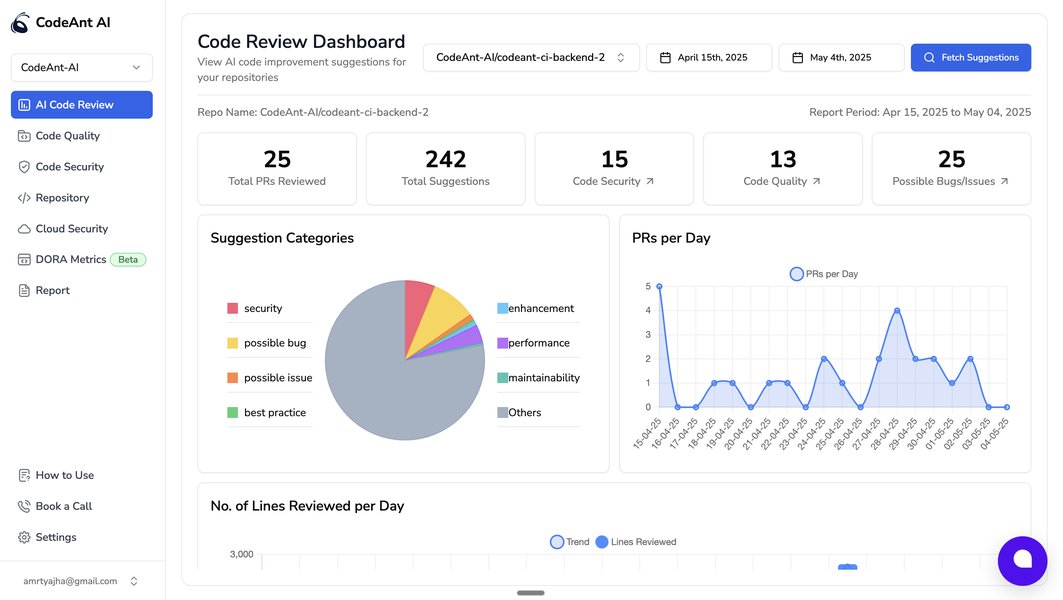
An example of an AI code review dashboard showcasing identified issues.
Utilizing Natively AI for Web App Wrapping
Once your codebase is polished and ready, the next step is to transform your web app into a mobile application. This is where tools like Natively come into play. Natively is a web-to-app converter that allows you to wrap your existing website or web application within a native mobile app container.
The core technology behind this process often involves using a WebView, which is an embeddable browser that a native application can use to display web content. Essentially, your web app runs within this embedded browser within the native mobile application frame.
Natively and similar wrapping services offer several advantages:
Benefits of Using Web Wrapping Tools
-
Speed and Efficiency: Converting a web app with a wrapper is significantly faster and requires less effort compared to building a native app from scratch for both iOS and Android platforms.
-
Cost-Effective: Since you are leveraging your existing web codebase, the cost of developing mobile apps is substantially reduced.
-
Single Codebase: You maintain a single codebase for your web and mobile applications, simplifying updates and maintenance.
-
Native Features: Despite being a wrapped web app, tools like Natively often provide access to native device features such as push notifications, in-app purchases, and biometrics (like Touch ID and Face ID) through SDKs or plugins.
-
Ease of Use: Many wrapping platforms are designed with no-code or low-code interfaces, making the conversion process accessible even without extensive mobile development experience.
Natively specifically mentions its ability to work with WordPress sites and Bubble web apps, indicating its flexibility in integrating with different web development platforms. The process typically involves configuring the wrapper tool to point to your web app's URL and then building the native applications for the desired platforms.
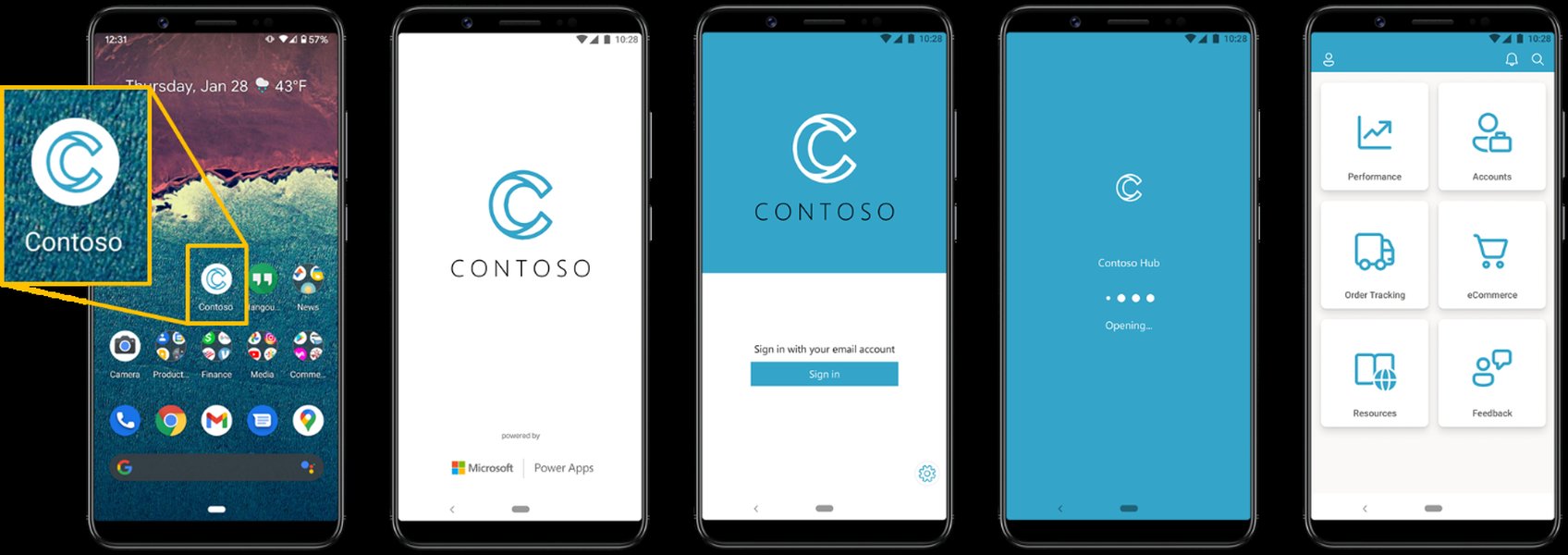
Illustrative diagram showing the concept of wrapping a web app into a native container.
Integrating AI Code Review and Web Wrapping
The process of preparing your AI-built web app for mobile deployment can be optimized by combining AI code review with a wrapping tool like Natively. Here’s a possible workflow:
A Synergistic Workflow
- Develop Your Web App: Continue building your AI-enhanced web application with your preferred technologies.
- Implement AI Code Review: Integrate an AI code review tool into your development pipeline. Configure it to analyze your codebase regularly, ideally within your version control system (e.g., on pull requests). Address the issues and suggestions provided by the AI tool to improve code quality, performance, and security.
- Refine Based on Feedback: Continuously refine your codebase based on the AI's feedback and any manual code reviews. Ensure your web app is stable and performs well.
- Prepare for Wrapping: Make sure your web app is responsive and optimized for mobile viewing. Consider any specific requirements or configurations needed by the chosen wrapping tool (like Natively).
- Utilize Natively (or a similar tool): Use the Natively platform to wrap your web app. Follow their documentation and configuration steps to build the iOS and Android versions of your application. Integrate native features as needed using the provided SDKs or plugins.
- Testing: Thoroughly test the wrapped mobile applications on various devices and screen sizes to ensure they function correctly and provide a good user experience.
- Deployment: Submit your wrapped applications to the Apple App Store and Google Play Store.
This combined approach allows you to benefit from automated code quality checks, freeing up development time, while the wrapping tool accelerates the process of creating mobile versions of your application. The continuous feedback loop from AI code review helps ensure that the underlying web app being wrapped is as robust as possible.
Comparing Development Approaches
Understanding the different approaches to mobile app development provides context for why web wrapping with tools like Natively can be an attractive option, especially when starting from an existing web application. Here's a brief comparison:
| Approach | Description | Pros | Cons |
|---|---|---|---|
| Native Development | Building separate applications for iOS (Swift/Objective-C) and Android (Kotlin/Java) using platform-specific tools and languages. | Optimal performance, full access to native features, best user experience. | Higher development cost and time, requires separate codebases and skill sets for each platform. |
| Cross-Platform Development | Building applications using frameworks like React Native, Flutter, or Xamarin that allow writing code once and deploying to multiple platforms. | Faster development than native, code reusability across platforms. | May have some performance limitations compared to native, potential limitations in accessing all native features directly. |
| Web Wrapping (Hybrid) | Embedding a web application within a native container using a WebView. Tools like Natively fall into this category. | Fastest and most cost-effective for existing web apps, single codebase, access to some native features. | Performance can be limited by the WebView, user experience might not be as seamless as native, limited access to advanced native APIs compared to other approaches. |
For your scenario, starting with a web app built with AI, web wrapping using a tool like Natively provides a direct and efficient path to having a presence on mobile app stores without undertaking a complete rebuild in native or cross-platform frameworks. The key is that your underlying web app is well-built and provides a good user experience, as the wrapper essentially presents this web experience within a mobile shell.
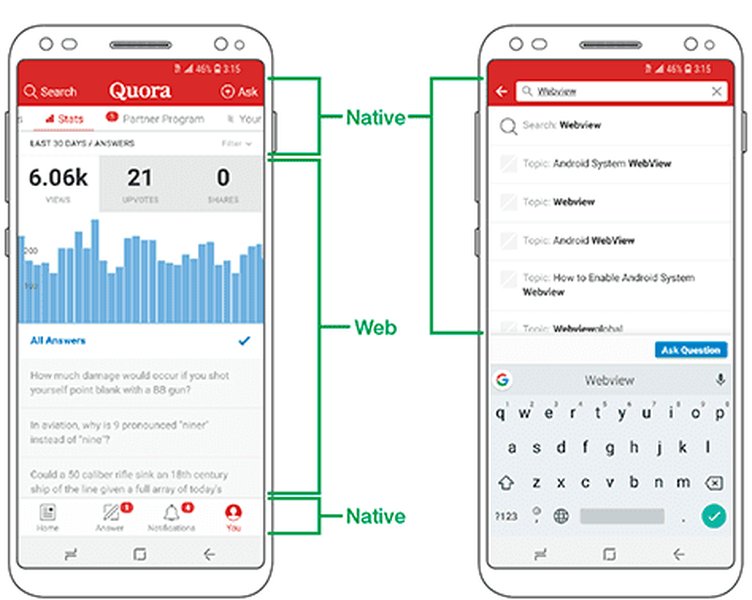
Diagram illustrating the architecture of a hybrid app, which is similar to a wrapped web app.
Frequently Asked Questions
Can AI code review tools fix the code automatically?
While some advanced AI code review tools can offer automated fixes for simple issues like syntax errors or code style violations, they generally provide suggestions and recommendations rather than fully automated solutions. The developer typically reviews and applies the suggested changes.
Will my wrapped web app perform as well as a native app?
Generally, a wrapped web app running within a WebView may not achieve the same level of performance and smoothness as a truly native application. Performance can depend on the complexity of your web app and the capabilities of the device's WebView. However, for many types of applications, the performance is perfectly acceptable.
Do I need coding skills to use Natively?
Natively and similar web wrapping tools are often designed to be used with minimal or no coding skills. The process is typically configuration-based, allowing you to convert your website into an app by providing the necessary information and preferences through a user interface.
Are wrapped web apps accepted on app stores?
Yes, wrapped web apps can be accepted on app stores like the Apple App Store and Google Play Store. However, app stores have guidelines that require applications to provide a good user experience and ideally offer functionality that goes beyond simply displaying a website. Integrating native features through the wrapper can help meet these requirements.
Can I still update my web app after wrapping it?
Yes, since the wrapped application is displaying your live web content, any updates you make to your website or web application will automatically be reflected in the wrapped mobile apps without needing to rebuild and resubmit the apps to the app stores. You would only need to rebuild the wrapped app if you change the native configurations or integrate new native features.
References
Last updated May 10, 2025