
Blueprint for Your AI-Powered Daily Planner: Building the Next 'Structured'
A comprehensive development prompt for creating an intelligent task management app with seamless AI integration and multi-device sync.
Embarking on the journey to create a daily planner app, inspired by the elegance and functionality of 'Structured – Daily Planner', but supercharged with Artificial Intelligence? This guide provides a detailed blueprint, outlining the essential components, technology stack, architecture, and AI features required to bring such an ambitious project to life. The goal is to develop an application that not only helps users organize their day but actively assists them in optimizing their time and achieving their goals through intelligent automation.
Essential Insights: Key Takeaways
- AI as the Core Differentiator: Integrate AI for smart scheduling, task prioritization based on context (deadlines, energy levels), and natural language processing for intuitive task entry.
- Seamless User Experience Across Devices: Prioritize a smooth, cross-platform (iOS, Android, Web) interface with real-time synchronization and robust offline capabilities.
- Modular and Scalable Architecture: Build upon a flexible architecture using modern technologies (e.g., React Native/Flutter, Node.js/Python, PostgreSQL/MongoDB, Cloud Services) to ensure maintainability and future growth.
Project Vision: An AI-Enhanced Daily Planner
Objective
Develop a cross-platform daily planner application that combines the intuitive task management and visual timeline features of 'Structured' with advanced AI capabilities. The app should empower users (professionals, students, freelancers) to manage their tasks, schedule their days effectively, integrate with existing calendars, and receive personalized, AI-driven insights and recommendations to boost productivity and well-being. Focus on seamless multi-device synchronization and a user-centric design.
Core Requirements
- Intuitive Task Management: Allow users to easily add, edit, categorize, prioritize, and schedule tasks with details like due dates, duration estimates, notes, and subtasks.
- Visual Scheduling: Implement a timeline view (similar to Structured) where tasks are visually laid out throughout the day. Support drag-and-drop rescheduling.
- Calendar Integration: Enable two-way synchronization with major calendar services (Google Calendar, Microsoft Outlook, Apple Calendar).
- AI-Powered Planning Assistance: Offer intelligent features such as automated scheduling, task prioritization suggestions, routine generation, and proactive reminders.
- Cross-Device Synchronization: Ensure real-time data consistency across mobile (iOS, Android) and potentially web platforms, including robust conflict resolution.
- User Customization & Personalization: Allow users to customize themes, notification settings, and provide input (e.g., energy levels, work patterns) to personalize AI recommendations.
Architectural Blueprint & Technology Stack
A robust and scalable architecture is crucial. We recommend a modular approach, potentially using microservices for distinct functionalities like authentication, task management, AI processing, and synchronization.
Key Components
1. Frontend (User Interface)
The face of the application, responsible for user interaction and data presentation.
- Platforms: iOS, Android (Mobile Native or Cross-Platform), Web (Optional).
- Technology Choices:
- Cross-Platform: React Native or Flutter (Recommended for code reuse and faster development across mobile platforms).
- Native Mobile: Swift (iOS), Kotlin/Java (Android) (For optimal performance and platform-specific features).
- Web: React, Vue.js, or Angular (If a web version is desired).
- Key UI/UX Features: Clean visual design, intuitive navigation, drag-and-drop timeline, customizable task lists, interactive calendar view, real-time updates, push notifications, offline data caching, accessibility support.
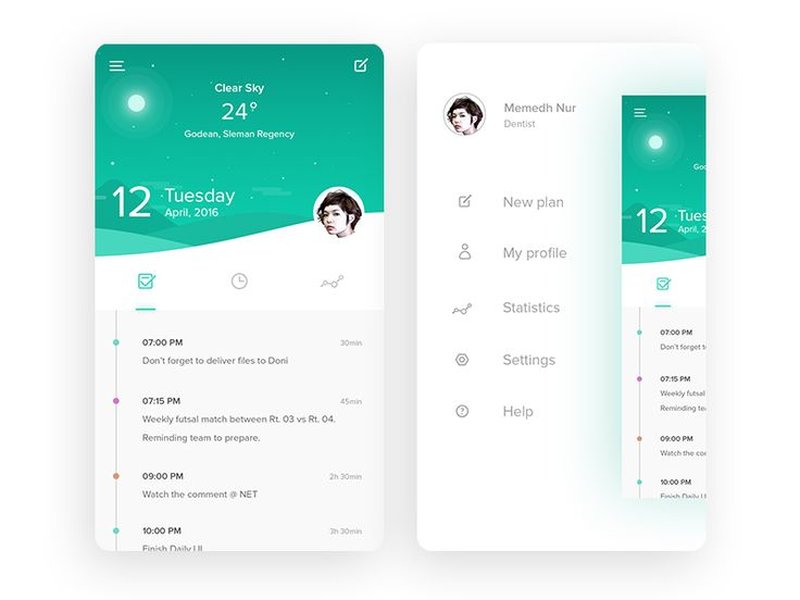
Conceptual UI for a daily planner app, showcasing a clean task list interface.
2. Backend (Server-Side Logic)
The engine room, handling business logic, data processing, API requests, and communication between components.
- Purpose: User authentication/authorization, CRUD operations for tasks/schedules, API endpoints for frontend, integration with third-party services (calendars), managing synchronization logic, orchestrating AI service calls.
- Technology Choices:
- Node.js (Express, NestJS): Excellent for real-time applications and JavaScript ecosystem alignment.
- Python (Django, Flask, FastAPI): Strong choice for AI/ML integration due to extensive libraries.
- Ruby on Rails, Go: Other viable options depending on team expertise and performance needs.
- Architecture: RESTful or GraphQL API design. Consider serverless functions (AWS Lambda, Google Cloud Functions, Azure Functions) or containerized microservices (Docker, Kubernetes) for scalability.
3. Database (Data Storage)
Stores all persistent user data, including tasks, schedules, user profiles, preferences, and potentially historical data for AI training.
- Technology Choices:
- Relational (SQL): PostgreSQL, MySQL (Good for structured data, ACID compliance). PostgreSQL often preferred for its JSONB support, offering some flexibility.
- NoSQL: MongoDB, Firebase Firestore, Cassandra (Offer flexibility, scalability, suitable for evolving data structures). Firebase Firestore provides built-in real-time sync capabilities.
- Key Considerations: Scalability, data integrity, security (encryption at rest and in transit), backup/recovery strategy, efficient querying for both structured and potentially unstructured AI-related data.
4. AI Integration Layer
The intelligence hub, providing features that automate and optimize the planning process.
- Potential AI Features:
- Smart Scheduling: Automatically suggest optimal time slots for tasks based on deadlines, estimated duration, priority, user-defined constraints (e.g., work hours), calendar availability, and learned productivity patterns.
- Task Prioritization Engine: Rank tasks based on urgency, importance (linked to goals), estimated effort, and user context.
- Energy Level Planning: Allow users to input or sync energy level data (e.g., from wearables, self-assessment) and suggest task types suited for different energy states (e.g., high-focus tasks during peak energy).
- Natural Language Processing (NLP): Enable task creation and scheduling via natural language input (e.g., "Schedule team meeting tomorrow at 2 PM for 1 hour"). Extract entities like date, time, duration, task name.
- Predictive Time Estimation: Refine task duration estimates based on the user's historical performance on similar tasks.
- Routine Generation/Optimization: Suggest personalized daily or weekly routines based on user goals and preferences.
- Conflict Detection & Resolution: Proactively identify scheduling conflicts and suggest resolutions.
- Technology Choices:
- ML Frameworks: TensorFlow, PyTorch, scikit-learn (For building custom models).
- Cloud AI Services: Google Cloud AI Platform, AWS AI/ML Services (SageMaker, Comprehend), Azure AI (Cognitive Services).
- Pre-trained Models/APIs: Leverage Large Language Models (LLMs) like OpenAI's GPT or similar via APIs for NLP tasks. Use specialized time-series analysis libraries for pattern detection.
- Integration: AI models typically run on the backend or via dedicated AI microservices, accessed through APIs.
5. Synchronization Engine
Ensures data consistency across all user devices and integrates with external calendars.
- Features: Real-time data push/pull, conflict detection and resolution (e.g., last write wins, operational transformation), offline support with background sync, reliable integration with Google Calendar, Outlook Calendar, and Apple Calendar APIs.
- Technology Choices: WebSockets (e.g., using Socket.io library), Push Notifications (APNS, FCM), Cloud-based real-time databases (Firebase Realtime Database/Firestore), custom backend sync logic perhaps using message queues (RabbitMQ, Kafka).
Suggested Tech Stack Summary
This table provides a potential combination of technologies. The final choice should depend on team expertise, scalability requirements, and budget.
| Layer | Recommended Technologies | Alternatives |
|---|---|---|
| Frontend (Mobile) | React Native / Flutter | Swift (iOS Native), Kotlin (Android Native) |
| Frontend (Web) | React / Vue.js | Angular, Svelte |
| Backend API | Node.js (Express/NestJS) / Python (FastAPI/Django) | Ruby on Rails, Go, Java (Spring Boot) |
| Database | PostgreSQL / MongoDB | MySQL, Firebase Firestore, Cassandra |
| AI/ML | Python Libraries (TensorFlow, PyTorch, spaCy), Cloud AI APIs (Google AI, AWS AI, Azure AI) | Custom model development environments |
| Real-time Sync | WebSockets (Socket.io), Firebase Realtime DB/Firestore | AWS AppSync, Custom Push/Polling Logic |
| Authentication | OAuth 2.0 / OpenID Connect (using libraries like Passport.js or dedicated services) | Firebase Authentication, Auth0, AWS Cognito |
| Infrastructure | AWS / Google Cloud Platform (GCP) / Microsoft Azure | Heroku, DigitalOcean |
| CI/CD | GitHub Actions / GitLab CI / Jenkins / CircleCI | Bitbucket Pipelines |
Visualizing the Architecture
The following mindmap illustrates the high-level interaction between the core components of the proposed AI-powered daily planner app.
(Timeline, Task List, Calendar)"] id1d["Local Caching / Offline Storage"] id2["Backend (API & Logic)"] id2a["API Endpoints (REST/GraphQL)"] id2b["User Authentication & Authorization"] id2c["Task & Schedule Management Logic"] id2d["Business Logic"] id2e["Orchestration Layer"] id3["Database"] id3a["User Data (Profiles, Preferences)"] id3b["Task & Event Data"] id3c["Scheduling Information"] id3d["AI Model Data / History"] id4["AI Integration Layer"] id4a["NLP Service (Task Parsing)"] id4b["Scheduling Engine (Optimization)"] id4c["Prioritization Algorithm"] id4d["Pattern Recognition (Energy/Productivity)"] id4e["Machine Learning Models"] id5["Synchronization Engine"] id5a["Real-time Data Sync (WebSockets/Push)"] id5b["Conflict Resolution Logic"] id5c["Background Syncing"] id6["External Services"] id6a["Calendar APIs (Google, Outlook, Apple)"] id6b["Push Notification Services (FCM, APNS)"] id6c["Cloud Hosting (AWS/GCP/Azure)"]
This map shows how the User Interface interacts with the Backend API, which in turn coordinates with the Database, AI Layer, Synchronization Engine, and External Services to deliver a seamless and intelligent user experience.
Feature Focus: Complexity vs. Impact Analysis
When building such an app, it's essential to balance development effort with user value. The radar chart below provides an opinionated view on the potential complexity and user impact of key feature areas. Scores are relative (e.g., out of 10), helping prioritize development efforts.
This visualization suggests that while AI Smart Scheduling and Real-time Sync are complex, they offer high user value, making them critical investment areas. Core Task Management and UI/UX are foundational with high impact. Features like Energy Level Planning and NLP add value but might be considered for later phases if resources are constrained.
Development Roadmap & Milestones
Adopt an agile, iterative development approach. Focus on delivering a Minimum Viable Product (MVP) first, then incrementally add features based on user feedback and strategic priorities.
- Phase 1: Foundation & MVP (e.g., 2-3 months)
- Basic user authentication and profile management.
- Core task CRUD (Create, Read, Update, Delete) functionality.
- Simple timeline view for manual scheduling.
- Basic local data storage (or simple backend sync).
- Initial UI/UX design implementation for one platform (e.g., iOS).
- Phase 2: Core Integrations & Sync (e.g., 2 months)
- Implement robust backend and database.
- Basic cross-device synchronization (real-time updates).
- One-way or basic two-way calendar integration (e.g., Google Calendar).
- Refine UI/UX based on early feedback.
- Expand platform support (e.g., Android or Web).
- Phase 3: Initial AI Features (e.g., 3 months)
- Introduce basic NLP for task input.
- Implement simple AI-driven task prioritization (e.g., based on deadlines).
- Develop initial smart scheduling suggestions (e.g., finding free slots).
- Enhance calendar integration (full two-way sync, conflict checks).
- Phase 4: Advanced AI & Polish (Ongoing)
- Implement more sophisticated AI features: energy level planning, predictive time estimation, routine generation.
- Refine AI models based on user data and feedback.
- Optimize performance and scalability.
- Enhance UI/UX, add customization options.
- Expand third-party integrations (e.g., other productivity tools).
- Implement robust analytics for monitoring and improvement.
Exploring AI in Planning: Lifestack
Understanding how existing AI planners approach similar challenges can be insightful. Lifestack, for instance, is an AI daily planner that focuses specifically on scheduling tasks based on user energy levels, a feature considered in our blueprint. Watching how such tools function can provide valuable context for design and implementation.
Video discussing Lifestack, an AI daily planner focusing on energy-based scheduling.
This video offers a glimpse into the user experience and functionality of an AI planner that incorporates physiological or self-reported energy rhythms. Integrating such a feature requires careful consideration of data input methods (manual, wearable sync), the AI model used to correlate energy with task suitability, and how these suggestions are presented to the user without being overly prescriptive.
Additional Considerations
- Privacy and Security: Prioritize user data protection. Be transparent about AI data usage, comply with regulations (GDPR, CCPA), anonymize data where possible, and implement robust security measures throughout the stack. Obtain explicit user consent for data collection, especially for AI training.
- Modularity and Maintainability: Design the codebase with modularity in mind, making it easier to update components (especially AI models) and add new features later.
- Scalability: Build on cloud infrastructure (AWS, GCP, Azure) and choose technologies that can scale horizontally to accommodate a growing user base.
- User Feedback Loop: Implement mechanisms for collecting user feedback (in-app surveys, support channels) and use analytics (performance monitoring, feature usage) to continuously improve the app and the AI recommendations.
- Monetization Strategy: Consider potential models like freemium (core features free, advanced AI/collaboration features paid), subscription, or a one-time purchase.
- Accessibility: Design and develop with accessibility standards (WCAG) in mind to ensure the app is usable by people with disabilities.
Frequently Asked Questions (FAQ)
What are the biggest challenges in building an AI planner like this?
Several challenges exist:
- AI Complexity: Developing accurate and truly helpful AI scheduling and prioritization algorithms requires significant expertise in machine learning, data science, and potentially user behavior modeling. Getting the AI to feel "smart" and not just "automated" is difficult.
- Data Requirements: Effective AI personalization relies on collecting sufficient user data (task history, preferences, calendar events, potentially energy levels), raising privacy concerns and requiring robust data handling practices. Bootstrapping the AI for new users can also be tricky.
- Synchronization Complexity: Ensuring seamless, real-time synchronization across multiple platforms and handling offline scenarios with conflict resolution is technically challenging. Integrating reliably with various external calendar APIs adds another layer of complexity.
- User Experience Balance: Striking the right balance between automation (letting the AI plan) and user control (allowing manual overrides and adjustments) is crucial for user adoption and trust.
- Integration Maintenance: External APIs (like Google Calendar) can change, requiring ongoing maintenance to ensure integrations remain functional.
How long might it take to develop an MVP?
The time to develop a Minimum Viable Product (MVP) depends heavily on the scope defined for the MVP, the size and experience of the development team, and the chosen tech stack. Based on the roadmap outlined above, a focused MVP (Phase 1) featuring core task management, basic timeline view, and local storage might take approximately 2-4 months for a small-to-medium sized team. Integrating backend sync and basic calendar features (Phase 2) could add another 2-3 months. Introducing initial AI features (Phase 3) would likely require an additional 3-4 months, depending on the complexity of the AI components.
How can user data privacy be ensured, especially with AI features?
Ensuring user privacy is paramount:
- Transparency & Consent: Clearly explain what data is collected, how it's used (especially for AI training/personalization), and obtain explicit user consent before collection. Provide granular controls for data sharing.
- Data Minimization: Only collect data that is strictly necessary for the app's functionality and AI features.
- Anonymization & Aggregation: Whenever possible, anonymize or aggregate user data before using it for AI model training to prevent identification of individuals.
- Secure Storage & Transmission: Implement strong encryption for data at rest (in the database) and in transit (between app, backend, and APIs). Use secure authentication protocols.
- Compliance: Adhere to relevant data protection regulations like GDPR and CCPA, including providing users with rights to access, modify, and delete their data.
- Regular Audits: Conduct regular security audits and privacy reviews to identify and mitigate potential vulnerabilities.
- User Control: Allow users to opt-out of certain data collection or AI features and provide options to delete their account and associated data easily.
Should we build custom AI models or use third-party AI APIs?
The choice depends on several factors:
- Expertise & Resources: Building custom AI models requires specialized ML engineering talent and significant development/training time and computational resources. Using third-party APIs (like OpenAI for NLP or cloud AI services) is often faster to implement and requires less specialized in-house expertise.
- Customization Needs: Custom models offer maximum control and can be tailored precisely to your app's unique requirements and data. APIs might offer less flexibility but benefit from the provider's ongoing research and scale.
- Cost: Custom models have high upfront development and training costs but potentially lower long-term operational costs. API usage typically involves ongoing costs based on usage volume.
- Data Privacy: Using third-party APIs means sending user data (potentially anonymized) to the provider, which requires careful consideration of their privacy policies and terms of service. Custom models keep data processing potentially more contained within your infrastructure.
- Differentiation: Highly unique or sophisticated AI features might necessitate custom models to create a competitive advantage. Standard features like basic NLP might be well-served by existing APIs.
A hybrid approach is also common: using APIs for standard tasks (like NLP) and building custom models for core, differentiating features (like the specific scheduling optimization algorithm).
Recommended Next Steps & Further Exploration
- Explore specific AI algorithms suitable for dynamic task scheduling and prioritization.
- Investigate the best practices for implementing robust real-time data synchronization in cross-platform applications.
- Compare React Native and Flutter specifically for their suitability in building complex UIs like interactive timelines.
- Research strategies for protecting user privacy while leveraging personal data for machine learning in planning applications.
References
Last updated May 4, 2025