
Unlock Flawless Production: Your Blueprint for an AI-Powered Defect Detection System
Leverage cutting-edge AI and computer vision to automatically spot texture, shape, color, scratch, and finishing flaws in industrial products.
Building a system to automatically detect a variety of defects on industrial products—ranging from subtle texture variations and finishing inconsistencies to more obvious shape anomalies, color deviations, and scratches—is a complex but highly rewarding endeavor. By harnessing the power of machine learning (ML), deep learning (DL), and computer vision (CV), you can significantly enhance quality control, reduce waste, and boost overall production efficiency. This guide outlines the essential steps, technologies, and tools required to create a robust defect detection solution tailored to your needs.
Essential Insights: Key Takeaways
Quickly grasp the core concepts for building your system.
- High-Quality Data is Paramount: The system's accuracy hinges on high-resolution images captured under controlled lighting, coupled with a large, meticulously annotated dataset covering all defect types.
- AI/ML Models Drive Detection: Deep learning models, especially Convolutional Neural Networks (CNNs) for classification/segmentation and models like YOLO for real-time detection, are the brains of the operation.
- Hardware and Integration Matter: Selecting appropriate industrial cameras, lighting, and processing units (often edge devices with GPUs for low latency) and integrating the system into the production line are critical for success.
Foundation: Defining Requirements and Scope
Clearly outlining your objectives is the first step.
Before diving into hardware and software, meticulously define the project's parameters:
- Specific Defect Types: Clearly list and characterize the defects you need to identify (e.g., texture irregularities, dimensional inaccuracies, color mismatches, surface scratches, finishing imperfections).
- Product Characteristics: Detail the types of products being inspected (e.g., metal components, electronic circuits, textiles, plastic moldings). Their material, size, and surface properties will influence hardware choices.
- Performance Needs: Determine the required inspection speed (throughput), maximum allowed delay (latency) for real-time systems, desired accuracy levels, and tolerance for false positives (flagging good products as defective) and false negatives (missing actual defects).
- Operational Context: Consider the production environment (lighting conditions, vibrations), integration points with existing manufacturing execution systems (MES) or quality control workflows, and whether the solution will run on-premise (edge) or in the cloud.
Building Blocks: Hardware Components
Selecting the right physical tools for image acquisition and processing.
Imaging Devices: The Eyes of the System
The quality of your input data starts with the camera. Choose industrial-grade machine vision cameras based on:
- Resolution: High resolution (e.g., 4K or higher) is often necessary to capture fine details required for detecting subtle scratches or texture variations.
- Frame Rate: Must be sufficient to capture clear images of products moving on the production line. Line-scan cameras are suitable for high-speed, continuous processes.
- Sensor Type: RGB cameras are common, but monochrome might offer better contrast for certain defects. Multispectral or hyperspectral cameras can be beneficial for analyzing material composition or detecting defects invisible to the human eye.
- Durability: Industrial environments demand rugged cameras resistant to dust, vibration, and temperature fluctuations.
Example providers include Emergent Vision Technologies, Cognex, Basler, and Keyence.
Lighting and Optics: Ensuring Clarity and Consistency
Controlled illumination is crucial for highlighting defects and ensuring consistent image quality, regardless of ambient light changes. Consider:
- Lighting Type: Diffuse lighting (e.g., dome lights) minimizes shadows for surface inspection. Directional lighting (e.g., bar lights, ring lights) can accentuate surface textures and scratches. Structured lighting can be used for 3D shape analysis.
- Wavelength: Specific light colors (e.g., red, blue) or infrared (IR)/ultraviolet (UV) light can enhance the visibility of certain defects on particular materials.
- Optics: Lenses must be chosen to provide the appropriate field of view and depth of field for the product and inspection distance. Telecentric lenses minimize perspective distortion for accurate shape measurement.
Processing Power: Enabling Real-Time Analysis
Analyzing high-resolution images with complex AI models requires significant computational power, especially for real-time applications:
- GPUs (Graphics Processing Units): Essential for accelerating the training and inference of deep learning models. NVIDIA GPUs (e.g., RTX series, A-series) are widely used.
- Edge Computing Devices: For low-latency inspection directly on the factory floor, deploy models on specialized edge hardware like NVIDIA Jetson modules, Google Coral TPUs, or industrial PCs equipped with GPUs. These devices process data locally, reducing reliance on network connectivity.
- Cloud Platforms: Offer scalable resources for model training and potentially for deployment if real-time latency is not a strict constraint or for centralized data analysis. AWS, Google Cloud, and Azure provide AI/ML services and edge capabilities (e.g., AWS SageMaker Edge).
Intelligence Engine: Software and AI Technologies
Choosing the algorithms and frameworks to power detection.
Core Libraries and Frameworks
- Computer Vision Libraries: OpenCV is the de facto standard for image preprocessing tasks like filtering, thresholding, morphological operations, and feature extraction.
- Machine Learning Frameworks: TensorFlow (with Keras) and PyTorch are the leading frameworks for building, training, and deploying deep learning models.
- Specialized Toolkits: NVIDIA TAO Toolkit simplifies the training and optimization of AI models for vision tasks, often requiring less AI expertise. Platforms like Roboflow offer end-to-end solutions from annotation to deployment.
AI Model Architectures
The choice of model depends heavily on the specific defect types and requirements:
- Convolutional Neural Networks (CNNs): The foundation for most image-based defect detection. Architectures like ResNet, VGG, EfficientNet, and MobileNet can be used as backbones for classification (is the product defective?) or feature extraction.
- Object Detection Models: Models like YOLO (You Only Look Once) variants (e.g., YOLOv5, YOLOv8), SSD (Single Shot MultiBox Detector), or Faster R-CNN can identify and locate multiple defects within an image in real-time. They draw bounding boxes around detected defects.
- Image Segmentation Models: Models like U-Net or Mask R-CNN perform pixel-level classification. This is highly effective for precisely outlining scratches, analyzing texture patterns, or segmenting defective regions with irregular shapes.
- Anomaly Detection Models: Techniques like One-Class SVMs or Autoencoders can be useful when defect examples are scarce or highly varied. They learn the pattern of "normal" products and flag deviations, suitable for detecting unexpected texture or finishing flaws.
Traditional Computer Vision Techniques
While deep learning often provides superior performance, traditional CV methods can still be effective, especially in simpler cases or as preprocessing steps:
- Thresholding & Blob Analysis: For detecting defects with distinct contrast differences (e.g., dark spots on a light surface).
- Template Matching: Comparing product images against a known "golden" template to spot deviations.
- Feature Extraction: Using algorithms like SIFT, SURF, or texture descriptors (e.g., Local Binary Patterns - LBP, Gabor filters) combined with classical ML classifiers (e.g., SVM, Random Forest).
Step-by-Step Development Process
From data collection to deployment and monitoring.
1. Data Collection and Preparation
Gather a substantial dataset of high-resolution images under realistic production conditions. Capture images of both non-defective ("good") products and products exhibiting each type of defect you need to detect (texture, shape, color, scratches, finishing). Aim for hundreds or ideally thousands of examples per defect class. Consistency in lighting and camera setup during collection is vital.
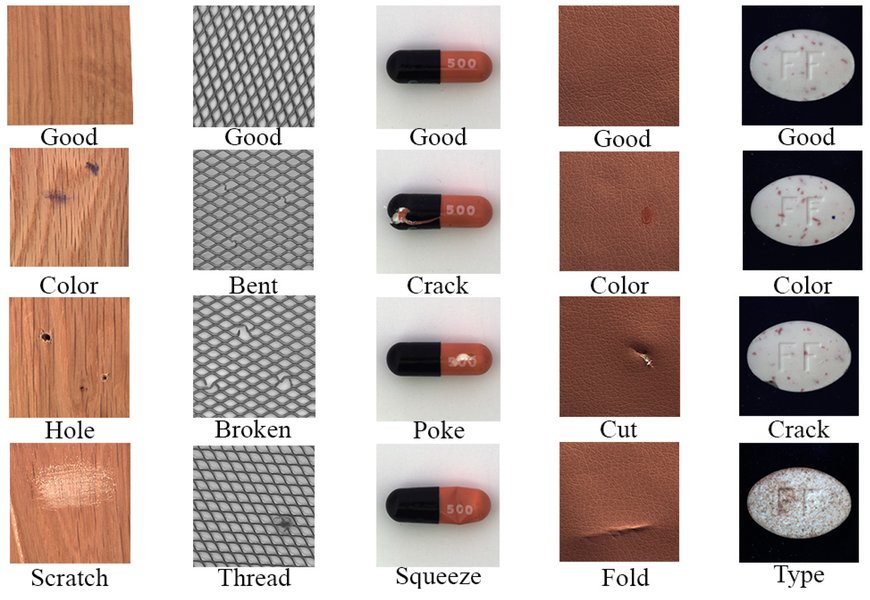
Example classifications of surface defects in industrial products.
2. Data Annotation
This crucial, often time-consuming step involves labeling the collected images. Depending on the chosen model type:
- Classification: Label entire images as "defective" (and potentially the defect type) or "non-defective".
- Object Detection: Draw bounding boxes around each defect instance.
- Segmentation: Precisely outline the pixels belonging to each defect.
Use annotation tools like CVAT (Computer Vision Annotation Tool), LabelImg, Roboflow Annotate, or VGG Image Annotator (VIA).
3. Model Selection and Training
Choose the appropriate model architecture(s) based on your defect types and performance requirements (real-time vs. batch, accuracy vs. speed). Leverage transfer learning by starting with models pre-trained on large datasets (like ImageNet) and fine-tuning them on your specific defect dataset. This significantly reduces training time and data requirements.
Employ data augmentation techniques (e.g., rotation, scaling, brightness/contrast adjustments, noise injection) to artificially increase the diversity of your training data and improve the model's robustness to variations.
Here's a conceptual Python snippet using a popular framework (Ultralytics YOLO) and a platform like Roboflow for managing datasets:
# Example using Ultralytics YOLO and Roboflow for training
# Note: This is illustrative; actual implementation requires setup.

# Import necessary libraries
# Ensure 'ultralytics' and 'roboflow' are installed: pip install ultralytics roboflow
from ultralytics import YOLO
import roboflow
import os # Required for environment variables

# --- Roboflow Integration (Example - Replace with your details) ---
# Best practice: Store API key as an environment variable
# try:
#     ROBOFLOW_API_KEY = os.environ['ROBOFLOW_API_KEY']
# except KeyError:
#     print("Error: ROBOFLOW_API_KEY environment variable not set.")
#     # Handle the error appropriately, e.g., exit or prompt user
#     exit() # Or set a default/prompt, but avoid hardcoding keys

# rf = roboflow.Roboflow(api_key=ROBOFLOW_API_KEY)
# project = rf.workspace("your-workspace").project("your-project-name")
# version = project.version(1) # Specify dataset version
# dataset = version.download("yolov8") # Download in YOLOv8 format

# --- Model Loading and Training ---
# Load a pre-trained model (e.g., yolov8n-seg.pt for segmentation)
# Choose model based on task: '.pt' for classification, '-seg.pt' for segmentation, '-obb.pt' for oriented boxes
model = YOLO('yolov8n-seg.pt') # Using segmentation variant

# Train the model on your custom dataset
# The 'data' argument should point to the dataset's YAML file (e.g., dataset.location + '/data.yaml')
# Adjust epochs, imgsz (image size), batch size, etc., as needed
# results = model.train(
#     data=dataset.location + '/data.yaml', # Path to Roboflow dataset YAML
#     epochs=100,         # Number of training cycles
#     imgsz=640,          # Input image size
#     patience=20,        # Epochs to wait for improvement before stopping
#     batch=16,           # Number of images per batch
#     name='yolov8n_custom_defect_detection' # Name for saving results
# )

# --- (Optional) Evaluation ---
# Evaluate model performance on a validation set
# metrics = model.val()
# print(metrics.box.map)    # Mean Average Precision (mAP) for detection/segmentation

# --- (Optional) Inference ---
# Run inference on a new image or video
# results = model('path/to/your/image.jpg')
# Or results = model.predict('path/to/image.jpg', save=True, conf=0.5) # Predict and save with confidence threshold

print("Conceptual code structure complete. Fill in your Roboflow details and paths.")
4. Model Evaluation
Assess the trained model's performance on a separate test dataset (images not used during training). Key metrics include:
- Classification: Accuracy, Precision, Recall, F1-Score, Confusion Matrix, ROC-AUC curve.
- Object Detection/Segmentation: Intersection over Union (IoU), Mean Average Precision (mAP).
Fine-tune model parameters or architectures based on evaluation results.
5. Deployment and Integration
Deploy the validated model into the production environment. This involves:
- Optimization: Convert the model to an optimized format for the target hardware (e.g., TensorRT for NVIDIA GPUs, TensorFlow Lite for edge devices).
- Pipeline Creation: Build a software pipeline that captures images from the camera, preprocesses them, feeds them to the model for inference, interprets the results, and triggers appropriate actions (e.g., alerts, robotic sorting, logging to a quality database).
- Integration: Connect the system with existing factory automation systems (e.g., PLCs, SCADA, MES).
6. Monitoring and Continuous Improvement
Continuously monitor the system's performance in production. Collect data on detected defects and any errors (false positives/negatives). Periodically retrain the model with new data, including examples of previously missed defects or new defect types, to maintain and improve accuracy over time. Techniques like active learning can help identify the most informative new images to label for retraining.
Comparative Effectiveness of Detection Approaches
Visualizing model suitability for different defect types.
Different AI and computer vision approaches vary in their effectiveness for detecting specific types of defects. This chart provides a comparative overview based on common strengths observed in industrial applications. Note that performance can vary significantly based on implementation details, data quality, and specific product characteristics.
This chart illustrates that techniques like CNN Segmentation often excel at fine-grained defects (texture, scratches, finishing), while Object Detection is strong for locating distinct anomalies (shape, color patches). Classification provides an overall assessment, and Anomaly Detection is valuable for catching unexpected issues. Traditional CV methods might suffice for simpler tasks but often lack the robustness of deep learning for complex, varied defects.
Mindmap: Defect Detection System Workflow
Visualizing the end-to-end process.
This mindmap outlines the key stages involved in conceptualizing, building, and deploying an industrial defect detection system.
(Texture, Shape, Color,
Scratches, Finishing)"] id1b["Set Performance Goals
(Accuracy, Speed, Latency)"] id1c["Analyze Product & Environment"] id1d["Choose Deployment Strategy
(Edge vs. Cloud)"] id2["2. Hardware Setup"] id2a["Select Cameras
(Resolution, Frame Rate, Type)"] id2b["Design Lighting System
(Type, Wavelength, Control)"] id2c["Choose Processing Units
(GPU, Edge Devices)"] id3["3. Data Acquisition & Preparation"] id3a["Collect Image Dataset
(Good & Defective Samples)"] id3b["Annotate Data
(Labeling: Classification,
Detection, Segmentation)"] id3c["Data Augmentation"] id4["4. Model Development & Training"] id4a["Select AI/ML Framework
(TensorFlow, PyTorch)"] id4b["Choose Model Architecture
(CNN, YOLO, U-Net, etc.)"] id4c["Train Model
(Transfer Learning, Fine-tuning)"] id4d["Evaluate Model Performance
(Metrics: mAP, F1, Recall)"] id5["5. Deployment & Integration"] id5a["Optimize Model for Target Hardware
(TensorRT, TFLite)"] id5b["Build Inference Pipeline"] id5c["Integrate with Production Line
(PLC, MES, Robots)"] id6["6. Monitoring & Maintenance"] id6a["Track Performance & Errors"] id6b["Collect New Data"] id6c["Periodically Retrain Model"] id6d["Active Learning Loops"]
The process flows from initial planning and hardware selection through data handling, model development, deployment into the production environment, and finally, ongoing monitoring and improvement.
Tools and Technologies Summary
A quick reference table for key components.
Choosing the right combination of tools is essential for building an effective system. This table summarizes common options across different categories:
| Category | Examples | Purpose |
|---|---|---|
| Hardware: Cameras | Industrial Machine Vision Cameras (e.g., Basler, Cognex, Keyence, Emergent Vision Technologies), Line-Scan Cameras | High-quality image acquisition tailored to product and line speed. |
| Hardware: Lighting | LED Ring Lights, Bar Lights, Dome Lights, Structured Light Projectors | Controlled illumination to highlight defects consistently. |
| Hardware: Processing | NVIDIA GPUs (RTX, A-Series), Edge Devices (NVIDIA Jetson, Google Coral, Industrial PCs) | Accelerating model training and enabling real-time inference. |
| Software: CV Libraries | OpenCV | Image pre-processing, feature extraction, basic vision tasks. |
| Software: ML/DL Frameworks | TensorFlow (Keras), PyTorch | Building, training, and deploying deep learning models. |
| Software: AI Models | CNNs (ResNet, EfficientNet), Object Detectors (YOLO, SSD), Segmentation (U-Net, Mask R-CNN), Anomaly Detectors (Autoencoders, One-Class SVM) | Algorithms for classifying, locating, or segmenting defects. |
| Software: Annotation Tools | CVAT, LabelImg, Labelbox, Roboflow Annotate, VGG VIA | Labeling images for supervised learning. |
| Platforms & Toolkits | NVIDIA TAO Toolkit, Roboflow, AWS SageMaker, Google Cloud Vision AI, Azure Machine Learning | End-to-end platforms or toolkits to streamline development and deployment. |
| Commercial Solutions | Cognex ViDi, Mitutoyo AI Inspect, Keyence Vision Systems, Averroes.ai | Pre-built or configurable hardware/software solutions for inspection. |
See It In Action: AI-Powered Visual Inspection
Understanding the application through a video example.
Visual examples can provide valuable insights into how these systems operate in a real-world industrial setting. The following video demonstrates AI-enabled visual inspection for defect detection across various industries, showcasing the technology's capabilities in automating quality control.
This video highlights how AI models analyze image feeds to identify defects, contributing to enhanced quality control in sectors like automotive, electronics, and pharmaceuticals. It illustrates the integration of cameras, processing, and AI algorithms to automate tasks previously done manually.
Addressing Challenges
Anticipating and mitigating potential hurdles.
Building and deploying a defect detection system comes with challenges:
- Data Quality and Quantity: Insufficient or poorly labeled data is a primary cause of poor model performance. Acquiring diverse data under various conditions is essential.
- Lighting and Environmental Variations: Changes in ambient light, reflections, or product positioning can confuse models. Robust lighting control and data augmentation help mitigate this.
- False Positives/Negatives: Balancing the trade-off between missing real defects (false negatives) and incorrectly flagging good products (false positives) requires careful model tuning and threshold setting based on business impact.
- Subtle or Rare Defects: Detecting very small flaws or defects that occur infrequently can be difficult and may require specialized techniques or larger datasets.
- Integration Complexity: Integrating the system seamlessly into high-speed production lines and existing software infrastructure can be technically challenging.
- Model Maintenance: Production processes or defect characteristics can change over time, requiring ongoing model monitoring and retraining.
Frequently Asked Questions (FAQ)
Quick answers to common queries.
How accurate can these defect detection systems be?
How much data do I need to train a reliable model?
Can the system detect new types of defects it wasn't trained on?
Is edge computing always necessary for real-time detection?
What's the difference between object detection and segmentation for defects?
Recommended Next Steps
Explore related topics for deeper insights.
- Compare deep learning models like YOLO vs. U-Net for industrial scratch detection.
- How to implement transfer learning for custom defect detection with TensorFlow or PyTorch?
- What are the best practices for lighting and camera setup in machine vision for surface inspection?
- Explore the challenges and solutions for deploying real-time AI models on edge devices like NVIDIA Jetson.
References
Sources used for this information.
 aws.amazon.com
Last updated May 4, 2025