
Unlocking Visual Creativity: How AI Transforms Your Sketches and Descriptions into Stunning Images
Discover the power of AI to bring your concepts to life, combining rough drawings with textual prompts for incredible results.
Yes, it is absolutely possible to generate images based on both a sketch and a textual description using advanced Artificial Intelligence (AI) tools. This innovative technology, often referred to as "sketch-to-image" or "sketch-guided image generation," empowers users to provide a basic visual outline (the sketch) and then refine and detail the final output using specific text prompts. This dual-input approach offers a remarkable level of control and creative expression, bridging the gap between a simple idea and a fully realized visual.
Key Highlights: The Fusion of Sketch and Text in AI Image Generation
- Enhanced Creative Control: By providing both a sketch for structural guidance and a text prompt for stylistic and detailed instructions, users gain unprecedented control over the AI's creative process, ensuring the output aligns closely with their vision.
- Accessibility for All Skill Levels: These AI tools are often designed with user-friendly interfaces, making sophisticated image generation accessible even to individuals without extensive artistic or technical backgrounds. A rough doodle can be the starting point for a masterpiece.
- Diverse Applications: From concept art and product design to architectural visualization and marketing materials, the ability to generate images from sketches and descriptions opens up a vast array of practical and creative applications across numerous industries.
The Magic Behind the Curtain: How AI Interprets Your Vision
The generation of images from both sketches and text descriptions relies on sophisticated deep learning models. These AI systems are typically trained on vast datasets containing pairs of sketches and corresponding finished images, along with associated textual descriptions. This training enables them to understand the relationship between lines, shapes, and textual concepts.
Core Mechanisms at Play
Sketch Analysis and Structural Foundation
When you upload a sketch, the AI first analyzes its fundamental components: lines, curves, shapes, and overall composition. This sketch serves as the structural blueprint for the final image. The AI identifies the key elements and their spatial relationships, ensuring that the generated image adheres to the basic form you've outlined.
Text Prompt Integration for Detail and Style
Simultaneously, the AI processes your text description. This prompt provides crucial information about the desired style (e.g., "photorealistic," "impressionistic," "cartoonish"), colors, textures, mood, specific objects, and context. The AI uses Natural Language Processing (NLP) to interpret the meaning and nuances of your words.
Diffusion Models and T2I Adapters
Many modern tools utilize diffusion models, such as Stable Diffusion. These models work by starting with random noise and gradually refining it step-by-step to match the input prompt. In sketch-guided generation, "Text-to-Image (T2I) adapters" or similar mechanisms are employed. These adapters allow the diffusion process to be conditioned not only by the text prompt but also by the structural information from the input sketch. This ensures that the generation process respects the visual layout of your drawing while incorporating the details from your text.
Parameters, often labeled as "strength" or "influence," allow users to control the balance between adherence to the sketch and the creative interpretation driven by the text prompt. A higher strength setting will make the AI follow the sketch more rigidly, while a lower strength will give more weight to the textual description, allowing for more imaginative transformations.
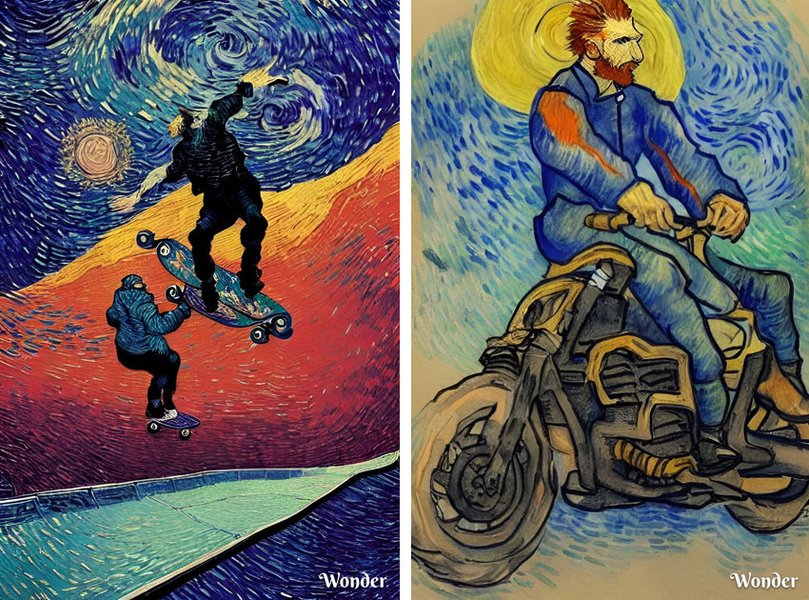
An example of AI's capability to generate artistic images based on textual prompts, often a core component in sketch-and-text systems.
Navigating the AI Sketch-to-Image Landscape: Popular Tools
A growing number of platforms offer robust AI sketch-to-image generation capabilities. These tools vary in their specific features, user interface, and pricing models, but all aim to make this powerful technology accessible.
| Tool Name | Key Feature | Typical Input | Primary Output Style | Ease of Use |
|---|---|---|---|---|
| Adobe Firefly | Integration with Adobe Creative Cloud, high-quality output, "Structure Reference" for sketches. | Uploaded sketch + text prompt. | Photorealistic, artistic, illustrative. | User-friendly for Adobe users. |
| Canva Sketch to Life | Free to use, simple interface, good for quick visualizations. | Drawn or uploaded sketch + text prompt. | Realistic, varied styles. | Very easy, beginner-friendly. |
| Leonardo.Ai | "Edge to Image" feature, fine-tuning control (strength parameter), community models. | Uploaded sketch + text prompt. | Artistic, game assets, concept art. | Moderate, offers advanced options. |
| OpenArt.ai | Fast generation, multiple AI models, focuses on evolving sketches. | Uploaded sketch + text prompt. | Realistic, stylized, anime. | Easy to use. |
| Fotor Sketch to Image | Turns sketches into digital images quickly, often no login for basic use. | Uploaded sketch + text prompt. | Digital art, varied styles. | Easy and accessible. |
| NewArc.ai | Specializes in converting sketches to photorealistic images or 3D-like renders. | Hand-drawn sketch + text prompt. | Photorealistic, 3D renders. | Streamlined for visualization. |
| Freepik AI Sketch to Image | Real-time generation, draw directly or upload, "imagination level" control. | Drawn sketch/icons + text prompt. | Varied, customizable. | Interactive and easy. |
The table above offers a comparative glance at some prominent AI tools that facilitate image generation from sketches and textual descriptions. Each platform brings unique strengths to cater to diverse creative needs.
Visualizing Tool Capabilities: A Comparative Look
To better understand how different AI sketch-to-image tools or general features might compare, consider the following conceptual radar chart. This chart visualizes hypothetical strengths across several key aspects of AI image generation when combining sketches and text. The scores are illustrative, representing general tendencies rather than precise metrics for specific tools, as capabilities evolve rapidly.
This radar chart illustrates a conceptual comparison of different types of AI sketch-and-text-to-image tools based on key performance and usability attributes. "Tool Type A" might represent platforms prioritizing ease of access, "Tool Type B" those for professional, high-control outputs, and "Tool Type C" tools excelling in specific artistic styles or niches.
The Creative Workflow: From Idea to AI-Generated Image
The process of generating an image from a sketch and description typically follows a user-friendly workflow. This mindmap illustrates the key stages involved, highlighting how your inputs are transformed into a final visual output.
(Digital or Scanned)"] id1b["Textual Description
(Prompt: Style, Colors, Objects, Mood)"] id2["AI Processing Core"] id2a["Sketch Analysis
(Shape & Structure Recognition)"] id2b["Text Interpretation
(Natural Language Processing)"] id2c["Feature Combination
(Integrating Visual & Textual Cues)"] id2d["Image Synthesis
(e.g., Diffusion Models, GANs)"] id3["Output & Refinement"] id3a["Generated Image(s)
(Multiple Variations Often Provided)"] id3b["User Review & Selection"] id3c["Iteration (Optional)
(Adjust Sketch, Refine Prompt, Modify Parameters)"] id4["Key Technologies"] id4a["Deep Learning"] id4b["Computer Vision"] id4c["Generative Adversarial Networks (GANs)"] id4d["Diffusion Models (e.g., Stable Diffusion)"] id4e["T2I Adapters"] id5["Applications"] id5a["Concept Art & Illustration"] id5b["Product Design & Prototyping"] id5c["Architectural Visualization"] id5d["Marketing & Advertising Content"] id5e["Educational Materials"] id5f["Personal Creative Projects"]
This mindmap outlines the journey from initial user inputs—a sketch and a text prompt—through the AI's internal processing stages, culminating in the generated image and potential refinement cycles. It also touches upon underlying technologies and common applications.
Benefits and Advantages
Employing AI to generate images from sketches and descriptions offers numerous advantages:
- Creative Empowerment: It allows individuals to visualize complex ideas quickly, even if they lack advanced drawing or digital painting skills.
- Time Efficiency: Artists, designers, and content creators can rapidly prototype visuals, iterating on concepts much faster than traditional methods would allow.
- Enhanced Collaboration: Sketches can be shared and then refined with descriptive text by team members, facilitating a more dynamic and collaborative creative process.
- Versatility: The technology is adaptable to a wide range of styles and applications, from creating realistic product mockups to fantastical artistic illustrations.
- Accessibility: Many tools are available online, with free or freemium tiers, making powerful image generation capabilities widely accessible without requiring expensive software or hardware.
- Democratization of Design: It lowers the barrier to entry for creating high-quality visuals, empowering more people to express their ideas visually.
Getting Started and Tips for Optimal Results
To achieve the best outcomes when using AI sketch-to-image generators, consider the following:
Crafting Your Inputs
The Sketch: Clarity is Key
While AI can interpret rough doodles, clearer and more defined lines in your sketch generally lead to more accurate and predictable results. Focus on conveying the main shapes and composition clearly. Don't worry about perfect lines, but ensure the overall structure is evident.
The Text Prompt: Be Specific and Descriptive
Your text prompt is your primary tool for guiding the AI's creative choices regarding style, color, texture, lighting, and mood.
- Be specific: Instead of "a cat," try "a fluffy ginger tabby cat curled up on a velvet cushion, sunlit room."
- Include style cues: "photorealistic," "Van Gogh style," "cyberpunk aesthetic," "watercolor painting."
- Describe the atmosphere: "serene," "eerie," "vibrant," "mystical."
- Mention negative prompts if supported: Some tools allow you to specify what you don't want to see.
Leveraging Tool Features
Experiment with Parameters
Many tools offer settings like "strength," "guidance scale," or "imagination level." Experiment with these to find the right balance between adherence to your sketch and the creative freedom given to the AI based on your text prompt.
Iterate and Refine
Don't expect the first generation to be perfect. AI image generation is often an iterative process. Use the initial outputs as a basis for refining your sketch, tweaking your text prompt, or adjusting the tool's parameters. Most platforms allow you to generate multiple variations from a single input set.
Choose the Right Style
Explore the different style options offered by the tool. Whether you want a photorealistic render, a cartoonish drawing, an abstract piece, or an image in the style of a famous artist, selecting the appropriate style preset (if available) can significantly impact the outcome.
This video tutorial from OpenArt demonstrates the sketch-to-image feature, providing practical insights into how these tools can be used to transform simple drawings into more elaborate AI-generated visuals, guided by text prompts.
Frequently Asked Questions (FAQ)
How does the AI understand my sketch and text description?
AI models are trained on vast datasets of image-text pairs, including sketches. They learn to associate visual features (lines, shapes) in a sketch with structural concepts, and textual elements (words, phrases) with stylistic attributes, objects, and context. The AI essentially deconstructs your sketch into a basic form and then "colors it in" or "details it" based on your textual instructions, using the patterns it learned during training.
What kind of sketches work best for AI image generation?
While AI can often work with very rough doodles, sketches with clear, well-defined lines and discernible shapes tend to produce more accurate and coherent results. The sketch should primarily convey the intended composition and the basic forms of the main subjects. Overly complex or messy sketches might confuse the AI, while extremely simple ones might not provide enough structural guidance.
Can I control the artistic style of the generated image?
Yes, absolutely. The artistic style is primarily controlled through your text prompt. You can specify styles like "photorealistic," "oil painting," "cartoon," "anime," "impressionistic," "cyberpunk," or even reference specific artists (e.g., "in the style of Van Gogh"). Many tools also offer pre-set style filters or options that you can select to further guide the AI.
Are these AI sketch-to-image tools free to use?
Many AI sketch-to-image generators offer free tiers or trial periods, allowing you to generate a certain number of images or use basic features without cost. These free versions are great for experimentation. For more advanced features, higher resolution outputs, faster processing, or unlimited generations, platforms typically offer subscription-based premium plans.
What are some common applications for this technology?
The applications are diverse and expanding. Common uses include:
- Concept Art: Quickly visualizing characters, environments, and props for games or films.
- Product Design: Creating mockups and prototypes from initial sketches.
- Architectural Visualization: Turning rough architectural drawings into realistic renders.
- Fashion Design: Visualizing clothing designs from sketches with different fabrics and colors.
- Marketing and Advertising: Generating unique visuals for campaigns.
- Education: Creating custom illustrations for learning materials.
- Personal Art and Creativity: Allowing hobbyists and artists to bring their imaginative ideas to life.
Recommended Further Exploration
- What are the best techniques for writing effective text prompts for AI image generators?
- How do diffusion models work in AI image generation?
- Can AI generate 3D models from sketches and text descriptions?
- What are the ethical considerations of using AI for art generation?
References
Last updated May 6, 2025