
Unlock YouTube Video Content: Your Guide to the Best AI Transcription Tools in 2025
Effortlessly convert spoken words in videos to text with these powerful web-based and AI solutions.
Transcribing the audio content of a YouTube video into text can be incredibly useful. Whether you need subtitles for accessibility, notes for study, content for blog posts, or improved SEO for your own videos, converting speech to text is a valuable process. Fortunately, numerous web-based tools and sophisticated AI platforms available today (as of Monday, 2025-04-28) make this task easier and faster than ever before.
Quick Insights: Transcribing YouTube Videos
- Multiple Options Exist: You can use YouTube's built-in free transcript feature or leverage more advanced third-party AI tools for potentially higher accuracy and more features.
- AI Powers Accuracy: Many modern tools use Artificial Intelligence (AI) to achieve high transcription accuracy (often claimed 90-99%), handle various languages, and even identify different speakers.
- Free & Paid Choices: Numerous free tools offer excellent basic transcription, while paid or freemium services provide enhanced features like translation, summarization, unlimited usage, and professional-grade accuracy.
Understanding Your Transcription Options
There are two primary routes you can take to get a text transcript from a YouTube video:
1. Using YouTube's Built-In Transcript Feature
YouTube automatically generates transcripts for many videos using its own speech recognition technology. This is often the quickest and most accessible method.
How to Access It:
- Go to the YouTube video you want to transcribe.
- Below the video player, click the three horizontal dots (...) next to the "Save" button.
- Select "Show transcript" (or sometimes "Open transcript").
- A transcript panel will appear, usually next to the video, displaying the text synchronised with the video playback. You can often toggle timestamps off and copy the text directly.
Pros:
- Completely free.
- Conveniently located within the YouTube interface.
- Instantly available for many videos.
Cons:
- Accuracy can be variable, especially with poor audio quality, background noise, strong accents, or multiple speakers talking over each other.
- Punctuation and speaker differentiation are often missing or incorrect.
- Limited editing capabilities directly within YouTube.
- Not available for all videos (depends on creator settings or automatic generation success).
2. Leveraging Third-Party Web & AI Tools
For greater accuracy, more features, and better control, numerous external web-based and AI-powered transcription services are available. These tools often employ more advanced algorithms and offer functionalities beyond basic transcription.
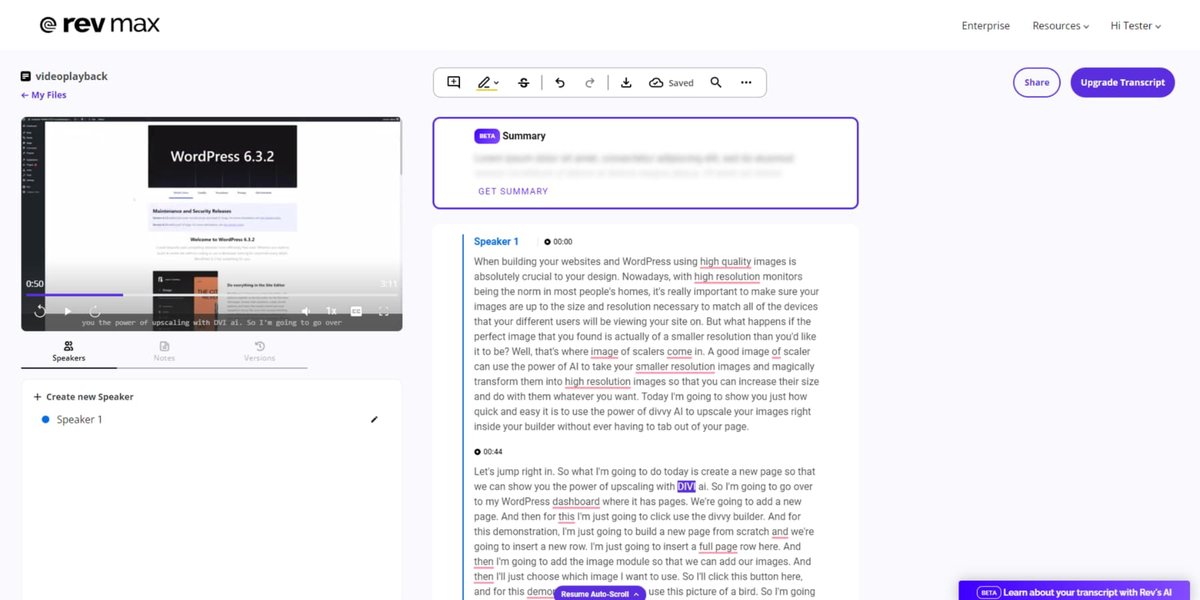
Example interface of an AI transcription service showing text generated from audio.
Advantages of Third-Party Tools:
- Higher Accuracy: Many tools boast accuracy rates above 95%, significantly reducing the need for manual corrections.
- Language Support: Extensive support for multiple languages and dialects is common.
- Speaker Identification: Ability to differentiate and label different speakers in the conversation.
- Timestamp Options: Precise timestamps linked to words or paragraphs.
- Export Formats: Download transcripts in various formats (TXT, DOCX, SRT for subtitles, etc.).
- Editing Tools: Built-in editors to easily correct or refine the transcript.
- Additional AI Features: Many tools bundle transcription with AI-powered summarization, translation, subtitle generation, or even voiceover creation.
- Ease of Use: Often require just pasting the YouTube video URL.
Exploring the Transcription Tool Landscape
The market offers a wide array of tools, ranging from completely free and simple options to sophisticated platforms with subscription plans. Here's a breakdown of some popular choices highlighted in recent reviews and comparisons:
Mindmap: YouTube Transcription Approaches
This mindmap illustrates the main methods and features associated with obtaining YouTube video transcripts using different types of tools available in 2025.
Recommended Free & Easy-to-Use Tools
These tools are excellent starting points if you need quick, straightforward transcriptions, often without needing an account:
- NoteGPT: A popular free online tool requiring no sign-up. It generates transcripts with timestamps from a YouTube URL and includes AI summarization capabilities. It can even attempt transcription for videos lacking native captions.
- Kome AI: Known for its speed and extensive language support (over 120 languages claimed). It's entirely free, processes videos quickly by pasting the URL, and allows unlimited transcriptions.
- TubeTranscript: Offers free AI-powered transcription and summarization directly from a YouTube URL. It emphasizes security and privacy, working across devices without installation.
- Tactiq.io: Provides a simple, free web tool to generate transcripts instantly from a YouTube link. You can read the transcript online or download it as a text file without needing an account.
- Youtubetotranscript.com: A free platform allowing URL pasting, transcript generation, customization (removing sections), and language selection (over 125 languages supported via AI).
Advanced AI Transcription Platforms (Often Freemium or Paid)
For users needing higher accuracy, more robust features, or handling large volumes, these platforms offer more advanced capabilities:
- Clipto: Touts very high accuracy (claimed ~99%) across over 99 languages. It uses AI not only for transcription from a link but also allows further AI processing to refine or summarize the text. Often has a trial or free tier.
- Maestra: Provides free transcription with additional AI tools for translation, summarization, subtitle creation, localization, and even voiceover generation, making it a versatile suite for content creators.
- Otter.ai: A well-regarded AI tool that can import YouTube links or files. It offers real-time transcription, speaker identification, and integrates well with other productivity tools. Has a generous free tier, with paid plans for more usage.
- Sonix: Described as fast, accurate, and affordable, Sonix handles YouTube video files or links. It provides transcription, translation, and subtitling features, with options to export in various formats suitable for professional workflows.
- Notta.ai: Supports transcription in 58 languages directly from a YouTube URL. Known for speed and accuracy, particularly with multilingual content. Offers freemium plans.
- Rev AI: While Rev is known for its human transcription services, it also offers a highly accurate AI transcription service. It's often a paid solution but provides professional-grade quality suitable for critical applications.
- Other Noteworthy Tools: Services like Fireflies.ai (transcription + AI assistant), Zeemo AI (transcription + subtitles), and Deepgram (AI transcription API/tool) are also mentioned as capable options in 2025 reviews.

Many AI tools offer real-time transcription capabilities.
Comparing Key Transcription Tool Features
Choosing the right tool depends on your specific needs. This radar chart provides a comparative overview of several popular AI transcription tools based on common evaluation criteria. Scores are relative estimates based on typical user experiences and features offered (higher is generally better).
As the chart suggests, tools like NoteGPT and Kome AI excel in ease of use and free access, making them great for quick tasks. Platforms like Otter.ai, Clipto, Sonix, and Maestra offer higher accuracy and more advanced features, often suitable for professional use, though their free tiers might be more limited.
Summary Table of Popular YouTube Transcription Tools (2025)
Here's a quick reference table comparing some of the frequently mentioned tools:
| Tool Name | Typical Cost Model | Key Features | Primary Input Method | Website |
|---|---|---|---|---|
| YouTube Built-in | Free | Basic transcript, timestamps, convenient access | N/A (within YouTube) | N/A |
| NoteGPT | Free | No sign-up, timestamps, AI summary, download/copy | YouTube URL | notegpt.io |
| Kome AI | Free | Fast, 120+ languages, no limits, download | YouTube URL | kome.ai |
| TubeTranscript | Free | Instant transcript & summary, secure | YouTube URL | tubetranscript.com |
| Tactiq.io | Free | No sign-up, read online or download TXT | YouTube URL | tactiq.io |
| Maestra AI | Freemium | Transcription, translation, summary, subtitles, voiceover | YouTube URL | maestra.ai |
| Clipto | Freemium/Paid | High accuracy (~99%), 99+ languages, AI refinement | YouTube URL / Speak | clipto.com |
| Otter.ai | Freemium | High accuracy, speaker ID, real-time, integrations | YouTube URL / File Upload | otter.ai |
| Sonix | Paid (Trial available) | High accuracy, subtitles, multi-language, various export formats | YouTube URL / File Upload | sonix.ai |
| Notta.ai | Freemium | 58 languages, timestamps, editing | YouTube URL | notta.ai |
| Rev AI | Paid (potential free tier/trial) | Professional-grade accuracy, robust API | File Upload / API | rev.com |
Visual Guide: How to Get Transcripts
Understanding the different methods can be easier with a visual explanation. The video below explores several effective ways to obtain YouTube video transcripts, often utilizing AI tools similar to those discussed above.
This video covers practical hacks and tools that can simplify the transcription process, demonstrating how accessible these techniques have become for everyday users and content creators alike.
Key Considerations When Choosing a Tool

Transcription tools significantly improve accessibility for diverse audiences.
Before settling on a tool, consider these factors:
- Accuracy vs. Cost: While free tools are convenient, paid tools or higher tiers often provide superior accuracy, especially for challenging audio. Evaluate if the accuracy level meets your needs (e.g., casual notes vs. professional subtitles).
- Audio Quality: The clearer the audio in the YouTube video (minimal background noise, clear pronunciation, single speaker), the better the results will be from any tool, including YouTube's native feature.
- Language Requirements: If you need to transcribe videos in languages other than English, check the tool's specific language support (e.g., Kome AI, Clipto, Notta.ai offer broad support).
- Need for Additional Features: Do you just need the text, or do you also require timestamps, speaker labels, summarization, translation, or subtitle (SRT) files? Choose a tool that offers the specific outputs you need.
- Video Length and Frequency: Free tiers often have limitations on the length or number of videos you can transcribe per month. High-volume users might need a paid subscription.
- Privacy and Security: If dealing with sensitive content, review the tool's privacy policy regarding how video data and transcripts are handled. Tools like TubeTranscript explicitly mention security.
Testing a few free options with your specific type of video content is often the best way to find the tool that works best for your workflow.
Frequently Asked Questions (FAQ)
How accurate are AI transcription tools for YouTube videos?
Are free YouTube transcription tools good enough?
Can these tools transcribe YouTube videos in languages other than English?
What if the YouTube video doesn't have captions or a transcript available?
Recommended Next Steps
Explore related topics to deepen your understanding:
- How can I improve the accuracy of AI video transcription for my recordings?
- What are the best tools specifically for generating subtitles (SRT files) from YouTube videos?
- Could you compare the features and pricing of top transcription services like Otter.ai, Sonix, and Descript?
- How can I use AI to automatically summarize long YouTube videos after getting the transcript?
References
Last updated April 28, 2025