
Unlock Your Coding Potential: Finding the Ultimate Value Keyboard for Programmers in 2025
Discover keyboards that blend performance, comfort, and price to enhance your programming workflow without breaking the bank.
Choosing the right keyboard is crucial for programmers who spend countless hours typing. The "best value" isn't just about the lowest price; it's about finding the optimal balance between cost, durability, features tailored for coding, and ergonomic comfort. A keyboard that enhances typing speed, accuracy, and reduces fatigue can significantly boost productivity and overall coding experience.
Highlights: Key Considerations for Value
- Mechanical Switches Reign Supreme: For durability and tactile feedback crucial for coding accuracy, mechanical keyboards (especially with tactile switches like Cherry MX Brown or similar) are often the preferred choice, offering longevity rated for millions of keystrokes.
- Compact Layouts Offer Ergonomic Benefits: Many developers favor compact layouts (like 60%, 75%, TKL, or 96%) to save desk space, keep the mouse closer, and maintain better posture, though the need for a numpad depends on specific tasks.
- Features vs. Price: Value lies in getting essential programming features like programmability (for macros), reliable connectivity (wired/wireless), and solid build quality at a competitive price point, often found in brands like Keychron and Royal Kludge.
Why Your Keyboard Matters for Programming
A programmer's keyboard is more than just an input device; it's a primary tool of the trade. Long coding sessions demand comfort, precision, and reliability. While membrane keyboards are quieter and often cheaper, mechanical keyboards are generally favored for their distinct advantages:
- Durability: Mechanical switches are typically rated for 50 million keystrokes or more, significantly outlasting membrane domes.
- Tactile Feedback: The physical bump or click confirms key actuation, leading to fewer typos and potentially faster typing speeds.
- Customization: Many mechanical keyboards offer options for different switch types, keycaps, and even hot-swappable PCBs for easy switch changes without soldering.
- N-Key Rollover (NKRO): Ensures every keypress is registered, even when multiple keys are pressed simultaneously, vital for complex shortcuts.
Decoding Keyboard Features for Coders
When searching for the best value, understanding key features helps prioritize what truly matters for programming:
Switch Types: The Heart of the Keyboard
The type of switch determines the feel, sound, and actuation force of each key press. For programming:
- Tactile Switches (e.g., Cherry MX Brown, Gateron Brown): Offer a noticeable bump mid-press without a loud click. This feedback confirms actuation, aiding accuracy without being overly disruptive. They are often considered the sweet spot for typing and programming.
- Linear Switches (e.g., Cherry MX Red, Gateron Red): Provide smooth, consistent actuation without any bump or click. Preferred by some for their speed, but the lack of tactile feedback might lead to more accidental presses or bottoming out.
- Clicky Switches (e.g., Cherry MX Blue, Gateron Blue): Offer both a tactile bump and an audible click. While satisfying for some, the noise can be distracting in shared environments.
- Membrane Switches: Found in most budget keyboards (like the Logitech MX Keys S), these use rubber domes. They are quieter but offer a mushier feel and less durability compared to mechanical switches.
Layout and Size: Finding Your Fit
Keyboard size impacts desk space and ergonomics:
- Full-Size (100%): Includes the alphanumeric block, function row, navigation cluster, and numeric keypad. Best for those who frequently input numerical data.
- Tenkeyless (TKL or 80%): Removes the numeric keypad, making the keyboard more compact and allowing the mouse to be positioned closer.
- 75% Layout: Compresses the TKL layout slightly, often aligning the navigation keys vertically. Balances compactness with key availability.
- 65% Layout: Removes the function row and navigation cluster, integrating navigation keys (like arrows) into the main block.
- 60% Layout: The most compact, removing arrow keys and the function row, relying heavily on function layers (accessed via an 'Fn' key). Maximizes desk space but requires adaptation.
- 96% Layout: A newer trend that squeezes nearly all keys of a full-size layout into a footprint slightly larger than a TKL, offering near-full functionality in a compact form (e.g., Keychron Q5 Max).
Compact layouts (TKL, 75%, 96%) are often favored by programmers for ergonomic reasons and space efficiency, unless extensive numerical input is required.
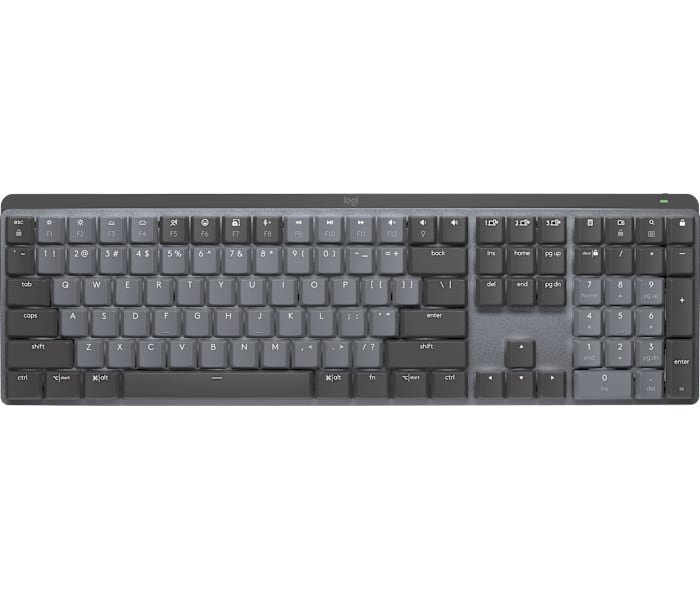
The Logitech MX Mechanical offers a low-profile mechanical typing experience.
Connectivity: Wired vs. Wireless
Wireless keyboards offer a cleaner desk setup and portability. Look for options with reliable connectivity (Bluetooth 5.0+ or 2.4GHz dongle) and decent battery life. Low latency is crucial, especially if you also game. Wired keyboards offer zero latency and no battery concerns, often preferred for stationary setups.
Programmability and Customization
Being able to remap keys or create macros can significantly speed up repetitive coding tasks. Software like QMK/VIA offers powerful, open-source customization. Hot-swappable switches allow you to change the keyboard's feel without buying a whole new board.
Build Quality and Ergonomics
A solid frame (plastic or aluminum), quality keycaps (PBT is more durable and resistant to shine than ABS), and ergonomic considerations (like adjustable tilt angles or wrist rests) contribute to longevity and comfort during long coding sessions.
Top Value Keyboard Recommendations for Programming (2025)
Based on reviews and feature analysis, here are some standout keyboards offering excellent value for programmers across different price points:
Best Budget Champions (Under $60)
These keyboards provide a solid mechanical experience without a hefty price tag, ideal for beginners or those on a tight budget.
- Keychron C3 Pro: Often cited as a top budget pick (around $45), it delivers a surprisingly good typing feel with mechanical switches (often Gateron Browns/Reds) and full programmability via QMK/VIA software. It's typically a TKL or 75% layout, offering essential keys in a compact form. While usually wired and not hot-swappable, its build quality and feature set provide exceptional value.
- Royal Kludge RK61: A popular ultra-budget wireless option (often under $50). Its compact 60% layout maximizes portability. It usually features hot-swappable switches (a rare find at this price), tri-mode connectivity (Bluetooth, 2.4GHz, Wired), and RGB backlighting. While the build might feel less premium, its versatility and customization potential make it a fantastic value.
- Ajazz AK820 Pro: Another strong contender under $60, often featuring a TKL layout, hot-swappable mechanical switches, RGB lighting, and wireless connectivity. It balances features and affordability well, though its customization software might be less intuitive than QMK/VIA.
Mid-Range Marvels ($80 - $150)
Stepping up slightly in price unlocks better build quality, more refined features, and often wireless convenience.
- Keychron Q5 Max: Frequently recommended as one of the best overall programming keyboards, balancing features and price (around $100-$150+ depending on configuration). It boasts a premium aluminum build, a space-saving 96% layout, hot-swappable switches, excellent sound and feel out-of-the-box, QMK/VIA support, and reliable wireless connectivity. It offers a near-premium experience at a reasonable cost.
- NuPhy Air75 V2: Praised for its low-profile design, excellent build quality, 75% layout, and tri-mode connectivity. It offers a comfortable typing experience, especially for those who prefer flatter keyboards, and supports VIA customization. It's a stylish and portable option often favored by developers on the go.
- Logitech MX Keys S: A premium membrane keyboard (around $100) valued for its comfort, quiet typing, smart backlighting, and excellent multi-device capabilities (Logitech Flow). While not mechanical, its low-profile design and ergonomic considerations make it a popular choice for programmers prioritizing quiet operation and seamless workflow across multiple computers.
Premium Value Considerations
While higher priced, some keyboards offer specific features that provide significant value for certain programmers.
- Das Keyboard 4 Professional: Known for its robust build quality, satisfying Cherry MX switches (often Brown or Blue), dedicated media controls, and built-in USB 3.0 hub. It's a durable workhorse focused on typing experience and productivity features.
- SteelSeries Apex Pro / Apex Pro Mini: Features unique adjustable actuation switches, allowing users to customize the key sensitivity for different tasks (e.g., lighter for typing, heavier for gaming). Available in full-size, TKL, and 60% (Mini) layouts.
Visualizing Keyboard Value: Feature Comparison
To better illustrate how some of the top value keyboards stack up against key programming criteria, the radar chart below provides a visual comparison. This assessment is based on typical configurations and general consensus from reviews, focusing on aspects important for developers.
This chart highlights the trade-offs: Budget options like the C3 Pro and RK61 excel in Price/Value and offer good Customization potential, while the mid-range Q5 Max scores highly across the board, particularly in Typing Feel and Build Quality. The MX Keys S offers good Features and Ergonomics for a membrane keyboard but lags in Typing Feel (for mechanical fans) and Customization.
Navigating Your Keyboard Choice: A Mindmap
Choosing the right keyboard involves balancing several factors. This mindmap illustrates a typical decision-making process for selecting a value-oriented programming keyboard:
This mindmap helps visualize the path from identifying your budget and core needs (like switch type and layout) to considering specific features and ultimately narrowing down to suitable keyboard models.
Keyboard Comparison Table
Here's a summary table comparing key specifications of the highly recommended value keyboards for programming:
| Keyboard Model | Approx. Price Range | Layout | Switch Type | Connectivity | Key Features |
|---|---|---|---|---|---|
| Keychron C3 Pro | $45 - $55 | TKL / 75% | Mechanical (e.g., Gateron Brown/Red) | Wired | QMK/VIA Programmable, Good Typing Feel, Budget-Friendly |
| Royal Kludge RK61 | $45 - $60 | 60% | Mechanical (Hot-Swappable options) | Wireless (BT/2.4GHz), Wired | Compact, Portable, Hot-Swappable, RGB, Tri-Mode |
| Ajazz AK820 Pro | $50 - $60 | TKL / 75% | Mechanical (Hot-Swappable options) | Wireless (BT/2.4GHz), Wired | Hot-Swappable, RGB, Wireless, Screen (optional) |
| Keychron Q5 Max | $100 - $180+ | 96% | Mechanical (Hot-Swappable) | Wireless (BT), Wired | Premium Build (Aluminum), QMK/VIA, Excellent Feel, Hot-Swappable |
| NuPhy Air75 V2 | $120 - $140 | 75% | Low-Profile Mechanical (Hot-Swappable) | Wireless (BT/2.4GHz), Wired | Low-Profile, Great Build, VIA Programmable, Portable |
| Logitech MX Keys S | $100 - $110 | Full-Size / TKL options | Membrane (Scissor Switch) | Wireless (BT/Bolt Receiver) | Quiet, Comfortable, Smart Backlight, Multi-Device Flow |
This table provides a quick overview to compare the core aspects of each recommended keyboard, helping you match features to your specific programming needs and budget.
Insights from the Community: Programming Keyboards in Action
Hearing from fellow developers and tech reviewers can provide valuable perspectives. This video discusses the Keychron Q5 Max, often highlighted as a top contender for programming, exploring its features and suitability for coding tasks.
Video discussing the Keychron Q5 Max and other options for programming.
Videos like this often delve into the typing sound, build quality nuances, and practical usability aspects like software customization (QMK/VIA) and wireless performance, offering deeper insights beyond spec sheets.
Frequently Asked Questions (FAQ)
Why are mechanical keyboards usually recommended for programming?
What's the best keyboard layout/size for programming?
Are wireless keyboards reliable enough for programming?
What does "hot-swappable" mean, and is it important for programming?
Recommended Further Exploration
- How do different tactile mechanical switches compare for long typing sessions?
- What are the advantages of using QMK/VIA programmable keyboards for software development workflows?
- Explore the ergonomic differences and benefits between TKL and 75% keyboard layouts for coders.
- Discover top-rated wireless mechanical keyboards under $100 focusing on battery longevity.
References
 amazon.in
Last updated May 5, 2025