
Responsive Design Adjustments in Blogger Customization
A detailed guide to achieving optimal mobile and desktop experiences
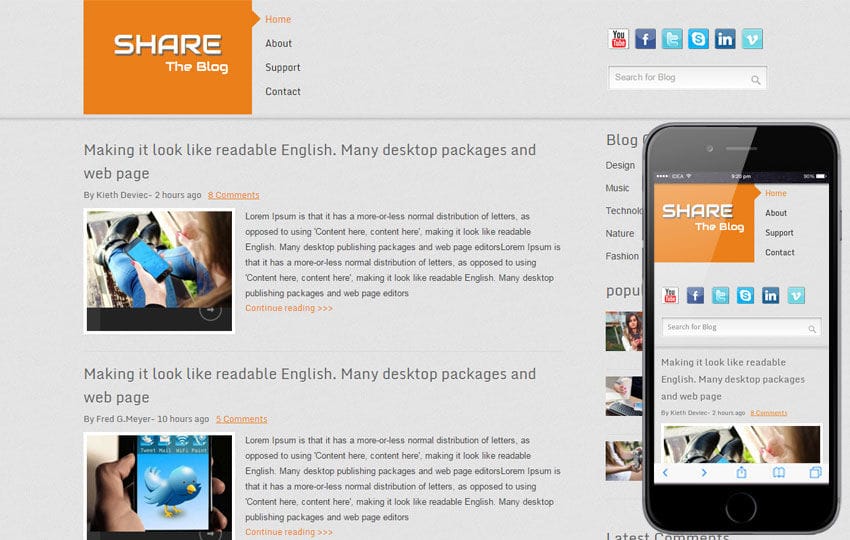
Highlights
- Responsive Templates & Mobile Settings: Starting with a responsive template and enabling mobile-specific settings optimizes your site's performance on all devices.
- CSS & Media Queries: Custom CSS adjustments, including media queries, allow for fluid layouts that adapt seamlessly across screen sizes.
- Testing & Optimization: Regular testing and fine-tuning ensure that your design remains functional, aesthetically pleasing, and user-friendly on various devices.
Introduction to Responsive Design in Blogger
Responsive design in Blogger customization involves ensuring that your blog’s layout, content, and functionality adjust seamlessly to a myriad of devices, ranging from smartphones and tablets to laptops and desktop computers. With search engines placing a higher emphasis on mobile-friendliness, integrating responsive design principles is not only important for user experience but also for enhancing your blog's SEO rankings. This comprehensive guide provides detailed insights into various techniques and best practices for adapting your Blogger site to ensure it remains accessible and visually appealing regardless of screen size.
Core Concepts and Best Practices
1. Choosing a Responsive Template
The foundation of a responsive Blogger site starts with selecting a template that is inherently responsive. Modern templates are built with flexible grid layouts that automatically adjust to the dimensions of the user's device. A responsive template ensures a consistent user experience without the need for extensive modifications. When browsing for templates, look for those that explicitly mention mobile optimization, as these are designed to auto-adjust element sizes and alignments, which simplifies subsequent customizations.
Template Selection Tips:
Apart from ensuring that a template is responsive, consider verifying that it includes:
- Auto-adjusting content sizes and grid layouts
- Built-in support for touch gestures on mobile devices
- SEO-friendly design patterns
2. Utilizing Blogger's Theme Customization Tools
Blogger provides a native Theme Customization tool that grants extensive control over your blog’s appearance. By navigating to the "Theme" section in your Blogger dashboard, you can access options to adjust layout settings, configure mobile settings, and fine-tune visual elements such as fonts, colors, and widget arrangements.
Theme Customization Features:
- Layout Adjustments: Customize widths, margins, and padding to better suit varying screen sizes. Ensuring a harmonious balance between content and whitespace is key.
- Mobile Specific Settings: Within the Theme editor, enable mobile settings and determine whether the mobile version uses a separate design or adapts from the desktop layout. This feature is instrumental in guaranteeing that mobile users have an optimized viewing experience.
- Widget Management: Adjust the visibility and location of widgets so as to avoid clutter on smaller screens. Reducing unnecessary elements contributes to improved load times and enhanced readability.
3. Applying Custom CSS and Media Queries
While built-in settings are beneficial, custom CSS offers the flexibility to address design nuances that the default settings might not cover completely. By editing the blog's HTML and CSS, you have the freedom to incorporate media queries. These queries enable you to adjust styles based on specific device characteristics, such as screen width.
Media Query Example:
The following is an example of a simple media query:
/* This media query targets devices with widths of 600px or less */
@media only screen and (max-width: 600px) {
    .content {
        width: 100%;
        padding: 10px;
    }
    .sidebar {
        display: none;  /* Hides sidebar on smaller screens */
    }
}
This code adjusts the content width to fill the screen and removes the sidebar when viewed on devices with a maximum width of 600px, ensuring that the display remains uncluttered and user-friendly.
4. Managing Images and Multimedia
Content such as images and videos must be adaptive to maintain the integrity of a responsive design. Using relative units (like percentages) instead of fixed widths ensures that these elements scale properly across devices. Implementing properties such as width: 100% in CSS helps media adjust dynamically.
Optimizing Multimedia:
- Flexible Images: Use CSS to make images fluid with percentage-based sizing. Ensure that the maximum width and height maintain their proportions.
- Responsive Videos: Embed videos that automatically adjust to the container size, utilizing techniques such as the intrinsic ratio method.
5. Testing for Responsiveness
After implementing design adjustments, testing is paramount. Use the Blogger Preview feature to simulate various device views. Additionally, appending ?m=1 to your blog URL brings up the mobile view, helping you identify any elements that may need further adjustment. External tools, such as Google’s Mobile-Friendly Test, provide an extra layer of validation to ensure that your design meets current standards.
Testing Strategies:
- Browser Developer Tools: Utilize tools like Chrome's Developer Tools to emulate different devices and screen sizes.
- Online Testing Platforms: Leverage services that analyze mobile usability and provide actionable feedback.
- User Feedback: Consider implementing user testing sessions to gather real-world data on the design's performance across devices.
6. Optimizing Page Performance
A responsive design is not solely about the visual layout; performance is a crucial aspect as well. Optimizing page performance is a multi-step process that includes reducing the number of HTTP requests, compressing images, and minifying CSS and JavaScript files. Fast loading times contribute significantly to user retention and SEO effectiveness.
Performance Tips:
- Minimize Resource Use: Simplify your design by removing unnecessary widgets and elements that slow down page load times.
- Lazy Loading: Implement lazy loading for images and videos to improve initial page rendering speed.
- CDN Utilization: Serve static assets through a Content Delivery Network (CDN) to reduce latency and improve overall performance.
Advanced Customization Techniques
Customizing Widget Visibility and Arrangement
Blogger’s platform allows you to customize which widgets are displayed based on the device accessing your site. For a cleaner appearance on mobile devices, consider hiding or rearranging certain elements that may be superfluous. This targeted approach not only aids in decluttering the user interface but also minimizes resource use, which is vital for maintaining fast load times.
Practical Widget Management:
When optimizing widget visibility, it might be necessary to apply specific CSS rules that make them appear or disappear based on the screen width. For example:
@media only screen and (max-width: 768px) {
    .widget {
        display: none;
    }
}
This rule ensures that certain widgets do not clutter the interface on smaller devices, thereby promoting a better user experience.
Balancing Aesthetics with Functionality
Customizing your blog often calls for striking a balance between design aesthetics and functional elements. While the user interface should be visually appealing with attractive typography, color schemes, and layout structures, it must also remain intuitive and straightforward. Focus on aspects such as spacing, alignment, and color contrast to ensure readability and ease-of-use. Utilizing a responsive design framework aids in maintaining this balance by automatically adjusting design elements to suit the device.
Implementing and Managing a Responsive Workflow
A Step-by-Step Responsive Workflow for Blogger
Developing a responsive workflow on Blogger involves a systematic approach that ensures all design elements are optimized. Here is a concise step-by-step process:
| Step | Action | Outcome |
|---|---|---|
| 1 | Choose a responsive template | Establishes a flexible layout foundation |
| 2 | Customize the theme via Blogger's tools | Configures layout, colors, fonts, and mobile settings |
| 3 | Apply media queries in the CSS | Ensures each element adapts to various screen sizes |
| 4 | Optimize images and multimedia | Maintains visual quality and performance across devices |
| 5 | Test and preview on different devices | Validates design functionality and user experience |
| 6 | Iterate based on feedback and performance metrics | Enhances both user experience and search engine ranking |
Maintaining Consistency Across Devices
Once you have established a baseline design, maintaining consistency across devices becomes crucial. Regular reviews of your Buddhist customization settings and CSS ensure that updates or new content do not disrupt the responsiveness of your site. In many cases, automated tools and testing frameworks can alert you to potential issues as they arise, allowing you to swiftly diagnose and correct any discrepancies.
Common Challenges and Troubleshooting
Identifying and Solving Responsive Design Issues
Despite best practices, designers may face challenges when implementing responsive design. Some potential issues include overlapping elements, text that is too small on mobile devices, or images breaking out of their containers. The key to solving these issues lies in systematic troubleshooting.
Troubleshooting Techniques:
- Review CSS Rules: Check for conflicting or overly specific CSS selectors that may override media queries.
- Continuous Testing: Regularly preview your site on multiple devices and resolutions to catch any design inconsistencies early.
- Use Developer Tools: Browser developer tools can simulate various device environments, making it easier to identify and correct issues.
Optimizing User Experience and SEO
A well-executed responsive design not only improves the overall user experience but also boosts SEO performance by ensuring your website is mobile-friendly—a key ranking factor for search engines. Responsive adjustments, when performed correctly, enhance navigation, reduce page load times, and improve overall accessibility which ultimately encourages visitors to engage more with your content.
Integrating Responsive Adjustments into Your Content Strategy
Content Management for Responsive Design
Beyond aesthetic adjustments, a responsive design should also inform your content strategy. This involves optimizing images, videos, and textual content to ensure they are accessible and engaging on any device. For instance, consider interweaving responsive images, using scalable vector graphics (SVGs) where appropriate, and ensuring that any embedded media is designed to dynamically adjust according to the viewer’s screen.
Content Strategy Tips:
- Utilize concise text layouts that are easy to navigate on mobile devices.
- Ensure that interactive elements, such as links and buttons, are adequately sized for touch interfaces.
- Regularly update and review your content to align with emerging responsive techniques.
Ensuring Future-Proofing and Scalability
Web design is an ever-evolving field with new device types and screen resolutions emerging regularly. The adaptability of your Blogger customization should therefore be designed with scalability and future-proofing in mind. This means writing clean, modular CSS that is easy to update and providing clear documentation of any customizations you implement. Regular audits and updates will help you maintain an edge as technology advances.
Conclusion and Final Thoughts
In conclusion, achieving a responsive design in Blogger customization involves a multi-faceted approach that balances aesthetics, functionality, and performance. Starting with a responsive template and leveraging the Blogger Theme Customization tools are baseline steps that form the foundation of your responsive design journey. The introduction of custom CSS and media queries further tailors your site to offer an adaptive experience. By optimizing multimedia elements, managing widget visibility, and rigorously testing and updating your design, you can ensure that your blog is both visually appealing and functionally robust on any device.
This comprehensive approach not only enhances the user experience but also plays a crucial role in driving search engine optimization and overall site performance. As digital trends continue to evolve, staying current with responsive design practices will ensure your Blogger site remains a flexible and modern platform for sharing your content. Maintaining consistency through periodic audits and iterative improvements will help your website meet user expectations and technological advancements.
References
- Responsive Blogger Templates 2025 Free Download - Gooyaabi Templates
-
How To Create And Design Responsive Blogger Template [Tutorial] - Compromath
- 90+ Best Free Responsive Blogger Templates for 2025 - Fresh Design Web
- Responsive Free Blogger Templates 2025 - Odd Themes
- How to Change the Body Size in a Blogger Template - Chron
Recommended
 forum.squarespace.com
 blogger-hints-and-tips.blogspot.com
Last updated February 27, 2025