
Browse AI: Effortlessly Unlock Web Data Without a Single Line of Code?
Discover how this AI-powered platform is revolutionizing data extraction and website monitoring for everyone.
In today's data-driven world, the ability to access and utilize information from the web is crucial. Browse AI emerges as a powerful, no-code solution designed to simplify web scraping, data extraction, and website monitoring. It empowers users, regardless of their technical background, to transform websites into structured data sources, automate tedious tasks, and gain valuable insights with remarkable ease.
Key Highlights of Browse AI
- No-Code Simplicity: Train "robots" to extract data using an intuitive point-and-click interface, making web scraping accessible to everyone, no programming skills required.
- Automated Monitoring & Alerts: Keep a vigilant eye on website changes, such as price updates, new product listings, or content modifications, with automated checks and notifications.
- Seamless Integration: Effortlessly transfer extracted data to your favorite tools like Google Sheets, Airtable, Zapier, or custom applications via API and webhooks, streamlining your workflows.
What is Browse AI? Decoding the Platform
Browse AI is an innovative, AI-powered web automation software that allows users to scrape, monitor, and automate data-related tasks from virtually any website without writing any code. At its core, Browse AI utilizes intelligent "robots"—automated agents that users can train in minutes. These robots mimic human browsing behavior to navigate websites, identify, and extract specific pieces of information. The platform is designed to convert unstructured web content into organized, actionable data, such as spreadsheets or API feeds.
The emphasis is squarely on user-friendliness and efficiency. By leveraging artificial intelligence, Browse AI's robots can adapt to changes in website layouts, ensuring more reliable and consistent data collection compared to traditional scraping methods. This makes it an invaluable tool for businesses, marketers, researchers, and individuals who need to gather web data regularly but lack the technical expertise or resources for custom coding solutions.
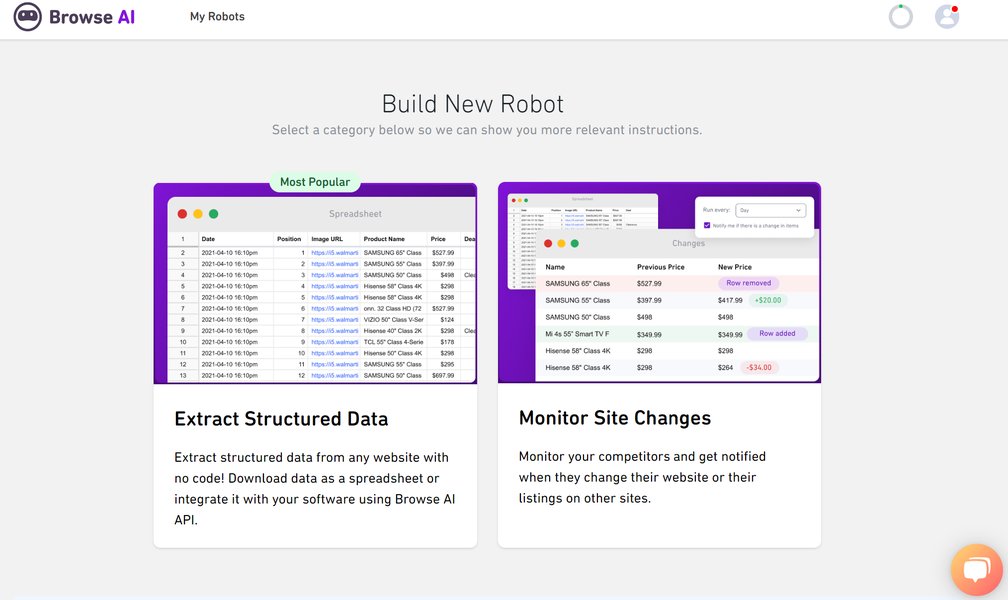
The Browse AI interface, designed for ease of use in web data extraction.
Unlocking the Power: Key Features of Browse AI
Browse AI is packed with features designed to make web data extraction and monitoring both powerful and accessible. Here’s a closer look at what it offers:
Seamless No-Code Data Extraction
Point, Click, Extract
The cornerstone of Browse AI is its no-code interface. Users can train robots by simply pointing and clicking on the data elements they wish to extract from a webpage – whether it's text, links, images, or entire lists of items like product details, prices, or contact information. This process typically takes just a few minutes, transforming complex websites into structured data without any programming.
Vigilant Website Monitoring
Stay Updated, Automatically
Browse AI excels at monitoring websites for changes. Users can set up robots to regularly check pages for updates, such as price fluctuations on e-commerce sites, new job postings on career portals, or competitor activity. Notifications can be configured to alert users to these changes, ensuring they always have the latest information. It supports bulk monitoring, allowing users to track thousands of pages simultaneously.
Ready-to-Deploy: Prebuilt Robots
Jumpstart Your Data Collection
To accelerate the process, Browse AI offers a library of prebuilt robots for common use cases. These templates cover tasks like scraping e-commerce product data, real estate listings, social media profiles, news articles, and more. Users can deploy these robots instantly or customize them to fit their specific needs, saving considerable setup time.
Intelligent Adaptation: AI-Powered Reliability
Smart Robots for Dynamic Web
Websites often change their layouts, which can break traditional web scrapers. Browse AI’s robots are infused with AI capabilities that help them adapt to such changes. They learn to identify data patterns and elements more robustly, mimicking human-like browsing to navigate dynamic content, handle logins, and manage pagination, leading to more consistent and reliable data extraction over time.
Effortless Workflow Integration
Connect Your Data, Your Way
Extracted data isn't useful in isolation. Browse AI provides multiple ways to integrate this data into existing workflows. Users can download data as CSV or JSON files, send it directly to Google Sheets or Airtable, or connect to thousands of other applications using Zapier, Make.com (formerly Integromat), Pabbly Connect, or its public API and webhooks for custom software integrations. This allows for powerful automation, such as automatically updating CRM records or feeding data into business intelligence dashboards.
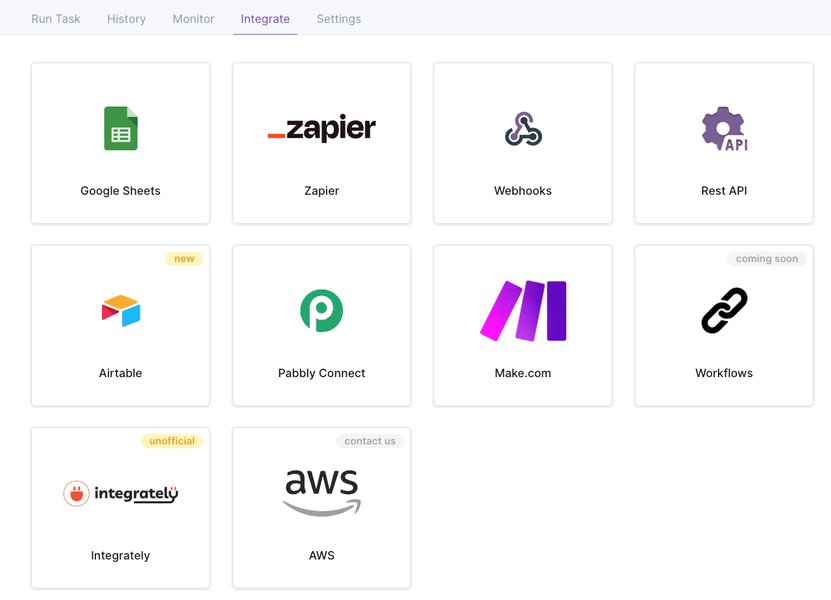
Browse AI offers a wide range of integrations for seamless data workflows.
How Browse AI Works: A Glimpse Under the Hood
Browse AI simplifies the complex process of web data extraction through an intuitive, AI-driven workflow:
- Robot Training: The user initiates the process by navigating to the target website within the Browse AI interface (often via its Chrome extension). They then demonstrate the data they want to extract by clicking on the desired elements (e.g., product names, prices, descriptions). The AI observes these actions and learns the pattern.
- Robot Creation: Based on the user's demonstration, Browse AI automatically configures a "robot" – a software agent programmed to perform the specified extraction task. Users can review and refine what the robot has learned.
- Data Extraction & Monitoring: Once trained, the robot can be run on demand or scheduled to execute at regular intervals (e.g., every hour, daily). The robot navigates the website, extracts the specified data, and handles elements like pagination (moving through multiple pages) or interacting with site features if needed.
- Cloud-Based Operation: All operations run on Browse AI's cloud infrastructure, meaning no software installation is required on the user's computer, and tasks can run 24/7 without user intervention.
- Data Delivery: The extracted data is then made available in a structured format. Users can download it, receive it via email, or have it automatically sent to integrated applications like Google Sheets, Airtable, or any system connected via API or webhooks.
The platform's AI continuously works to ensure the robots remain functional even if the target website's structure changes slightly, attempting to self-heal or alerting the user if significant modifications prevent data extraction.
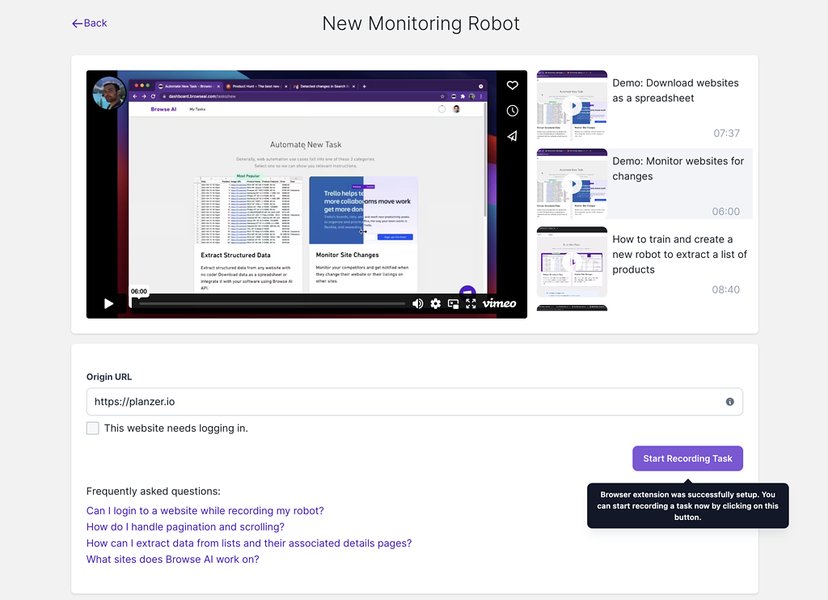
Setting up a Browse AI robot to monitor website changes.
Diverse Applications: Popular Use Cases
Browse AI's versatility makes it suitable for a wide array of data-gathering tasks across various industries. Here are some common ways users leverage the platform:
- Price Monitoring: E-commerce businesses and market analysts track competitor pricing, monitor price changes for specific products, and gather data for dynamic pricing strategies.
- Product Data Extraction: Users scrape product details (descriptions, images, SKUs, reviews, availability) from online stores like Amazon or eBay for market research, competitive analysis, or populating their own e-commerce platforms.
- Lead Generation: Sales and marketing teams extract contact information, company details, and other relevant data from online directories, professional networks like LinkedIn, or industry-specific websites to build targeted lead lists.
- Review Scraping & Sentiment Analysis: Businesses gather customer reviews from platforms like G2, Capterra, Yelp, or product pages to analyze customer sentiment, identify trends, and make data-driven decisions about product development or service improvements.
- News and Content Aggregation: Researchers, content creators, and media analysts monitor news sites, blogs, and forums for specific keywords or topics, aggregating relevant articles and information for analysis or content curation.
- Job Posting Monitoring: Recruiters and job seekers track job listings on platforms like Indeed, LinkedIn, or company career pages to stay updated on new opportunities or market trends.
- Real Estate Data Collection: Real estate professionals gather property listings, pricing information, agent details, and market trends from real estate websites.
- Financial Data Monitoring: Investors and financial analysts monitor financial news, stock prices (where permitted), or company announcements for timely insights.
The following mindmap illustrates the breadth of Browse AI's applications, showcasing its adaptability to various data extraction needs.
Popular Use Cases"] PriceMonitoring["Price Monitoring
(E-commerce, Dynamic Pricing)"] ProductData["Product Data Extraction
(Market Research, Inventory)"] LeadGen["Lead Generation
(Sales, Marketing Outreach)"] ReviewScraping["Review Scraping
(Sentiment Analysis, Feedback)"] NewsAggregation["News & Content Aggregation
(Research, Content Curation)"] JobPostings["Job Posting Monitoring
(Recruitment, Job Seeking)"] RealEstate["Real Estate Data
(Listings, Market Trends)"] FinancialData["Financial Data Monitoring
(News, Company Updates)"]
Feature Emphasis Across Different User Needs
Browse AI caters to a diverse range of users, from individual freelancers to large enterprises. While all users benefit from its core no-code capabilities, the emphasis on certain features may vary depending on their specific requirements. The radar chart below provides an opinionated visualization of how different user profiles might prioritize or benefit from various aspects of Browse AI.
This chart illustrates that while ease of use is important for all, solopreneurs might prioritize it slightly more. Conversely, enterprise clients will likely demand higher levels of automation power, monitoring frequency, scalability, and AI adaptability to handle complex, large-scale data operations.
Pricing Tiers: Finding the Right Fit (as of May 2025)
Browse AI offers a range of pricing plans designed to accommodate various usage levels and needs, from individuals just starting out to large organizations requiring extensive data extraction capabilities. Plans are typically based on the number of "credits" consumed (credits are used for tasks like running robots or performing checks), the number of robots, and the frequency of monitoring. Here's an overview of common plan structures:
| Plan | Approx. Monthly Cost (Annual Billing) | Credits | Robots Limit | Key Features | Ideal For |
|---|---|---|---|---|---|
| Free | $0 | ~200 (monthly) | 5 | 24-hour check intervals, Email support, Basic data extraction. | Beginners, Testing the platform, Very small-scale or infrequent tasks. |
| Starter | $39 | 10,000 (annually) | Increased (e.g., 10-50) | Faster check intervals, API & Webhooks, Integrations (Google Sheets, Airtable, Zapier), More frequent monitoring. | Individuals, Solopreneurs, Small businesses with moderate data needs. |
| Professional | $99 | Significantly More (e.g., 50,000+ annually) | Higher (e.g., 50-200) | Very fast check intervals (e.g., down to 12 minutes), Bulk monitoring capabilities, Advanced features, Higher data retention. | Growing businesses, Marketing teams, Users with regular and intensive monitoring requirements. |
| Premium / Managed Services | $500+ | Custom / High Volume | Custom | Fully managed data extraction services, Custom robot development, Tailored solutions for complex websites, Dedicated support, Enterprise-grade features. | Large enterprises, Businesses with complex or high-volume data extraction needs requiring a hands-off solution. |
Note: Pricing and plan features are subject to change. It's always recommended to check the official Browse AI website for the most current information. Credits are consumed per robot run or per page monitored, so usage can vary based on task complexity and frequency.
User Perspectives: What People Are Saying
Browse AI generally receives positive feedback from its users, who frequently praise its ease of use, efficiency, and powerful no-code approach to web scraping. Many users highlight the significant time savings achieved by automating data collection tasks that were previously manual or required custom development.
Common Praises:
- Intuitive Interface: Users, especially those without a technical background, find the point-and-click robot training process straightforward and quick to learn.
- Time and Cost Savings: Automating data extraction and monitoring frees up valuable time and resources, often eliminating the need to hire developers for scraping tasks.
- Effective Integrations: The ability to seamlessly send data to Google Sheets, Airtable, Zapier, and other platforms is a major plus for automating workflows.
- Responsive Customer Support: Many reviews mention helpful and quick customer support when issues or questions arise.
- AI Adaptability: The AI's capability to handle minor website changes reduces the fragility often associated with web scrapers.
Areas for Improvement Noted by Some Users:
- Handling Very Complex Websites: While generally robust, some users note occasional difficulties with extremely dynamic or JavaScript-heavy websites, or sites with advanced anti-bot measures.
- Learning Curve for Advanced Features: While basic use is simple, mastering all advanced functionalities and troubleshooting complex scenarios can take some time.
- Credit System Understanding: New users sometimes need time to fully grasp how credits are consumed for different types of tasks and monitoring frequencies.
- Cost for High Volume: For very high-volume scraping needs, the cost can add up, though it's often still more economical than custom development or alternative solutions.
Overall, Browse AI is often described as a "game-changer" for individuals and businesses looking to leverage web data without getting bogged down in technical complexities. Aggregate review scores on platforms like Capterra and Trustpilot are typically high, reflecting strong user satisfaction.
Watch Browse AI in Action
To get a quick visual understanding of how easy it is to train a robot and extract data with Browse AI, check out this short overview video. It demonstrates the core functionality of the platform, showcasing the process of selecting data on a website and setting up an automated extraction task.
This video provides a glimpse into the user experience, highlighting the point-and-click interface and the speed at which a data extraction robot can be configured and deployed.
Frequently Asked Questions (FAQ)
What sets Browse AI apart from traditional web scraping methods?
Traditional web scraping often requires custom coding (e.g., using Python libraries like Beautiful Soup or Scrapy), which demands programming skills and significant setup time. Browse AI differentiates itself with its no-code approach, allowing non-technical users to create scrapers through a visual interface. Furthermore, its AI-powered adaptability helps robots better handle website layout changes, reducing the frequent maintenance typically needed for custom scripts. It also offers built-in scheduling, monitoring, and integrations, which would otherwise need to be developed separately.
Do I need any programming or coding skills to use Browse AI?
No, absolutely not. Browse AI is specifically designed for users without any programming or coding background. The platform uses an intuitive point-and-click interface where you show the "robot" what data to extract by interacting with the website directly. The AI handles the underlying complexities of web structure and data retrieval.
How does Browse AI handle websites that frequently change their layout or structure?
Browse AI employs artificial intelligence to make its robots more resilient to website changes. When training a robot, the AI learns not just the exact location of data but also contextual clues and patterns. If a website's layout changes moderately, the AI attempts to intelligently re-locate the target data. While no system is foolproof against major redesigns, this AI-driven adaptability significantly improves reliability and reduces the need for constant re-training compared to more rigid scraping tools.
What types of data can I typically extract using Browse AI?
You can extract a wide variety of data, including:
- Text content (product descriptions, articles, names, addresses)
- Numbers (prices, ratings, quantities)
- Links (URLs)
- Image URLs or even screenshots of elements
- Lists of items (e.g., all products on a category page, all comments on a post)
- Data from tables
- Information that requires interaction, like clicking buttons to reveal more data (within limits)
Essentially, if you can see it on a webpage, Browse AI can usually be trained to extract it.
What options are available for integrating extracted data into my existing workflows?
Browse AI offers several integration options:
- Direct Downloads: You can download data as CSV or JSON files.
- Google Sheets: Send data directly to a Google Sheet, which updates automatically.
- Airtable: Integrate with Airtable bases.
- Zapier & Make.com (Integromat): Connect to thousands of other apps and automate complex workflows.
- Public API & Webhooks: For developers or custom solutions, data can be accessed via a robust API or pushed to your systems using webhooks.
These options provide flexibility to incorporate web data into almost any business process or analytical tool.
Recommended Further Exploration
To deepen your understanding of web data extraction and automation, consider exploring these related queries:
- How does no-code AI data extraction compare to traditional web scraping techniques?
- What are the best practices for ethical web scraping and data collection?
- Exploring advanced automation workflows using Browse AI integrations with Zapier or Make.com.
- Case studies of businesses successfully using Browse AI for market research and competitive analysis.
References
Last updated May 8, 2025