
Unlock the Blueprint: Building Your Own Shopify-Style E-commerce Platform
A comprehensive guide to creating a basic web application where users can list and sell their products online.
Creating an e-commerce application where users can add and sell products, much like the core functionality offered by platforms such as Shopify, is a significant but achievable web development project. It involves integrating various technologies to handle user management, product catalogs, shopping carts, orders, and secure payments. This guide outlines the essential components, technologies, and steps required to build a foundational version of such a platform.
Essential Insights
- Core Features are Key: A successful basic e-commerce app needs robust user authentication, intuitive product management (adding/editing items with details, images, variants), clear product listings, a functional shopping cart, a secure checkout process, and basic order management for sellers.
- Technology Choices Matter: Building from scratch requires a combination of frontend (React, Vue, Angular), backend (Node.js/Express, Python/Django, Ruby on Rails), database (PostgreSQL, MySQL, MongoDB), and payment gateway (Stripe, PayPal) technologies.
- Development Path Flexibility: You can build entirely from scratch for maximum control, use open-source e-commerce frameworks to speed up development, or even leverage existing platforms like Shopify via their APIs for specific functionalities.
Understanding the Core Functionality of an E-commerce Platform
What Makes an Online Store Tick?
Before diving into development, it's crucial to understand the fundamental features that allow users (sellers) to add products and other users (buyers) to purchase them. A basic Shopify-like application needs to handle several interconnected processes seamlessly.
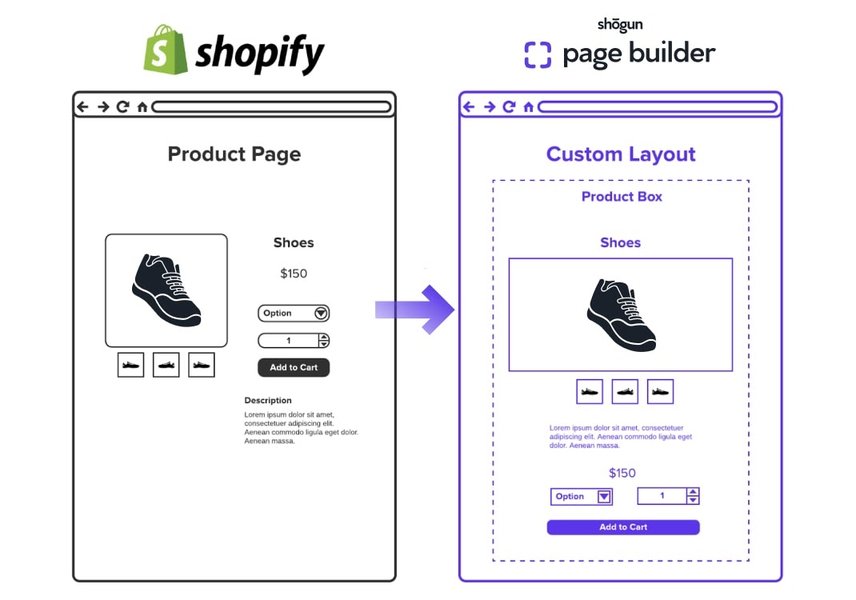
Example of a detailed product page, a key component in e-commerce.
User Authentication and Management
Secure registration and login systems are necessary for both sellers and buyers. Sellers need accounts to manage their products and orders, while buyers need accounts (or guest checkout options) to make purchases and track their orders.
Product Management System
This is the heart of the seller's experience. The system must allow users to:
- Add Products: Include fields for title, detailed description, high-quality images, pricing, and categories/tags.
- Manage Variants: Support options like size, color, material, etc., each potentially having its own price, SKU, and inventory level.
- Control Inventory: Track stock quantities automatically, preventing overselling and indicating availability to buyers.
- Edit and Delete Products: Allow easy modification or removal of listings.
Platforms like Shopify offer sophisticated interfaces for this, including bulk CSV uploads and integration with third-party services (like print-on-demand), setting a high bar for user expectations.
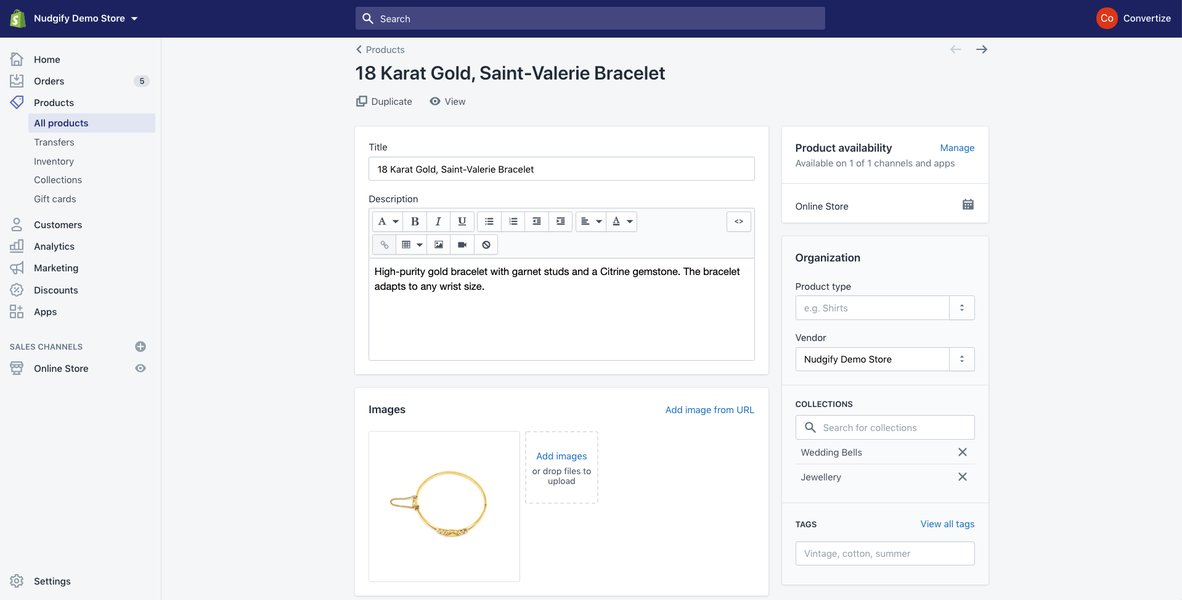
Interface for adding product details in an e-commerce platform.
Product Listing and Browsing
Buyers need an intuitive way to discover products. This involves displaying products attractively on category or search result pages, often with filtering and sorting options (by price, popularity, date added).
Shopping Cart and Checkout
A standard feature where buyers can add multiple items, review their selection, modify quantities, and then proceed to a secure checkout process. The checkout typically involves collecting shipping information and processing payment.
Payment Gateway Integration
Securely handling online payments is non-negotiable. Integrating with trusted payment gateways like Stripe, PayPal, or Square is essential to process credit card transactions and other payment methods safely.
Order Management
Sellers need a dashboard to view incoming orders, update their status (e.g., paid, shipped, delivered, cancelled), manage customer communication, and potentially handle returns or refunds.
Visualizing the E-commerce App Structure
Mapping the Core Components
To better understand how these features interconnect, a mindmap can illustrate the structure of a basic e-commerce application built from scratch.
(Listings, Search, Filters)"] id1b["Product Details Page"] id1c["Shopping Cart"] id1d["Checkout Process"] id1e["User Account Management
(Profile, Order History)"] id1f["Seller Dashboard
(Product/Order Management)"] id2["Backend (Server-Side Logic)"] id2a["API Endpoints (REST/GraphQL)"] id2b["User Authentication & Authorization"] id2c["Product CRUD Operations"] id2d["Inventory Tracking"] id2e["Order Processing Logic"] id2f["Payment Gateway Integration"] id3["Database"] id3a["User Data (Credentials, Profiles)"] id3b["Product Catalog (Details, Variants, Images)"] id3c["Inventory Levels"] id3d["Order Information (Customer, Items, Status)"] id3e["Cart Data (Temporary/Persistent)"] id4["External Services"] id4a["Payment Gateway (Stripe, PayPal)"] id4b["Cloud Storage (AWS S3, Google Cloud Storage)
for Images/Media"] id4c["Email Service (Notifications)"]
This mindmap shows the main layers: the frontend that users interact with, the backend that handles logic and data processing, the database where information is stored, and external services like payment processors and file storage.
Choosing Your Development Path
Comparing Approaches: Effort vs. Flexibility
There are different ways to approach building your e-commerce application. The choice depends on factors like your technical expertise, budget, time constraints, and desired level of customization. The radar chart below compares three common approaches based on estimated effort, cost, speed of development, flexibility, and scalability potential.
As the chart suggests, building from scratch offers the most flexibility but requires the highest effort and potentially cost. Using Shopify directly is the fastest way to get started but offers less deep customization compared to a custom build. Open-source frameworks offer a middle ground.
Building from Scratch: Technology Stack
Choosing the Right Tools for the Job
If you opt to build your application from the ground up, selecting an appropriate technology stack is crucial. Here’s a breakdown of common choices for each component:
| Component | Purpose | Popular Technologies | Considerations |
|---|---|---|---|
| Frontend Framework | Builds the user interface (UI) that users interact with in their browser. | React.js, Vue.js, Angular | Choose based on team familiarity, ecosystem, performance needs, and desired interactivity. |
| Backend Framework | Handles server-side logic, API creation, database interactions, user authentication. | Node.js (with Express), Python (with Django or Flask), Ruby (with Rails), Java (with Spring) | Consider performance, scalability, language preference, and available libraries/packages. |
| Database | Stores all persistent data like users, products, orders. | SQL: PostgreSQL, MySQL NoSQL: MongoDB |
SQL databases offer structure and ACID compliance, good for relational data (orders, users). NoSQL databases offer flexibility, good for less structured data (product catalogs with varying attributes). |
| Payment Gateway API | Processes online payments securely. | Stripe, PayPal, Square, Braintree | Evaluate based on transaction fees, supported countries/currencies, ease of integration, and features (subscriptions, etc.). |
| Cloud File Storage | Stores large files like product images efficiently and scalably. | Amazon S3, Google Cloud Storage, Azure Blob Storage | Consider cost, scalability, CDN integration for faster image delivery. |
| Hosting Platform | Runs your web application and makes it accessible online. | Heroku, Vercel (frontend/serverless), AWS (EC2, Lambda), Google Cloud Platform, Azure | Choose based on ease of deployment, scalability options, cost, and required services (database hosting, etc.). |
This table summarizes the typical roles of each technology component and provides popular options to consider when planning your custom e-commerce build.
High-Level Development Steps
A Roadmap for Building Your Application
Building even a basic e-commerce application is a multi-step process. Here’s a typical workflow:
- Project Setup & Environment Configuration: Initialize your frontend and backend projects. Set up version control (Git). Configure your database schema (users, products, orders, cart items).
- Implement User Authentication: Create backend endpoints for user registration, login, and session/token management (e.g., using JWT). Implement secure password hashing. Build corresponding frontend forms.
- Develop Product Management API & UI:
- Backend: Create RESTful API endpoints for CRUD (Create, Read, Update, Delete) operations on products. Handle image uploads (saving links from cloud storage). Support product variants.
- Frontend: Build a seller dashboard interface with forms for adding/editing products and displaying the product list.
- Build Product Listing & Browsing UI: Create frontend components to display products to buyers, including search and filtering capabilities.
- Implement Shopping Cart & Checkout Logic:
- Frontend: Manage cart state (adding/removing items, updating quantities).
- Backend: Create endpoints to manage cart data (if persistent) and initiate the order creation process upon checkout.
- Integrate Payment Gateway: Implement backend logic to communicate with the chosen payment gateway's API (e.g., Stripe API) to create payment intents/charges. Handle payment confirmations (webhooks) to update order status. Securely handle payment details on the frontend (often using the gateway's own UI elements/SDKs).
- Develop Order Management System:
- Backend: Store order details linked to users and products. Update inventory automatically upon successful purchase.
- Frontend: Create interfaces for buyers to view their order history and for sellers to view and manage incoming orders (update status, etc.).
- Refine UI/UX and Ensure Responsiveness: Polish the user interface using CSS frameworks (like Tailwind CSS, Bootstrap) or component libraries. Ensure the application works well on various screen sizes (desktop, tablet, mobile).
- Testing and Deployment: Thoroughly test all functionalities (user flows, edge cases, security). Deploy the backend and frontend to a hosting provider. Set up HTTPS for security.
Illustrative Backend Code Snippet (Conceptual)
Here’s a simplified example of what a backend endpoint to add a product might look like using Node.js and Express (this is illustrative and requires more setup):
// Example using Node.js with Express
const express = require('express');
const authenticateUser = require('./middleware/auth'); // Hypothetical auth middleware
const Product = require('./models/Product'); // Hypothetical database model
const uploadToCloud = require('./utils/fileUpload'); // Hypothetical file upload utility
const upload = require('multer')(); // Middleware for handling file uploads

const app = express();
app.use(express.json()); // Middleware to parse JSON bodies

// POST endpoint to create a new product
app.post('/api/products', authenticateUser, upload.single('productImage'), async (req, res) => {
  try {
    // Extract product details from request body
    const { title, description, price, variants, stock } = req.body;

    // Assume 'req.user' is populated by 'authenticateUser' middleware
    const ownerId = req.user.id;

    let imageUrl = null;
    // If an image file was uploaded, process it
    if (req.file) {
      // Upload the file to cloud storage (e.g., S3) and get the URL
      imageUrl = await uploadToCloud(req.file.buffer, req.file.originalname);
    }

    // Create a new product record in the database
    const newProduct = await Product.create({
      title,
      description,
      price: parseFloat(price), // Ensure price is a number
      imageUrl,
      variants: variants ? JSON.parse(variants) : [], // Parse variants if provided
      stock: parseInt(stock, 10), // Ensure stock is an integer
      ownerId
    });

    // Respond with the newly created product data
    res.status(201).json(newProduct);

  } catch (error) {
    console.error('Error creating product:', error);
    res.status(400).json({ message: 'Failed to create product', error: error.message });
  }
});

// Placeholder for starting the server (in a real app, this would be more complex)
// app.listen(3000, () => console.log('Server running on port 3000'));
This snippet demonstrates receiving product data and an image file, potentially uploading the image, interacting with a database model, and sending back a response. Real-world implementations require robust error handling, validation, and security measures.
See It in Action: Shopify Store Setup
Understanding the Benchmark
While building your own platform offers customization, understanding how established platforms like Shopify work provides valuable context. Shopify simplifies the process significantly for end-users. This video gives a quick overview of setting up a Shopify store, showcasing the user experience you might aim to replicate or improve upon for your sellers.
Shopify Beginner's Tutorial 2025 - A walkthrough of setting up an e-commerce store on the Shopify platform.
Watching how products are added, themes are customized, and settings are configured in Shopify can offer insights into user expectations and standard e-commerce workflows, which is helpful even when building a custom solution.
Frequently Asked Questions (FAQ)
Common Questions About Building an E-commerce App
How long does it take to build a basic e-commerce app?
The time can vary significantly based on the complexity of features, the chosen technology stack, and the developer's experience. A very basic version with core features (product add/list, cart, checkout with one payment method) built from scratch by an experienced developer might take a few weeks to a couple of months. Adding more features, robust testing, and polish will extend this timeline considerably.
What skills are needed to build this type of application?
You'll typically need proficiency in:
- Frontend Development: HTML, CSS, JavaScript, and a framework like React, Vue, or Angular.
- Backend Development: A server-side language and framework (e.g., Node.js/Express, Python/Django), API design (RESTful principles).
- Database Management: Understanding SQL or NoSQL databases, schema design, querying.
- DevOps Basics: Version control (Git), deployment, server management/hosting.
- Security Fundamentals: Understanding common web vulnerabilities (XSS, CSRF, SQL injection) and how to prevent them, secure authentication, HTTPS.
- Payment Gateway Integration: Working with third-party APIs like Stripe or PayPal.
Is it better to build from scratch or use a platform like Shopify?
It depends on your goals:
- Use Shopify (or similar platform): Best if you want to launch quickly, need a wide range of built-in features and apps, require reliability and scalability without managing infrastructure, and don't need deep, unique customization beyond themes and apps. Ideal for most standard online stores.
- Build from Scratch: Better if you need highly specific, unique features not available on platforms, want complete control over the code and user experience, are building a specialized marketplace, or have specific integration requirements. Requires significantly more development resources (time, cost, expertise).
- Use Open-Source Frameworks: Offers a balance, providing a pre-built foundation that you can customize more deeply than a SaaS platform like Shopify, but still requires significant development effort.
How much does it cost to build a custom e-commerce app?
Costs vary widely based on feature scope, design complexity, technology choices, and developer rates (location, experience). A basic custom app could range from thousands to tens of thousands of dollars if hiring developers or an agency. Ongoing costs include hosting, domain registration, payment gateway fees, and maintenance/updates.
Recommended Next Steps
Explore Further Topics
- Explore a detailed guide on using Node.js and Express for building e-commerce backend APIs.
- Compare the pros and cons of React, Vue, and Angular specifically for e-commerce frontend development.
- Learn how to securely integrate Stripe payments into a custom web application.
- Discover popular open-source e-commerce platforms like MedusaJS or Saleor as alternatives to building from scratch.
References
Sources and Further Reading
 help.shopify.com
 aws.amazon.com
 shopify.com
 community.shopify.com
shopify.com
help.shopify.com
community.shopify.com
community.shopify.com
shopify.com
help.shopify.com
 apps.shopify.com
apps.shopify.com
help.shopify.com
apps.shopify.com
apps.shopify.com
apps.shopify.com
help.shopify.com
 shopify.dev
community.shopify.com
help.shopify.com
help.shopify.com
shopify.dev
community.shopify.com
help.shopify.com
help.shopify.com
Last updated May 5, 2025