
Decoding C++ setBandwidth Errors with libiio
A Comprehensive Analysis of Potential Issues and Best Practices for RF Device Control
The provided C++ code snippet for setBandwidth aims to configure the radio frequency (RF) bandwidth of a device using the libiio library, specifically through the iio_channel_attr_write_longlong function. While the snippet itself appears syntactically correct, potential issues often arise from its interaction with the underlying hardware, the libiio framework, or the environment in which it operates. Understanding these nuances is crucial for robust RF system development.
Key Highlights of Potential Issues
- Return Value Interpretation: The
iio_channel_attr_write_longlongfunction returns a negativeerrnocode on failure, which provides specific clues about the error cause, such as invalid arguments or I/O errors. - Hardware and Driver Compatibility: Many issues stem from the RF device (e.g., AD9361, ADRV9009) not supporting the requested bandwidth or the underlying Linux Industrial I/O (IIO) drivers not being correctly configured or up-to-date.
- Context and Channel Initialization: Improper initialization of the
libiiocontext (iio_context) and the specific receiver channel (rxChan) before attempting to write attributes is a common pitfall that leads to failures.
Understanding the setBandwidth Function
The setBandwidth function is designed to dynamically adjust the RF bandwidth of a receiver channel. Let's break down its components:
void setBandwidth(int bw) {
    long long target_bw = (bw > 0) ? bw : std::min<int>(samplerate, 52000000);

    if (iio_channel_attr_write_longlong(rxChan, "rf_bandwidth", target_bw) < 0) {
        flog::error("Failed to set bandwidth to {}", target_bw);
    } else {
        flog::info("Bandwidth set to {}", target_bw);
    }
}
The function takes an integer bw as input. If bw is positive, it's used directly as target_bw. Otherwise, it defaults to the minimum of samplerate and 52,000,000 Hz, suggesting a maximum bandwidth limit for the specific hardware (possibly an Analog Devices AD9361, which has a 56 MHz maximum RF bandwidth). The core of the function is the call to iio_channel_attr_write_longlong, which attempts to write the target_bw value to the "rf_bandwidth" attribute of the rxChan (receiver channel).
The Role of iio_channel_attr_write_longlong
The iio_channel_attr_write_longlong function is a crucial part of the libiio library, enabling direct interaction with Industrial I/O (IIO) device attributes. It's designed to set the value of a channel-specific attribute, in this case, "rf_bandwidth", to a long long integer. A negative return value indicates an error, typically an errno code, which provides vital diagnostic information. Common error codes include:
-EINVAL(Invalid argument -22): This often means the value being written is out of the supported range for the attribute, or the attribute name is incorrect/unsupported.-EIO(I/O error): A general input/output error, often indicating a problem communicating with the hardware or the IIO device.- Other negative error codes: These correspond to various system errors, as defined in
errno.h.
The libiio library facilitates communication with Linux IIO devices, abstracting away much of the low-level kernel interaction. It provides functions to discover devices, channels, and attributes, as well as to read and write attribute values. The library's portability across various GNU/Linux distributions, macOS, and Windows enhances its utility in diverse development environments.
Common Sources of Errors in setBandwidth
While the code snippet is structurally sound, several factors can lead to the iio_channel_attr_write_longlong call returning an error. Identifying these is key to debugging.
Incorrect Initialization or Missing Context
Before any libiio function can be successfully called, a valid iio_context must be created, and the rxChan (representing the receiver channel) must be properly found and initialized within that context. If the context is NULL or the channel lookup fails, subsequent calls to iio_channel_attr_write_longlong will fail. For example, issues related to finding the device or channel can manifest as undefined references or runtime errors, as seen in various libiio discussions.
The iio_device_find_channel function is typically used to obtain a pointer to the desired channel. If this fails, rxChan will be invalid, leading to errors in the setBandwidth function. It's critical to ensure that the device and channel are accessible within the IIO context, which can be verified using tools like iio_attr -d to list available devices and attributes.
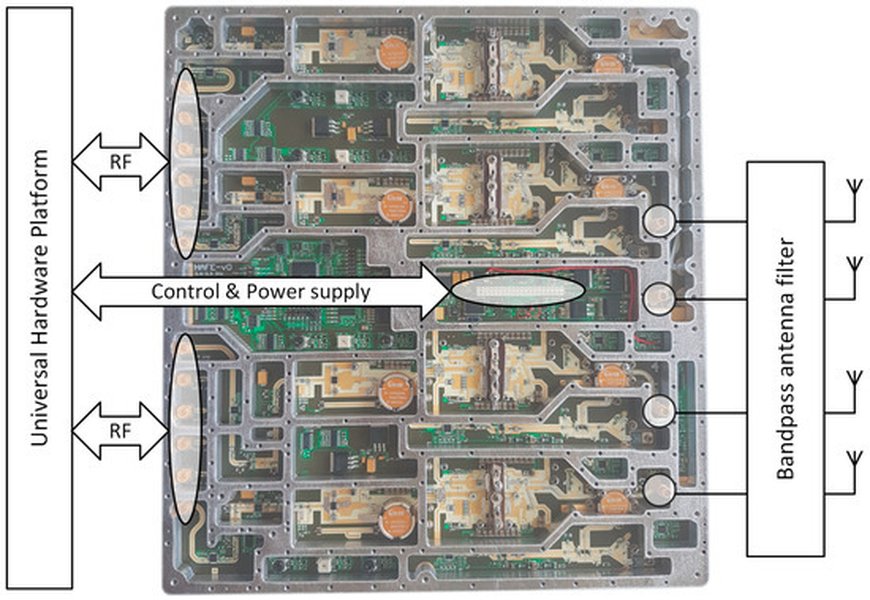
A conceptual block diagram illustrating the components involved in Software Defined Radio (SDR) and where bandwidth control fits into the signal chain.
Unsupported Bandwidth Value or Hardware Limitations
One of the most frequent causes of iio_channel_attr_write_longlong failing with an "Invalid argument" error (-EINVAL or -22) is attempting to set an "rf_bandwidth" value that the underlying hardware or its current configuration does not support. RF transceivers like the ADRV9009 or AD9361 have specific ranges for supported bandwidths, often dependent on the sample rate and other profile configurations.
- Out-of-Range Values: If
target_bwexceeds the maximum allowed RF bandwidth for the device or is below the minimum, the write operation will fail. - Profile Dependencies: For devices like the ADRV9009, bandwidth and sample rate are often configurable through predefined profiles. Directly writing to
rf_bandwidthmight be rejected if it conflicts with the active profile. - Sample Rate Interaction: The relationship between sample rate and bandwidth is critical. For instance, the bandwidth is often related to half the sampling frequency (
fs/2). Ifsamplerateis not correctly synchronized with the desiredrf_bandwidth, issues can arise.
Outdated or Mismatched libiio Versions
Inconsistencies between the local libiio library version and the remote iiod (IIO Daemon) version can lead to unexpected behavior or errors, particularly when attribute sorting or internal API calls differ. While less common for simple attribute writes, it's a potential cause for obscure failures. Ensuring that both the host and target systems have compatible libiio versions is good practice.
Permissions and System Configuration
On Linux systems, access to IIO devices typically requires appropriate user permissions. If the application running the code does not have the necessary permissions to write to device attributes (e.g., trying to write to /sys/bus/iio/device/iio:devicex/in_voltageX_rf_bandwidth without root privileges or proper udev rules), the iio_channel_attr_write_longlong call will fail, often with a "Permission denied" error.
Runtime Environment and Resource Issues
- Resource Exhaustion: While less likely for a single attribute write, continuous or rapid configuration changes might strain system resources.
- Hardware Instability: Underlying hardware issues, such as poor power delivery or unstable clocking, can lead to communication errors that manifest as
iio_channel_attr_write_longlongfailures. - Concurrency: If multiple threads or processes attempt to write to the same IIO attribute simultaneously, race conditions or conflicts could occur, leading to intermittent errors.
Debugging Strategies and Best Practices
To effectively debug issues with the setBandwidth function, a systematic approach is recommended.
Leveraging Error Codes
The flog::error message provides a placeholder for the error code. The actual negative return value from iio_channel_attr_write_longlong directly corresponds to a standard errno value. You can use strerror(abs(v)) (where v is the negative return value) to get a human-readable description of the error. This is the most direct way to understand the immediate cause of failure.
#include <cerrno> // For errno values
#include <cstring> // For strerror

// ... inside setBandwidth function ...
    if (iio_channel_attr_write_longlong(rxChan, "rf_bandwidth", target_bw) < 0) {
        int err_code = iio_channel_attr_write_longlong(rxChan, "rf_bandwidth", target_bw); // Re-call to get the error if not stored
        flog::error("Failed to set bandwidth to {} - Error {}: {}", target_bw, err_code, strerror(abs(err_code)));
    } else {
        flog::info("Bandwidth set to {}", target_bw);
    }
Note: The code above re-calls the function to demonstrate how to get the error code for strerror. In practice, you would store the return value of the first call.
Verifying libiio Context and Channel
Before calling setBandwidth, ensure that rxChan is a valid pointer. This involves properly creating the iio_context and finding the channel. Add checks for NULL pointers:
// Example (assuming context and device are already obtained)
struct iio_channel *rxChan = iio_device_find_channel(my_device, "voltage0", true); // Or appropriate channel name
if (!rxChan) {
    flog::error("Failed to find RX channel.");
    return; // Or handle the error appropriately
}
// Now call setBandwidth(bw)
Inspecting Supported Bandwidths
Many IIO attributes, including "rf_bandwidth", have a set of allowed values or a valid range. These can sometimes be queried programmatically or found in device documentation. Use iio_attr from the command line to inspect the device's capabilities:
iio_attr -u ip:<device_ip> -c <device_name> <channel_name> rf_bandwidth
This command can show the current value and potentially reveal if the attribute is read-only or has specific constraints. For example, if the device is ad9361-phy and the channel is altvoltage0, you might use iio_attr -u ip:192.168.2.1 -c ad9361-phy altvoltage0 rf_bandwidth.
Updating Drivers and Firmware
Ensure that the Linux kernel drivers for your IIO device (e.g., AD9361, ADRV9009) and the device firmware are up-to-date. Outdated versions can have bugs or lack support for certain functionalities or bandwidths.
Considering Bandwidth Measurement Techniques
While the setBandwidth function is about configuring the RF bandwidth, it's distinct from measuring network bandwidth. However, understanding general bandwidth concepts is crucial. RF bandwidth refers to the frequency range occupied by a signal, typically measured in Hertz. In contrast, network bandwidth refers to the data transfer capacity, usually in bits per second. The setBandwidth function directly impacts the former. Measuring actual RF performance after setting bandwidth often involves specialized equipment and techniques to ensure the desired filtering and signal integrity.
Comparative Analysis of C++ Bandwidth Control Techniques
Controlling bandwidth in C++ applications can take many forms, from network-level throttling to RF device configuration. The setBandwidth function uses a direct hardware attribute write via libiio. Here's a comparison of different approaches and their complexity:
| Technique | Description | Complexity | Typical Use Case |
|---|---|---|---|
libiio Attribute Write (e.g., iio_channel_attr_write_longlong) |
Directly sets hardware-specific parameters like RF bandwidth on IIO devices (e.g., SDR platforms). Returns negative errno on failure. | Moderate | Controlling SDRs, ADCs, DACs, and other Industrial I/O hardware. |
Network Throttling (e.g., via Sleep or WinHTTP APIs) |
Programmatically limits data transfer rates over a network connection by introducing delays or managing buffer sizes. | High | Client-server applications, background downloads, real-time streaming where network usage needs to be controlled. |
File Bandwidth Reservation (Windows SetFileBandwidthReservation) |
Reserves a certain amount of I/O bandwidth for file operations to ensure constant throughput, preventing interruptions. | High | Disk-intensive applications, video editing, data logging, where consistent disk I/O is critical. |
UHD Library (e.g., usrp::set_rx_bandwidth) |
Similar to libiio, but specific to Ettus Research USRP devices, offering functions to configure various RF parameters including bandwidth. |
Moderate | Controlling USRP Software Defined Radios. |
The setBandwidth function falls into the first category, directly influencing the physical layer's RF characteristics rather than network data rates. This distinction is vital for understanding the context of potential errors.
Advanced Considerations for Robust Implementation
To make the setBandwidth function more robust, consider these advanced points:
Error Handling and Logging
While flog::error is used, a more detailed error handling mechanism could involve:
- Returning a boolean or an error code from
setBandwidthto indicate success or failure to the caller. - Throwing exceptions (if the project adheres to C++ exception handling) to propagate errors more effectively.
- Logging the specific
errnovalue and its string representation for better diagnostics.
Retry Mechanisms and Validation
For intermittent issues, a retry mechanism with a back-off strategy could be implemented. Additionally, after attempting to set the bandwidth, you could read back the "rf_bandwidth" attribute using iio_channel_attr_read_longlong to verify that the value was set successfully. This adds a layer of confirmation.
RAII for Resource Management
For libiio contexts and buffers, adopting Resource Acquisition Is Initialization (RAII) can prevent resource leaks. Objects like iio_context and iio_buffer should be managed in a way that ensures their destruction functions (e.g., iio_context_destroy, iio_buffer_destroy) are called when they go out of scope, even if errors occur.
Assessing the Effectiveness of Bandwidth Configuration
To truly understand if the setBandwidth function is working as intended, beyond just the absence of an error return, it's beneficial to visualize the system's performance. A radar chart can help compare different attributes related to system performance after bandwidth configuration, such as signal-to-noise ratio (SNR), throughput, and spectral efficiency.
This radar chart illustrates how different bandwidth settings can impact various performance metrics of an RF system. For instance, a "High Bandwidth Attempt" might lead to higher theoretical throughput but could degrade signal integrity and increase power consumption if the hardware limits are pushed. Conversely, a "Low Bandwidth Attempt" might offer excellent signal integrity and lower power consumption but at the cost of reduced throughput. An "Optimal Configuration" aims to balance these trade-offs. The setBandwidth function directly influences these performance characteristics, and its success is measured not just by the absence of errors but by the achieved system performance.
Frequently Asked Questions (FAQ)
What does a negative return value from iio_channel_attr_write_longlong mean?
iio_channel_attr_write_longlong indicates an error. This value is typically a negative errno code (e.g., -22 for EINVAL, -5 for EIO), which provides specific information about the nature of the failure, such as an invalid argument or a general I/O error.Why might "rf_bandwidth" fail to set even with valid numerical input?
How can I verify the actual bandwidth set on the device?
iio_channel_attr_read_longlong after attempting to write it. Command-line tools like iio_attr can also be used to inspect the current attribute value on the device.What is the relationship between RF bandwidth and sample rate in SDRs?
samplerate / 2, though specific hardware implementations might have different internal relationships and limitations.Conclusion
The setBandwidth function is a critical component for controlling RF devices through the libiio framework. While the C++ syntax of the provided snippet is correct, the root cause of errors typically lies in the interaction with the underlying hardware, the configuration of the libiio context and channels, or the validity of the requested bandwidth value relative to the device's capabilities. Effective debugging hinges on interpreting the negative errno return values, ensuring proper initialization, verifying device support, and maintaining compatible software/firmware versions. By adopting robust error handling, validation, and a systematic debugging approach, developers can ensure reliable control over RF parameters in their applications.
Recommended Further Exploration
- Understanding libiio error codes and their meanings
- Best practices for initializing and and managing iio_context in C++
- How to query supported RF bandwidths for Analog Devices SDRs
- Debugging common issues with Analog Devices AD9361 and ADRV9009 via libiio
References
Last updated May 21, 2025