
Unveiling the Shadows: Exploring Fileless Malware Proofs-of-Concept in C#
Dive into how C# is used to craft stealthy malware that operates directly in memory, bypassing traditional defenses.
Key Insights into C# Fileless Malware POCs
- Memory-Resident Operation: Fileless malware primarily executes in RAM, avoiding writing executable files to the hard disk, making detection significantly harder for traditional signature-based antivirus.
- Leveraging Legitimate Tools: Techniques often involve using trusted system utilities ("Living Off The Land" - LOTL), like PowerShell or WMI, and manipulating system components like the Windows Registry for persistence and execution.
- C# & .NET Advantages: The .NET framework provides powerful features like Reflection, dynamic code compilation (e.g., via `CodeDomProvider` or `Add-Type` in PowerShell), and easy access to Windows APIs, making C# a popular choice for developing sophisticated fileless attack vectors.
Understanding Fileless Malware
What Makes It "Fileless"?
Fileless malware represents a sophisticated category of malicious software designed to infiltrate and operate on a system without leaving the traditional footprint of executable files stored on the hard drive. Instead of writing files to disk, it leverages native system tools, exploits vulnerabilities, and executes malicious code directly within the computer's memory (RAM). This approach allows it to evade many conventional security solutions that primarily focus on scanning files for known malicious signatures.
Why C# for Fileless Malware POCs?
C# has become a language of interest for developing fileless malware Proofs-of-Concept (POCs) due to its tight integration with the Windows operating system via the .NET Framework. Key advantages include:
- Memory Manipulation: C# and .NET provide mechanisms to load and execute assemblies (compiled code) directly in memory without touching the disk.
- Reflection: The ability to inspect and invoke code dynamically at runtime allows for stealthy execution and manipulation of other processes.
- Windows API Access: Easy interaction with low-level Windows APIs enables techniques like process injection, registry manipulation, and hooking.
- Dynamic Compilation: C# code can be compiled on-the-fly within a running process or script (like PowerShell using `Add-Type`), creating executable logic without prior file storage.
- Integration with Scripting: C# code can be easily embedded within or invoked by scripting languages like PowerShell, facilitating "Living Off The Land" (LOTL) techniques where attackers use legitimate tools for malicious purposes.
These capabilities make C# a versatile tool for security researchers and attackers alike to explore and demonstrate advanced evasion and execution techniques characteristic of fileless threats.
Common Techniques in C# Fileless Malware POCs
Fileless malware POCs developed in C# often showcase a variety of stealth techniques. Understanding these methods is crucial for both offensive research and defensive strategy development.
In-Memory Execution
Running Code Without Files
This is the cornerstone of fileless attacks. Instead of dropping an executable file, the malicious code is loaded directly into the memory space of a legitimate process or executed via scripts. C# facilitates this through:
- Assembly Loading: Using methods like `Assembly.Load()` to load byte arrays (representing .NET assemblies) directly from memory or remote sources.
- Dynamic Compilation: Compiling C# source code fetched remotely or embedded within a script using tools like `CodeDomProvider` or PowerShell's `Add-Type`, then executing the resulting assembly in memory.
- Process Injection: Injecting malicious code (often shellcode or a .NET assembly) into the memory space of another running process (e.g., `explorer.exe`). Techniques like Process Hollowing (RunPE) or Threadless Injection fall under this category.
Registry Persistence
Hiding in Plain Sight
The Windows Registry provides a persistent storage location that fileless malware can abuse without writing traditional files. Common methods include:
- Storing Payloads: Encoding and storing malicious scripts or small executables within registry keys/values.
- Auto-Start Mechanisms: Creating registry entries (e.g., in `Run` or `RunOnce` keys) that execute malicious code or scripts stored elsewhere (potentially also in the registry or fetched remotely) upon system startup or user login.
Living Off The Land (LOTL)
Using Trusted System Tools
LOTL techniques involve abusing legitimate, often signed, system utilities to perform malicious actions. This blends malicious activity with normal system operations, making detection difficult. C# POCs often integrate with or orchestrate LOTL tools like:
- PowerShell: A powerful scripting engine often used as a primary vector for fileless attacks. C# code can be executed within PowerShell sessions.
- WMI (Windows Management Instrumentation): Used for system administration tasks, but can be abused for persistence, lateral movement, and code execution.
- Other System Binaries: Tools like `regsvr32.exe`, `rundll32.exe`, `mshta.exe`, etc., can be misused to execute malicious scripts or code.
Evasion Techniques
Staying Undetected
To bypass security solutions like Antivirus (AV), Endpoint Detection and Response (EDR), and the Antimalware Scan Interface (AMSI), C# POCs employ various evasion tactics:
- Obfuscation: Making the code harder to understand and analyze through techniques like string encryption, control flow flattening, and packing.
- AMSI Bypass: Implementing techniques to disable or circumvent AMSI checks within PowerShell or .NET processes.
- Sandbox Evasion: Detecting if the malware is running in an analysis environment and altering its behavior.
- Threadless Injection: A more advanced process injection technique that avoids creating new threads, potentially bypassing some EDR detection mechanisms.
Notable C# Fileless Malware POC Examples
Several publicly available Proof-of-Concept projects on platforms like GitHub demonstrate the principles of fileless malware using C#. These serve as valuable educational resources for understanding attack vectors and developing defenses. Note: These POCs are for educational and research purposes only. Misuse is illegal and unethical.
Key GitHub Repositories
-
mirror12k/In-Registry-Malware
A straightforward POC demonstrating persistence via the Windows Registry. It stores an encoded C# payload (often a reverse shell) within registry keys and uses a Run key to ensure execution on startup. While simple, it clearly illustrates the registry-based fileless concept, although modern AMSI may detect default implementations.
-
bytecode77/living-off-the-land
This POC showcases a more complex fileless attack chain. A C# injector (`Injector.exe`) is stored within a registry value. A PowerShell script loads this injector using `Assembly.Load()`. The injector then extracts a payload (e.g., `Payload.exe`) from its own resources and injects it into a target process using Process Hollowing (RunPE). This demonstrates registry storage, in-memory loading via PowerShell, and process injection.
-
G4lb1t/LazyS
Described as a POC built by "copy-pasting code," LazyS demonstrates achieving persistence through the current user's registry, capturing screenshots, and even triggering a Blue Screen of Death (BSoD). It highlights how various malicious functionalities can be combined in a fileless manner.
-
daniellowrie/update_script
Focuses on bypassing Windows Defender using PowerShell obfuscation combined with C# execution. It often involves compiling C# code (like a reverse shell) dynamically within a PowerShell session, avoiding disk writes and leveraging obfuscation to hinder detection.
-
CCob/ThreadlessInject
Demonstrates a more advanced technique: threadless process injection using C#. By injecting code without creating new threads in the target process, it aims to evade more sophisticated EDR solutions that monitor thread creation anomalies.
-
athulck/Fileless-Malware
This repository contains sample code exploring fileless techniques, potentially including obfuscation methods to hide malicious executables within other data formats before loading them into memory using C#.
Comparison of Techniques in POCs
The following table summarizes the primary techniques demonstrated by some of the notable C# fileless malware POCs:
| POC Repository | Primary Technique(s) | Persistence Method | Execution Vector | Key Feature(s) |
|---|---|---|---|---|
| In-Registry-Malware | Registry Storage, In-Memory Execution | Registry Run Keys | Direct Execution from Registry | Simple Registry Payload, Reverse Shell |
| living-off-the-land | Registry Storage, Process Injection (RunPE) | Registry Value Storage | PowerShell (`Assembly.Load`) -> C# Injector | Multi-stage, Process Hollowing |
| LazyS | Registry Persistence, System Manipulation | Registry Run Keys | Direct Execution | Screenshotting, BSoD Trigger |
| update_script | Dynamic Compilation, Obfuscation | Varies (often none or via script) | PowerShell (`Add-Type` or similar) | Defender Evasion Focus, Obfuscation |
| ThreadlessInject | Process Injection (Threadless) | N/A (Focus on Injection) | C# Injector | Advanced EDR Evasion Technique |
Visualizing C# Fileless Malware POC Characteristics
To better understand the relative strengths and focus areas of different approaches demonstrated in C# fileless malware POCs, the following chart compares conceptual archetypes based on typical implementations found in public repositories. The scores represent a qualitative assessment of focus and sophistication rather than absolute metrics.
Mapping Fileless Malware Concepts
This mindmap provides a visual overview of the core components, techniques, and tools often associated with C# fileless malware Proofs-of-Concept.
Illustrating the Cyber Threat Landscape
Visualizing Malware and Security Concepts
Fileless malware operates within the broader context of cybersecurity threats. The images below depict various aspects of this landscape, from the abstract nature of digital threats to the tools used by attackers and defenders. Understanding this environment is crucial when analyzing the impact and detection of techniques like those used in C# fileless POCs.
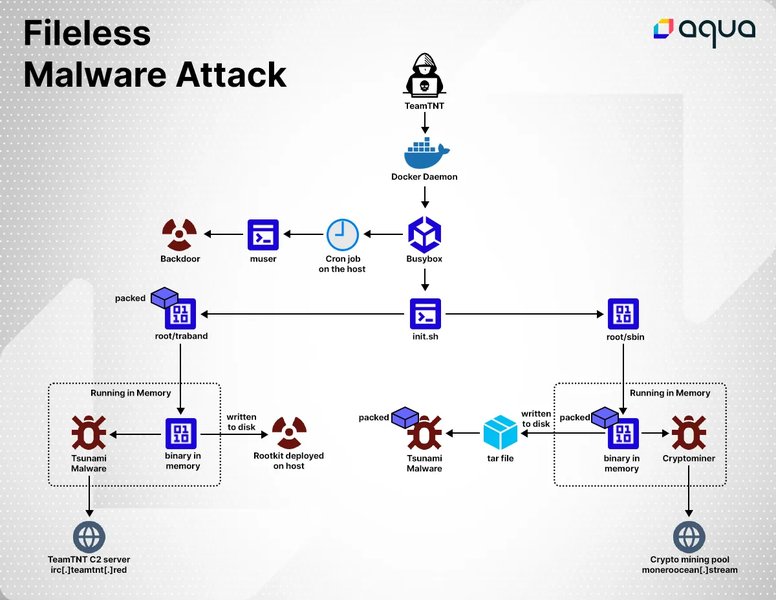


Going Fileless: Executables in Memory
From C# Executable to In-Memory PowerShell Execution
One common technique demonstrated in fileless malware POCs is converting a standard C# executable into a format that can be loaded and executed directly into memory, often using PowerShell as the delivery mechanism. This avoids dropping the original `.exe` file onto the disk. The video below explains and demonstrates how C# executables can be transformed into PowerShell scripts and subsequently loaded into memory using download cradles, effectively achieving fileless execution.
This method typically involves taking the compiled C# assembly (the `.exe` or `.dll`), converting its byte representation into a Base64 string or byte array within a PowerShell script. The script then uses .NET capabilities available within PowerShell (like `[System.Reflection.Assembly]::Load()`) to load these bytes directly into memory and invoke the entry point (e.g., the `Main` method) of the C# program. Download cradles, which are short PowerShell commands designed to fetch and execute code from a remote URL (`http://` or `https://`), are often used to deliver this script onto the target machine without saving it as a `.ps1` file first. This entire process allows the functionality of the C# executable to run without the executable file itself ever being saved to the target's file system.
Ethical Considerations and Detection
Responsible Research
While studying fileless malware POCs is crucial for understanding modern threats and building better defenses, it's imperative to do so responsibly. Creating, distributing, or using such tools for malicious purposes is illegal and unethical. All experimentation should occur within isolated, controlled environments (like virtual machines disconnected from networks) with explicit permission.
Detection and Mitigation Strategies
Detecting fileless malware is challenging but not impossible. Security solutions focus on:
- Behavioral Analysis: Monitoring process behavior, API calls, network connections, and script execution for anomalous or known malicious patterns.
- Memory Forensics: Analyzing system RAM to find injected code, loaded assemblies, or other artifacts left by memory-resident threats.
- AMSI (Antimalware Scan Interface): An interface allowing applications (like PowerShell) and scripts to integrate with antivirus software for scanning content (like scripts) before execution.
- Enhanced Logging: Enabling detailed logging for PowerShell, WMI, and command-line activities to capture traces of LOTL techniques.
- EDR Solutions: Endpoint Detection and Response tools provide deeper visibility into endpoint activities and employ advanced heuristics and machine learning to detect suspicious behaviors indicative of fileless attacks.
Frequently Asked Questions (FAQ)
What exactly is "fileless" malware?
Fileless malware refers to malicious code that operates primarily in a computer's volatile memory (RAM) rather than installing itself as traditional files on the hard drive. It leverages legitimate system tools (like PowerShell, WMI), exploits, or scripts loaded directly into memory to carry out its objectives. This makes it harder to detect using conventional file-scanning antivirus products.
Why use C# for creating these POCs?
C# is often used for fileless malware POCs because of its powerful features within the .NET Framework. It allows easy interaction with Windows APIs (P/Invoke), dynamic code compilation and execution in memory (Reflection, `CodeDomProvider`), integration with PowerShell (`Add-Type`), and manipulation of system processes and memory. These capabilities facilitate the implementation of stealthy techniques like process injection and registry persistence.
Are the GitHub POCs mentioned safe to use?
These POCs are intended for educational and security research purposes ONLY. They contain code designed to perform actions that are characteristic of malware (e.g., creating reverse shells, injecting code, bypassing security). Running them on production systems or without proper authorization is dangerous and potentially illegal. They should only be studied or executed in isolated, controlled lab environments (like virtual machines) by individuals who understand the risks involved.
How is fileless malware typically detected?
Detection relies less on file signatures and more on monitoring system behavior. Key methods include:
- Behavioral analysis by EDR/XDR solutions looking for suspicious process chains, API calls, or script executions.
- Memory scanning/forensics to identify injected code or unexpected modules loaded into processes.
- Monitoring and analyzing logs from PowerShell, WMI, and command-line interfaces.
- Leveraging AMSI to scan scripts and commands before execution.
- Network traffic analysis to detect command-and-control (C2) communication.
References
- In-Registry-Malware - GitHub
- living-off-the-land - GitHub
- LazyS - GitHub
- update_script - GitHub
- ThreadlessInject - GitHub
- Fileless Process Injection using PowerShell - maximilian-marx.me
- What is Fileless Malware? - Fortinet
- Windows Malware in C# using Github as C2 - ITNEXT
- Fileless-Malware Sample - GitHub
- Using C# for Post-PowerShell Attacks - Forcepoint
Recommended Reading
 offensivecraft.wordpress.com
Last updated April 11, 2025