
Unlock Dynamic & Scalable VPNs: Your Comprehensive Guide to Cisco DMVPN Configuration
Master the intricacies of setting up Cisco Dynamic Multipoint VPN for robust and flexible network connectivity.
Cisco Dynamic Multipoint VPN (DMVPN) is a powerful and scalable solution for building secure overlay networks. It combines several key technologies to connect multiple sites, such as branch offices, to a central headquarters (hub) or directly to each other (spoke-to-spoke) with reduced configuration complexity. This guide will walk you through the essential concepts and step-by-step configuration of Cisco DMVPN.
Key Highlights of DMVPN
- Dynamic Connectivity: DMVPN allows for the dynamic establishment of VPN tunnels, eliminating the need for static, point-to-point configurations for each remote site. This greatly simplifies deployment and management, especially in large or growing networks.
- Scalability: It supports a hub-and-spoke topology that can scale to thousands of remote sites. Advanced DMVPN phases enable direct spoke-to-spoke communication, optimizing traffic paths and reducing load on the hub.
- Integrated Security: DMVPN leverages IPsec to encrypt tunnel traffic, ensuring data confidentiality and integrity across public networks like the internet.
Understanding DMVPN Core Components
DMVPN's functionality relies on the interplay of three primary technologies:
- Multipoint GRE (mGRE) Tunnels: Unlike traditional point-to-point GRE tunnels, an mGRE interface on the hub router can support multiple dynamic GRE tunnels from various spokes. This allows a single tunnel interface to serve many connections.
- Next Hop Resolution Protocol (NHRP): NHRP is a client-server protocol. Spokes (NHRP clients) register their public IP addresses (NBMA - Non-Broadcast Multiple Access addresses) with the hub (NHRP server). This allows the hub to maintain a dynamic database of spoke mappings. For spoke-to-spoke communication, NHRP enables spokes to query the hub for the public IP address of another spoke, facilitating direct tunnel formation.
- IPsec (Internet Protocol Security): IPsec provides robust encryption and authentication for the data traversing the GRE tunnels, securing the VPN communication.
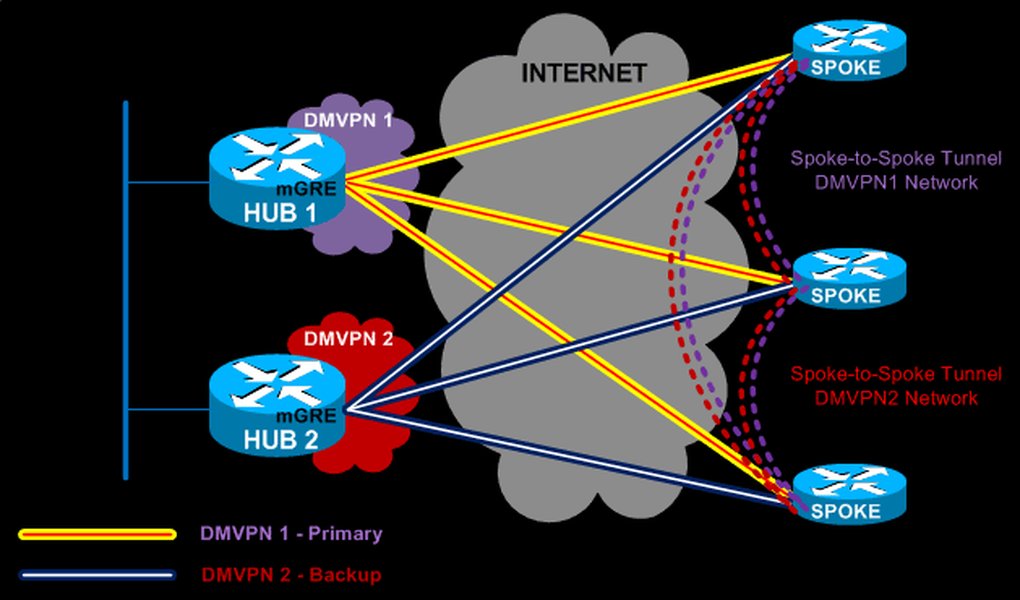
Diagram illustrating a typical DMVPN hub-and-spoke deployment model.
DMVPN Phases: Evolving Capabilities
DMVPN has evolved through different phases, each offering enhanced functionalities:
- Phase 1: This is the simplest form, strictly a hub-and-spoke model. All spoke-to-spoke traffic must pass through the hub. Spoke routers typically use point-to-point GRE or mGRE tunnels but only map to the hub. Routing on spokes points to the hub for all remote networks.
- Phase 2: Introduces dynamic spoke-to-spoke tunnels. Spokes can establish direct tunnels with other spokes after initially querying the hub via NHRP. The hub still holds all specific routes for spokes, and routing protocols might require specific configurations (like disabling split horizon on the hub for distance vector protocols).
- Phase 3: This is the most scalable and efficient phase. It allows for spoke-to-spoke communication using NHRP redirects and shortcuts. The hub can summarize routes to spokes, reducing the size of routing tables on spoke routers. The hub informs the initiating spoke that a better path exists directly to the destination spoke, prompting the creation of a dynamic spoke-to-spoke tunnel.
Comparative Analysis of DMVPN Phases
The choice of DMVPN phase significantly impacts network design and performance. The radar chart below illustrates a qualitative comparison of the three phases across key attributes. Higher values indicate better performance or greater capability in that specific attribute, with 1 being low and 5 being high.
As depicted, Phase 3 generally offers the best scalability and efficiency for spoke-to-spoke traffic, though it comes with increased configuration complexity compared to Phase 1.
Prerequisites and Initial Setup
Before diving into the configuration, ensure the following:
- Cisco IOS Version: Routers should run a Cisco IOS release that supports DMVPN (e.g., 12.3(6) or later, with 15M&T releases or newer recommended for full features).
- IP Addressing: Plan your IP addressing scheme for the physical (NBMA) interfaces and the tunnel interfaces. Ensure public IP addresses are available for the hub and spokes, or proper NAT configurations are in place.
- Connectivity: The hub and spoke routers must have IP reachability over the underlying network (e.g., the internet).
- Privileged Access: You'll need privileged (enable) mode access to the Cisco routers' command-line interface (CLI).
Step-by-Step DMVPN Configuration
The configuration process involves setting up the hub router, followed by the spoke routers. We will then configure IPsec for tunnel protection and a routing protocol to exchange network information.
1. Hub Router Configuration
The hub router acts as the central point for DMVPN, serving as the NHRP server.
A. Configure the mGRE Tunnel Interface
enable
configure terminal

interface Tunnel0
 description DMVPN Hub mGRE Tunnel
 ip address 172.16.0.1 255.255.255.0  ! Private IP for the tunnel network
 no ip redirects
 ip mtu 1400                         ! Adjust MTU for GRE/IPsec overhead
 ip nhrp authentication [your_auth_key] ! Consistent authentication string
 ip nhrp map multicast dynamic         ! Allow dynamic mapping of multicast for routing protocols
 ip nhrp network-id 1                  ! Unique NHRP network identifier (must match on all devices)
 tunnel source GigabitEthernet0/0      ! Public-facing interface of the Hub
 tunnel mode gre multipoint            ! Enables mGRE
 ! Optional: tunnel key [your_tunnel_key] - Consider performance implications on some platforms
B. Configure IPsec for Tunnel Protection (Hub)
First, define ISAKMP (IKE) policy, IPsec transform set, and an IPsec profile.
! ISAKMP (IKEv1) Policy
crypto isakmp policy 10
 encr aes 256
 hash sha256
 authentication pre-share
 group 14
 lifetime 86400

! Pre-shared key for authentication (use a strong, unique key)
crypto isakmp key [your_preshared_key] address 0.0.0.0 0.0.0.0

! IPsec Transform Set (defines encryption and integrity for data)
crypto ipsec transform-set DMVPN_TS esp-aes 256 esp-sha256-hmac
 mode transport  ! Transport mode is typically used with GRE

! IPsec Profile
crypto ipsec profile DMVPN_PROFILE
 set transform-set DMVPN_TS
Apply the IPsec profile to the tunnel interface:
interface Tunnel0
 tunnel protection ipsec profile DMVPN_PROFILE
C. Configure Routing Protocol (Hub)
Use a dynamic routing protocol like EIGRP, OSPF, or BGP to advertise networks over the DMVPN. Example using EIGRP:
router eigrp MY_EIGRP_AS
 network 172.16.0.0 0.0.0.255      ! Advertise the tunnel network
 network [hub_lan_network] [wildcard_mask] ! Advertise Hub's LAN network(s)
 no auto-summary

! For EIGRP over NBMA (like DMVPN), on the hub's Tunnel0 interface:
interface Tunnel0
 ip split-horizon eigrp MY_EIGRP_AS ! Disable split-horizon if needed for Phase 2/3 designs
 ip summary-address eigrp MY_EIGRP_AS [summary_prefix] [summary_mask] ! Optional summarization for Phase 3
2. Spoke Router Configuration
Spoke router configuration is similar but points to the hub for NHRP services.
A. Configure the GRE/mGRE Tunnel Interface (Spoke)
For Phase 1, tunnel mode gre ip with a defined tunnel destination can be used. For Phase 2/3 flexibility, tunnel mode gre multipoint is often preferred on spokes as well.
enable
configure terminal

interface Tunnel0
 description DMVPN Spoke Tunnel to Hub
 ip address 172.16.0.2 255.255.255.0  ! Unique private IP for this spoke's tunnel interface
 no ip redirects
 ip mtu 1400
 ip nhrp authentication [your_auth_key] ! Must match Hub's authentication key
 ip nhrp map 172.16.0.1 [hub_public_ip_address]    ! Static mapping for Hub's tunnel IP to its public IP
 ip nhrp map multicast [hub_public_ip_address]   ! Send multicast traffic (like routing updates) to Hub
 ip nhrp network-id 1                              ! Must match Hub's network ID
 ip nhrp nhs 172.16.0.1                            ! Define Hub's tunnel IP as the Next Hop Server (NHS)
 tunnel source GigabitEthernet0/0                  ! Public-facing interface of the Spoke
 tunnel mode gre multipoint                        ! Or "tunnel mode gre ip" for strict Phase 1 pointing to hub
 ! If using "tunnel mode gre ip":
 ! tunnel destination [hub_public_ip_address]
 ! Optional: tunnel key [your_tunnel_key]
For Phase 2/3 functionality, add these on the spoke's Tunnel0 interface:
interface Tunnel0
 ! For Phase 3 to enable spoke-to-spoke shortcuts through NHRP redirects:
 ip nhrp redirect ! Hub tells spoke to find a shorter path
 ip nhrp shortcut ! Spoke modifies its CEF path for direct spoke-to-spoke
B. Configure IPsec for Tunnel Protection (Spoke)
The IPsec configuration (ISAKMP policy, pre-shared key, transform set, and profile) should generally mirror the hub's configuration to ensure compatibility.
! ISAKMP (IKEv1) Policy (identical to Hub)
crypto isakmp policy 10
 encr aes 256
 hash sha256
 authentication pre-share
 group 14
 lifetime 86400

! Pre-shared key (identical to Hub)
crypto isakmp key [your_preshared_key] address 0.0.0.0 0.0.0.0

! IPsec Transform Set (identical to Hub)
crypto ipsec transform-set DMVPN_TS esp-aes 256 esp-sha256-hmac
 mode transport

! IPsec Profile (identical to Hub)
crypto ipsec profile DMVPN_PROFILE
 set transform-set DMVPN_TS

! Apply IPsec profile to the Tunnel interface
interface Tunnel0
 tunnel protection ipsec profile DMVPN_PROFILE
C. Configure Routing Protocol (Spoke)
Configure the same routing protocol as on the hub. Example using EIGRP:
router eigrp MY_EIGRP_AS
 network 172.16.0.0 0.0.0.255      ! Advertise the tunnel network
 network [spoke_lan_network] [wildcard_mask] ! Advertise Spoke's LAN network(s)
 no auto-summary

! On the spoke's Tunnel0 interface for EIGRP:
interface Tunnel0
 ! Spoke typically does not need split-horizon disabled unless it acts as a transit point.
DMVPN Configuration Mindmap
This mindmap visualizes the key elements and their relationships within a Cisco DMVPN setup. It helps in understanding how different components like mGRE, NHRP, IPsec, and routing protocols integrate to form a functional DMVPN.
tunnel mode gre multipoint"]
id2_2["Spoke Routers"]
id2_2_1["Remote sites"]
id2_2_2["NHRP Clients"]
id2_2_3["Register with Hub"]
id3["DMVPN Phases"]
id3_1["Phase 1 (Hub-and-Spoke)"]
id3_2["Phase 2 (Spoke-to-Spoke via Hub Routing)"]
id3_3["Phase 3 (Optimized Spoke-to-Spoke via NHRP Redirects)"]
id4["Configuration Aspects"]
id4_1["Tunnel Interface Setup"]
id4_2["IPsec Profile Application"]
id4_3["Dynamic Routing Protocol (EIGRP, OSPF, BGP)"]
id4_4["NHRP Configuration (network-id, authentication, mapping)"]
id5["Key Benefits"]
id5_1["Scalability"]
id5_2["Simplified Configuration"]
id5_3["Secure Connectivity"]
id5_4["Flexible Topology"]
The mindmap outlines the hierarchical structure and dependencies in a DMVPN deployment, offering a clear overview of its architecture.
Key Configuration Parameters: Hub vs. Spoke
The following table summarizes some critical command differences and roles for Hub and Spoke routers in a typical DMVPN setup:
| Parameter / Command | Hub Router | Spoke Router |
|---|---|---|
| NHRP Role | Server (implicitly or explicitly configured as NHS) | Client |
ip nhrp map multicast ... |
dynamic |
[hub_public_ip_address] (static mapping to hub) |
ip nhrp nhs ... |
Typically not needed (is the NHS) or points to self if explicitly configured. | [hub_tunnel_ip_address] (points to hub as NHS) |
ip nhrp map [tunnel_ip] [nbma_ip] |
Not typically used for spokes (dynamic registration) | ip nhrp map [hub_tunnel_ip] [hub_public_ip] (static map to hub) |
tunnel mode ... |
gre multipoint |
gre multipoint (recommended for Phase 2/3) or gre ip (for Phase 1 with tunnel destination) |
tunnel destination ... |
Not used with gre multipoint |
Used with tunnel mode gre ip (points to hub's public IP) |
| Routing Protocol Summarization | Can summarize routes to spokes (especially in Phase 3) | Receives routes, typically advertises local LANs |
Verification and Troubleshooting Commands
After configuration, use these commands to verify the DMVPN status and troubleshoot issues:
show dmvpn: Displays detailed information about DMVPN tunnels, including peer NBMA addresses and tunnel uptime.show ip nhrp: Shows the NHRP cache, including dynamic and static mappings. Useshow ip nhrp detailfor more information.show crypto isakmp sa: Displays the status of IKE Security Associations.show crypto ipsec sa: Shows the IPsec Security Associations, including encryption/decryption statistics.show ip interface brief: Verify tunnel interface status and IP address.show ip route: Check the routing table to ensure routes are learned over the DMVPN.ping [remote_tunnel_ip]: Test connectivity across the tunnel.traceroute [remote_tunnel_ip]: Verify the path taken by traffic.debug crypto isakmp,debug crypto ipsec,debug ip nhrp: Use with caution for detailed debugging.
Visual Guide: DMVPN Configuration Overview
For a visual walkthrough and explanation of DMVPN concepts and basic configuration, the following video provides a helpful introduction. It covers why DMVPN is used and demonstrates initial setup steps, offering a practical perspective on the technology.
Video: DMVPN Configuration On Cisco Routers - Part I. This video explains the rationale behind DMVPN and initial configuration steps.
Best Practices for DMVPN Deployment
- Use DMVPN Phase 3: For most deployments, especially larger ones, Phase 3 offers the best scalability and efficiency for spoke-to-spoke traffic.
- Strong IPsec Encryption: Employ strong encryption algorithms (e.g., AES-256) and hashing functions (e.g., SHA-256 or higher) with robust pre-shared keys or certificates.
- Consistent NHRP Settings: Ensure the NHRP network ID and authentication key are consistent across all DMVPN routers.
- MTU Adjustment: Set the IP MTU on tunnel interfaces (e.g., to 1400 bytes) to account for GRE and IPsec overhead and prevent fragmentation issues. Also, adjust TCP MSS clamping (
ip tcp adjust-mss) accordingly. - Routing Protocol Optimization: Configure routing protocols appropriately for the NBMA environment. This might include disabling split-horizon on the hub (for EIGRP in Phase 2/3), using appropriate OSPF network types, or careful BGP peering. Summarize routes on the hub in Phase 3 to reduce spoke routing table sizes.
- Redundancy: Consider dual-hub designs for high availability.
- Avoid Tunnel Keys on Certain Platforms: On some older hardware platforms (like Cisco 6500/7600 series supervisors), using `tunnel key` could lead to traffic being process-switched, impacting performance. It's generally not required with mGRE and IPsec.
- Monitor Regularly: Use SNMP, NetFlow, and syslog to monitor the health and performance of your DMVPN.
Frequently Asked Questions (FAQ)
What is the main advantage of DMVPN over traditional site-to-site IPsec VPNs?
The main advantage of DMVPN is its scalability and dynamic nature. Traditional IPsec VPNs often require static configurations for each pair of sites, which becomes cumbersome for large networks. DMVPN allows spokes to dynamically connect to the hub and, in Phases 2 and 3, directly to other spokes with minimal static configuration on the hub for new spokes.
Can DMVPN spokes be behind NAT?
Yes, DMVPN spokes can operate behind Network Address Translation (NAT) devices. NHRP helps in registering the post-NAT (public) IP address of the spoke with the hub. However, specific NAT traversal (NAT-T) mechanisms within IPsec might be required, and careful consideration of the NAT type is important. All spokes behind NAT must have unique post-NAT IP addresses for proper operation.
Which routing protocols are recommended for DMVPN?
EIGRP, OSPF, and BGP are commonly used with DMVPN. EIGRP is often straightforward to configure but may require adjustments like disabling split-horizon on the hub. OSPF requires careful consideration of network types (e.g., broadcast or point-to-multipoint). BGP is also a robust option, especially for larger or more complex networks.
How does DMVPN Phase 3 improve upon Phase 2?
DMVPN Phase 3 improves scalability and efficiency by allowing the hub to send NHRP redirect messages. This enables spokes to establish direct tunnels without the hub needing to process the initial data packets of the spoke-to-spoke communication. Additionally, Phase 3 allows the hub to advertise summarized routes to spokes, reducing the routing table size on spoke routers and minimizing the routing information exchanged.
Recommended Further Learning
- Explore detailed steps for configuring DMVPN Phase 3 focusing on EIGRP and route summarization techniques.
- Learn about advanced troubleshooting methods for common connectivity and routing problems in DMVPN setups.
- Discover how to implement Quality of Service (QoS) policies effectively across DMVPN tunnels to prioritize critical traffic.
- Understand the benefits and configuration process for using digital certificates for authentication in DMVPN, enhancing security over pre-shared keys.
References
Last updated May 12, 2025