
Building Your Ultimate Compact Home Server: A Budget-Friendly Start in Toronto
Crafting a powerful Mini-ITX server in the DAN A4 H2O, ready for future upgrades, without breaking the bank initially.
Embarking on building a home server, especially one housed in the sleek, compact DAN A4 H2O case, presents exciting possibilities. You aim to run demanding applications like Frigate or BlueIris for video surveillance, HomeAssistant for smart home automation, and even dabble with large language models (LLMs), all while keeping the initial investment low in the Toronto/GTA area and planning for a powerful RTX 4090 GPU upgrade later. This guide focuses on selecting the essential starting components – motherboard, CPU, RAM, and power supply – balancing cost, performance, and future-proofing.
Key Considerations for Your Build
- Future-Proof Foundation: Selecting a motherboard and PSU capable of handling the demanding RTX 4090 later is crucial, even if it means a slightly higher initial cost for these specific parts.
- Compact Powerhouse: The DAN A4 H2O mandates Mini-ITX motherboards and SFX/SFX-L power supplies, requiring careful selection for compatibility and cooling.
- Smart Savings: Leveraging the used hardware market in Toronto/GTA for components like the CPU, motherboard, and initial RAM can significantly reduce upfront costs.
The Heart of the Server: Motherboard Selection
Finding the Right Mini-ITX Foundation
The motherboard is arguably the most critical choice for this build, dictating compatibility, connectivity, and future upgrade potential within the tight confines of the DAN A4 H2O. Your requirements – Mini-ITX form factor, support for at least 96GB of DDR5 RAM, latest-gen Wi-Fi/Bluetooth, and multiple M.2 slots – narrow the field considerably.
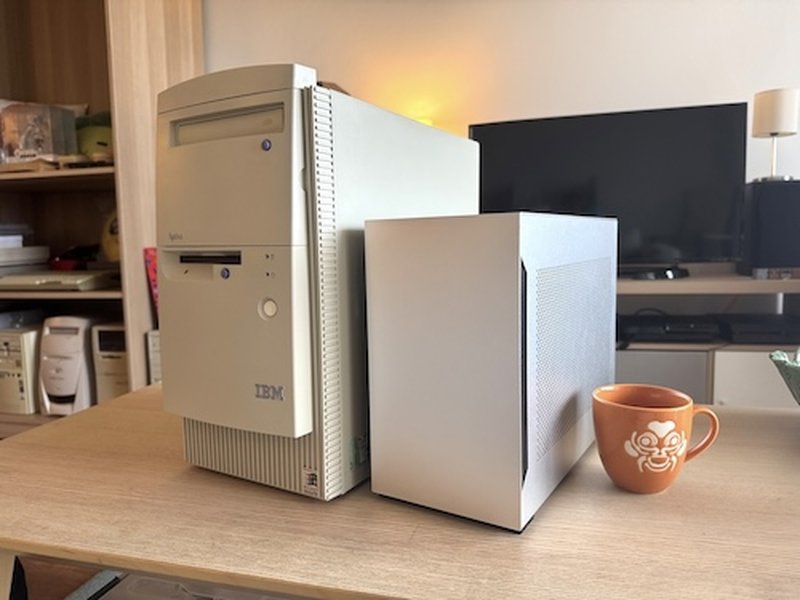
The compact DAN A4-H2O case requires careful Mini-ITX component selection.
Meeting the RAM Challenge
Supporting 96GB or more RAM on a Mini-ITX board typically means using high-density 48GB or 64GB DDR5 modules (since most ITX boards have only two RAM slots). You must verify a motherboard's Qualified Vendor List (QVL) or specifications to ensure it explicitly supports these non-binary capacity modules. High-end chipsets like Intel Z790 or AMD B650/X670 are more likely to offer this capability.
Connectivity Needs
Integrated Wi-Fi 6E or Wi-Fi 7 and Bluetooth 5.2+ are standard on many recent Mini-ITX boards. For M.2 slots, most boards offer two (one front, one back). Finding three or more is rare and often reserved for premium models, sometimes utilizing daughterboards. For your needs (NVMe SSD, NPU, potentially HomeAssistant controller), two slots are essential, and a third might require alternative solutions like a PCIe bifurcation card (though this conflicts with the single PCIe slot needed for the future GPU) or USB adapters.
Recommended Motherboard Platforms & Models (Check Used First!)
- Intel LGA 1700 (Z790 Chipset): Offers support for 12th, 13th, and 14th Gen Intel CPUs.
- Example: ASUS ROG Strix Z790-I Gaming WiFi - Known for robust features, often supports high RAM capacities (verify QVL for 96GB+), includes Wi-Fi 6E/BT, and typically has two M.2 slots. Can be pricey new, but potentially found used.
- AMD AM5 (B650/B650E Chipset): Supports Ryzen 7000 series CPUs and beyond, offering a strong upgrade path.
- Example: MSI MPG B650I Edge WiFi or ASUS ROG Strix B650E-I Gaming WiFi - Similar feature set to the Z790-I, supporting high-speed DDR5 (check QVL for 96GB+), Wi-Fi 6E/BT, and dual M.2 slots.
Pricing (Toronto/GTA): Expect new high-end Mini-ITX boards to range from CAD $400-$600+. Searching the used market (Kijiji, Facebook Marketplace) could yield prices between CAD $250-$450, depending on the model and condition.
Processing Power: Choosing Your CPU
Balancing Initial Cost and Multitasking Needs
Your server needs a CPU capable of juggling video surveillance processing (Frigate/BlueIris can be CPU-intensive, though NPU offloading helps), HomeAssistant's background tasks, and the demands of running an LLM. Starting with a cost-effective CPU that fits your chosen motherboard socket allows for a future upgrade when you add the RTX 4090 and potentially need more processing power.
Starting Point Recommendations (Used Market Focus)
- For Intel Z790 Boards:
- Intel Core i5-13600K/12600K: Offer a great mix of performance cores (P-cores) and efficient cores (E-cores), excellent for multitasking. Used prices might range from CAD $200-$350.
- Intel Core i5-12400/13400: More budget-friendly options, still capable for initial tasks. Used prices could be CAD $150-$250.
- For AMD B650 Boards:
- AMD Ryzen 7 7700/7700X: 8 cores / 16 threads provide strong multitasking performance. Used market prices might be CAD $280-$400.
- AMD Ryzen 5 7600/7600X: A solid 6-core / 12-thread starting point, very power efficient. Used prices potentially CAD $200-$300.
Aim for at least 6 cores / 12 threads initially. Ensure the CPU includes integrated graphics (non-F Intel SKUs, non-X AMD SKUs sometimes lack them, G SKUs always have them) if you need video output before adding the dedicated GPU, although for a server, it might not be necessary if accessed remotely.
CPU Options Comparison
This chart provides a relative comparison of potential starting CPU options based on factors relevant to your build. Scores are subjective estimates (out of 10, higher is better) to illustrate trade-offs.
Memory: Starting with DDR5
Minimum Start, Maximum Potential
You've specified DDR5 RAM, which aligns with the latest Intel and AMD platforms. Starting with a 16GB kit (e.g., 2 x 8GB or 1 x 16GB) is a cost-effective way to get the system running.
- Speed: Look for kits rated at 5200MHz or higher for good performance, ensuring compatibility with your chosen motherboard's specifications.
- Future Expansion: Crucially, ensure the motherboard supports your target of 96GB+ total RAM using higher-density modules later.
- Pricing (Toronto/GTA): A new 16GB DDR5 kit typically costs CAD $80-$120. Used kits might be found for CAD $50-$90 on local marketplaces.
Powering It All: The PSU Decision
Investing for the Future RTX 4090
The power supply unit (PSU) is critical, especially given your plan to add an RTX 4090. This GPU is power-hungry, with manufacturers typically recommending an 850W PSU *minimum*, often suggesting 1000W for systems with high-end CPUs.
SFX/SFX-L Form Factor
The DAN A4 H2O requires a compact SFX or slightly longer SFX-L PSU. High-wattage options in these form factors are available but carry a premium.
Wattage and Efficiency Recommendation
To safely power the system with an RTX 4090 and a capable CPU, investing in an 850W or ideally 1000W SFX/SFX-L PSU with an 80 Plus Gold or Platinum rating is strongly recommended *from the start*. While this is a higher upfront cost than a PSU just for the initial components, it avoids needing to buy and reinstall another PSU later.
- Examples: Corsair SF850L / SF1000L, Cooler Master V850 / V1100 SFX Gold/Platinum, Silverstone SX1000R Platinum SFX-L.
- Pricing (Toronto/GTA): New 850W+ Gold/Platinum SFX/SFX-L PSUs generally cost CAD $200-$350+. Used options are less common and should be approached with caution regarding warranty and reliability, but might save CAD $50-$100 if found.
Do not skimp here; recommendations in some answers for 500-650W PSUs are insufficient for a system with an RTX 4090.
Visualizing Your Build Plan
This mindmap illustrates the core components, requirements, and considerations for your compact home server build, highlighting the path from initial setup to future upgrades.
Building in the DAN A4 H2O: Tips and Visual Guide
The DAN A4 H2O is a popular case for powerful SFF builds. Its layout requires careful cable management and component selection for airflow. An All-In-One (AIO) liquid cooler (up to 240mm) is often recommended for higher-power CPUs in this case.
Watching build guides specific to the case can be incredibly helpful. This video provides a step-by-step guide for building in the Lian Li DAN A4 H2O, showcasing component installation and cable management techniques:
Step-By-Step Mini ITX PC Build Guide! (Lian Li Dan A4 H20)
Summary: Recommended Initial Budget Build (Toronto/GTA Focus)
This table summarizes a potential starting configuration, prioritizing future compatibility (especially the PSU) while leveraging used parts where feasible to keep initial costs down. Prices are estimates based on the Toronto/GTA market (May 2025) and will vary.
| Component | Example Recommendation | Key Features | Est. Price (CAD Used) | Est. Price (CAD New) | Notes |
|---|---|---|---|---|---|
| Motherboard | ASUS ROG Strix B650E-I / Z790-I Gaming WiFi | Mini-ITX, DDR5 (Verify 96GB+ QVL), Wi-Fi 6E/BT, 2x M.2, PCIe 4.0 | $250 - $450 | $450 - $600+ | Crucial for RAM/M.2 needs. Hunt used market! |
| CPU | AMD Ryzen 5 7600 / Intel Core i5-12600K | 6+ Cores, Good Multitasking, Upgradeable Socket | $180 - $300 | $250 - $400 | Balance cost/performance. Used offers great value. |
| RAM | 16GB DDR5 Kit (2x8GB) | DDR5, 5200MHz+, Expandable Later | $50 - $90 | $80 - $120 | Easy initial saving. Ensure compatibility. |
| PSU | Corsair SF850L / Cooler Master V850 SFX Gold | SFX/SFX-L, 850W+, 80+ Gold/Plat | $150 - $250 (Use caution) | $200 - $300+ | Invest here for RTX 4090! Buying new is often safer. |
| Estimated Initial Total | $630 - $1140 | $980 - $1420+ | Excludes case, storage, OS, NPU. Prices highly variable. |
Finding Your Components in Toronto/GTA
Where to Hunt for Deals
- Used Marketplaces:
- Kijiji (GTA): Often the best source for local used PC hardware deals. Be diligent checking listings.
- Facebook Marketplace: Another popular platform for local used sales.
- Reddit (r/CanadianHardwareSwap): A community for buying/selling/trading used hardware across Canada.
- Retail Stores (New & Open Box):
- Canada Computers: Multiple locations in GTA, offers new components and sometimes open-box deals.
- Memory Express: Strong competitor, check online stock for local pickup/delivery.
- Newegg.ca: Major online retailer, ships to Toronto.
- Local Shops: Smaller local computer shops might occasionally have used stock or consignment items.
Tips for Buying Used: Always try to test components before buying if possible, or purchase from sellers with good reputations. Check compatibility carefully. Understand that warranties are usually non-transferable.
Frequently Asked Questions (FAQ)
► How difficult is building in a Mini-ITX case like the DAN A4 H2O?
Building in SFF (Small Form Factor) cases like the DAN A4 H2O is more challenging than standard ATX builds due to limited space. Cable management is crucial, and component selection needs careful consideration regarding size (especially GPU length/width, CPU cooler height, PSU form factor). Using modular SFX PSUs helps significantly. Planning the build order and consulting online guides/videos specific to the case is highly recommended.
► Is buying used hardware safe for a server?
Buying used can be safe and save significant money, but carries risks. CPUs and RAM are generally reliable used components if not physically damaged. Motherboards can be riskier due to potential hidden damage or BIOS issues. PSUs are often recommended to buy new due to their critical role and degradation over time, though reliable used units can be found. Always test used components thoroughly upon receipt. Prioritize sellers with good history or platforms offering some buyer protection.
► Can the initial budget CPU really handle Frigate, HomeAssistant, and an LLM?
A modern mid-range CPU (like a Ryzen 5 7600 or Core i5-12600K/13600K) should comfortably handle Frigate (especially if using Coral TPU or NPU for detection) and HomeAssistant simultaneously. Running a large 70B parameter LLM is very demanding and will heavily utilize CPU/RAM, potentially impacting other services. Performance will depend on the specific LLM implementation and quantization. The initial setup might run smaller models or the 70B model slowly; the RTX 4090 upgrade will dramatically improve LLM performance via GPU acceleration.
► Do I really need an 850W+ PSU just to start?
While your initial setup (without the RTX 4090) will draw much less power, buying the high-wattage SFX/SFX-L PSU upfront saves you from purchasing a second PSU and going through the hassle of swapping it out in the tight SFF case later. Given the high cost and limited availability of powerful SFX/SFX-L PSUs, securing one early that meets the demands of your final build configuration (including the RTX 4090) is a sensible, albeit more expensive, initial investment.
Recommended Further Exploration
- Discover the best cooling solutions for the DAN A4 H2O case to manage heat in your compact build.
- Learn how to set up Frigate with NPU acceleration on a home server for efficient video surveillance.
- Find tips on how to find reliable used PC parts deals specifically in the Toronto GTA area.
- Understand the RAM requirements for running large language models like LLaMA 70B effectively.
References
 amazon.com
Last updated May 4, 2025