
Visualizing the Eternal Contract Management Process
A comprehensive guide to creating an illustrative, circular cycle diagram
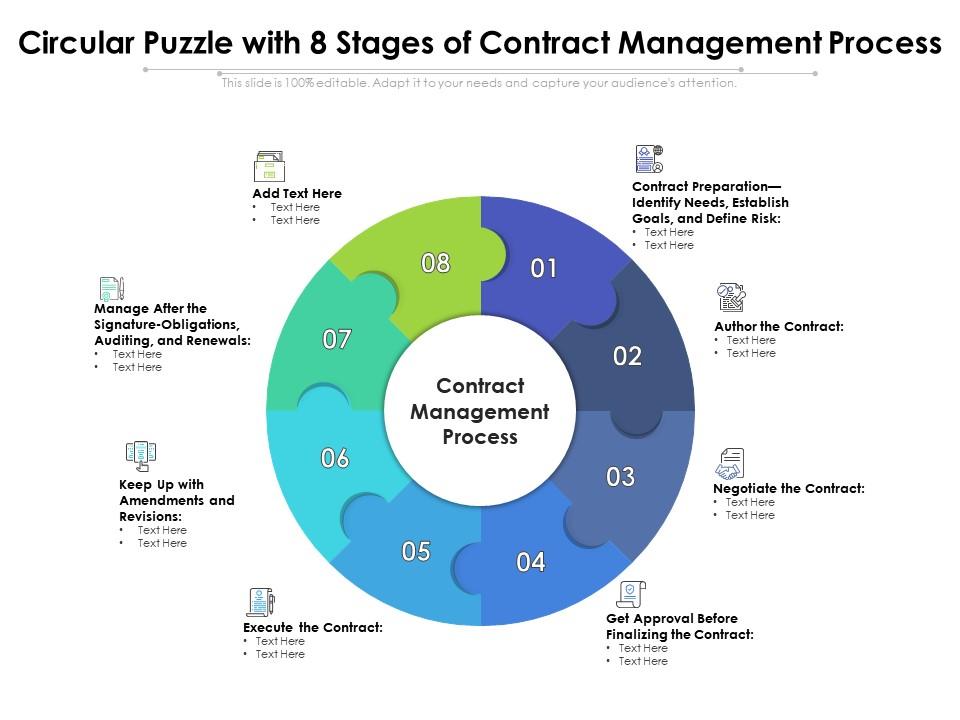
Key Highlights
- Eternal Cycle: The process is visualized as a continuous loop.
- Structured Stages: Five distinct stages from initiation to termination are clearly defined.
- Clear Labeling and Icons: Each segment is labeled with its key actions and supported by relevant symbols.
Understanding the Process
The guide provided outlines an annual cycle for contract management (Årshjul for kontraktshåndtering), which is designed to be an eternal process. This means it is a continuous loop where each stage flows into the next, eventually circling back to the start. Visualizing this cycle can help stakeholders understand the process flows, the responsibilities at each step, and how to manage the contract lifecycle effectively. The steps comprise five essential stages:
1. Kontraktsinngåelse (Contract Initiation)
Primary Actions:
This stage involves the preliminary steps before any contractual document is created. It focuses primarily on:
- Prekvalifisering (Pre-qualification) using tools such as survey modules.
- Signering (Signing), typically executed via digital channels ensuring a swift and secure signature process.
2. Innsamling av signerte kontrakter (Collection of Signed Contracts)
Primary Actions:
After digital signing, the next step is to collect and verify the signed contracts. This stage includes:
- Motta signert kontrakt fra leverandør/partner/kunde (Receiving the signed contract from the respective party).
- Kontrollere at alle sider og vedlegg er med (Ensuring all pages and attachments are included).
- Verifisere signaturens gyldighet (Verifying the authenticity of the signature).
3. Registrering i kontraktssystemet (Registration in the Contract System)
Primary Actions:
This crucial stage ensures that the contract is properly documented, accessible, and categorized within the system. The actions include:
- Klassifisere kontrakten (Classifying the contract according to type and relevance).
- Tilordne ansvarlig person/avdeling (Assigning a responsible person or department).
- Sette opp påminnelser for viktige datoer (Setting up reminders for key dates such as renewals or expirations).
- Registrere forpliktelser (Recording all obligations contained within the contract).
- Laste opp kontrakten (Uploading the contract for easy access and monitoring).
4. Overvåking og oppfølging (Monitoring and Follow-up)
Primary Actions:
Continuous monitoring ensures compliance and timely review, providing oversight of currently active contracts:
- Løpende gjennomgang av kontrakter (Regular review of contract statuses).
- Sjekke om alle kontrakter er mottatt (Verifying that all necessary contracts have been received and recorded).
- Vurdere reforhandling, oppsigelse eller forlengelse (Evaluating whether contracts need renegotiation, early termination, or extension).
5. Oppsigelse av kontrakter (Contract Termination)
Primary Actions:
This final phase before the cycle loops again deals with proper closure and termination procedures:
- Identifisere utløpsdato og oppsigelsesfrist (Identifying the expiration date and any notice periods).
- Varsle motpart i henhold til vilkår (Notifying the counterparty in accordance with the contractual terms).
- Dokumentere oppsigelse og sluttoppgjør (Documenting the termination and settling final accounts).
- Registrere kontrakten som oppsagt (Recording the contract as terminated within the system).
Designing the Visual Diagram
To effectively create a visual diagram representing the eternal process of contract management, follow these steps:
1. Setup the Circular Diagram
Framework:
Create a circular or elliptical shape that forms the foundation of your diagram. The circle symbolizes the cyclical nature of the process, with the starting point seamlessly connecting to the ending point, thus establishing an "eternal" loop.
2. Divide the Circle into Five Segments
Segmentation Details:
Divide the circle into five equal segments, each representing one of the stages outlined above. Each segment should be clearly separated using distinct boundaries or color variations. The segmentation not only organizes the content but also makes it visually intuitive.
3. Label Each Segment with Key Actions
Labeling Tips:
Within each segment, add the following elements to enhance clarity:
- Stage title (e.g., "Kontraktsinngåelse").
- Brief summary of key activities, such as digital signing and pre-qualification for the first segment.
- Specific icons or symbols representing the key actions. For example, a handshake or digital signature icon for contract initiation, a document icon for contract collection, a filing or folder icon for registration, a calendar icon for follow-up, and an hourglass or termination symbol for cessation of contracts.
4. Connect Segments with Arrows
Flow Indicators:
To underline the continuity of the process, use arrows to connect the segments in a clockwise or counterclockwise direction. The arrows emphasize that after one segment, the process flows into the next, with one arrow leading from the final stage back to the first.
5. Incorporate Color Coding
Color Scheme Guidance:
Select a different color for each segment to create a visually appealing and easily distinguishable diagram. The choices might involve a palette that balances professional tone with vibrancy, ensuring that the key stages are both prominent and harmonious.
Example Diagram Structure in a Table Format
The table below provides an example of how each segment’s details can be organized before designing the visual diagram:
| Stage | Key Actions | Icons/Symbols |
|---|---|---|
| Kontraktsinngåelse |
|
🤝, ✍️ |
| Innsamling av signerte kontrakter |
|
📄, ✔️ |
| Registrering i kontraktssystemet |
|
🗃️, 📁 |
| Overvåking og oppfølging |
|
🔍, 📆 |
| Oppsigelse av kontrakter |
|
⏳, ❌ |
Additional Design Considerations
Iconography and Typography
Recommendations:
Consider using professionally designed icons and a consistent typography style that complements the overall corporate branding. The icon sets should be modern and simple, avoiding unnecessary complexity while remaining visually engaging.
Software and Tools
Tools for Creation:
You can use graphic design software such as Adobe Illustrator, Canva, or online diagram tools like Lucidchart to create the circular diagram. These platforms allow you to choose from pre-made templates or craft a custom design that fits your specific requirements.
Iterative Refinement
Enhancement Tips:
Once the initial design is complete, review the diagram with key stakeholders to ensure all critical aspects of the contract management process are accurately represented. Refinements based on feedback will help ensure that the diagram is both informative and easily understood by all users.
Conclusion
The eternal process of contract management outlined herein represents a continuous cycle that ensures contracts are managed efficiently, from inception through execution, monitoring, and eventual termination. By visualizing this process as a circular diagram, stakeholders can gain a clear and intuitive understanding of the stages involved, how each stage interrelates, and the expected actions at each point.
Although I cannot generate images directly, this detailed guide provides a blueprint for creating a high-quality visual representation. The diagram, once created, will serve as an effective communication tool, helping teams monitor contract lifecycles, ensure compliance, and ultimately drive better business outcomes.
References
- What is Contract Lifecycle Management? - ContractWorks
- What is Contract Lifecycle Management? - Icertis
- The Six Key Stages of Contract Lifecycle Management - Wolters Kluwer
- Stages of Contract Management - ContractSafe
- Contract Lifecycle Management Overview - Thomson Reuters
- Contract Lifecycle Management Explained - Ironclad
- What is CLM? - SAP
Recommended
Last updated February 26, 2025