
Cybersecurity Website Development with Inspira UI
A comprehensive guide to build a secure, modern cybersecurity website
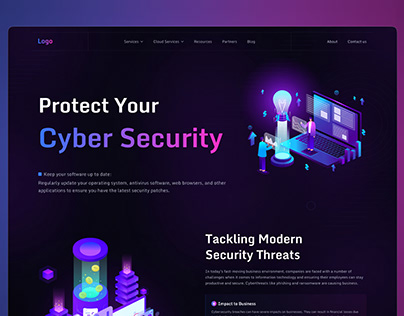
Highlights
- Modern Design with Inspira UI: Utilize Inspira UI components for a visually appealing interface.
- Robust Cybersecurity Best Practices: Secure your website by implementing multi-layer security measures.
- Engaging Content & User Experience: Combine professional aesthetics, user engagement tools, and informative content for maximum impact.
Introduction
Creating an effective cybersecurity website today involves much more than just attractive design and eye-catching interfaces. The digital landscape demands both aesthetic appeal and robust security measures. By transitioning from legacy interfaces such as Aceternity UI or Magic UI to the versatile Inspira UI, you can achieve a seamless blend of modern design components and meticulous security practices that reassure clients and establish authority in the cybersecurity space.
Design Strategy with Inspira UI
Inspira UI offers a dynamic and flexible suite of design components, building on the strengths seen in Aceternity and Magic UI but with enhanced capabilities. This modern UI toolkit is particularly suited for cybersecurity websites where establishing user trust through design is as important as the underlying technical fortifications.
Key Design Elements
The design should represent professionalism, clarity, and functionality. The following points illustrate how to achieve these qualities:
Responsive Layout and Navigation
A clean and intuitive layout is essential. Structure your website to have a minimalistic interface with clearly defined sections such as Home, Services, About Us, Resources, and Contact. Use structured navigation menus with dropdown or sidebar options to enhance user experience across various devices.
Attractive Components and Visual Hierarchy
Prioritize high-quality visuals and well-organized components that reflect trustworthiness. Use Inspira UI’s components such as cards, panels, and hero banners to highlight key security features, important announcements, and services. A uniform color palette—typically incorporating blues, greens, and neutral tones—helps in creating a consistent brand identity.
Modern Animations and Interactive Elements
Enhance user engagement with subtle animations and interactive transitions using tools like Framer Motion alongside Inspira UI. These animations can be applied to essential elements such as service cards or navigation menus to provide a smooth interactive experience.
Content Strategy and User Engagement
The content of your cybersecurity website is as significant as its design. High-value, relevant, and engaging content is crucial in educating users, establishing credibility, and driving conversions. Here are strategies to organize and deliver your content effectively:
Educational and Informational Content
Publish valuable resources such as blog posts, white papers, case studies, and tutorials on cybersecurity best practices. Ensure your content explains complex topics in a clear manner, and offer in-depth guides on vulnerability management, data protection, and emerging threat trends.
Threat Detection & Alerts
Include dedicated sections for real-time threat intelligence where you can share updates, alerts, and analyses of recent cybersecurity incidents. This not only informs visitors but also reinforces your standing as an authority in the field.
User Interaction and Engagement
Enhance user engagement by incorporating interactive elements such as live chat bots, inquiry forms, and community forums. A secure login interface with multi-factor authentication (MFA) can also be implemented for users who wish to have personalized experiences or access premium content.
Implementing Robust Cybersecurity Measures
No cybersecurity website can afford to compromise on security, especially when showcasing your expertise requires the highest levels of trust and reliability. The following practices should be integrated into your website construction and maintenance:
Critical Security Technologies
Secure Authentication and User Management
Implement a multi-layered authentication system that may include multi-factor authentication (MFA). Use secure login procedures and ensure that sensitive customer data is protected using encryption protocols like SSL/TLS to secure data in transit.
Regular Software Updates and Patch Management
Frequently update your operating system, CMS (e.g., WordPress), plugins, and all third-party components. Regular patch management is vital in mitigating vulnerabilities and thwarting potential cyber-attacks.
Data Encryption and Secure Storage
Encrypt all sensitive data both during transit and storage. Use HTTPS to secure data communications, and employ robust encryption algorithms to safeguard data at rest within databases and other storage systems.
Advanced Protective Measures
Web Application Firewalls (WAFs)
Incorporate a web application firewall to protect your website from common exploits such as SQL injections and cross-site scripting (XSS) attacks. Regularly monitor firewall activity logs to identify and mitigate potential threats.
Vulnerability Scanning and Penetration Testing
Regular vulnerability scanning and penetration testing are crucial. Implement automated scanners to identify vulnerabilities on a routine basis and perform manual testing to validate the effectiveness of your security measures.
Access Control and User Permissions
Limit access to sensitive sections of the website to authorized personnel only. Implement role-based access controls (RBAC) to ensure that administrative privileges are securely managed.
Incorporating Inspira UI Components
Inspira UI provides a library of components that expedite website development while ensuring a professional and consistent look:
Component Overview
Navigation Bars and Menus
Utilize Inspira UI’s responsive navigation bars and menus to create an intuitive interface that makes it easy for users to explore your site. Dropdown menus and sidebars can be customized with Tailwind CSS to match your branding.
Cards and Panels
Display services, cybersecurity resources, news, or client testimonials using card layouts and panels. These components help in organizing content, making it visually appealing and easy to digest. The aesthetically pleasing card stacks from Inspira UI can be animated using Framer Motion for dynamic effects.
Alerts and Notification Systems
Effective notification systems are integral in a cybersecurity context. Use Inspira UI’s alert components to notify users about system updates, potential threats, or important news. Ensure that these notifications are prominently displayed and easily accessible.
Form and Input Components
Secure forms are crucial for collecting user data, contact information, and service inquiries. Use well-designed form components that include validation checks to prevent malicious inputs and ensure data integrity.
Hands-On Example: Implementing a Card Stack
Below is an example code snippet for a card stack component that exemplifies how you can use Inspira UI’s dynamic features to create engaging content sections:
// Import necessary libraries for animations and state management
import { motion } from "framer-motion";
import { useState, useEffect } from "react";

// Individual card component displaying cybersecurity content
const Card = ({ id, name, designation, content }) => {
  return (
    <motion.div
      key={id}
      className="absolute bg-white h-60 w-60 md:h-60 md:w-96 rounded-3xl p-4 shadow-xl border border-neutral-200"
    >
      <div className="font-normal text-neutral-700">{content}</div>
      <div>
        <p className="text-neutral-500 font-medium">{name}</p>
        <p className="text-neutral-400 font-normal">{designation}</p>
      </div>
    </motion.div>
  );
};

// CardStack component rotates through various cybersecurity cards
const CardStack = ({ items }) => {
  const [cards, setCards] = useState(items);

  useEffect(() => {
    const interval = setInterval(() => {
      setCards((prevCards) => {
        const newArray = [ ...prevCards ];
        newArray.unshift(newArray.pop());
        return newArray;
      });
    }, 5000);
    return () => clearInterval(interval);
  }, []);

  return (
    <div className="relative h-60 w-60 md:h-60 md:w-96">
      {cards.map((card) => (
        <Card key={card.id} {...card} />
      ))}
    </div>
  );
};

export default CardStack;
This code snippet demonstrates the use of React components along with Framer Motion to create an engaging, rotating display of cybersecurity-related content. The dynamic repositioning of cards every five seconds not only livens up the website but also highlights critical information in an organized manner.
Project Management and Maintenance
Beyond the front-end design and content strategy, ongoing maintenance of your cybersecurity website is vital for sustained performance. Utilize content management systems like WordPress, which seamlessly integrate with Inspira UI, to manage ongoing updates. Implement a robust backup strategy and regular security audits to ensure data integrity and continuity of service.
Maintenance Best Practices
Routine Security Audits
Schedule regular checks and vulnerability assessments to identify and remediate potential issues before they can be exploited. Keep all software, plugins, and third-party integrations current to minimize security risks.
Performance Monitoring
Integrate performance monitoring tools to track website load times, traffic spikes, and overall user experience. Monitoring provides insights that can be used to optimize both security protocols and UI responsiveness.
User Feedback and Continuous Improvement
Actively solicit user feedback to identify pain points or usability issues. Incorporate feedback-driven changes to enhance ease of use, making sure that both security and accessibility are continuously improved.
Tools and Resources Overview
| Category | Tools / Resources | Description |
|---|---|---|
| UI Components | Inspira UI | Modern, customizable components for rapid development. |
| CMS | WordPress | Flexible platform for managing content efficiently. |
| Security | OWASP | Guidelines and best practices to secure web applications. |
| Web Animation | Framer Motion | Library for creating smooth, interactive animations. |
| Design Inspiration | 99designs | Examples and inspiration for secure web design. |
References
- Best Cybersecurity Website Designs - CyberOptik
- Cybersecurity Website Inspiration - MotionTactic
- Security Website Designs Examples - 99designs
- Cybersecurity Insights for Designers - Designiscope
- Cybersecurity Websites - Webflow Showcase
Recommended Searches
Last updated March 20, 2025