
Mastering DAX for Profitability Forecasting: Unveiling the Techniques
Explore practical DAX formulas and forecasting methods in Power BI
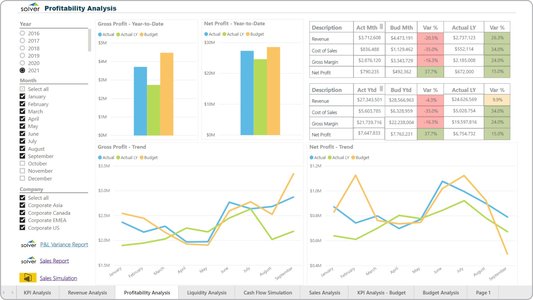
Key Highlights
- Integrative Methods: Combines time intelligence, CAGR, and moving averages.
- Dynamic Measures: Uses CALCULATE and DATEADD to shift context and predict profitability.
- Historical Analysis: Leverages prior period data to forecast future trends.
Overview of Profitability Forecasting Using DAX
Profitability forecasting in Power BI using DAX (Data Analysis Expressions) involves combining a variety of techniques to analyze historical profit data and predict future performance. By leveraging functions such as CALCULATE, DATEADD, and time intelligence functions like SAMEPERIODLASTYEAR or SAMEPERIODLAG, you can develop a robust model that incorporates historical trends, seasonal adjustments, and projected growth rates. The process varies depending on whether you are focusing on short-term trends or creating a multi-year forecast, and this guide will walk you through the key steps and ideas.
Core Techniques and Concepts
1. Establishing Foundational Measures
Every profitability forecasting model should start with clear, well-defined foundational measures. The basic functions include calculating total sales and total costs to derive total profits, which form the cornerstone of any forecast.
Total Profits Calculation
The initial step involves computing the overall profit. This is achieved with the following DAX measure:
// Total Profits = Total Sales - Total Costs
Total Profits = [Total Sales] - [Total Costs]
This simple formula is the basis upon which further adjustments and forecasts are made. Once total profits are established, you can integrate more advanced forecasting techniques.
2. Applying Time Intelligence Functions
By employing time intelligence functions, you augment your ability to analyze historical data trends and to project these trends into the future. There are several useful functions available:
- DATEADD: Shifts the date context forward or backward.
- SAMEPERIODLASTYEAR / SAMEPERIODLAG: Compares current performance with the same period in prior years or months.
- DATESINPERIOD: Helps in creating ranges of dates for more comprehensive analysis.
Forecasting Using DATEADD
For example, to calculate the total profits for a future time period, you can shift the date context using DATEADD:
// Future Profit Calculation using DATEADD
Future Profit =
CALCULATE(
    [Total Profits],
    DATEADD(DateTable[Date], 1, MONTH)
)
In this formula, the DATEADD function moves the current context one month ahead, applying the same calculation to project future profits.
3. Incorporating Historical Data and Growth Trends
Forecasting profit also requires the integration of historical data points, such as profits from previous months or years, to discern trends and subtle clues in seasonality or cyclical behavior. Two primary approaches facilitate this:
- Direct historical averaging: Averages profits from key historical periods to derive a simple forecast.
- CAGR (Compound Annual Growth Rate): Estimates and applies the average annual growth rate to project future profits.
Direct Historical Average Example
To compute a forecast based on historical averages, consider calculating profits from last year, two years ago, last month, and two months ago:
// Calculating historical periods
Profits Last Year = CALCULATE([Total Profits], SAMEPERIODLASTYEAR(DateTable[Date]))
Profits Two Years Ago = CALCULATE([Total Profits], SAMEPERIODLAG(DateTable[Date], 2, YEAR))
Profits Last Month = CALCULATE([Total Profits], SAMEPERIODLAG(DateTable[Date], 1, MONTH))
Profits Two Months Ago = CALCULATE([Total Profits], SAMEPERIODLAG(DateTable[Date], 2, MONTH))

// Forecast based on historical average
Profit Prediction =
DIVIDE(
    [Profits Last Year] + [Profits Two Years Ago] + [Profits Last Month] + [Profits Two Months Ago],
    4
)
This approach smooths out anomalies by relying on several data points, ensuring that unpredictable fluctuations do not overly influence the forecast.
Forecasting Using CAGR
The CAGR provides a dynamic way to estimate the average annual growth rate. This is particularly useful if you are forecasting over multiple years:
// CAGR Calculation
CAGR =
VAR FirstYearProfit = FIRSTNONBLANK(ALL(YearTable[Year]), CALCULATE(SUM(Profit[Amount])))
VAR LastYearProfit = LASTNONBLANK(ALL(YearTable[Year]), CALCULATE(SUM(Profit[Amount])))
VAR NoOfYears = LastYearProfit - FirstYearProfit
RETURN
POWER(
    DIVIDE(
        CALCULATE(SUM(Profit[Amount]), YearTable[Year] = LastYearProfit),
        CALCULATE(SUM(Profit[Amount]), YearTable[Year] = FirstYearProfit)
    ),
    1 / NoOfYears
) - 1

// Forecasting using CAGR
Forecast =
VAR BaseProfit = CALCULATE(SUM(Profit[Amount]), YearTable[Year] = LastYearProfit)
VAR FutureYears = SELECTEDVALUE(YearTable[Year]) - LastYearProfit
RETURN
IF(
    SELECTEDVALUE(YearTable[Year]) > LastYearProfit,
    BaseProfit * POWER((1 + [CAGR]), FutureYears)
)
The CAGR-based approach first determines the average growth rate over a period and then applies this rate to forecast profits for subsequent years.
Integrated DAX Forecasting Model Components
Combining Techniques into a Unified Model
A proficient DAX model in Power BI weaves together the core components discussed above. The following table summarizes the key measures and techniques, providing a consolidated view of how each piece contributes to profitability forecasting:
| Component | Technique/Function | Usage |
|---|---|---|
| Total Profits | Basic Calculation | Subtraction of Total Costs from Total Sales |
| Time Intelligence | DATEADD, SAMEPERIODLASTYEAR, SAMEPERIODLAG | Shifting date context to analyze and forecast historical trends |
| Historical Averages | Direct Averages | Averaging profits over multiple historical periods (yearly, monthly) |
| CAGR | POWER, DIVIDE, VAR | Calculating Compound Annual Growth Rate to project multi-year forecasts |
| DAX Measures | CALCULATE, VAR, IF | Dynamic creation and manipulation of forecasting measures |
Visualization and Scenario Analysis
After your DAX measures and forecasting calculations are in place, Power BI's visualization tools become instrumental in comparing historical data with future predictions. Visual elements like line charts, bar graphs, and scatter plots can vividly display trends, seasonality, and growth trajectories. Furthermore, "what if" parameters allow you to simulate various scenarios, testing how changes in specific variables (such as growth rate or cost structures) might affect future profitability.
Practical Steps for Visualization
1. Create separate visuals to depict historical trends versus forecasted values.
2. Use slicers to allow dynamic filtering by date ranges, product lines, or regions.
3. Integrate forecasting measures with dynamic titles and tooltips for better interpretability.
Advanced Considerations and Best Practices
Managing Data Granularity and Seasonality
When building your forecasting model, carefully consider the granularity of your data. Profit data might be available on daily, monthly, or yearly bases, and applying the wrong level of granularity can lead to erroneous forecasts. Aggregating daily data into monthly or quarterly figures often provides a clearer picture when forecasting longer time periods.
Additionally, identifying seasonality patterns is crucial. Decompose your time series into trend, seasonal, and irregular components to better isolate the underlying growth rate. This decomposition allows you to adjust your forecasts to account for predictable seasonal variations.
Using Variables and Optimizing Performance
The use of variables (VAR) in DAX not only aids clarity by breaking down complex formulas into understandable components but also often results in performance improvements. By storing intermediate calculations, you avoid redundant computations and streamline your forecasting measures.
For instance, storing last recorded profit or the growth rate in variables can make your formulas less cumbersome and easier to debug:
// Example using VAR for clarity and performance
Forecasted Profit =
VAR LastProfit = CALCULATE(LASTNONBLANK(Profit[ProfitAmount], 1), FILTER(Profit, Profit[Date] = MAX(Profit[Date])))
VAR GrowthRate = [CAGR]
RETURN
LastProfit * (1 + GrowthRate)
Iterative Testing and Validation
No forecasting model is complete without rigorous testing. Validate your forecasts by comparing them against actual performance over recent periods. This iterative process not only fine-tunes your DAX measures but also alerts you to anomalies in the data that might require additional analysis. Adjusting for unexpected trends and outliers can significantly enhance the accuracy of your forecasts.
Extended Resources and Reading
For further exploration of DAX formulas, forecasting models, and advanced Power BI techniques, the following resources are highly recommended. They offer detailed guides, case studies, and community forums that deepen your understanding of time series forecasting and data analysis.
References
- Forecasting Techniques in Power BI by Using DAX - Enterprise DNA
-
Predict Profitability for Future Time Periods with Power BI Techniques - Enterprise DNA
- Finance Forecast using DAX - Microsoft Fabric Community
-
How to Use All DAX Functions in Power BI for Forecasting - ZebraBI
- Time Series Analysis in Power BI: Looking Ahead with Forecasting - DataCamp
Recommended Queries for Further Insight
Last updated March 27, 2025