
Finding the Best Free Team Chat and Task Management Tools for Your Small Team
Exploring Free Options for Collaboration, Self-Hosting, and Cloud Deployment for Teams Up to 10 Users
Key Insights:
- Numerous free options exist: There is a wide array of free team chat and task management applications available, catering to various needs and preferences.
- Cloud vs. Self-Hosted: You can find both cloud-based and self-hosted free solutions, offering flexibility in terms of data control and technical expertise required.
- Feature variations in free tiers: While free plans provide core functionalities, they often have limitations on features like storage, integrations, or message history, which is important to consider for scalability.
Essential Tools for Seamless Team Collaboration
Effective team communication and task management are crucial for productivity, especially for small teams. Fortunately, a wealth of free tools are available that can significantly enhance collaboration without incurring significant costs. Whether you prioritize real-time chat, organized task tracking, or a combination of both, there are options to suit your team's specific requirements. These tools offer a range of features, from simple messaging to integrated project workflows, and are accessible via cloud deployment or self-hosting.
Free Team Chat Applications
Team chat applications are the backbone of real-time communication, allowing for quick exchanges, file sharing, and group discussions. Several platforms offer robust free tiers suitable for teams of up to 10 users.
Popular Cloud-Based Free Chat Options
Many well-known team chat platforms offer free plans that are excellent for getting started. These are typically easy to set up and require no technical expertise for maintenance.
- Slack: A widely popular platform known for its intuitive interface and extensive integrations. The free plan usually includes limitations on searchable message history and the number of app integrations, but it's a solid choice for basic team communication.
- Microsoft Teams (Free): If your team is already using Microsoft services, the free version of Teams is a seamless option. It offers chat, video meetings, and file sharing, integrating well with other Microsoft Office tools.
- Google Chat: Included with Google Workspace, Google Chat integrates effortlessly with Gmail, Calendar, and Drive. It's a straightforward option for teams already embedded in the Google ecosystem.
- Pumble: Pumble offers a free plan with unlimited message history, users, and core features, making it a compelling option for teams needing extensive message archives without cost.
- Discord: While often associated with gaming, Discord provides excellent always-on voice chat and text channels, which can be adapted for team communication. It is free to use with optional paid features for server boosts.
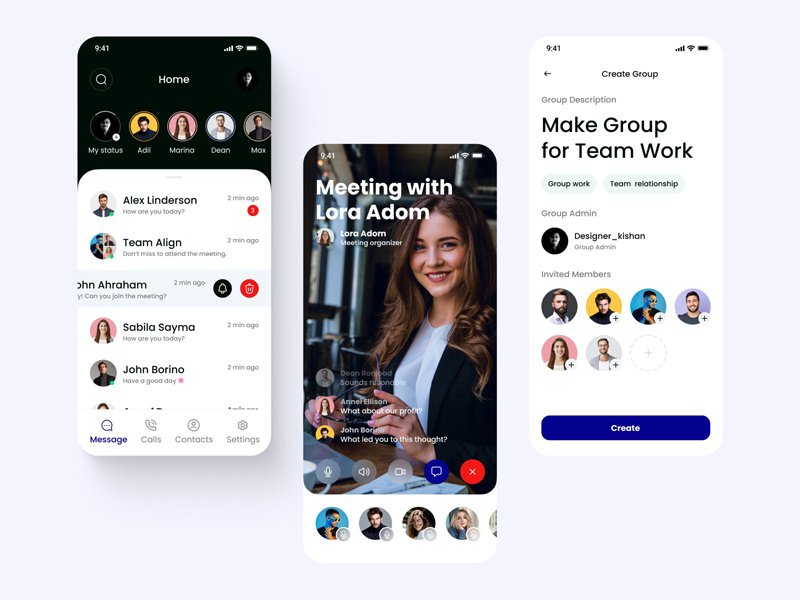
Here is an image illustrating a chat application interface, similar to what you might find in these platforms:
Free Self-Hosted Chat Alternatives
For teams that prioritize data control and privacy, self-hosting a chat application is a viable option. This requires more technical expertise to set up and maintain, but offers greater control.
- Element (Matrix): Element is a client for the Matrix network, an open-source decentralized communication protocol. It offers end-to-end encryption and can be self-hosted, providing strong privacy features.
- Mattermost: An open-source platform designed for developer communication, Mattermost offers a free basic plan for small teams. It can be self-hosted and provides features like channels, direct messaging, and integrations with development tools.
- Rocket.Chat: Another open-source team communication platform that can be self-hosted. Rocket.Chat is considered a strong alternative to Slack, offering various communication and collaboration features.
Streamlining Workflows with Free Task Management Tools
Task management tools are essential for organizing work, tracking progress, and ensuring accountability within a team. Many platforms offer free versions with sufficient features for small teams to manage their projects effectively.
Free Cloud-Based Task Management Solutions
Cloud-based task management tools are generally easy to use and access from anywhere. Their free tiers are often generous enough for the needs of a team up to 10 users.
- Trello: Known for its visual Kanban board style, Trello is excellent for organizing tasks into lists and boards. The free plan offers unlimited boards and users, making it very flexible for various project types.
- Asana: Asana is a robust project and task management tool that is hands-down one of the best apps for managing to-do lists for teams and businesses. Its free tier allows for unlimited tasks, projects, and collaborators, though some advanced features are restricted.
- ClickUp: ClickUp is a highly customizable productivity platform that includes task management features. Its free plan is quite comprehensive, offering various views and integrations suitable for small teams.
- Todoist: While often used for personal task management, Todoist offers a free tier that is useful for small team collaboration on shared projects and tasks.
- Plaky: Plaky provides free and flexible project management software for visually managing tasks and teams. It offers unlimited projects, tasks, and users in its free forever plan.
Below is an image representing a task management interface, showcasing how tasks can be organized:

Free Self-Hosted Task Management Tools
For teams seeking to self-host their task management, there are open-source options available.
- OpenProject: An open-source project management tool that helps teams collaborate effectively in a secure environment. It can be self-hosted and offers features like task management, Gantt charts, and bug tracking.
- Wekan: An open-source Kanban board application similar to Trello. Wekan can be self-hosted and supports features like task assignments, labels, and deadlines.
Combining Chat and Task Management Capabilities
Some platforms offer a more integrated approach, combining chat and task management features within a single application. This can streamline workflows and reduce the need to switch between different tools.
- Fleep: Fleep integrates chat, tasks, and file sharing into a centralized hub. It has a basic free version suitable for small teams.
- Spike: Spike transforms your email inbox into a powerful productivity tool, unifying email, chat, calendar, and tasks in one place. Its free plan includes basic functionalities for a small number of team members.
- Connecteam: While Connecteam offers a range of employee management features, it also includes communication and task management tools with a free plan available for up to 50 users (changing to 30 users from March 1st, 2025).
Choosing the Right Tool(s) for Your Team
Selecting the best free tools for your team depends on your specific needs and priorities. Consider the following factors:
-
Team Size: Ensure the free tier supports up to 10 users comfortably.
-
Required Features: Do you need just chat, just task management, or an integrated solution? What specific features within those categories are essential (e.g., file sharing, video calls, specific task views)?
-
Technical Expertise: If you're considering self-hosting, assess your team's technical capabilities for setup and maintenance.
-
Integration Needs: Do the tools integrate with other applications your team uses?
-
Data Sensitivity: If you handle sensitive data, self-hosted or tools with strong security and compliance features might be necessary.
To help visualize the distinctions between some of the options, here is a table summarizing key aspects of several free tools mentioned:
| Tool | Type | Deployment (Free Tier) | Key Features (Free Tier) | User Limit (Free Tier) |
|---|---|---|---|---|
| Slack | Team Chat | Cloud | Messaging, channels, file sharing, limited integrations, limited message history | Unlimited (with history limit) |
| Microsoft Teams | Team Chat & Collaboration | Cloud | Messaging, video calls, file sharing, Office integration | Up to 100 participants for meetings (with time limit) |
| Google Chat | Team Chat | Cloud | Messaging, integrations with Google Workspace | Included with Google Workspace (Free version available) |
| Pumble | Team Chat | Cloud | Unlimited message history, users, core chat features | Unlimited |
| Trello | Task Management | Cloud | Kanban boards, lists, cards, basic automation | Unlimited users, unlimited boards |
| Asana | Task Management | Cloud | Tasks, projects, lists, boards, calendar view | Unlimited tasks, projects, and collaborators |
| ClickUp | Task Management & Productivity | Cloud | Tasks, customizable views, integrations | Limited storage, limited features |
| Element (Matrix) | Team Chat | Cloud or Self-Hosted | Encrypted messaging, channels, voice/video calls | Varies based on hosting |
| Mattermost | Team Chat | Cloud or Self-Hosted | Messaging, channels, integrations (developer-focused) | Free basic plan for small teams |
| OpenProject | Task Management & Project Management | Cloud or Self-Hosted | Task management, project planning, bug tracking | Varies based on hosting |
Frequently Asked Questions
Are these free tools truly free forever?
Yes, the free tiers of these applications are designed to be free forever, typically with limitations on features, storage, or usage compared to their paid counterparts. These limitations are usually manageable for small teams up to 10 users.
What are the main differences between cloud-based and self-hosted free options?
Cloud-based options are hosted by the provider, offering ease of use and minimal technical overhead. Self-hosted options require you to set up and maintain the software on your own server, providing greater control over data and customization but requiring technical expertise.
Can I use a combination of free chat and task management tools?
Absolutely. Many teams successfully use separate tools for chat and task management, often integrating them to some degree. Consider how well the tools you choose can connect with each other to avoid workflow silos.
Will I need to upgrade to a paid plan as my team grows?
It depends on your team's growth and evolving needs. The limitations of free plans might become restrictive as your team size increases or your requirements become more complex. At that point, evaluating paid plans or more scalable free options would be necessary.
Learn More About Team Communication Tools
For a visual overview of various team communication tools, you might find the following video helpful:
This video provides insights into different team communication tools available, helping you understand their interfaces and features, which can be beneficial when making a decision for your team.
References
Last updated May 7, 2025