
Unlocking Ticket Void Timelines: Navigating Travelport Galileo with Universal API
Discover how to pinpoint the crucial window for voiding air tickets using Travelport's Universal API and Galileo system.
Understanding the precise timeframe for voiding air tickets is essential for travel agencies to manage bookings effectively and avoid penalties. While Travelport's Universal API facilitates the voiding process for tickets issued via Galileo, it's crucial to know that the API itself doesn't dictate these time limits. Instead, the void period is governed by the rules of the ticketing provider, typically the airline, and the relevant settlement plan, such as the Billing and Settlement Plan (BSP) or the Airlines Reporting Corporation (ARC).
Key Insights: Voiding Tickets with Universal API
- Provider Rules Prevail: The Universal API acts as a messenger; the actual voiding window (e.g., same day or next business day) is determined by the airline and settlement plan (BSP/ARC), not by the API.
- Settlement Plan Specifics: BSP tickets generally must be voided on the same day of issuance, while ARC tickets often allow voiding until the end of the next business day, with extensions for weekends and holidays.
- API Request Logic: You don't "get" a void time from the API. Instead, you send an
AirDocumentVoidReq. Its success or failure, based on provider rules, indicates if you're within the permissible window.
Decoding the Void Period: Who Sets the Clock?
When using Travelport Galileo through the Universal API, it's vital to recognize that the Universal API does not enforce or define the void period for air tickets. This responsibility lies with the underlying provider systems—Galileo itself, the airline whose ticket it is, and the settlement plan governing the transaction. The API merely transmits your void request (AirDocumentVoidReq) to the provider. If the request is made outside the allowed timeframe, the provider will reject it, and the API will return an error.
The Role of Settlement Plans: BSP vs. ARC
The two primary settlement plans that dictate voiding timelines are:
Billing and Settlement Plan (BSP)
For agencies operating under BSP, the rule is generally straightforward: electronic tickets must be voided on the same calendar day they were issued. This typically means up to 23:59 local time of the Pseudo City Code (PCC) or agency that issued the ticket. If an exchanged ticket needs to be voided, this also must happen on the same day the exchange was processed.
Airlines Reporting Corporation (ARC)
Agencies in the United States, primarily those using ARC, have a slightly more extended window. E-tickets can usually be voided until 11:59 PM (23:59) local agency time on the next business day following the ticket's issuance.
- A ticket issued on a Tuesday can typically be voided until Wednesday at 11:59 PM.
- If a ticket is issued on a Friday, Saturday, or Sunday, the void window often extends to the following Monday at 11:59 PM.
- Official ARC holidays can also extend this deadline to one business day after the holiday.
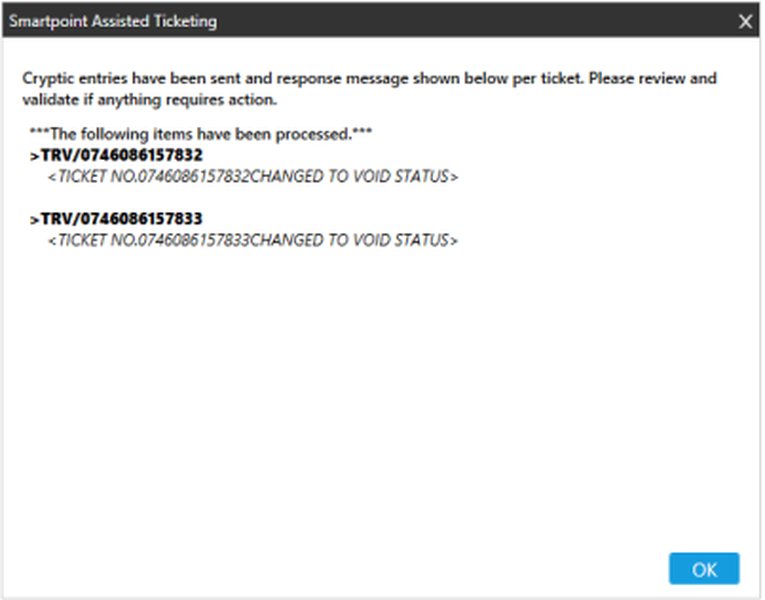
Example of a ticket successfully marked as "Voided" within a Travelport system.
Using Universal API: The AirDocumentVoidReq
The Universal API does not feature a specific function to query and return the "valid until" time for voiding a ticket. Instead, your application must infer this based on the ticket's issuance details and the applicable BSP/ARC rules. The primary API call for this action is AirDocumentVoidReq.
When you send an AirDocumentVoidReq:
- The request must originate from the same PCC where the ticket was initially issued.
- All coupons on the ticket must be in an "open" status (i.e., not used, refunded, exchanged, or otherwise closed). A ticket cannot be voided if any coupon status is not open.
- For Galileo-issued tickets, the ticket number in the request must include the check digit.
AirVoidDocumentRsp) will indicate whether the void was successful. A failure, potentially with an error message, suggests the void period may have expired or other conditions weren't met. After a successful void, it's good practice to use an AirRetrieveDocumentReq to confirm the ticket status has changed to "V" (Void).
Practical Steps to Determine Void Eligibility via Universal API
To effectively manage ticket voids, your application logic should typically follow these steps:
- Retrieve Ticket Issuance Details: Use Universal API to fetch the ticket's issuance date, time, and the issuing PCC.
- Identify the Settlement Plan: Determine if the issuing agency operates under BSP or ARC rules. This is usually known based on the agency's location and setup.
- Calculate the Void Cutoff Time:
- For BSP: The cutoff is 23:59 on the same day of issuance, in the local time zone of the issuing PCC.
- For ARC: The cutoff is 23:59 on the next business day after issuance (accounting for weekends and holidays), in the local time zone of the issuing PCC.
- Compare Current Time to Cutoff: Before sending the void request, check if the current date and time are within the calculated void window.
- Submit
AirDocumentVoidReq: If within the window, send the void request. - Handle the Response: Process the success or failure response accordingly.
Visualizing the Void Process
The following mindmap illustrates the key considerations and steps involved in determining void eligibility and processing a ticket void through Travelport Galileo using the Universal API.
(Not Universal API Enforced)"] id1_2["BSP Rules: Same Day
(by 23:59 local PCC time)"] id1_3["ARC Rules: Next Business Day
(by 23:59 local agency time)"] id1_3_1["Weekend/Holiday Extensions Applicable"] id2["Universal API Process"] id2_1["Primary Request:
AirDocumentVoidReq"]
id2_2["No Direct 'Get Void Time' Function"]
id2_3["Response (Success/Failure)Indicates Eligibility"] id2_4["Confirm with
AirRetrieveDocumentReq for 'V' status"]
id3["Practical Steps for Agency Systems"]
id3_1["Retrieve TicketIssuance Date/Time & PCC"] id3_2["Identify Agency's
Settlement Plan (BSP/ARC)"] id3_3["Calculate Void Cutoff Time
(Factoring in Local PCC Timezone)"] id3_4["Submit
AirDocumentVoidReqBefore Calculated Cutoff"] id4["Key Considerations & Limitations"] id4_1["PCC Consistency:
Void from Issuing PCC"] id4_2["All Ticket Coupons
Must Be 'Open'"] id4_3["No 'Un-void' Functionality via API"] id4_4["Exclusions: Spoiled Tickets,
Refunded/Exchanged Ticket Voids,
EMDs, Paper Tickets"] id4_5["Galileo Ticket Number:
Include Check Digit"]
Comparative Factors for Successful Ticket Voiding
Several factors influence the success of a ticket void attempt. The radar chart below illustrates the perceived importance and control levels associated with these factors when using the Universal API. "Criticality for Success" reflects how vital each factor is. "API Control Level" indicates how much direct control or information the Universal API provides over that factor (low means the API mainly passes through, high means the API might offer more direct management). "Agency Responsibility" highlights the aspects where the agency's diligence is paramount.
This chart underscores that while the API facilitates the transaction, successful voiding heavily relies on the agency's understanding and adherence to external rules and timely actions.
Summary Table: Void Timeframes
This table provides a quick comparison of the general voiding rules for BSP and ARC settlement plans, which are critical when working with Travelport Galileo via Universal API.
| Ticket Type / Settlement Plan | General Void Time Allowed (Local Time of Issuing PCC/Agency) | Key Notes |
|---|---|---|
| BSP (Billing and Settlement Plan) | Same day of issuance, until 23:59 | Applies to electronic tickets. Void must be processed on the day of issue only. |
| ARC (Airlines Reporting Corporation) | Until 23:59 on the next business day after issuance | The void window can be extended if the ticket is issued on a Friday, Saturday, Sunday, or an official ARC holiday (extends to the next business day). |
| Universal API Context | As permitted by the provider (Galileo/Airline based on BSP/ARC) | Universal API does not enforce the void period itself; it relays the request. Success depends on provider rules. Generally, for Galileo, this aligns with BSP/ARC. |
Visual Guide: Voiding a Ticket in Galileo
The following video provides a general overview of how tickets are issued and voided within the Galileo system. While it may demonstrate direct GDS commands, the underlying principles of void eligibility and timelines are relevant when using the Universal API, as the API interacts with these GDS functionalities.
This video illustrates the process of issuing and voiding tickets in Galileo, offering context to the GDS operations that the Universal API interacts with.
Important Limitations and Considerations
When using the AirDocumentVoidReq via Universal API, be aware of its limitations:
- Spoiled Tickets: Cannot be voided using this request.
- Refunded/Exchanged Tickets: You cannot void the refund of a refunded ticket or the exchange of an exchanged ticket. Once a ticket has undergone these processes, its original void eligibility typically changes.
- Aggregated Tickets: Limitations exist for voiding certain aggregated tickets (e.g., an Apollo or Galileo ticket) for specific providers like Worldspan and ACH.
- EMDs and Other Documents: Electronic Miscellaneous Documents (EMDs), MCOs, paper tickets, or service fees are generally not voidable through this specific Universal API request and are handled by provider-specific functionalities within Galileo or Apollo.
- No "Un-void": If a ticket is voided accidentally via the API, there isn't a direct "un-void" function through Universal API. While Galileo might have terminal commands for correcting TINS reports in specific scenarios, this is outside the standard API scope.
Frequently Asked Questions (FAQ)
Does the Universal API tell me the exact deadline to void a ticket?
No, the Universal API does not provide a specific "void by" timestamp. Your system needs to calculate this based on the ticket's issuance date/time, the issuing PCC's local time zone, and the rules of the applicable settlement plan (BSP or ARC).
What happens if I try to void a ticket after the deadline using Universal API?
The AirDocumentVoidReq will likely fail. The provider (Galileo/airline) will reject the request, and the Universal API will return an error message indicating the failure. The Universal Record (UR) will not be synchronized to reflect a void.
Can I void a ticket issued by a different PCC using my PCC's Universal API access?
No, the AirDocumentVoidReq must be sent from the same PCC that originally issued the ticket. While you might be able to retrieve a booking from another PCC, voiding is restricted to the issuing PCC.
What if only some coupons of a ticket need to be voided?
A ticket void applies to all open coupons on that ticket. You cannot perform a partial void of only selected coupons if others are not in an "open" status. The entire ticket is voided, or none of it is.
How do weekends and public holidays affect ARC void times?
For ARC tickets, if the "next business day" falls on a weekend or an official ARC-recognized holiday, the deadline typically extends to the end of the following business day. For example, a ticket issued on Friday can often be voided until Monday 11:59 PM local agency time.
Conclusion
Successfully managing ticket voids via Travelport Galileo and the Universal API hinges on understanding that the API is a conduit, not a rule-setter. The critical timeframes are dictated by airline policies and settlement plans (BSP's same-day rule versus ARC's next-business-day rule). By retrieving ticket issuance details, correctly identifying the settlement plan, and calculating the void cutoff based on the issuing PCC's local time, developers can build robust logic to send AirDocumentVoidReq within the permissible window. Vigilance regarding PCC consistency, coupon status, and API limitations is key to smooth void operations.
Recommended Further Exploration
- How do BSP and ARC ticket voiding rules compare for agencies operating in multiple countries?
- What are common error codes and messages when an AirDocumentVoidReq fails due to an expired void period in Universal API?
- What are best practices for automating pre-void eligibility checks in an application using Universal API and Galileo?
- How do specific airline policies override or supplement standard BSP/ARC void rules when using Travelport Universal API?