
Revolutionize Your Accounts Payable: Automate Invoice Processing with GCP and NetSuite
Discover how Google Cloud Platform services can extract, enrich, and format invoice data, slashing manual effort for your accounting team.
Key Takeaways
- Automated Data Extraction: Leverage Google's powerful Document AI to accurately and efficiently pull structured data from various PDF invoice formats.
- Intelligent Enrichment: Utilize serverless tools like Cloud Functions and data services like BigQuery to translate extracted invoice details into precise, system-ready accounting entities (e.g., business units, department codes, GL account numbers).
- Seamless NetSuite Integration: Format the processed and enriched data into NetSuite-compatible CSV files, enabling streamlined bulk imports and significantly reducing manual data entry.
The Power of Automation: Why GCP for Invoice Processing?
Manual vendor invoice processing is a common pain point for accounting teams. It's often a time-consuming, repetitive, and error-prone task, involving the meticulous extraction of data from PDF invoices and manual entry into ERP systems like NetSuite. This not only diverts valuable accounting professionals from more strategic activities but can also lead to payment delays, inaccurate financial reporting, and increased operational costs.
By leveraging Google Cloud Platform (GCP) services, you can build a robust automated workflow to handle vendor invoices. This approach transforms the process by automatically reading PDF invoices, extracting relevant information, enriching it with your specific accounting logic, and formatting it for direct import into NetSuite. This not only saves significant effort but also enhances data accuracy, improves processing speed, and provides better visibility into your accounts payable operations.
Phase 1: The Core Automation Workflow for NetSuite Import
The initial phase of your invoice automation project focuses on getting data from PDF invoices into NetSuite efficiently. This involves three primary steps:
Step 1: Invoice Extraction – From PDF to Structured Data
The Challenge of Diverse Invoice Formats
Vendor invoices come in a multitude of layouts and formats. Manually locating and transcribing information like invoice numbers, dates, vendor details, line items, and totals from each unique PDF is a significant bottleneck. Traditional OCR might extract text, but it often fails to understand the context and structure of an invoice.
GCP's Solution: Document AI
Google Cloud's Document AI is specifically designed to tackle these challenges. It uses advanced machine learning models, including specialized processors for invoices (like the Procurement Document AI suite), to not only perform OCR but also to identify, classify, and extract key-value pairs and line items with high accuracy. You can use:
- Pre-trained Invoice Processors: Optimized for common invoice fields out-of-the-box.
- Document AI Workbench with Custom Extractor: Allows you to train custom models or fine-tune existing ones using your own invoices, especially useful for unique layouts or specific fields not covered by pre-trained models. Generative AI capabilities further enhance this customization.
Typically, PDF invoices are uploaded to a Google Cloud Storage (GCS) bucket, which can then trigger the Document AI processing pipeline.
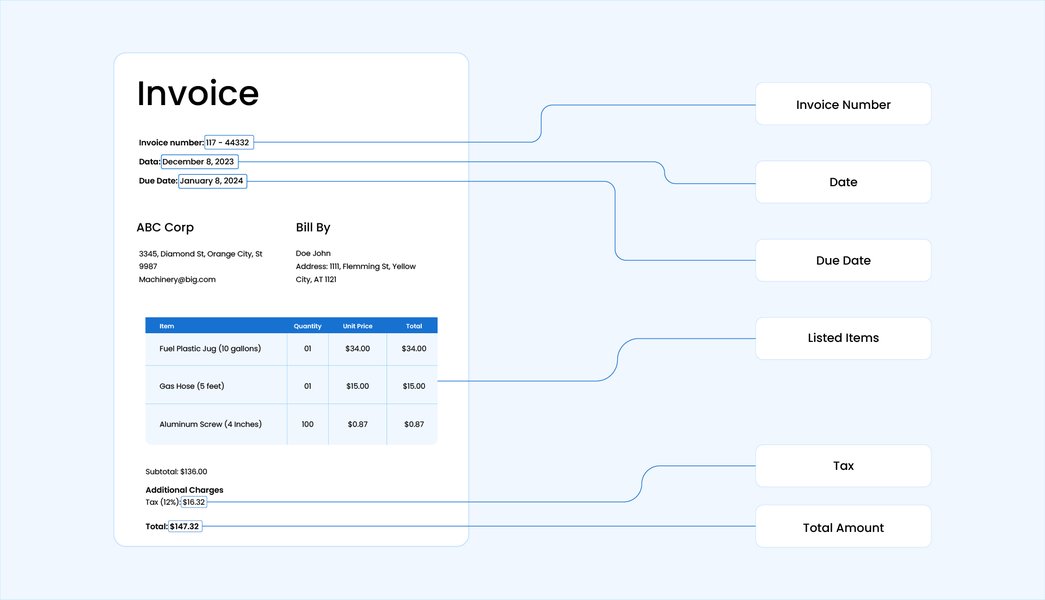
Visual representation of key data fields being automatically extracted from an invoice document.
Output: Structured JSON
Document AI outputs the extracted data in a structured JSON format. This includes the identified fields, their values, confidence scores, and bounding box coordinates on the original document, making it easy for downstream services to consume and process.
Step 2: Data Enrichment – Adding Accounting Intelligence
Translating Raw Data into Meaningful Insights
Once data is extracted, it often needs to be "translated" or enriched to align with your internal accounting structures in NetSuite. For example, a vendor name from an invoice needs to be mapped to a specific vendor ID in NetSuite, or product descriptions might need to be converted into internal item codes, and expenses allocated to correct business units, departments, or GL account numbers.
Leveraging GCP Services for Enrichment
This enrichment logic can be implemented using a combination of GCP services:
- Cloud Functions or Cloud Run: These serverless compute platforms are ideal for hosting microservices that execute your enrichment rules. They can take the JSON output from Document AI, apply transformations, and call other services.
- BigQuery or Cloud SQL: Store and manage your mapping tables (e.g., vendor name to NetSuite vendor ID, keyword to department code, product description to item SKU). Your enrichment microservice would query these databases to find the correct accounting entities.
- Vertex AI (Optional): For more complex scenarios, such as fuzzy matching vendor names that have slight variations or using custom machine learning models for categorizing expenses based on line item descriptions, Vertex AI provides a platform to build, train, and deploy these models.
The outcome of this step is an enriched JSON object, now containing all the necessary accounting codes and identifiers required by NetSuite.
Step 3: Data Formatting – Preparing for NetSuite
NetSuite's Import Requirements
NetSuite typically allows data import via CSV files. These CSV files must adhere to specific templates and field naming conventions defined by NetSuite for different record types (e.g., Vendor Bills). Key considerations include using NetSuite's internal IDs or External IDs for reliable data mapping and updates, correct date formats, and appropriate column headers.
GCP Tools for Transformation
The enriched JSON data needs to be transformed into the required CSV format. This can be achieved using:
- Cloud Functions or Cloud Run: For simpler transformations, a Python or Node.js function can parse the enriched JSON and generate the CSV string.
- Cloud Dataflow: For more complex transformations or high-volume processing, Dataflow (based on Apache Beam) provides a scalable and robust data processing service. It can efficiently convert large datasets from JSON to CSV according to NetSuite's schema.
The resulting CSV file is then typically stored in a designated Google Cloud Storage bucket, ready for the import step into NetSuite.
Orchestrating the End-to-End Process
To create a truly automated system, these steps need to be connected and managed. GCP offers several services for workflow orchestration:
Event-Driven Automation with Cloud Storage Triggers
Configure a GCS bucket so that when a new PDF invoice is uploaded, it automatically triggers a Cloud Function or Cloud Run service to start the extraction process.
Robust Messaging with Cloud Pub/Sub
For more complex, multi-step workflows, Pub/Sub can be used to decouple services. For example, Document AI finishes extraction and publishes a message; an enrichment function subscribes to this message, processes the data, and then publishes another message for the formatting service.
Scheduled Operations with Cloud Scheduler
If you prefer batch processing (e.g., processing all invoices received daily at a specific time) or need to schedule the final NetSuite import, Cloud Scheduler can invoke your Cloud Functions or other services on a defined schedule.

Conceptual overview of an automated invoice processing workflow, from ingestion to system integration.
Seamless Integration: Importing Data into NetSuite
Once your data is extracted, enriched, and formatted into a NetSuite-compatible CSV file, the final step is to import it into your NetSuite system. There are several ways to achieve this:
NetSuite's Native CSV Import Tool
NetSuite provides a built-in CSV import functionality (usually found under Setup > Import/Export > Import CSV Records). This tool allows users to map CSV columns to NetSuite fields and manage import jobs. This can be a manual step initially or semi-automated.
Automated Integration Options
For full automation, consider:
- SuiteScript: Develop custom scripts within NetSuite to fetch CSV files (e.g., from an FTP site or via an HTTP call to a Cloud Function exposing the file) and process them automatically.
- NetSuite APIs (SuiteTalk SOAP/REST Web Services, RESTlets): Programmatically push data to NetSuite from your GCP environment. This requires more development effort but offers fine-grained control.
- Integration Platforms (e.g., Google Cloud Integration Connectors, Celigo, Boomi): These platforms often provide pre-built connectors for NetSuite that can simplify the process of automating data transfer from GCP (like Cloud Storage) to NetSuite. Google Cloud offers Integration Connectors which can facilitate this.
It's crucial to handle aspects like using unique External IDs to prevent duplicate entries and to ensure data is mapped to the correct subsidiaries, accounts, and custom fields within NetSuite.
Python in Action: A Glimpse of Document AI Data Extraction
While a full implementation involves multiple services, here’s a conceptual Python snippet illustrating how you might use the Document AI client library to process an invoice. This focuses on the core extraction part.
# Import the Document AI client library
from google.cloud import documentai

def simple_invoice_extraction(project_id: str, location: str, processor_id: str, file_path: str):
    """
    A simplified function to process a PDF invoice using Google Cloud Document AI.
    Note: For production, robust error handling and more detailed entity processing are needed.
    """
    # Configure the API client options
    client_options = {"api_endpoint": f"{location}-documentai.googleapis.com"}
    client = documentai.DocumentProcessorServiceClient(client_options=client_options)

    # The full resource name of the processor
    # e.g., projects/your-project-id/locations/us/processors/your-processor-id
    name = client.processor_path(project_id, location, processor_id)

    # Read the PDF file into memory
    with open(file_path, "rb") as pdf_file:
        pdf_content = pdf_file.read()

    # Create a RawDocument object
    raw_document = documentai.RawDocument(content=pdf_content, mime_type="application/pdf")

    # Configure the ProcessRequest
    # Specific configurations like ProcessOptions can be added if needed
    request = documentai.ProcessRequest(name=name, raw_document=raw_document)

    try:
        # Call the process_document method
        result = client.process_document(request=request)
        document_object = result.document

        print(f"Successfully processed document: {file_path}")
        print(f"Found {len(document_object.entities)} entities.")

        # Iterate through extracted entities
        for entity in document_object.entities:
            entity_type = entity.type_
            mention_text = entity.mention_text
            confidence = entity.confidence

            print(f"  Type: {entity_type}, Text: \"{mention_text}\", Confidence: {confidence:.2f}")

            # For structured entities like line_items, you might iterate through entity.properties
            if entity_type == "line_item" and entity.properties:
                for prop in entity.properties:
                    print(f"    - {prop.type_}: {prop.mention_text}")

        # Here, you would typically take these 'document_object.entities'
        # and pass them to your enrichment service.

    except Exception as e:
        print(f"Error during Document AI processing: {e}")

# Example usage (replace placeholder values with your actual GCP project details)
# project_id = "your-gcp-project-id"
# location = "us"  # e.g., "us" or "eu" (ensure your processor is in this region)
# processor_id = "your-invoice-processor-id" # The ID of your Document AI invoice processor
# file_path = "path/to/your/sample_invoice.pdf"
#
# if __name__ == "__main__":
#   # Ensure you have authenticated with GCP and the Document AI API is enabled.
#   # Also, ensure the processor_id corresponds to an actual invoice processor.
#   # simple_invoice_extraction(project_id, location, processor_id, file_path)
#   print("Above is a conceptual example. Uncomment and provide actual values to run.")
This code provides a basic framework. In a real-world scenario, you would parse the result.document object more thoroughly, handle different entity types (like line items, which are nested entities), and integrate this with error handling and subsequent enrichment and formatting steps.
Visualizing the Workflow: An Automated System
Understanding the flow of data and processes is crucial. The mindmap below illustrates the key stages and components of the automated invoice processing system using GCP for NetSuite integration.
Mindmap: Invoice Processing Pipeline
This mindmap outlines the journey of an invoice from a PDF document to structured, enriched data ready for NetSuite. It highlights the core GCP services involved in each phase of extraction, enrichment, formatting, and the overarching workflow automation and NetSuite integration points.
GCP & NetSuite"] id1["Phase 1: Data Pipeline"] id1.1["Invoice Input"] id1.1.1["PDF Invoices Received"] id1.1.2["Upload to
Google Cloud Storage (GCS)"] id1.2["Step 1: Extraction"] id1.2.1["Google Document AI"] id1.2.2["(Procurement Processor,
Custom Extractor,
Document AI Workbench)"] id1.2.3["Output: Structured JSON Data"] id1.3["Step 2: Enrichment"] id1.3.1["Cloud Functions / Cloud Run
(Microservices)"] id1.3.2["BigQuery / Cloud SQL
(Lookup Tables:
Vendor Master, GL Codes, Depts)"] id1.3.3["Vertex AI (Optional
for advanced matching/categorization)"] id1.3.4["Output: Enriched JSON Data"] id1.4["Step 3: Formatting"] id1.4.1["Cloud Functions / Cloud Run / Dataflow"] id1.4.2["Transform to NetSuite
CSV Import Template"] id1.4.3["Store Formatted CSV
in Cloud Storage (GCS)"] id2["Workflow Automation & Orchestration"] id2.1["GCS Triggers
(on PDF upload)"] id2.2["Cloud Pub/Sub
(for decoupling steps)"] id2.3["Cloud Scheduler
(for batch jobs)"] id3["NetSuite Integration & Import"] id3.1["NetSuite Native CSV Import Tool
(Manual/Semi-Automated)"] id3.2["Automated Options:"] id3.2.1["SuiteScript"] id3.2.2["NetSuite APIs (SuiteTalk, RESTlets)"] id3.2.3["Integration Connectors
(e.g., Google Cloud Integration Connectors)"] id4["Key Benefits"] id4.1["Reduced Manual Data Entry"] id4.2["Increased Accuracy & Consistency"] id4.3["Faster Invoice Processing Cycle"] id4.4["Scalable Solution"] id4.5["Improved Visibility & Control"]
Comparing GCP Services for Invoice Automation
Radar Chart: GCP Service Suitability
The following radar chart offers a comparative perspective on key GCP services involved in this invoice automation workflow. It evaluates them based on criteria like accuracy (for AI services), scalability, cost-effectiveness, ease of use, and integration capability within the broader GCP ecosystem and with external systems like NetSuite. This is an opinionated analysis to illustrate relative strengths.
Note: Ratings are illustrative and can vary based on specific use case complexity and implementation details. Cost-Effectiveness can be highly variable depending on usage volume.
GCP Services for Invoice Automation: A Quick Reference
The table below summarizes the key Google Cloud Platform services discussed and their roles in the vendor invoice automation workflow for NetSuite.
| Step in Workflow | Primary GCP Service(s) | Purpose & Functionality |
|---|---|---|
| Invoice Input/Storage | Google Cloud Storage (GCS) | Securely store incoming PDF invoices. Acts as a trigger point for the workflow. |
| Invoice Extraction | Document AI (Procurement AI, Custom Extractor, Workbench) | Automated OCR and entity extraction (e.g., invoice number, vendor, dates, line items, amounts) from PDF invoices into structured JSON. |
| Data Enrichment Logic | Cloud Functions, Cloud Run | Serverless compute for running custom code to translate extracted strings into accounting entities (e.g., mapping vendor names, deriving GL codes). |
| Enrichment Data Storage | BigQuery, Cloud SQL | Store and query mapping tables, master data (vendor lists, chart of accounts, department codes) needed for enrichment. |
| Advanced Enrichment/Matching | Vertex AI | (Optional) For complex fuzzy matching, custom ML models for categorization, or advanced analytics. |
| Data Formatting | Cloud Functions, Cloud Run, Cloud Dataflow | Transform enriched JSON data into NetSuite-compatible CSV format based on specific import templates. Dataflow is suitable for large-scale transformations. |
| Workflow Orchestration | Cloud Storage Triggers, Cloud Pub/Sub, Cloud Scheduler | Automate the sequence of operations, handle events, manage dependencies between services, and schedule batch processes. |
| Integration with NetSuite | Google Cloud Integration Connectors, Custom API integrations (using Cloud Functions/Run) | Facilitate the automated transfer of formatted CSV data or direct data push to NetSuite. |
Video Guide: Bulk Invoice Upload to NetSuite
While the focus here is on GCP for extraction and preparation, understanding how data gets into NetSuite is key. The following video provides a tutorial on bulk uploading invoices into NetSuite using CSV files, which is the common target format for the GCP workflow described. This can help visualize the final step of the process once GCP has prepared your data.
This video demonstrates the process of bulk importing invoices into NetSuite using a CSV file, relevant to the output of the automated GCP workflow.
Key Considerations for Successful Implementation
Embarking on an invoice automation project requires careful planning. Here are some important considerations:
Ensuring Data Accuracy
The accuracy of Document AI extraction is high but can be affected by poor quality scans or highly unusual invoice layouts. Plan for an exception handling process, where invoices with low confidence scores can be routed for manual review.
Managing Enrichment Complexity
The rules for mapping extracted data to NetSuite entities can become complex. Maintain clear, well-documented mapping tables in BigQuery or Cloud SQL. Start with the most common vendors and gradually expand.
Robust Error Handling and Logging
Implement comprehensive error handling and logging at each step of the workflow (extraction, enrichment, formatting, import). Use services like Cloud Logging and Cloud Monitoring to track pipeline health and diagnose issues quickly.
Designing for Scalability
Leverage serverless services like Cloud Functions, Cloud Run, and autoscaling features of Dataflow and Document AI to ensure your solution can handle growing volumes of invoices without performance degradation.
Model Customization for Diverse Invoices
If you deal with a wide variety of non-standard invoice formats, investing time in Document AI Workbench to train or fine-tune custom extractors will yield better accuracy.
Pre-Import Validation Rules
Before attempting to import data into NetSuite, implement validation checks within your GCP workflow (e.g., in a Cloud Function) to catch common errors like missing mandatory fields, incorrect data types, or invalid accounting codes. This reduces import failures in NetSuite.
Security and Compliance
Invoice data is sensitive. Utilize GCP's security features, including Identity and Access Management (IAM) for controlling access to services, data encryption at rest and in transit, and ensure your solution complies with relevant data privacy regulations.
Frequently Asked Questions (FAQs)
What is Document AI and how does it help with invoices?
Google Cloud Document AI is an AI-powered platform that automates data extraction from documents. For invoices, it uses specialized machine learning models (like the Invoice Parser) to identify and extract key information such as vendor name, invoice number, line items, amounts, and dates from PDF or image files, converting unstructured data into a structured JSON format. This significantly reduces manual data entry and improves accuracy.
How are variations in PDF invoice layouts handled?
Document AI's pre-trained models are designed to handle a wide variety of common invoice layouts. For highly unique or complex formats, you can use Document AI Workbench to create a Custom Extractor. This involves uploading sample invoices and labeling the specific fields you want to extract, allowing you to train a model tailored to your specific needs, improving accuracy for those challenging layouts.
How is data enrichment performed to match NetSuite's requirements?
Data enrichment typically involves using Cloud Functions or Cloud Run to execute custom logic. This logic references mapping tables stored in BigQuery or Cloud SQL. For example, an extracted vendor name ("ACME Corp") would be looked up to find its corresponding NetSuite Vendor ID ("V1001"). Similarly, terms or descriptions can be mapped to GL accounts, department codes, or business units as defined in your NetSuite setup. This ensures the data is ready for seamless import.
What are the options for importing the processed data into NetSuite?
The most common method is generating a CSV file formatted according to NetSuite's import templates, which can then be uploaded via NetSuite’s native CSV import tool. For greater automation, you can use NetSuite's SuiteScript to fetch and process these CSVs, or leverage NetSuite's APIs (SuiteTalk, RESTlets) to push data directly. Integration platforms, including Google Cloud Integration Connectors, can also automate this data flow between GCP and NetSuite.
Is this GCP-based invoice automation solution scalable?
Yes, GCP services like Document AI, Cloud Functions, Cloud Run, and BigQuery are designed for scalability. They can automatically adjust to handle fluctuating workloads, from a few invoices per day to thousands. This serverless and managed infrastructure allows your automation solution to grow with your business needs without requiring manual provisioning or management of underlying servers.
Recommended Next Steps
To further explore and enhance your invoice automation capabilities, consider these related queries:
- How to implement 3-way matching for invoices using BigQuery and GCP AI services?
- What are the best practices for securing sensitive invoice data on Google Cloud Platform?
- Can I integrate Google Cloud's invoice automation with other ERP systems besides NetSuite?
- How to build a human-in-the-loop review process for automated invoice extraction on GCP?
References
Last updated May 13, 2025