
Conquering Invoice Chaos: Mastering Automation for Every Format Imaginable?
Unlock peak efficiency by transforming how your business handles diverse invoice types through intelligent automation.
In today's fast-paced business environment, accounts payable departments are often inundated with invoices in a multitude of formats – from structured electronic data interchanges (EDI) and PDFs to scanned images, emails, and even handwritten documents. This diversity can cripple traditional automation efforts, leading to manual processing bottlenecks, errors, and increased operational costs. Optimizing document automation performance to adeptly handle these varied formats is no longer a luxury but a necessity for maintaining competitive agility and financial health.
Key Insights for Optimizing Invoice Automation
- Embrace Intelligent Data Capture: Leverage AI-powered Optical Character Recognition (OCR) and Machine Learning (ML) to accurately extract data from any invoice format, adapting to new layouts and improving over time.
- Standardize and Integrate: Implement preprocessing steps to normalize inputs and ensure seamless integration with existing ERP and accounting systems for a unified workflow.
- Focus on Dynamic Workflows and Continuous Improvement: Design flexible automation rules that can route diverse invoices appropriately and continuously monitor Key Performance Indicators (KPIs) to refine processes.
The Power of Intelligent Data Capture
The cornerstone of optimizing document automation for diverse invoice formats lies in the ability to accurately and efficiently extract relevant information, regardless of how it's presented. Traditional OCR systems often struggle with variations in layout, font, or quality. Modern solutions, however, are supercharged with Artificial Intelligence (AI) and Machine Learning (ML).
AI-Powered OCR and Intelligent Document Processing (IDP)
AI-driven OCR goes beyond simple text recognition. Combined with Natural Language Processing (NLP), these systems can understand the context of the information on an invoice. For example, they can identify an "Invoice Number" or "Due Date" even if these fields are located in different places on invoices from different vendors or are phrased slightly differently. Intelligent Document Processing (IDP) platforms often incorporate these technologies, offering robust capabilities to:
- Handle Unstructured and Semi-Structured Data: Effectively process invoices in various formats including PDFs, JPEGs, PNGs, and even low-quality scans or handwritten notes.
- Contextual Understanding: Identify and extract key data points (e.g., vendor name, invoice ID, line items, totals, tax amounts) with high accuracy despite layout variations.
- Continuous Learning: ML models can be trained on new invoice samples, continuously improving their accuracy and ability to handle previously unseen formats without manual template creation for each new vendor. Some systems utilize prebuilt models for common invoice elements, allowing for quicker deployment and fine-tuning.
- Document Classification: Automatically categorize incoming documents (e.g., invoice, purchase order, delivery note) before extraction, directing them to the appropriate processing path.
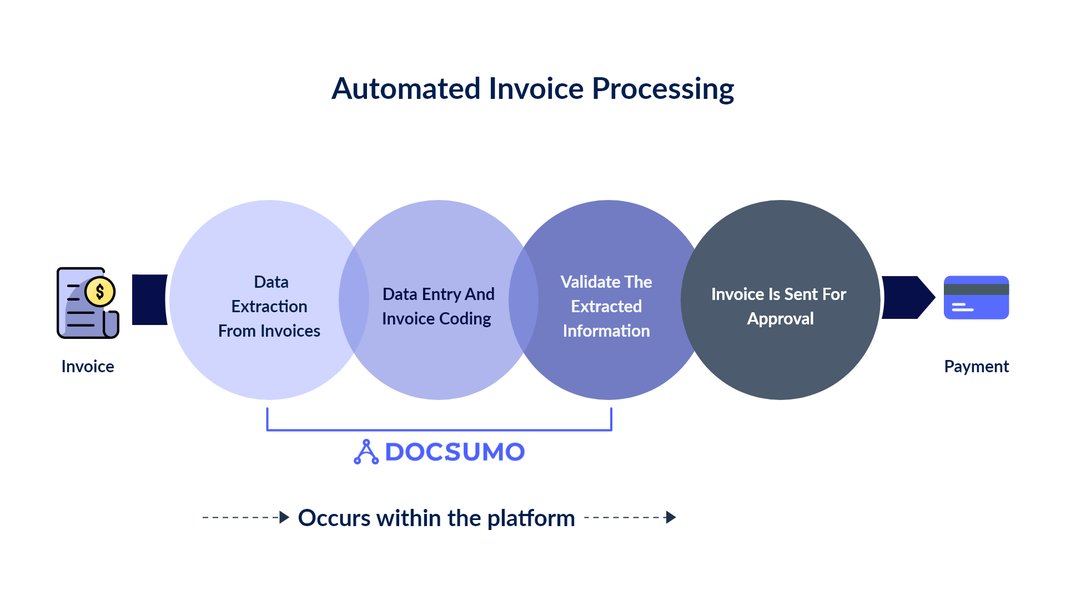
AI-enhanced OCR technology plays a pivotal role in extracting data from diverse document formats.
Preprocessing for Enhanced Accuracy
Before data extraction, preprocessing steps can significantly improve the quality of the input document, leading to better automation performance. These steps might include:
- Image Enhancement: Deskewing (straightening), noise reduction, contrast adjustment, and binarization (converting to black and white) for scanned invoices.
- Format Normalization: Converting various file types (e.g., email attachments) into a consistent format suitable for the OCR engine.
Streamlining Workflows for Maximum Efficiency
Effective automation isn't just about data extraction; it's about orchestrating the entire invoice processing lifecycle. Diverse formats necessitate flexible and intelligent workflows.
Dynamic Workflow Routing and Approval
Once data is extracted, invoices need to be validated, approved, and posted for payment. Automation solutions should support:
- Configurable Business Rules: Set up rules to automatically route invoices based on extracted data (e.g., amount, vendor, department). For instance, invoices over a certain threshold might require multiple approval levels.
- Automated Three-Way Matching: Automatically match invoices against purchase orders (POs) and goods receipt notes (GRNs) to verify discrepancies before payment. AI can assist in flagging partial matches or inconsistencies even if formats differ.
- Exception Handling: Establish clear pathways for invoices that fail validation or require manual review. The system should flag these exceptions and route them to the appropriate personnel with all necessary context. Hybrid models combining automation with selective human intervention are often most effective.
- Electronic Approvals: Eliminate physical routing or email-based approvals with digital workflows, significantly accelerating the approval cycle.
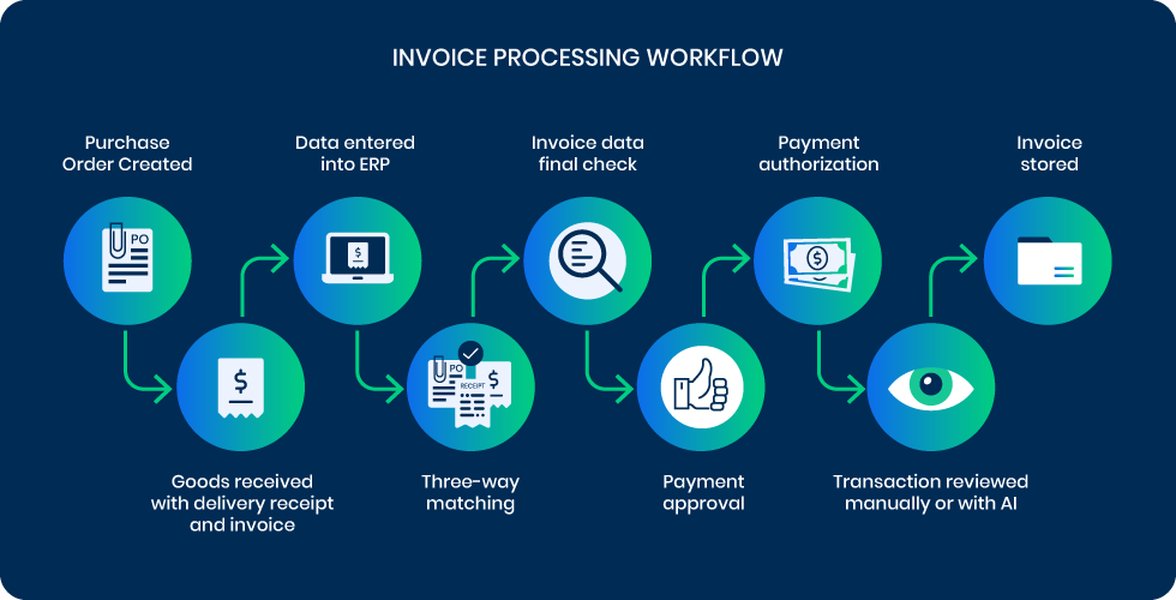
An optimized workflow is critical for efficiently managing diverse invoice formats from receipt to payment.
The Importance of Standardization and Integration
While modern automation tools are adept at handling variability, some level of standardization and robust integration can further enhance performance.
Standardizing Inputs and Processes
While it's challenging to enforce universal invoice formats on all vendors, organizations can:
- Encourage Electronic Invoicing: Promote e-invoicing standards like XML or EDI with key suppliers, which are inherently structured and easier to automate.
- Internal Standardization: Implement consistent internal naming conventions and categorization for processed invoices. This aids in tracking, searching, and reporting.
- Flexible Field Mapping: Utilize automation tools that allow for dynamic or configurable field-mapping templates, enabling adaptation to new invoice formats with minimal IT intervention.
Seamless System Integration
For end-to-end automation, the invoice processing solution must seamlessly integrate with other critical business systems:
- ERP and Accounting Systems: Direct integration allows for automatic posting of approved invoices and synchronization of vendor data, payment information, and financial records. This eliminates manual data re-entry and reduces errors.
- Document Management Systems (DMS): A DMS can serve as a centralized repository for all invoices, ensuring secure storage, version control, and easy retrieval for audits or reference, while maintaining regulatory compliance.
- APIs for Connectivity: Application Programming Interfaces (APIs) facilitate smooth data transfer between the automation tool and other business applications, enhancing overall process cohesion.
Key Technologies in Modern Invoice Automation
Understanding the core technologies empowers businesses to choose the right solutions for handling diverse invoice formats. The table below summarizes some of the pivotal technologies and their benefits in this context.
| Technology | Description | Key Benefits for Diverse Formats |
|---|---|---|
| AI-Powered OCR | Optical Character Recognition enhanced with Artificial Intelligence to recognize and extract text and data from images or scanned documents with contextual understanding. | Handles various fonts, layouts, languages, and image qualities. Learns from new examples to improve accuracy on unfamiliar formats. |
| Machine Learning (ML) | Algorithms that enable systems to learn from data without being explicitly programmed. Used for classification, extraction logic, and anomaly detection. | Adapts to evolving invoice formats, improves data extraction accuracy over time, identifies potential errors or fraudulent invoices based on patterns. |
| Intelligent Document Processing (IDP) | A suite of technologies that captures, extracts, understands, and processes data from various document types, often combining OCR, AI, ML, and NLP. | Provides an end-to-end solution for complex documents like invoices, transforming unstructured/semi-structured data into structured, actionable information. |
| Natural Language Processing (NLP) | Enables computers to understand, interpret, and generate human language. | Helps in understanding the semantic meaning of text on invoices, improving the identification of fields even with non-standard terminology. |
| Robotic Process Automation (RPA) | Software "robots" that automate repetitive, rules-based digital tasks across applications. | Automates tasks like opening emails with invoices, downloading attachments, entering data into systems, and initiating workflow steps. Works well in conjunction with IDP. |
| Workflow Automation Tools | Software designed to automate business processes by managing tasks, data, and rules for routing and approvals. | Ensures invoices, once data is extracted, are routed efficiently for validation, approval, and payment according to predefined (and often dynamic) rules. |
Visualizing Performance: AI's Edge in Invoice Automation
To illustrate the advantages of modern AI-powered automation over traditional methods when dealing with diverse invoice formats, the following radar chart compares key performance aspects. AI-driven solutions generally offer superior adaptability, accuracy, and efficiency, leading to significant improvements in the accounts payable process.
This chart highlights how AI-powered systems typically outperform traditional automation, especially in areas crucial for handling diverse invoice formats like Format Adaptability and Accuracy, while also significantly reducing the need for manual intervention.
Structuring Your Optimization Strategy: A Mindmap
A holistic approach is essential for successfully optimizing document automation for varied invoice formats. The mindmap below outlines the key interconnected areas to focus on, from technology adoption to process refinement and ongoing improvement.
for Diverse Formats"] Technology_Adoption["Advanced Technology Adoption"] AI_ML["AI & Machine Learning"] Contextual_Understanding["Contextual Understanding"] Continuous_Learning["Continuous Learning Models"] OCR_IDP["Advanced OCR & IDP"] Multi_Format_Support["Multi-Format Support (PDF, IMG, etc.)"] Handwritten_Recognition["Handwritten Recognition"] RPA["Robotic Process Automation"] Process_Optimization["Process Optimization"] Standardization["Standardization"] Input_Preprocessing["Input Preprocessing & Normalization"] Vendor_Collaboration["Encourage E-Invoicing"] Internal_Protocols["Consistent Naming & Categorization"] Workflow_Automation["Workflow Automation"] Dynamic_Routing["Dynamic Routing Rules"] Automated_Matching["3-Way Matching (Invoice, PO, GRN)"] Exception_Handling["Clear Exception Queues"] Electronic_Approvals["Digital Approval Chains"] Data_Validation["Data Validation & Accuracy"] Automated_Checks["Automated Business Rule Checks"] Cross_Verification["Cross-Verification with Master Data"] Integration_Strategy["Integration Strategy"] ERP_Accounting["ERP & Accounting System Sync"] DMS["Document Management System"] APIs["APIs for Broad Connectivity"] Continuous_Improvement["Continuous Improvement"] Monitoring_KPIs["Monitoring Key Performance Indicators (KPIs)"] Processing_Time["Invoice Processing Time"] Accuracy_Rate["Extraction Accuracy Rate"] Exception_Rate["Exception Rate"] Feedback_Loops["User Feedback & System Adjustments"] Regular_Audits["Regular Process Audits"] Security_Compliance["Security & Compliance"] Data_Protection["Data Encryption & Security"] Access_Controls["Role-Based Access Controls"] Audit_Trails["Comprehensive Audit Trails"] Regulatory_Adherence["Adherence to Financial Regulations"]
This mindmap visually breaks down the multifaceted strategy required, emphasizing that technology, process, integration, and continuous oversight all play crucial roles.
Ensuring Accuracy, Reliability, and Continuous Improvement
Even with advanced technology, maintaining high performance requires ongoing attention to accuracy and a commitment to continuous improvement.
Data Validation and Error Handling
Implement robust validation checks both pre- and post-data extraction. This includes:
- Business Rule Validation: Check extracted data against predefined business rules (e.g., valid date formats, sum of line items matching total amount, recognized vendor).
- Cross-Checks: Validate invoice data against purchase orders, contracts, or vendor master files.
- Confidence Scoring: Many AI systems provide confidence scores for extracted fields. Low-confidence data can be automatically flagged for human review.
Monitoring, KPIs, and Optimization
Regularly monitor the performance of your document automation system. Key Performance Indicators (KPIs) to track include:
- Invoice Processing Time: Average time from receipt to payment approval. An industry standard is often cited as 3-5 days, but automation aims to significantly reduce this.
- Straight-Through Processing (STP) Rate: Percentage of invoices processed without any manual intervention.
- Extraction Accuracy Rate: Percentage of data fields extracted correctly. Aim for 95% or higher.
- Exception Rate: Percentage of invoices requiring manual review or correction.
- Cost Per Invoice Processed: To measure ROI and efficiency gains.
Use these metrics to identify bottlenecks, areas for improvement in AI model training, or adjustments to workflow rules. Collect feedback from users to understand practical challenges and refine the system. This iterative process of monitoring, evaluating, and adjusting is crucial for sustained optimization.
Training and Change Management
Successfully implementing and optimizing document automation involves more than just technology. Ensure that staff are adequately trained on how to use the new systems and understand the automated workflows. Effective change management practices can help foster adoption and encourage a culture of continuous learning and adaptation within the organization.
Transforming Accounts Payable with AI
The following video provides insights into how AI is revolutionizing invoice digitization and transforming Accounts Payable operations, offering a glimpse into the capabilities that can be harnessed to manage diverse invoice formats effectively.
This video illustrates the practical application of AI in automating the digitization of invoices, a core component of handling diverse formats. It showcases how AI can extract, validate, and process invoice data, reducing manual effort and improving overall efficiency in accounts payable departments. Such systems are designed to learn and adapt, becoming more proficient over time as they encounter a wider variety of invoice structures.
Frequently Asked Questions (FAQ)
What are the biggest challenges when automating diverse invoice formats?
The primary challenges include:
- Layout Variations: Different vendors use unique invoice templates, making it hard for template-based systems to locate data fields consistently.
- Data Quality: Invoices can be low-resolution scans, contain handwritten notes, or have missing information, affecting OCR accuracy.
- Multiple Languages and Currencies: Global businesses deal with invoices in various languages and currencies, requiring more sophisticated recognition and validation.
- Unstructured Data: Information like line items can be presented in complex tables or free-form text, which is difficult for basic OCR to parse correctly.
- File Types: Invoices arrive in numerous formats (PDF, DOCX, JPG, PNG, email body), each requiring appropriate handling.
How does AI offer an advantage over traditional OCR for diverse invoices?
Traditional OCR converts images of text into machine-readable text but lacks understanding of the content. AI, particularly when combined with Machine Learning and Natural Language Processing, offers significant advantages:
- Contextual Understanding: AI can identify fields (e.g., "invoice date," "total amount") based on context and surrounding keywords, even if their position or label varies.
- Adaptability: AI models can learn from new invoice formats and improve their accuracy over time without requiring manual creation of new templates for each vendor.
- Higher Accuracy: AI can better handle noise, distortions, and variations in font or layout, leading to more accurate data extraction.
- Complex Data Extraction: AI is more capable of extracting complex information like line-item details from tables, even if table structures vary.
- Reduced Exceptions: By handling a wider range of formats more accurately, AI reduces the number of invoices that need manual review and correction.
What Key Performance Indicators (KPIs) should I track for invoice automation performance?
Tracking the right KPIs is crucial for measuring success and identifying areas for improvement. Key KPIs include:
- Invoice Processing Time: Average time from invoice receipt to payment posting.
- Straight-Through Processing (STP) Rate: Percentage of invoices processed without manual intervention.
- Data Extraction Accuracy Rate: Percentage of data fields captured correctly.
- Exception Rate: Percentage of invoices flagged for manual review or correction.
- Cost Per Invoice Processed: Total cost of processing divided by the number of invoices.
- On-Time Payment Rate: Percentage of invoices paid by their due date, helping to capture early payment discounts.
- First-Pass Yield: Percentage of invoices processed correctly the first time without needing rework.
Is it possible to achieve 100% automation for all invoice formats?
While 100% automation (i.e., zero human intervention for any invoice) is an aspirational goal, it's rarely achievable in practice due to the sheer unpredictability and complexity of all possible invoice formats, especially very poorly scanned, damaged, or entirely novel layouts. However, with advanced AI-powered IDP solutions, businesses can achieve very high straight-through processing rates, often exceeding 80-90% for a majority of their invoice volume. The focus should be on maximizing automation for common and predictable formats while having efficient human-in-the-loop processes for the exceptions. Continuous learning capabilities of AI systems mean that the level of automation can steadily increase over time as the system encounters and learns from more diverse examples.
Recommended Further Exploration
- What are the latest advancements in AI for intelligent document processing?
- How can small businesses implement cost-effective invoice automation?
- What are the security considerations when automating financial documents like invoices?
- Compare top invoice automation software solutions for enterprises handling high volumes of diverse invoices.
References

Last updated May 6, 2025