
Revolutionizing Your Document Management: From Paper Chaos to Digital Organization
A comprehensive guide to implementing a robust document scanning and electronic management system in two strategic phases
Essential Project Insights
- Stage 1 involves high-volume document digitization: Converting approximately 700,000-1,200,000 physical documents across three locations using on-premises scanning equipment.
- Stage 2 requires implementing a complete EDMS solution: A centralized system that will store, organize, and manage the newly digitized documents with advanced search and retrieval capabilities.
- The project requires strategic planning and quality management: Successful implementation demands careful coordination of scanning operations, metadata extraction, and system configuration.
Understanding Document Scanning & Indexing (Stage 1)
The first stage of this project involves converting approximately 700,000-1,200,000 physical documents into digital format across three distinct locations. This process requires specialized equipment, methodical procedures, and strategic planning to ensure high-quality results.
Document Inventory Assessment
Before beginning the scanning process, a comprehensive inventory assessment is essential to understand the scope and nature of documents at each location:
- Mombasa Location: Approximately 250,000-300,000 A4 documents in good condition, suitable for high-speed scanning.
- Magadi HR Records: Approximately 400,000-700,000 mainly A4 documents, likely containing sensitive personnel information requiring special handling protocols.
- Innovation and Engineering: Approximately 100,000-200,000 mixed-format documents including A4, A3, books, manuals, and contracts that may require specialized scanning techniques.
The Scanning Process
Document scanning involves converting physical documents into digital formats through specialized equipment. This project specifies on-premises scanning using the supplier's equipment, which offers several advantages including security, immediate quality control, and reduced document transportation risks.
Key Components of Professional Document Scanning
- Document Preparation: Removing staples, paperclips, and organizing documents for smooth feeding through scanners.
- High-Volume Scanning Equipment: Industrial-grade scanners capable of processing 60-100 pages per minute with automatic document feeders.
- Image Processing: Applying enhancements like deskewing, despeckling, and contrast adjustments to improve readability.
- Quality Control: Implementing visual inspections and automated checks to ensure all pages are properly captured and legible.
- File Format Selection: Converting documents to appropriate formats (typically PDF/A for archival purposes) that balance quality and file size.
Document Indexing Methodologies
Indexing is the critical process of organizing scanned documents by assigning metadata to make them easily searchable in the EDMS. Effective indexing strategies must be tailored to the document types and organizational needs.
Essential Indexing Parameters
- Document Classification: Categorizing documents by type (contracts, HR records, technical manuals, etc.)
- Metadata Extraction: Identifying and recording key data points from each document (dates, reference numbers, authors, departments)
- Keyword Assignment: Adding relevant search terms to enhance future discoverability
- Hierarchical Organization: Creating logical folder structures that mirror organizational needs
- OCR Processing: Applying Optical Character Recognition to make text within documents searchable
Quality Assurance in Document Digitization
Quality control is paramount in large-scale scanning projects to ensure the integrity and usability of the digital collection. A comprehensive QA process should include:
- Visual Sampling: Regular spot-checks of scanned documents against originals
- Completeness Verification: Ensuring all pages and documents are captured without omissions
- Image Quality Assessment: Checking resolution, contrast, and clarity of scanned images
- Metadata Verification: Validating the accuracy of indexed information
- OCR Accuracy Testing: Confirming that text recognition meets established accuracy thresholds
This radar chart illustrates the relative complexity and requirements across different document categories in the scanning project. The Mombasa A4 documents show higher scanning speed and cost efficiency but require less preparation, while Innovation & Engineering documents present higher complexity due to their mixed formats.
Electronic Document Management System Implementation (Stage 2)
The second stage of this project involves the supply, installation, and configuration of an Electronic Document Management System (EDMS) to store, manage, and provide access to the digitized documents from Stage 1.
What is an Electronic Document Management System?
An EDMS is specialized software designed to store, organize, and manage digital documents and images of paper-based information. Unlike simple file storage, an EDMS provides structured organization, enhanced security, workflow automation, and powerful search capabilities to efficiently manage an organization's document lifecycle.
Core EDMS Functionalities
- Document Storage & Organization: Secure repository with logical organization structures
- Document Retrieval: Advanced search capabilities using metadata and full-text search
- Version Control: Tracking document changes and maintaining version history
- Access Control: Granular permissions to regulate who can view, edit, and delete documents
- Workflow Automation: Routing documents through review and approval processes
- Audit Trails: Logging of all document interactions for compliance and security
- Integration Capabilities: Connections with other enterprise systems like ERP or CRM
EDMS Technical Specifications for This Project
Based on the document volumes and organizational requirements, the EDMS should include these technical specifications:
- Storage Capacity: Sufficient to handle 700,000-1,200,000 documents with room for growth
- Network Compatibility: Ability to operate efficiently over the existing WAN with 1-2 Mbps connections
- Compression & Deduplication: Technologies to optimize storage usage and transmission efficiency
- Format Support: Capability to handle multiple file formats including text documents, images, audio, and video
- Scalability: Capacity to grow as document volumes increase
- User Capacity: Support for multiple concurrent users with responsive performance
- Security Features: Robust protection against unauthorized access and data loss
EDMS Deployment & Configuration
Deploying an EDMS involves several key phases to ensure successful implementation:
| Deployment Phase | Key Activities | Expected Outcomes | Typical Timeline |
|---|---|---|---|
| System Installation | Server setup, software installation, database configuration | Functioning base system with admin access | 1-2 weeks |
| System Configuration | User roles setup, workflow definition, metadata structure creation | Customized system aligned with organizational needs | 2-4 weeks |
| Document Migration | Importing scanned documents, validating metadata, testing retrieval | Complete document repository with accurate indexing | 3-6 weeks |
| Integration | Connecting with existing systems (e.g., Active Directory, ERP) | Seamless information flow between systems | 2-3 weeks |
| User Training | Admin and end-user training sessions, documentation creation | Competent system users across the organization | 1-3 weeks |
| Testing & Quality Assurance | Performance testing, security audits, user acceptance testing | Validated system meeting all requirements | 2-3 weeks |
| Go-Live & Support | Production deployment, initial support, performance monitoring | Fully operational system with support mechanisms | 1-2 weeks |
This mindmap illustrates the key components and considerations for implementing an Electronic Document Management System. It highlights the three main areas of focus: core components that form the foundation of the system, essential features that provide functionality, and implementation requirements that ensure successful deployment.
Project Implementation Strategy
Successfully executing this two-stage project requires careful planning, coordination, and quality management throughout the process.
Pre-Implementation Planning
Document Assessment & Categorization
Before beginning the scanning process, conduct a thorough assessment of all document collections to identify:
- Document types, sizes, and conditions
- Confidentiality requirements and access restrictions
- Required metadata fields for each document category
- Logical organization structures that align with business processes
- Preservation requirements for original documents post-scanning
Resource Allocation & Scheduling
Develop a detailed project plan that includes:
- Equipment requirements for each scanning location
- Staffing needs for document preparation, scanning, and quality control
- Timeline estimates for each location based on document volumes and complexity
- Coordination with departments to minimize disruption during document access
- Contingency plans for handling unexpected document conditions or volumes
Scanning & Indexing Execution
During the scanning and indexing phase, implement these best practices:
- Batch Processing: Organize documents into manageable batches with tracking sheets
- Consistent Metadata: Establish and enforce standardized metadata extraction protocols
- Regular Backups: Implement frequent backup procedures for scanned images and metadata
- Progress Tracking: Maintain detailed logs of scanning progress, issues, and resolutions
- Chain of Custody: Document the handling of all materials, especially sensitive records
EDMS Selection Criteria
When selecting an EDMS solution for Stage 2, prioritize these key factors:
- Scalability: Ability to grow with organizational needs and document volumes
- Usability: Intuitive interface that requires minimal training for end-users
- Security: Robust access controls and encryption capabilities
- Search Performance: Powerful and flexible search capabilities for quick document retrieval
- Integration Capabilities: Easy connections with existing enterprise systems
- Support & Maintenance: Reliable vendor support and straightforward update processes
- Total Cost of Ownership: Consideration of licensing, infrastructure, and ongoing maintenance costs
This video provides an excellent overview of Electronic Document Management Systems (EDMS), explaining how they function as efficient ways to store, share, and manage electronic documents. It covers the fundamental concepts that apply directly to Stage 2 of this project, highlighting the benefits of implementing an EDMS for large document collections like those being digitized in Stage 1.
Modern Document Scanning Technology
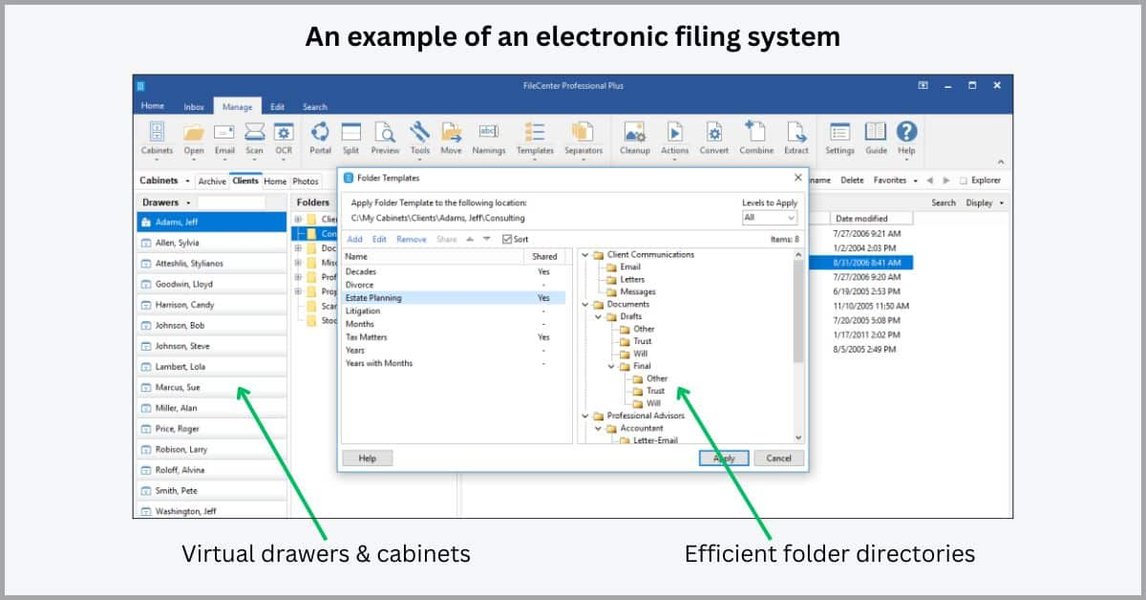
A modern electronic filing system with organized digital document storage.

Professional document scanner for high-volume digitization projects.

User interface of a digital filing system showing organization structure and search capabilities.
Modern document scanning technology has evolved significantly, offering high-speed capabilities with enhanced image processing algorithms. Professional-grade scanners used for large-volume projects like this one typically feature automatic document feeders capable of processing 60-100 pages per minute while simultaneously performing quality checks and image enhancement. These systems often include integrated OCR capabilities that convert scanned images into searchable text, greatly enhancing the usability of the digitized documents in the EDMS.
Frequently Asked Questions
References
- What is an Electronic Document Management System - Cognidox
- Top 10 Document Management Systems - Spiceworks
- What is an EDMS? - ComplianceQuest
- EDMS Services - North Dakota Information Technology
- What is an Electronic Document Management System - IRIS Global
- What is EDMS? - Laserfiche
- Bulk Document Scanning Services in Kenya - Domino Systems
- Document Digitization & Scanning - Cadtech Services Limited Kenya
Recommended Searches
Last updated April 7, 2025