
Ensuring Operational Continuity: A Deep Dive into GE CPU366 PLC Battery Status
Understanding and Maintaining Your GE Fanuc PLC's Vital Power Source
Maintaining the health of a Programmable Logic Controller (PLC) is paramount for uninterrupted industrial operations. At the heart of many PLCs, including the GE CPU366, is a crucial backup battery. This battery is not merely for powering the unit; it safeguards critical data, such as system time, date, PLC configuration, and most importantly, the PLC logic program, especially during power outages or when the main power supply is disconnected. A failing battery can lead to data loss and costly downtime. Therefore, understanding how to check its status and intervene when necessary is a vital skill for anyone working with these systems.
Key Insights into GE CPU366 PLC Battery Management
- Visual Indicators are Your First Alert: The primary and most immediate way to check the battery status on a GE CPU366 PLC is by observing the BATT LED on the CPU module. A red, yellow, or flickering light signifies a low or failing battery, demanding prompt attention.
- Software Diagnostics Provide Deeper Insights: While visual cues are helpful, connecting to the PLC via its programming software (e.g., Proficy Machine Edition or similar GE Fanuc software) offers a more detailed diagnostic view. This allows you to check for specific battery fault codes and monitor the battery's condition within the system.
- Timely Replacement is Crucial for Program Integrity: Once a low battery warning is detected, it's critical to have a current backup copy of the PLC program. Battery replacement should ideally be performed while the PLC is powered up to prevent loss of the program, although some models may require specific power-down procedures.
Understanding the Role of the PLC Battery
The battery in a GE CPU366 PLC, like other PLC batteries, serves as a crucial backup power source for volatile memory. This memory holds the PLC's operational program and configuration settings. Without a functioning battery, this data could be lost if the main power to the PLC is interrupted, leading to significant operational disruption and potential safety hazards. These batteries are typically 3V or 3.6V lithium cells, designed for longevity but still subject to degradation over time.
Why Battery Health Matters
A healthy battery ensures that the PLC's program and stored data remain intact even when the primary power supply is off. This is essential for preventing unscheduled downtime and the laborious process of re-programming a PLC from scratch. Frequent low battery warnings, shorter battery life, or system malfunctions are all strong indicators that a replacement is imminent. Manufacturers generally recommend replacing backup batteries every three to five years, but regular checks are advisable to catch issues sooner.
Common Types of PLC Batteries and Their Characteristics
While the GE CPU366 PLC typically uses specific lithium batteries, it's useful to understand the broader context of PLC batteries. Most are lithium-based due to their stable voltage output and long shelf life. They come in various voltage ratings (e.g., 3.0 VDC and 3.6 VDC) and capacities (mAh). For instance, a common replacement for GE Fanuc 90-30 series, which might share battery characteristics with a CPU366, could be a 3V 1500mAh lithium battery or a 3.6V 2100mAh battery. It's crucial to use the correct battery type and voltage specified by the manufacturer for your specific GE CPU366 model to ensure proper functionality and longevity.
Methods for Checking GE CPU366 PLC Battery Status
There are several effective ways to ascertain the battery status of your GE CPU366 PLC, ranging from quick visual checks to detailed software diagnostics.
Visual Inspection: The BATT LED
The most straightforward method to check the battery status on a GE CPU366 PLC is to look for the "BATT" LED indicator on the CPU module. This LED is specifically designed to alert operators to battery issues. When the battery voltage drops below a safe threshold, this LED will typically turn red, yellow, or begin to flicker. A solid red light usually indicates a low or missing battery, signaling an urgent need for replacement. This visual cue acts as an immediate warning, prompting further investigation or immediate action.
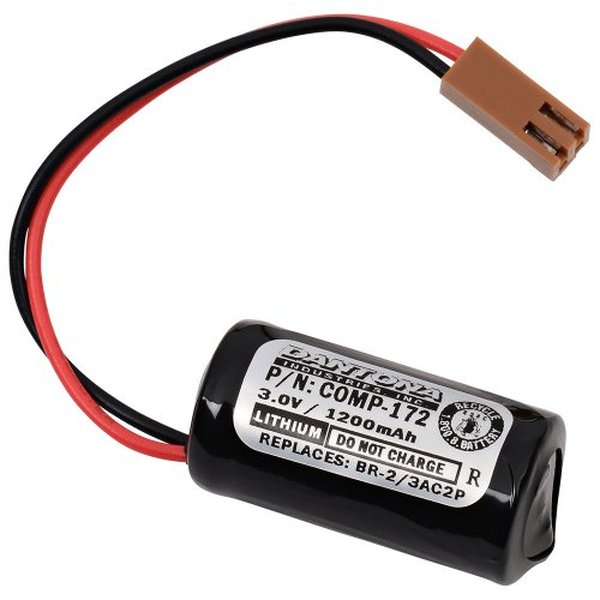
An example of a GE Fanuc PLC battery, illustrating the type of component that safeguards your PLC's program.
Software-Based Diagnostics
For a more precise and comprehensive understanding of the battery's condition, industrial professionals can leverage the PLC's programming software. GE Fanuc PLCs, including the CPU366, often provide diagnostic functions within their respective software environments (e.g., Proficy Machine Edition). Going online with the PLC allows you to:
- Check Fault Tables: The software will often log minor or major faults related to the battery. A common fault type for a low battery is a "minor fault type 10, code 10." Clearing these fault tables after battery replacement is often necessary to reset the alarm.
- Monitor Battery Voltage: Some PLC software platforms can display the current battery voltage, providing a quantitative measure of its health. This allows for proactive maintenance before the battery fails critically.
- Set Up Alarms and Notifications: Advanced monitoring setups can be configured to send email or SMS alerts to technicians when the battery voltage falls below a predefined threshold, integrating battery status into a larger maintenance management system.
It's important to note that sometimes the physical BATT LED on the PLC might indicate a low battery, while the software's battery indicator might still show "OK." In such cases, the physical LED is usually the more reliable indicator, and immediate action should be taken.
Utilizing a Multimeter for Direct Voltage Measurement
While not a primary method for checking a battery already installed in a powered-up PLC (as it risks program loss), a multimeter can be invaluable for testing spare batteries or batteries that have been removed. To test a PLC battery with a multimeter:
- Ensure the multimeter is set to the DC Volt (DCV or V with a straight line) setting, choosing a range above the battery's stated voltage (e.g., 5V, 10V, or 20V for 3.0V or 3.6V batteries).
- Connect the multimeter leads to the positive and negative terminals of the battery.
- A 3.0 VDC battery reading between 2.0V to 2.5V, or a 3.6 VDC battery reading between 2.4V to 2.9V, indicates it is functional. Readings below these thresholds suggest the battery is depleted and requires replacement.
Best Practices for GE CPU366 PLC Battery Replacement
Replacing a PLC battery is a critical maintenance task that, if done incorrectly, can lead to program loss. Adhering to best practices is essential.
Maintaining Power During Replacement
The cardinal rule for most PLC battery replacements, especially for GE Fanuc models like the CPU366, is to perform the replacement while the PLC is powered up. This ensures that the volatile memory, which relies on the battery, is continuously sustained by the main power supply, preventing program loss. For models like the GE Fanuc 90-30, it's explicitly stated to replace the battery while the PLC is powered up. Some systems may even have two connectors for batteries, allowing a new battery to be installed before the old one is removed, providing an extra layer of safety.
However, it is crucial to consult the specific manual for your GE CPU366 model, as procedures can vary. Some older or specific models might have different requirements or a limited "power-off" window for battery replacement (e.g., within 10 minutes for some CLICK CPUs).
This video demonstrates how to install an IC693ACC301 PLC Battery for a GE Fanuc 90-30 series, providing visual guidance on a similar replacement process that might apply to your GE CPU366.
The Importance of Program Backup
Even when following the "hot swap" procedure, it is an absolute best practice to have a current backup copy of the PLC program before attempting a battery replacement. In the rare event of an unexpected issue during the replacement, a recent backup ensures that you can quickly restore the program, minimizing downtime. This backup should be stored securely and accessible for quick deployment.
Post-Replacement Steps
After replacing the battery, it is often necessary to clear any lingering battery fault alarms from the PLC's fault tables within the programming software. A power cycle of the PLC might also be required for the new battery status to be fully recognized and for the BATT LED to turn off.
Comparative Overview of Battery Monitoring Across Systems
While the focus is on GE CPU366 PLCs, it's insightful to see how battery status is checked across different systems, highlighting commonalities and differences.
| System Type | Primary Battery Check Method | Additional Monitoring Options | Typical Battery Type/Voltage |
|---|---|---|---|
| GE Fanuc PLCs (e.g., CPU366, 90-30) | BATT LED on CPU module (red/yellow/flickering indicates low) | PLC programming software (fault tables, direct voltage display), Multimeter (for removed batteries) | Lithium (3V, 3.6V, various mAh) |
| Other PLCs (Allen-Bradley, Siemens, Omron) | Dedicated BATT LED on CPU, System/Minor Faults in software | Diagnostic functions in specific PLC software (e.g., Siemens TIA Portal 'Battery Status'), Analog input cards for custom monitoring | Lithium (3V, 3.6V, various mAh) |
| Laptop Computers (Windows) | Settings app, Command Prompt (`powercfg /batteryreport`) | Third-party utilities (e.g., BatteryInfoView), BIOS/UEFI settings | Lithium-ion (Li-ion) |
| Laptop Computers (Mac) | Battery Status menu in menu bar, System Settings > Battery | Lithium-ion (Li-ion) | |
| Security System CPUs (GE Concord, Simon) | Keypad display messages (e.g., "System Low Battery"), Trouble beeps | Regular manual checks, contacting customer support for firmware updates | Lead-acid (typically 12V), Lithium (for wireless sensors) |
| Motherboard CMOS Batteries | BIOS/UEFI time/date reset, System diagnostics tools | Hardware monitoring software (HWiNFO, AIDA64), Multimeter (direct measurement) | CR2032 Lithium coin cell (3V) |
Proactive Battery Management Strategy
Effective battery management goes beyond just reacting to alarms. A proactive approach significantly reduces the risk of unexpected downtime.
Implementing Regular Inspection Schedules
Integrate battery status checks into your routine maintenance schedule. For PLCs, this could mean periodic visual checks of the BATT LED and scheduled software diagnostics to monitor battery health. For critical systems, consider remote monitoring solutions that can alert personnel to low battery conditions automatically via email or SMS.
Maintaining a Spares Inventory
Always keep a supply of the correct replacement batteries for your GE CPU366 PLCs readily available. Knowing the exact model number and voltage (e.g., 3V or 3.6V lithium) is crucial. Having spares on hand eliminates delays when a battery needs urgent replacement.
Data-Driven Insights into Battery Health
To further illustrate the aspects of proactive battery management, here is a radar chart presenting hypothetical scores for different strategies in maintaining PLC battery health.
This radar chart illustrates the importance of a holistic approach to PLC battery management. While "Visual Inspection Frequency" and "Program Backup Consistency" might be strong in current practices, areas like "Proactive Replacement Policy" and "Software Diagnostic Depth" often have room for improvement. An optimized strategy involves strengthening all these aspects to minimize the risk of battery-related failures.
Frequently Asked Questions (FAQ)
What does a red BATT LED on my GE CPU366 PLC mean?
Can I replace the GE CPU366 PLC battery while the power is on?
What type of battery does a GE CPU366 PLC use?
Will I lose my PLC program if the battery dies?
How often should I replace my GE CPU366 PLC battery?
Conclusion
Checking the battery status on your GE CPU366 PLC is a fundamental aspect of maintaining industrial automation systems. By vigilantly observing the BATT LED indicator, utilizing the diagnostic capabilities of the PLC's programming software, and following careful replacement procedures, you can ensure the integrity of your PLC program and prevent costly downtime. Proactive monitoring, timely replacement, and maintaining current program backups are cornerstones of reliable PLC operation. Understanding these practices safeguards not only the equipment but also the entire production process it controls, ensuring continuous and efficient operations.
Recommended Searches
- How to replace a GE Fanuc 90-30 PLC battery without losing the program?
- What are the different types of batteries used in PLCs and their voltage ratings?
- Steps to troubleshoot a battery alarm on a GE VersaMax PLC.
- How to set up remote monitoring for PLC backup battery status?
Referenced Search Results
 cdn.automationdirect.com
 program-plc.blogspot.com
