
Optimizing GPU Resources for AI
Unlock peak performance with smart GPU optimization strategies
Key Highlights
- Efficient Resource Management: Optimize memory usage, batch sizes, and dynamic allocation to eliminate bottlenecks.
- Hardware and Software Synergy: Select the appropriate GPU architecture and leverage specialized AI libraries for maximum parallel processing.
- Monitoring and Adaptability: Use hardware monitoring tools and profiling methods to continuously adjust and fine-tune GPU performance.
Understanding GPU Optimization for AI
In the rapidly evolving field of artificial intelligence, Graphics Processing Units (GPUs) play an essential role in accelerating both training and inference tasks. GPUs are built to handle the extensive parallel computations that AI workloads demand. Given their significance, ensuring optimal utilization of GPU resources is critical for enhancing performance, reducing costs, and accelerating the development of AI models.
Effective optimization integrates proper hardware selection, software toolkits, and strategies for memory management, parallel processing, and dynamic resource allocation. Each of these elements contributes to minimizing bottlenecks, maximizing throughput, and maintaining efficiency even under heavy computational loads.
Strategies to Optimize GPU Resources for AI
Hardware Selection and Architecture
Choosing the Right GPUs
The foundation of effective GPU optimization starts with selecting the right hardware. Consider factors such as memory bandwidth, capacity, and support for specialized AI processing features. Modern GPUs come equipped with tensor cores and other dedicated units that can significantly accelerate deep learning tasks. For instance, choosing GPUs with architectures like NVIDIA’s A100 or newer generations facilitates better handling of large model parameters and high computational loads.
Multi-GPU Deployment and Connectivity
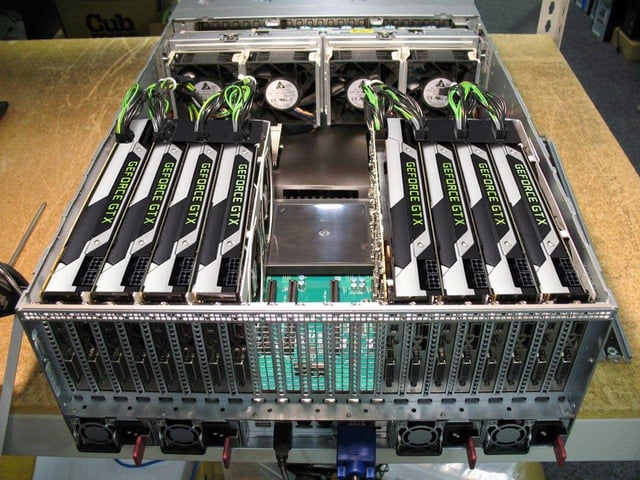
For expansive AI workloads, using multiple GPUs can dramatically improve processing speeds. Distributed training frameworks and communication libraries enable the coordination of multiple GPUs, distributing workloads evenly among available resources. It is important to ensure that the system’s CPU and interconnect bandwidth are sufficient to support the chosen multi-GPU configuration.
Software and Toolkit Optimization
Leveraging GPU-Specific Libraries
Optimizing GPU performance involves the judicious use of specialized libraries and software frameworks. Tools like CUDA, cuDNN, TensorRT, and NCCL are designed specifically to maximize the computational power of GPUs. These libraries offer optimized routines for deep learning, from basic arithmetic operations to intricate neural network computations and parallel data processing.
Kernel and Code Optimization
Tailoring your code to the GPU’s architecture is another crucial step. Refining kernel operations—such as adjusting execution configurations, synchronizing threads, and reducing warp stalls—ensures that computational resources are being used as efficiently as possible. Utilizing optimized frameworks like TensorFlow’s XLA or PyTorch’s JIT compiler can automate many of these improvements.
Efficient Memory Management
Optimizing Memory Usage
One of the most effective methods for enhancing GPU performance is to ensure efficient memory management. This involves:
- Monitoring the GPU memory to avoid unnecessary data retention and memory swaps.
- Employing techniques like memory coalescing to align data and reduce latency.
- Utilizing batch size tuning and gradient accumulation to make the best use of available memory.
- Implementing mixed precision training to reduce memory usage by using lower-precision formats (e.g., FP16) while retaining numerical accuracy with techniques such as loss scaling.
These strategies prevent bottlenecks that can stifle performance while ensuring that the GPU is operating at an optimal workload.
Algorithm and Model Optimization
Streamlining AI Models
Optimizing the algorithm itself is key:
- Model pruning and quantization help remove redundant parts of a model, thus decreasing its size and computational demand.
- Revising architecture by eliminating unnecessary layers or operations can reduce complexity during inference.
- Optimized models not only limit memory usage but also enable faster processing speeds, ensuring quicker iterations during development.
Data Pipeline Optimization
Efficient Data Handling
An integral component that affects GPU optimization is the effectiveness of the data pipeline. Techniques such as prefetching data, using pinned memory, and asynchronous data transfers help reduce idle times when fetching data for computation. These methods ensure that GPUs always have the data they need and aren’t left waiting, thus keeping the computational pipeline running smoothly.
Advanced Preprocessing Techniques
Offloading preprocessing tasks through GPU-optimized libraries or by preprocessing data offline can substantially improve performance. Libraries that are designed to perform data augmentation and transformation on the GPU reduce the load on the CPU and accelerate the overall workflow.
Dynamic Resource Allocation
Scaling GPU Usage
Dynamic resource allocation is particularly useful in environments with varying computational loads. By dynamically adjusting GPU resources, often through cloud-based platforms or container orchestration tools, you can ensure that the appropriate resources are available on demand. This prevents over-provisioning during low-activity periods and optimizes performance during peak periods.
Technologies such as Kubernetes support dynamic GPU scheduling, allowing you to assign GPU resources based on real-time demands and workloads, thus maximizing efficiency and ensuring a balanced load distribution.
Batch Processing and Precision Management
Optimizing Batch Sizes
Appropriate batch size selection is critical. Larger batches more fully utilize the GPU’s memory capacity, but must be balanced against the risk of overloading memory. If a batch size is too large, out-of-memory errors may occur. A dynamic batching approach that adjusts batch sizes in accordance with available memory is often ideal.
Mixed-Precision Training
Mixed-precision training leverages lower precision arithmetic (for example, FP16), which can significantly reduce memory usage and speed up calculations without compromising the accuracy of your model. This technique allows you to accelerate computations while keeping resource consumption in check.
Implementation and Practical Tips
Step-by-Step Approach to GPU Optimization
The following table outlines a systematic approach for optimizing GPU resources in AI applications:
| Step | Action | Tools and Techniques |
|---|---|---|
| 1. Hardware Selection | Choose GPUs with optimal memory capacity and parallel processing capabilities. | NVIDIA A100, Multi-GPU configurations |
| 2. Software Optimization | Utilize optimized libraries and toolkits for AI workloads. | CUDA, cuDNN, TensorRT, NCCL |
| 3. Memory Management | Implement efficient memory usage techniques and dynamic memory allocation. | Batch size tuning, Gradient accumulation, Mixed-precision training |
| 4. Model and Algorithm Tuning | Prune and quantize models, optimize kernels to reduce computational overhead. | Model pruning, Quantization, Code and kernel optimizations |
| 5. Data Pipeline Optimization | Streamline data preprocessing and loading to minimize idle times. | Prefetching, Pinned memory, Asynchronous data transfer, NVIDIA DALI |
| 6. Dynamic Resource Allocation | Adjust GPU allocation based on real-time workloads and demands. | Kubernetes scheduling, Cloud infrastructure for scalable GPU usage |
Monitoring and Continuous Improvement
Establishing a Robust Monitoring Framework
Continuous monitoring is critical for sustaining optimal GPU performance over time. Utilize performance monitoring tools to track metrics such as GPU utilization percentage, memory usage, temperature, processing time, and energy efficiency. Tools like NVIDIA’s nvidia-smi, Nsight Systems, and DCGM provide granular insights into GPU activity and can help pinpoint bottlenecks. Regular profiling not only detects performance lags but also facilitates ongoing improvements in resource usage and cost management.
Key Performance Metrics
- GPU Utilization Percentage
- Memory Bandwidth and Usage
- Kernel Execution Time
- Temperature and Energy Consumption
By tracking these metrics in real time, you can implement corrective measures promptly and ensure that GPUs always operate at their optimal levels.
Leveraging Cloud-Based Solutions for Scalability
Many organizations are turning to cloud-based GPU services to meet their AI processing demands. Cloud platforms such as AWS, Google Cloud, and Azure provide scalable GPU resources that can be allocated dynamically based on current workload requirements. This model not only reduces upfront hardware investments but also permits rapid scaling to accommodate fluctuating computational loads.
Cloud-based solutions often include built-in monitoring and management features, making it easier to track resource usage and optimize expenditures in real time.
References
- GPU Memory and Core Optimization for AI Workloads - GPU Server Case
-
Guide to GPU Performance - CentML
- Optimizing GPU Usage for AI - Restack
- Optimizing GPU Performance for AI Companies - ArcCompute
- Optimizing GPU Monitoring - Kubecost
- Optimizing GPU Performance for AI Workloads - Toxigon
- GPU as a Service - Iguazio
- GPU Deep Learning Optimization Guide - Run.ai
- GPU Accelerated Applications - NVIDIA
- Deep Learning with NVIDIA - NVIDIA Developer
Recommended Related Queries
Last updated March 1, 2025