
Comprehensive Guide to Setting Up a Git Server
Introduction
Git has become the de facto version control system for software development, enabling teams to collaborate efficiently and manage codebases effectively. Whether you're working on personal projects or within a large organization, setting up your own Git server can provide greater control, security, and flexibility compared to relying solely on third-party hosting services.
Choosing the Right Git Server Solution
Self-Hosted vs. Cloud-Based Solutions
When setting up a Git server, you have two primary options:
- Self-Hosted Solutions: Installing and managing your own Git server on-premises or on cloud infrastructure provides maximum control over your repositories, security configurations, and integration with other tools. Popular self-hosted options include GitLab, Gitea, and bare Git repositories managed via SSH.
- Cloud-Based Services: Platforms like GitHub, GitLab.com, and Bitbucket offer hosted Git repositories with additional features such as issue tracking, continuous integration, and collaboration tools. These services reduce the overhead of server maintenance but may come with subscription costs for advanced features.
Setting Up a Self-Hosted Git Server
1. Installing Git
The first step in setting up a self-hosted Git server is to install Git on your server machine. Depending on your operating system, the installation commands may vary:
-
For Debian-based distributions (e.g., Ubuntu):
sudo apt update sudo apt install git -
For Fedora-based distributions (e.g., RHEL):
sudo dnf install git
2. Creating a Git User
It's best practice to create a dedicated system user for managing Git repositories. This enhances security by isolating Git operations from other system activities:
sudo useradd git
sudo passwd git
3. Setting Up the Repository Directory
Create a directory to store all Git repositories and assign ownership to the Git user:
sudo mkdir /home/git/storage
sudo chown git:git /home/git/storage
4. Initializing a Bare Repository
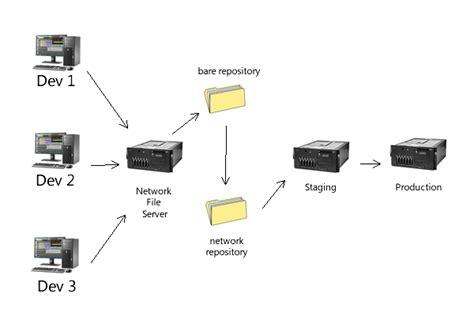
A bare repository is a central repository that doesn't have a working directory. It's ideal for collaboration:
cd /home/git/storage
git init --bare my_project.git
Replace my_project.git with your desired repository name.
5. Configuring SSH Access
Secure Shell (SSH) is the recommended method for accessing Git repositories. To set up SSH access:
- Generate an SSH key on your local machine:
ssh-keygen -t rsa -b 4096 -C "your_email@example.com" - Copy the public key to the Git server:
ssh-copy-id git@your_server_ip - Ensure the SSH daemon is running and properly configured on the server. You may need to edit the
/etc/ssh/sshd_configfile to allow key-based authentication and disable password logins for enhanced security.
6. Configuring DNS and Firewall
To make your Git server accessible over the internet:
- DNS Configuration: Assign a domain name to your server's IP address by updating your DNS records. This makes accessing the Git server more convenient.
-
Firewall Settings: Open the necessary ports to allow Git and SSH traffic:
sudo ufw allow 22/tcp   # SSH
sudo ufw allow 443/tcp  # HTTPS (if using SSL)
After configuring the DNS and firewall, verify that your server is reachable by attempting to SSH into it:
ssh git@your_domain_or_ipAlternative Methods to Host a Git Server
Using Git Daemon
Git includes a built-in daemon that allows you to share repositories over the network using the Git protocol. This method is suitable for read-only access or environments where authentication is managed separately:
git daemon --reuseaddr --base-path=/path/to/repositories --export-all --verbose
Replace /path/to/repositories with the path to your Git repositories. Note that the Git daemon does not provide authentication mechanisms, so it's recommended to use it within a secure network.
Using SSH
Setting up a Git server via SSH is one of the most common and secure methods. It leverages SSH's authentication and encryption features to protect data in transit:
-
Advantages:
- Secure and encrypted connections.
- Supports user-based access control.
- Compatible with various clients and tools.
-
Disadvantages:
- Requires managing SSH keys for each user.
- Lacks features like web interfaces unless combined with additional tools.
Self-Hosted Git Solutions
For a more feature-rich Git server, consider using dedicated self-hosted solutions that offer web interfaces, user management, issue tracking, and continuous integration:
-
GitLab: An open-source platform that provides comprehensive tools for Git repository management, CI/CD pipelines, and more. It can be self-hosted or used via GitLab.com.
GitLab Installation Guide -
Gitea: A lightweight, self-hosted Git service with a simple installation process and a user-friendly interface. It's ideal for smaller teams or individual projects.
Gitea Installation Guide -
Gogs: Similar to Gitea, Gogs is a minimalist Git server implementation written in Go. It aims to provide a simple and efficient way to host Git repositories.
Gogs Installation Guide
Popular Git Hosting Platforms
1. GitHub
- Most well-known Git hosting platform with extensive community support.
- Free for public repositories and offers paid plans for private repositories.
- Provides robust collaboration features, including pull requests, issues, and project boards.
- Supports integrations with a wide range of third-party tools and services.
- Visit GitHub
2. GitLab
- An open-source Git repository manager that can be self-hosted or used as a cloud service.
- Offers comprehensive CI/CD pipeline features for automated testing and deployment.
- Supports both public and private repositories with granular access control.
- Includes additional tools like issue tracking, wiki pages, and container registry.
- Visit GitLab
3. Bitbucket
- Atlassian's Git repository management solution, integrating seamlessly with tools like Jira and Confluence.
- Offers free private repositories for small teams.
- Provides features like pull requests, branch permissions, and continuous delivery.
- Visit Bitbucket
4. Self-Hosted Options
- Gitea: Lightweight and easy to set up, suitable for personal projects and small teams.
- Gogs: Minimalist design focused on efficiency and simplicity.
- Bare Git Repositories via SSH: For those who prefer managing repositories without additional web interfaces.
Security Best Practices
Securing your Git server is paramount to protect your code and data. Implement the following best practices:
-
Use SSH for Authentication: SSH provides encrypted connections and robust user authentication. Ensure that password-based logins are disabled and only SSH keys are permitted.
-
Regularly Update Software: Keep Git and all server software up to date to protect against vulnerabilities.
-
Manage User Access: Implement strict access controls, granting permissions based on the principle of least privilege.
-
Enable Firewalls: Use firewalls to restrict access to essential ports and monitor suspicious activities.
-
Backup Repositories: Regularly back up your Git repositories to prevent data loss in case of hardware failures or security breaches.
-
Use HTTPS: If you're deploying a web interface, ensure that all connections are secured using HTTPS to encrypt data in transit.
-
Monitor Logs: Keep an eye on server logs to detect and respond to unauthorized access attempts or other anomalies.
Conclusion
Setting up your own Git server can provide unparalleled control and customization for your development workflows. Whether you choose a simple SSH-based repository or a feature-rich platform like GitLab, understanding the setup process and best practices is crucial for a secure and efficient Git environment. By following this guide, you can establish a robust Git server tailored to your specific needs, fostering better collaboration and version control within your projects.
Recommended Resources
Last updated January 3, 2025