
Spinning Hexagon with Bouncing Ball Simulation
Step-by-step Python Simulation Demonstrating Gravity, Friction, and Rotation
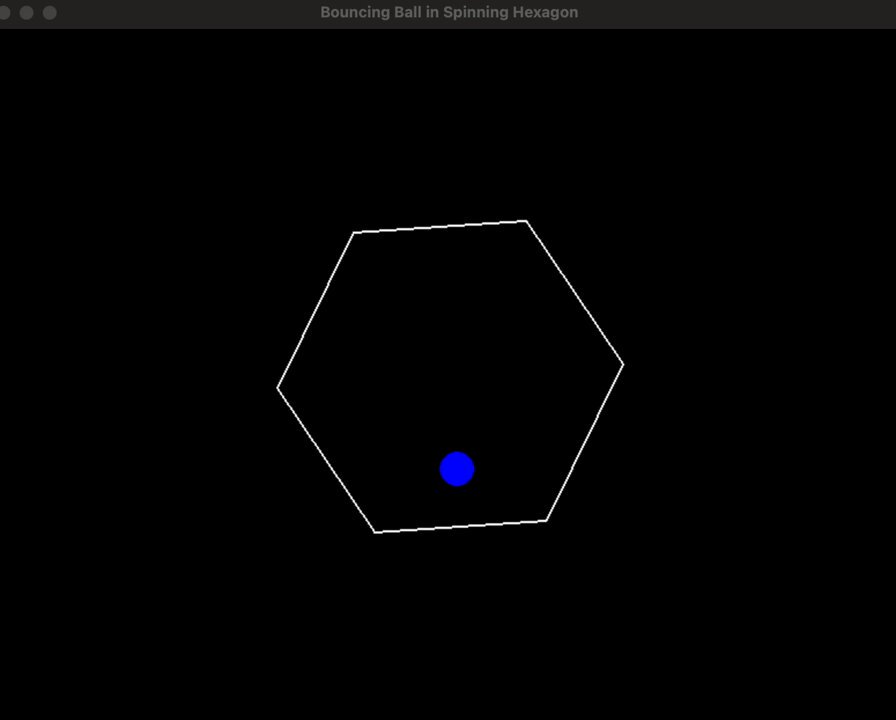
Key Highlights
- Gravity and Friction: Realistic physics model applying gravity and friction to the ball’s movement.
- Hexagon Rotation: A continuously spinning hexagon which interacts with the ball’s trajectory.
- Collision Detection: Basic collision detection between the ball and the hexagon's edges, along with screen boundary checks.
Introduction and Step-by-Step Reasoning
In this simulation, we combine basic physics principles with a graphical representation using Python’s Pygame library. The program creates a window where a ball enclosed in a spinning hexagon bounces around while being influenced by gravity and friction. The simulation involves several key steps:
Step 1: Importing Libraries and Setting Up Initialization
We begin by importing the necessary libraries, namely Pygame for graphics and interaction, and math for trigonometric calculations. The display window is then set up along with the primary constants including the screen dimensions, colors, physics constants (gravity and friction), and the properties for the ball and hexagon.
Step 2: Defining the Ball and Hexagon Classes
To organize the simulation, two classes are created:
- Ball Class: Contains the ball’s properties such as position, velocity, radius, and methods for updating its position based on gravity and friction, as well as handling collisions with boundaries.
- Hexagon Class: Manages the hexagon’s properties such as center position, size, and rotational angle. It also includes a method to calculate and draw the current vertices of the hexagon based on its rotation.
Step 3: Collision Logic and Physics
The physics is simulated by updating the ball’s velocity and position each frame. Gravity is applied by incrementing the vertical velocity, and friction reduces the overall velocity gradually. Collision detection is implemented both for the screen edges and as a simplified version for the hexagon boundaries. When the ball collides either with a screen edge or when it is in close proximity to one of the rotating hexagon’s sides, the ball’s velocity is inverted to simulate a bounce.
Step 4: Main Game Loop for Continuous Simulation
The game loop is the heart of the simulation. It processes system events, updates the physics for both the ball and hexagon, clears the screen, redraws the objects, and maintains a stable frame rate using Pygame’s clock.
The Complete Python Code
Copy and run the following code in your Python environment after installing Pygame:
# Import libraries
import pygame
import math

# Initialize Pygame
pygame.init()

# Screen and simulation parameters
SCREEN_WIDTH = 800
SCREEN_HEIGHT = 600
screen = pygame.display.set_mode((SCREEN_WIDTH, SCREEN_HEIGHT))
pygame.display.set_caption("Spinning Hexagon with Bouncing Ball")

# Define colors
BLACK = (0, 0, 0)
WHITE = (255, 255, 255)
RED   = (255, 0, 0)

# Physics parameters
GRAVITY = 0.5        # Gravity constant
FRICTION = 0.99      # Friction coefficient (applied as damping)
FPS = 60             # Frames per second

# Ball properties
BALL_RADIUS = 15

class Ball:
    def __init__(self, x, y):
        self.x = x
        self.y = y
        # Initial velocities along x and y
        self.vx = 5
        self.vy = -5

    def update(self):
        # Apply gravity (vertical acceleration)
        self.vy += GRAVITY

        # Update position based on velocity
        self.x += self.vx
        self.y += self.vy

        # Apply friction to dampen velocities
        self.vx *= FRICTION
        self.vy *= FRICTION

        # Boundary collision detection for the screen
        if self.x - BALL_RADIUS < 0 or self.x + BALL_RADIUS > SCREEN_WIDTH:
            self.vx = -self.vx
        if self.y - BALL_RADIUS < 0 or self.y + BALL_RADIUS > SCREEN_HEIGHT:
            self.vy = -self.vy

    def draw(self, surface):
        pygame.draw.circle(surface, RED, (int(self.x), int(self.y)), BALL_RADIUS)

class Hexagon:
    def __init__(self, center_x, center_y, size):
        self.center_x = center_x
        self.center_y = center_y
        self.size = size
        self.angle = 0    # Initial rotation angle

    def update(self):
        # Increase angle to simulate rotation (radians)
        self.angle += 0.01

    def get_vertices(self):
        # Calculate the 6 vertices using trigonometry
        vertices = []
        for i in range(6):
            theta = self.angle + math.radians(60 * i)
            x = self.center_x + self.size * math.cos(theta)
            y = self.center_y + self.size * math.sin(theta)
            vertices.append((x, y))
        return vertices

    def draw(self, surface):
        # Draw the hexagon by connecting its vertices
        vertices = self.get_vertices()
        # Draw polygon with a specified thickness
        pygame.draw.polygon(surface, WHITE, vertices, 3)

def check_hexagon_collision(ball, vertices):
    """
    Basic collision detection by checking the distance of the ball from each hexagon edge.
    If the perpendicular distance from the ball's center to an edge is less than the ball's radius,
    a collision is assumed.
    """
    for i in range(6):
        x1, y1 = vertices[i]
        x2, y2 = vertices[(i + 1) % 6]
        # Compute the distance from ball center (ball.x, ball.y) to the edge defined by (x1, y1) & (x2, y2)
        numerator = abs((x2 - x1) * (ball.y - y1) - (y2 - y1) * (ball.x - x1))
        denominator = math.hypot((x2 - x1), (y2 - y1))
        if denominator == 0:
            continue
        distance = numerator / denominator
        if distance <= BALL_RADIUS:
            return True
    return False

def main():
    clock = pygame.time.Clock()

    # Create ball and hexagon objects
    ball = Ball(SCREEN_WIDTH // 2, SCREEN_HEIGHT // 2)
    hexagon = Hexagon(SCREEN_WIDTH // 2, SCREEN_HEIGHT // 2, 200)

    running = True
    while running:
        # Event handling loop
        for event in pygame.event.get():
            if event.type == pygame.QUIT:
                running = False

        # Update simulation components
        ball.update()
        hexagon.update()
        vertices = hexagon.get_vertices()

        # Check for collision between ball and hexagon edges
        if check_hexagon_collision(ball, vertices):
            # Reverse ball velocity on collision (basic collision response)
            ball.vx = -ball.vx
            ball.vy = -ball.vy

        # Drawing procedures: clear screen, draw hexagon and ball
        screen.fill(BLACK)
        hexagon.draw(screen)
        ball.draw(screen)

        # Update display
        pygame.display.flip()
        # Maintain consistent framerate
        clock.tick(FPS)

    pygame.quit()

if __name__ == "__main__":
    main()
Simulation Features Overview
| Feature | Description |
|---|---|
| Gravity | Constant acceleration to simulate natural falling motion |
| Friction | Velocity damping to imitate energy loss on bounces |
| Hexagon Rotation | Continuous change in angle resulting in a spinning hexagon |
| Collision Detection | Simple edge detection to reverse ball velocities upon impact |
Additional Enhancements and Considerations
The code above provides a basic and functional simulation. However, there are several enhancements you could explore:
Enhanced Collision Response
Implementing a more precise collision response using vector reflection would simulate how the ball bounces off the hexagon’s walls more realistically. Incorporating angle of incidence calculations can help improve the accuracy of bounces.
Multiple Objects
Extending the simulation to include multiple balls, or adding user interaction to apply forces to the ball, can create a more complex and interactive physics simulation.
Variable Time Steps
Instead of assuming a fixed frame rate, using a variable time step can produce more reliable physics calculations under fluctuating frame rates.
References
- Bouncing Ball in Spinning Hexagon - grok.com
- Ball in Spinning Hexagon - GitHub
- Bouncing Balls with Python - Medium
- Bouncing Ball Simulation - Adam Dempsey
Recommended Further Queries
 pythonforphysics.blogspot.com
Last updated February 28, 2025