
Unlock Efficient Security: Drastically Improve Vulnerability Management with Minimal Effort
Streamline your defenses by focusing on smart automation, risk-based prioritization, and efficient workflows.
Key Highlights for Effortless Improvement
- Embrace Automation: Leverage tools to automate repetitive tasks like scanning, assessment, and even patching, freeing up valuable time and reducing errors.
- Prioritize Ruthlessly: Focus remediation efforts on the highest-risk vulnerabilities affecting critical assets, maximizing impact with limited resources.
- Streamline Workflows: Implement clear processes, use centralized dashboards, and integrate tools to enhance communication and operational efficiency.
Embrace Automation: The Cornerstone of Efficiency
One of the most significant ways to reduce the effort involved in vulnerability management is through automation. Manual processes are time-consuming, prone to human error, and simply cannot scale effectively in modern IT environments. By automating core tasks, you can achieve continuous coverage and faster responses with significantly less manual intervention.
Automated Scanning and Assessment
Instead of relying on infrequent, manual scans, implement vulnerability management solutions that offer automated, continuous scanning capabilities. These tools can operate in the background, regularly identifying new vulnerabilities across your network, endpoints, and cloud environments without requiring constant oversight. They automatically assess findings, often providing initial risk scores and context.
- Implementation: Configure tools like Tenable Vulnerability Management, Qualys VMDR, or Rapid7 InsightVM to run scans on a regular schedule (e.g., daily or weekly). Start with critical assets or public-facing systems to manage initial setup effort.
- Low-Effort Benefit: Reduces the significant time investment required for manual scan setup, execution, and basic analysis. Provides consistent visibility.
Automated Patch Management
Patching is often a major bottleneck. Automating patch deployment for certain classes of systems or vulnerabilities (especially lower-risk ones or pre-approved updates) can drastically reduce manual workload and expedite remediation. Tools like Automox specialize in automating the entire patching workflow, from assessment to deployment and validation.
- Implementation: Define policies for automatic patching based on severity, system criticality, or testing outcomes. Integrate patch management tools with your vulnerability scanner.
- Low-Effort Benefit: Speeds up the Mean Time To Remediate (MTTR) for many vulnerabilities without manual patching effort for each instance. Ensures consistency.
Automated Reporting and Ticketing
Manually compiling reports or creating remediation tickets for each vulnerability is inefficient. Modern platforms can automatically generate reports tailored to different audiences (technical teams, management) and integrate directly with IT service management (ITSM) or ticketing systems (like Jira or ServiceNow) to assign remediation tasks.
- Implementation: Configure integrations between your vulnerability management tool and ticketing system. Set up automated report generation schedules.
- Low-Effort Benefit: Eliminates manual data aggregation and task creation, ensuring findings are promptly routed to the correct teams for action.
Prioritize Smarter, Not Harder
Not all vulnerabilities pose the same level of risk. Trying to fix everything is often impractical and inefficient. A risk-based approach allows you to focus your limited time and resources on the vulnerabilities that matter most, significantly improving your security posture with less overall effort.
Focus on High-Impact Vulnerabilities
Prioritize vulnerabilities based on factors beyond just the base CVSS score. Consider:
- Exploitability: Is the vulnerability actively being exploited in the wild? Threat intelligence feeds can provide this crucial context.
- Asset Criticality: How important is the affected asset to business operations? Vulnerabilities on critical servers or internet-facing systems demand higher priority.
- Severity: While not the only factor, CVSS scores (especially 9.0+) remain a useful indicator of potential technical impact.
Many modern vulnerability management tools incorporate threat intelligence and allow asset tagging to automate this richer prioritization process.
Leverage Risk-Based Scoring
Advanced tools often provide their own risk scores (e.g., Tenable's VPR, Rapid7's Real Risk Score) that consider exploitability, vulnerability age, malware associations, and threat intelligence. Relying on these scores can be a low-effort way to quickly identify the most dangerous threats without extensive manual analysis.
Start with the Biggest Risks
Concentrate initial efforts on critical and high-severity vulnerabilities affecting your most important assets, particularly those exposed to the internet. Addressing these first provides the greatest risk reduction for the effort invested.
Know Your Battlefield: Automated Asset Discovery
You can't protect what you don't know you have. Maintaining an accurate and comprehensive inventory of all hardware, software, and cloud assets is fundamental to effective vulnerability management. Automating asset discovery eliminates the painstaking manual effort of tracking IT resources.
Why It Matters for Low Effort
Manual asset tracking is laborious and quickly becomes outdated. Automated discovery tools continuously scan your network and cloud environments to identify new or changed assets, including unauthorized "shadow IT" devices. This ensures your vulnerability scans cover your entire attack surface without requiring manual updates to asset lists.
Implementation
Many vulnerability management platforms include built-in asset discovery features. Alternatively, dedicated IT asset management (ITAM) tools can integrate with your security solutions. Enable scheduled discovery scans to maintain an up-to-date inventory automatically.
- Low-Effort Benefit: Ensures comprehensive scan coverage and accurate risk assessment without manual inventory management. Identifies potential blind spots automatically.
Streamline Patching and Remediation
Beyond pure automation, optimizing the workflow for patching and remediation can save significant effort. This involves standardizing processes and using tools effectively.
Simplified Patch Management Policies
Define clear, simple policies for patching schedules and responsibilities. For example, establish pre-approved maintenance windows for applying patches to non-critical systems automatically, reducing decision fatigue and coordination overhead. Focus policy complexity only where absolutely necessary (e.g., for highly sensitive systems requiring extensive testing).
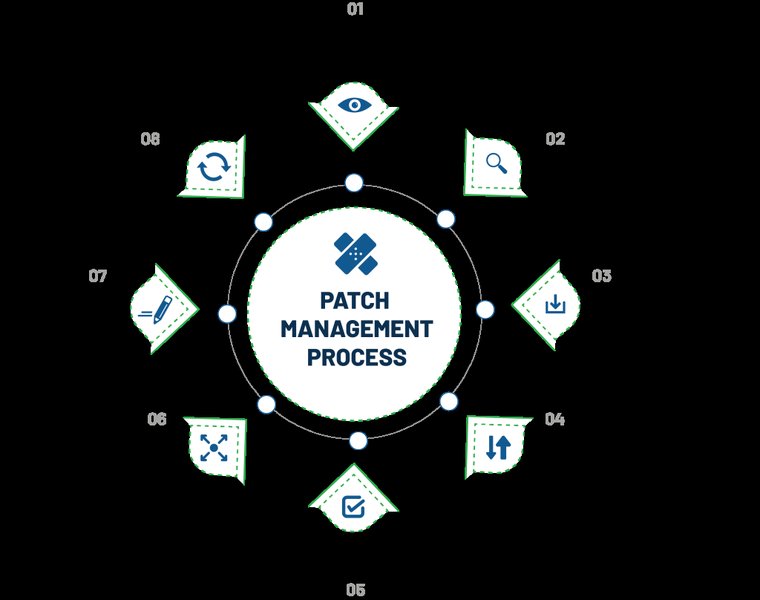
A typical patch management process workflow, which can be streamlined through automation and clear policies.
Develop Basic Playbooks
Create simple, repeatable procedures (playbooks) for handling common types of vulnerabilities, such as outdated software versions or specific misconfigurations. This provides clear guidance for remediation teams, reducing the need for ad-hoc analysis and decision-making for recurring issues.
Centralized Dashboards and Reporting
Utilize the dashboarding capabilities of your vulnerability management tools to provide a single pane of glass view of your risk posture, remediation progress, and key trends. This eliminates the need to manually aggregate data from multiple sources and provides quick insights for all stakeholders.
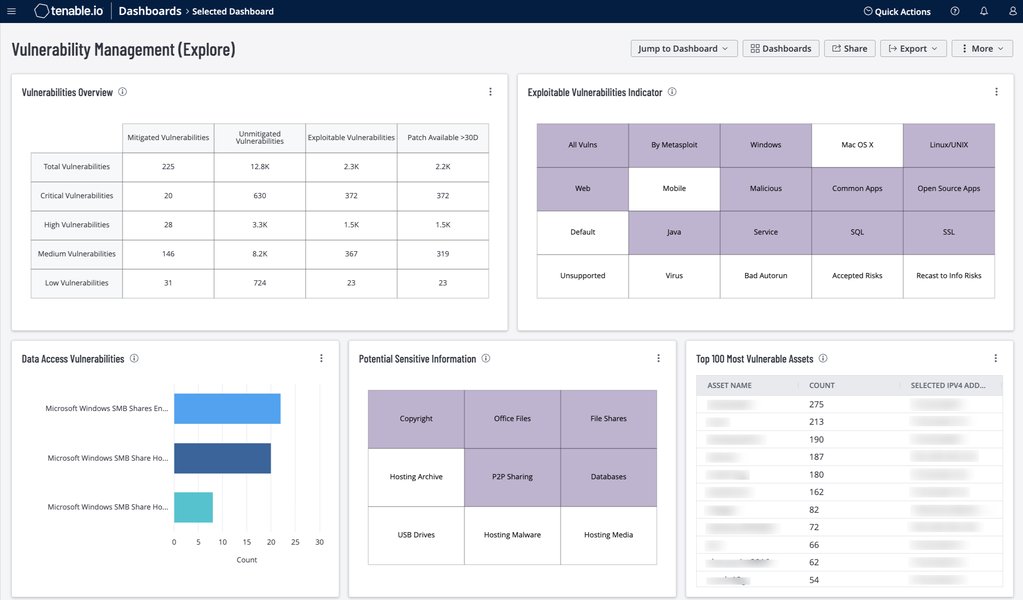
Example of a vulnerability management dashboard providing centralized visibility.
Visualizing Vulnerability Management Approaches
Different approaches to vulnerability management vary significantly in terms of effort, speed, and effectiveness. The radar chart below compares several common strategies across key dimensions. As shown, adopting more automated and risk-based methods generally leads to higher efficiency (lower effort, faster remediation) and better coverage compared to traditional manual processes.
Mapping the Low-Effort Approach
Improving vulnerability management with minimal effort involves focusing on several interconnected areas. This mindmap illustrates the key components of an efficient, low-effort strategy, emphasizing automation, smart prioritization, and streamlined processes as central pillars.
Continuous Visibility with Minimal Oversight
Shift from periodic, effort-intensive audits to a model of continuous monitoring. Modern tools can provide real-time visibility into your changing attack surface and vulnerability landscape with minimal ongoing human intervention once configured.
Real-Time Alerts
Configure your monitoring tools to generate alerts only for significant events, such as the discovery of critical vulnerabilities on key assets or detection of active exploitation attempts. This avoids alert fatigue while ensuring timely notification of urgent issues.
Background Operation
Effective continuous monitoring solutions run unobtrusively in the background, constantly assessing your environment without impacting performance or requiring manual initiation for each check.
- Low-Effort Benefit: Provides ongoing awareness of risks without the recurring effort of manual or scheduled point-in-time assessments. Enables faster response to emerging threats.
Integrate and Communicate Seamlessly
Efficiency gains also come from integrating tools and fostering smooth communication between teams (Security, IT Operations, Development). Disconnected tools and siloed teams lead to duplicated effort and delays.
Toolchain Integration
Integrate your vulnerability scanner, patch management system, asset inventory, and ticketing system. This creates a cohesive workflow where data flows automatically between tools, reducing manual data transfer and speeding up the remediation lifecycle.
Clear Roles and Communication
Define clear responsibilities for vulnerability remediation. Use shared dashboards and automated reporting to keep relevant teams informed about priorities and progress without requiring constant meetings or manual updates.
Leverage Intelligence and Existing Resources
You don't always need brand-new, expensive solutions. Leveraging threat intelligence and making the most of tools and frameworks you might already have access to can be a low-effort path to improvement.
Incorporate Threat Intelligence
Integrate threat intelligence feeds (many are available through vulnerability management platforms or as standalone services) to automatically enrich vulnerability data with real-world exploit context. This is a low-effort way to dramatically improve prioritization accuracy.
Utilize Existing or Free Tools
Assess the capabilities of your current security tools – they may have vulnerability management features you aren't fully utilizing. Consider reputable open-source tools like OpenVAS for scanning if budget is a major constraint, although they may require more configuration effort than commercial solutions.
Adopt Standard Frameworks
Leverage established guidelines from organizations like NIST or the NCSC (UK's National Cyber Security Centre). These frameworks provide pre-built structures and best practices for vulnerability management, saving you the effort of designing a program from scratch.
Understanding the Vulnerability Management Lifecycle
To effectively implement these low-effort strategies, it helps to understand the overall vulnerability management lifecycle. This video provides a comprehensive overview of the key stages, from discovery and prioritization to remediation and validation, offering context for where automation and streamlining can be most impactful.
Summary Table: Low-Effort VM Strategies
This table summarizes some of the key low-effort strategies discussed, highlighting their primary benefit in reducing workload and suggesting example approaches.
| Strategy | Description | Key Benefit (Low Effort) | Example Tools/Techniques |
|---|---|---|---|
| Automated Scanning | Using tools to perform regular vulnerability scans automatically. | Eliminates manual scan setup and execution time. Provides consistent coverage. | Tenable VM, Qualys VMDR, Rapid7 InsightVM, OpenVAS (requires more setup). Scheduled scans. |
| Risk-Based Prioritization | Focusing remediation on vulnerabilities posing the greatest actual risk (exploitability, asset criticality). | Avoids wasting time on low-impact issues. Maximizes risk reduction efficiency. | Threat intelligence feeds, built-in scoring (VPR, Real Risk), asset tagging/criticality rating. |
| Automated Patching (Selective) | Automatically deploying patches for pre-approved categories (e.g., low-risk systems, specific severities). | Reduces manual patching workload significantly. Speeds up MTTR. | Automox, ManageEngine Patch Manager Plus, SCCM/Intune policies. Policy-based deployment. |
| Centralized Dashboards | Using a single interface to view overall vulnerability posture, trends, and remediation progress. | Eliminates manual data aggregation and reporting effort. Provides quick insights. | Built-in dashboards in VM platforms (Tenable, Qualys, Rapid7, Defender for VM). |
| Automated Asset Discovery | Tools automatically finding and inventorying assets on the network and in the cloud. | Ensures comprehensive scan coverage without manual inventory upkeep. | Features within VM platforms, dedicated ITAM tools, network scanners. |
| Integrated Ticketing | Automatically creating remediation tickets in ITSM systems based on scan findings. | Removes manual ticket creation step. Ensures accountability and tracking. | Integrations between VM tools and systems like ServiceNow, Jira. |
Frequently Asked Questions (FAQ)
Where should I start if I want to improve VM with minimal effort?
Start with automated scanning and risk-based prioritization. Implementing a tool to automatically scan your most critical assets and focusing only on the high-risk, exploitable vulnerabilities identified will provide the biggest security improvement for the least initial effort. Configure the tool's built-in prioritization features or integrate a threat intelligence feed.
How can I prioritize effectively without expensive tools?
Even with basic tools, you can prioritize with less effort by:
- Focusing on vulnerabilities with known public exploits (check sources like CISA KEV catalog).
- Prioritizing vulnerabilities on internet-facing systems.
- Addressing high and critical CVSS scores (e.g., 7.0+) first.
- Manually identifying your most critical business assets and prioritizing vulnerabilities found on them.
While more manual than advanced tools, this is still more efficient than trying to fix everything.
Is automated patching safe?
Automated patching can be safe if implemented thoughtfully. Start by automating patches for less critical systems or lower-severity updates. Implement testing phases for critical systems before full automated rollout. Use tools that offer rollback capabilities. The key is to define clear policies based on risk tolerance and system importance, rather than applying blanket automation everywhere immediately.
How often do I need to review and update my low-effort VM program?
Even a low-effort program needs periodic review. Aim for quarterly or semi-annual reviews. Check if your automation rules are still effective, if your prioritization strategy aligns with current threats, and if your asset discovery is capturing new devices. The goal isn't constant tinkering, but ensuring the automated and streamlined processes remain relevant and efficient as your environment and the threat landscape evolve.
Recommended Further Exploration
- Compare top automated vulnerability management tools for small businesses.
- How to implement risk-based vulnerability prioritization using CVSS and threat intelligence.
- Steps to create a simple patch management policy focusing on critical updates.
- Key performance indicators (KPIs) to measure vulnerability management effectiveness with minimal reporting.
References
Last updated May 5, 2025