
Arrays vs. ArrayLists in Java: Unlock the Secrets to Storing Your Data!
Your ultimate beginner's guide to understanding Java's core data containers – fixed arrays and flexible ArrayLists.
When you start learning Java, you'll quickly encounter the need to store multiple pieces of data, like a list of names or a collection of scores. Java offers several ways to do this, but two fundamental structures you'll use frequently are Arrays and ArrayLists. While both serve a similar purpose – holding groups of elements – they have distinct characteristics, advantages, and disadvantages. Understanding these differences is crucial for writing efficient and effective Java code. Let's dive in!
Key Takeaways: Array vs. ArrayList at a Glance
- Size Matters: The most significant difference is size management. Arrays have a fixed size determined at creation, while ArrayLists have a dynamic size that can grow or shrink as needed.
- Data Types: Arrays can store both primitive data types (like
int,float,boolean) and objects. ArrayLists, being part of the Collections Framework, can only store objects (requiring wrapper classes likeIntegerfor primitives). - Flexibility vs. Performance: Arrays offer potentially better performance for simple access due to their basic nature and contiguous memory allocation. ArrayLists provide more flexibility and convenience with built-in methods for adding, removing, and managing elements, sometimes at the cost of slight performance overhead due to resizing.
Understanding Arrays in Java
The Foundation: Fixed-Size Containers
An Array is one of the most basic data structures in Java. Think of it as a numbered row of storage slots, all holding the same type of data. Once you decide how many slots you need, that number is fixed – you can't change it later without creating a completely new array.
Core Characteristics of Arrays
- Fixed Size: You must define the size of an array when you declare it, and this size cannot be altered afterwards.
- Homogeneous Elements: All elements stored within a single array must be of the same data type (e.g., all
int, allString, allStudentobjects). - Primitive and Object Support: Arrays can hold both primitive types (like
int,double,char) and object references (likeString, or custom objects you create). - Index-Based Access: Elements are accessed directly using their numerical index, starting from 0 for the first element. Accessing
myArray[0]gets the first item,myArray[1]the second, and so on. - Memory Allocation: Arrays typically occupy a contiguous block of memory, which can lead to efficient element access.
Declaring, Initializing, and Using Arrays
Here's how you work with arrays in Java code:
// 1. Declare an array of integers
int[] scores;

// 2. Create (instantiate) the array with a fixed size (e.g., 5 elements)
scores = new int[5]; // Now 'scores' can hold 5 integers, initially all 0

// 3. Assign values to elements using their index
scores[0] = 95;
scores[1] = 88;
scores[2] = 72;
scores[3] = 90;
scores[4] = 85;
// Trying scores[5] = 100; would cause an ArrayIndexOutOfBoundsException!

// 4. Access an element
int firstScore = scores[0]; // firstScore is now 95
System.out.println("The third score is: " + scores[2]); // Output: The third score is: 72

// Alternative: Declare and initialize in one step
String[] daysOfWeek = {"Monday", "Tuesday", "Wednesday", "Thursday", "Friday", "Saturday", "Sunday"};
System.out.println("The first day is: " + daysOfWeek[0]); // Output: The first day is: Monday

// Get the length (size) of an array
int numberOfDays = daysOfWeek.length; // numberOfDays is 7
System.out.println("Number of scores stored: " + scores.length); // Output: Number of scores stored: 5
Pros and Cons of Arrays
Advantages:- Performance: Generally faster for accessing elements by index due to direct memory access.
- Memory Efficiency: Can be more memory-efficient for a known, fixed number of elements, especially primitives.
- Simplicity: Basic concept, easy to understand for simple storage tasks.
- Multi-dimensional: Arrays can easily be made multi-dimensional (e.g.,
int[][]for a grid or matrix).
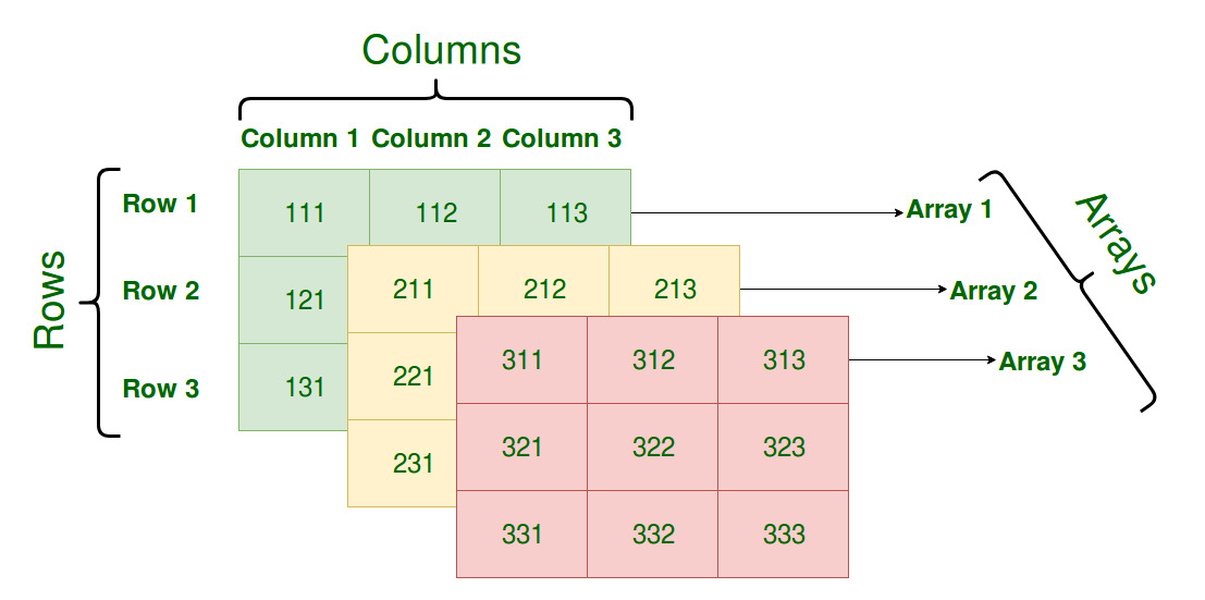
Arrays can represent multi-dimensional data structures like grids or matrices.
- Fixed Size: The inability to change size after creation is the biggest limitation. Adding or removing elements requires creating a new array and copying data.
- Limited Functionality: No built-in methods for common operations like adding, removing, searching (beyond simple iteration). You have to implement these yourself or use helper classes.
Exploring ArrayLists in Java
The Flexible Cousin: Dynamic-Size Collections
An ArrayList is a more advanced and flexible data structure provided by the Java Collections Framework (found in the `java.util` package). Think of it as a smart list that can automatically grow or shrink as you add or remove items. It uses an array internally but hides the complexity of resizing from you.
Core Characteristics of ArrayLists
- Dynamic Size: ArrayLists automatically resize themselves when needed. You don't need to specify a size upfront (though you can suggest an initial capacity for performance).
- Object Storage Only: ArrayLists can only store objects. To store primitive types, you must use their corresponding wrapper classes (e.g., `Integer` for `int`, `Double` for `double`, `Boolean` for `boolean`). Java's autoboxing often handles this conversion automatically.
- Part of Collections Framework: Benefits from a rich set of methods for manipulation (add, remove, get, set, sort, search, etc.) and integrates well with other collection types.
- Ordered Collection: Maintains the insertion order of elements.
- Allows Duplicates: You can store duplicate elements within an ArrayList.
Declaring, Initializing, and Using ArrayLists
Working with ArrayLists involves using its methods:
// 1. Import the ArrayList class
import java.util.ArrayList;
import java.util.Arrays; // Useful for initialization

// 2. Declare and create an ArrayList (e.g., to hold Strings)
// Using generics (<String>) ensures type safety
ArrayList<String> taskList = new ArrayList<>();

// 3. Add elements using the add() method
taskList.add("Buy groceries");
taskList.add("Pay bills");
taskList.add("Walk the dog");
System.out.println(taskList); // Output: [Buy groceries, Pay bills, Walk the dog]

// 4. Access elements using the get() method (index-based)
String secondTask = taskList.get(1); // secondTask is "Pay bills"
System.out.println("First task: " + taskList.get(0)); // Output: First task: Buy groceries

// 5. Get the current size using the size() method
int numberOfTasks = taskList.size(); // numberOfTasks is 3
System.out.println("Number of tasks: " + numberOfTasks);

// 6. Remove elements by index or by object
taskList.remove(0); // Removes "Buy groceries"
System.out.println(taskList); // Output: [Pay bills, Walk the dog]
taskList.remove("Walk the dog"); // Removes the element "Walk the dog"
System.out.println(taskList); // Output: [Pay bills]

// 7. Modify an element using the set() method
taskList.add("Clean room"); // taskList is now [Pay bills, Clean room]
taskList.set(0, "Pay utility bills"); // Replaces "Pay bills" at index 0
System.out.println(taskList); // Output: [Pay utility bills, Clean room]

// 8. Check if an element exists using contains()
boolean hasCleaning = taskList.contains("Clean room"); // hasCleaning is true
System.out.println("Contains 'Clean room'? " + hasCleaning);

// Alternative Initialization
ArrayList<Integer> numbers = new ArrayList<>(Arrays.asList(10, 20, 30));
System.out.println(numbers); // Output: [10, 20, 30]
Pros and Cons of ArrayLists
Advantages:- Dynamic Sizing: Easily handles situations where the number of elements isn't known beforehand or changes frequently.
- Rich API: Provides many built-in methods for adding, removing, searching, sorting, and iterating, simplifying common tasks.
- Flexibility: Easier to insert elements in the middle or remove elements compared to arrays.
- Integration: Seamlessly works with other parts of the Java Collections Framework.
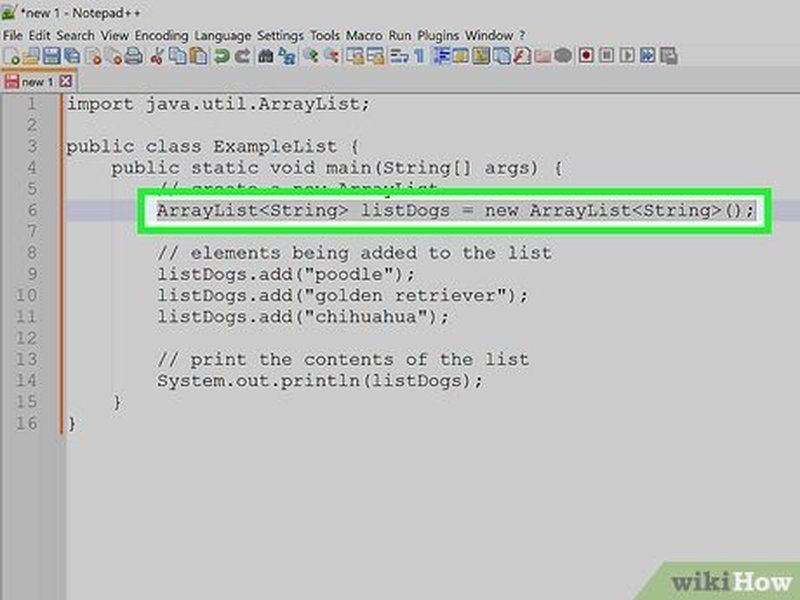
ArrayLists provide convenient methods for initialization and manipulation.
- Performance Overhead: Resizing the internal array when capacity is exceeded incurs some performance cost. Method calls also add a small overhead compared to direct array access.
- Object Storage Only: Cannot store primitives directly, requiring wrapper classes which can consume slightly more memory and potentially add overhead (though often optimized by the JVM).
- Slightly More Complex Syntax: Using methods (`get()`, `add()`) instead of square brackets (`[]`) might seem slightly less direct initially.
Direct Comparison: Array vs. ArrayList
Choosing the Right Tool for the Job
Understanding the core differences helps you decide when to use each data structure. This table summarizes the key distinctions:
| Feature | Array | ArrayList |
|---|---|---|
| Size Management | Fixed size (determined at creation) | Dynamic size (can grow and shrink automatically) |
| Data Types Stored | Primitives (int, float, etc.) and Objects (String, etc.) | Objects only (uses Wrapper Classes like Integer, Double for primitives) |
| Nature | Basic language feature | Class within the Java Collections Framework (`java.util.ArrayList`) |
| Element Access | Using index with square brackets `[]` (e.g., `myArray[i]`) | Using `get(index)` and `set(index, value)` methods |
| Manipulation (Add/Remove) | Difficult; requires creating a new array and copying elements | Easy; uses built-in methods like `add()`, `remove()` |
| Performance (Access) | Generally faster for direct index access | Slight overhead due to method calls and potential internal checks |
| Performance (Modification) | Inefficient if resizing is needed (manual copying) | Efficient for adding/removing at the end; potentially costly if resizing occurs or elements are inserted/removed in the middle (shifting) |
| Memory Usage | Potentially more memory-efficient for fixed sizes, especially with primitives | Slightly higher memory footprint due to object overhead and potential unused capacity |
| Generics (Type Safety) | Type safety enforced by declaration (e.g., `int[]`) | Uses Generics (e.g., `ArrayList<String>`) for compile-time type safety |
Visualizing the Differences: Feature Comparison
Array vs. ArrayList Performance and Flexibility
This chart provides a visual comparison of Arrays and ArrayLists across several key characteristics. Higher scores indicate better performance or greater ease/flexibility in that specific area. Note that performance can vary based on the specific use case.
As the chart suggests, ArrayLists excel in flexibility and ease of manipulation, while Arrays have an edge in direct access performance and direct support for primitive types.
Conceptual Overview: Mindmap
Structuring Array and ArrayList Concepts
This mindmap provides a hierarchical view of the key concepts related to Java Arrays and ArrayLists, highlighting their core features and differences.
Video Explanation: Array vs. ArrayList
Visual Learning: Understanding the Differences
For a dynamic explanation, this video provides a clear comparison between Arrays and ArrayLists, discussing their use cases and key distinctions in Java. It complements the text explanations by offering visual examples and commentary, reinforcing the concepts discussed above.
When Should You Use Which?
Making the Right Choice for Your Code
Choosing between an Array and an ArrayList depends heavily on your specific requirements:-
Use an Array when:
- You know the exact number of elements you need to store beforehand, and this number will not change.
- Maximum performance for accessing elements by index is critical.
- You need to store primitive data types directly and want to minimize memory overhead.
- You are working with multi-dimensional data structures (like matrices).
- You are interfacing with older APIs or libraries that specifically require arrays.
-
Use an ArrayList when:
- You don't know the exact number of elements upfront, or the number might change during program execution.
- You need the flexibility to easily add, remove, or insert elements.
- Convenience and ease of use provided by built-in methods are more important than squeezing out the absolute maximum performance.
- You are primarily working with objects.
- You want to leverage other features of the Java Collections Framework.
In modern Java development, ArrayLists (and other Collection types like LinkedList or HashMap) are often preferred for general-purpose programming due to their flexibility and ease of use, unless the specific constraints favoring arrays (fixed size, performance-critical primitive storage) are present.
Frequently Asked Questions (FAQ)
Can an ArrayList store different types of objects?
Technically, you can declare an `ArrayList` without specifying a type (`ArrayList list = new ArrayList();`), which allows it to store any type of Object. However, this is strongly discouraged because you lose type safety. You would need to manually cast objects when retrieving them, risking `ClassCastException` errors at runtime. It's best practice to use generics (`ArrayList<String>`, `ArrayList<Integer>`, `ArrayList<MyObject>`) to specify the type of object the list will hold, ensuring type safety at compile time.
How does an ArrayList resize itself?
Internally, an ArrayList uses a regular array to store its elements. When you add an element and the internal array is full, the ArrayList automatically creates a new, larger array (typically 1.5 times the old size), copies all the elements from the old array to the new one, and then adds the new element. This resizing operation is what gives ArrayList its dynamic nature, but it also introduces some performance overhead compared to a fixed-size array.
Is an ArrayList always slower than an Array?
For direct element access using an index (`get(i)` vs `array[i]`), arrays are generally slightly faster because `get()` involves a method call and potentially some boundary checks, whereas array access `[]` is a more direct operation. However, for operations like adding or removing elements (especially if it forces an array to be recreated and copied), ArrayList can be more convenient and sometimes even more efficient overall if frequent modifications are needed, despite the potential resizing overhead. The performance difference for simple access is often negligible in typical applications.
What are wrapper classes and why do ArrayLists need them?
Wrapper classes are object representations of primitive data types in Java (e.g., `Integer` for `int`, `Double` for `double`, `Boolean` for `boolean`). Since ArrayLists (and other generic collections in Java) can only store objects, you need to use these wrapper classes when you want to store primitive values. For example, you'd create an `ArrayList<Integer>` to store whole numbers. Java's autoboxing feature often makes this seamless, automatically converting between primitives and their wrapper objects when you add elements (`myList.add(5);` works for an `ArrayList<Integer>`), but it's important to understand that behind the scenes, an `Integer` object is being stored, not a primitive `int`.
References
Further Reading and Sources
- Array vs ArrayList in Java - GeeksforGeeks
- Guide to the Java ArrayList - Baeldung
- Java Arrays - W3Schools
- Java ArrayList - W3Schools
- Array vs ArrayList in Java - HowToDoInJava
- Arrays and ArrayLists pros and cons - Stack Overflow
- Array vs ArrayList - Programming Guide
Recommended
Explore Similar Topics
Last updated April 25, 2025