
Java Collections Unlocked: Mastering Arrays vs. ArrayLists for Beginners
Confused about when to use an Array or an ArrayList? This guide breaks down everything you need to know.
Welcome to the world of Java programming! When you start dealing with multiple pieces of data, like a list of student names or sensor readings, you need efficient ways to store and manage them. Two fundamental tools in Java for this purpose are Arrays and ArrayLists. While both serve to hold collections of elements, they have crucial differences in how they work, especially regarding size and flexibility. Understanding these differences is key to writing effective and efficient Java code. This guide is designed for beginners to clarify what arrays and ArrayLists are, how they differ, and when you should use each one.
Quick Highlights: Array vs. ArrayList
- Fixed vs. Dynamic Size: Arrays have a fixed size determined at creation, while ArrayLists offer a dynamic, resizable structure that can grow or shrink as needed.
- Data Types: Arrays can store both primitive types (like
int,float,char) and objects, whereas ArrayLists primarily store objects (requiring wrapper classes likeIntegerfor primitives). - Flexibility & Features: ArrayLists, being part of the Java Collections Framework, provide a rich set of built-in methods for adding, removing, and manipulating elements, offering more flexibility than basic arrays.
Deep Dive into Java Arrays
The Foundation: Fixed-Size Collections
In Java, an array is a fundamental data structure. Think of it as a container that holds a fixed number of values, all of which must be of the same data type. This concept is known as being homogeneous. Once you decide how large an array needs to be, you cannot change its size later without creating a completely new array.
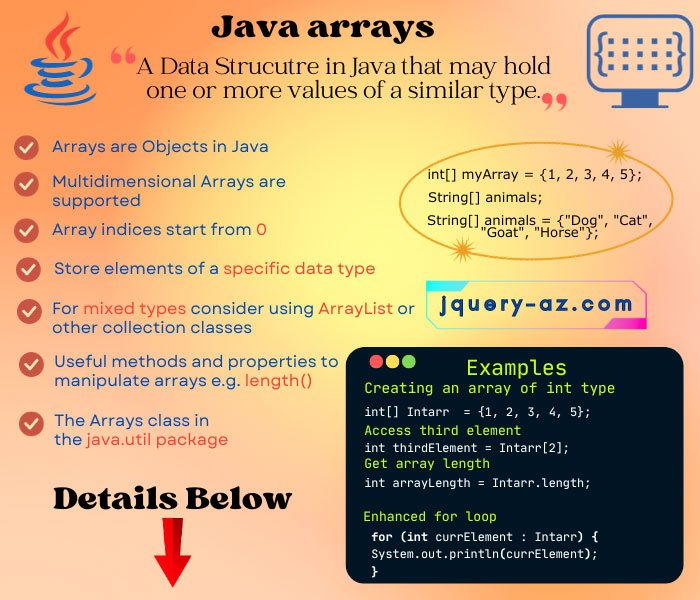
A simple illustration of a Java array structure.
Creating and Initializing Arrays
You declare an array by specifying the data type followed by square brackets [], and then initialize it using the new keyword and the desired size.
// Declare an array of integers
int[] numbers;

// Initialize the array to hold 5 integers
numbers = new int[5]; // All elements are initialized to default value 0

// Declare and initialize in one line
String[] names = new String[3]; // Holds 3 String objects, initialized to null

// Declare and initialize with specific values (array literal)
double[] temperatures = {98.6, 100.1, 99.5};
Accessing and Modifying Elements
Array elements are accessed using a zero-based index. The first element is at index 0, the second at index 1, and so on. The last element is at index length - 1.
int[] scores = new int[3];
scores[0] = 95;       // Assign 95 to the first element
scores[1] = 88;       // Assign 88 to the second element
// scores[2] is still 0 (default value for int)

int firstScore = scores[0]; // Access the value at index 0 (which is 95)
System.out.println("The first score is: " + firstScore);

// Trying to access an index outside the bounds (0 to length-1) causes an error
// System.out.println(scores[3]); // This would throw an ArrayIndexOutOfBoundsException
Array Properties and Utilities
- Length: You can find the size (number of elements it can hold) of an array using its public
lengthproperty:int size = scores.length;(which would be 3 for thescoresarray above). This length is fixed. - Multi-dimensional Arrays: Java supports arrays of arrays, known as multi-dimensional arrays, useful for representing grids or tables. Example:
int[][] matrix = new int[3][4];creates a 3x4 grid. - Utility Class: The
java.util.Arraysclass provides helpful static methods for common array operations like sorting (Arrays.sort()), searching (Arrays.binarySearch()), copying (Arrays.copyOf()), and converting arrays to strings (Arrays.toString()).
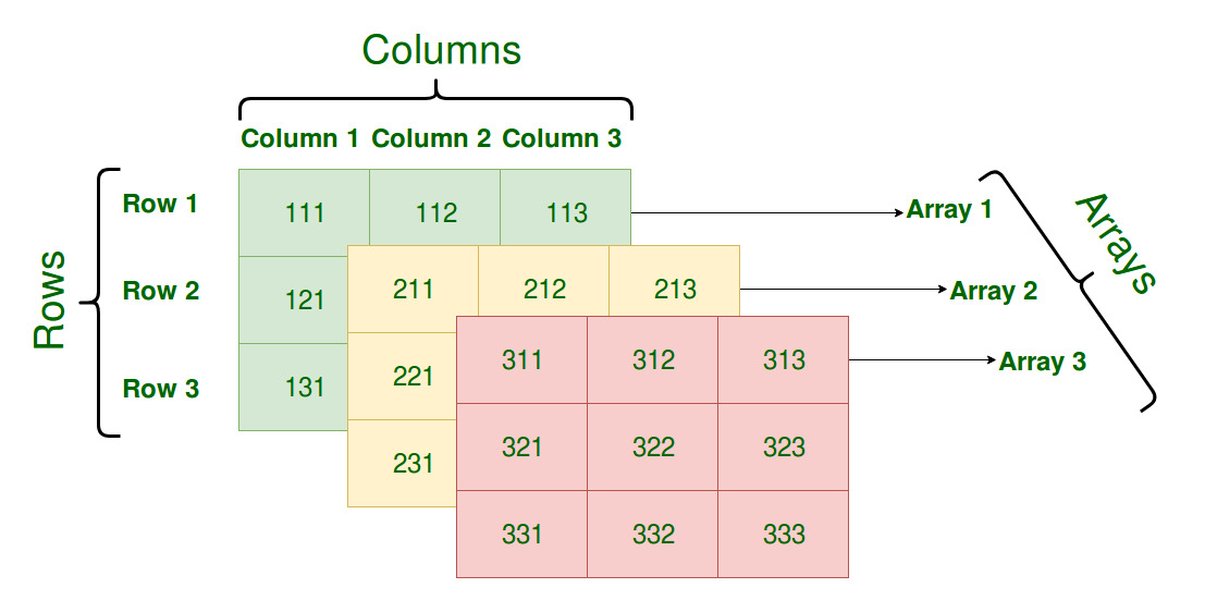
Arrays can have multiple dimensions, like this 3D array example.
Pros and Cons of Arrays
Advantages:
- Performance: Generally offer better performance for accessing elements due to direct memory access based on index.
- Memory Efficiency: Can be more memory-efficient for primitive types.
- Simplicity: Basic and straightforward for fixed-size collections.
Limitations:
- Fixed Size: The inability to change size after creation is the primary limitation. Adding or removing elements requires creating a new array and copying data.
- Limited Functionality: Lack built-in methods for common list operations like insertion or dynamic removal.
Exploring Java ArrayLists
The Flexible Alternative: Dynamic Collections
An ArrayList is a class from the Java Collections Framework (found in the java.util package). It implements the List interface and provides a resizable array. This means you can add or remove elements, and the ArrayList automatically adjusts its internal capacity. It's designed to hold objects.
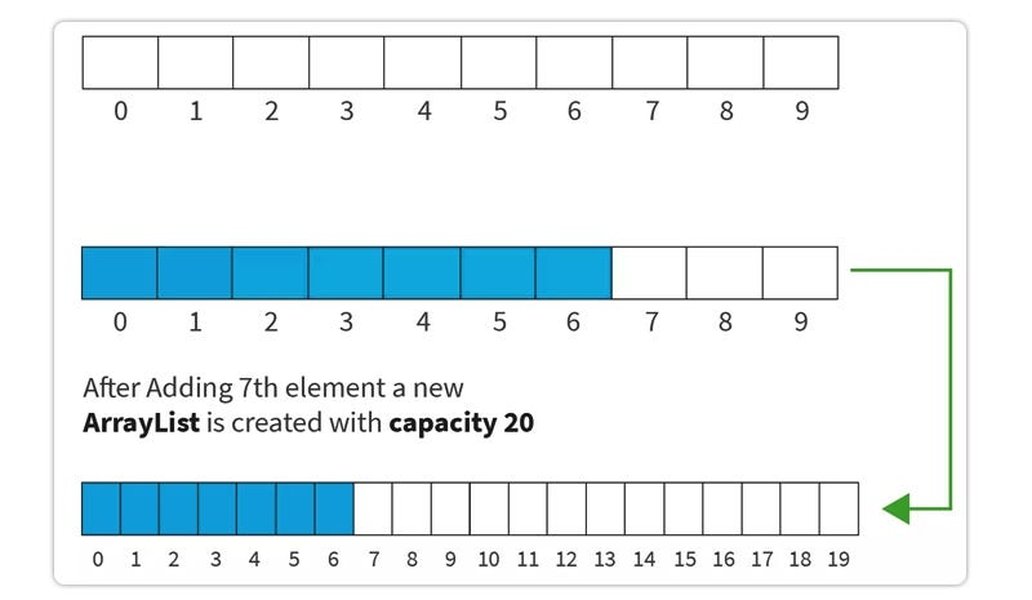
ArrayLists provide dynamic resizing capabilities.
Creating and Initializing ArrayLists
To use ArrayList, you typically import it first. You declare it using generics (<Type>) to specify the type of objects it will hold. If you need to store primitive types, you must use their corresponding wrapper classes (e.g., Integer for int, Double for double, Boolean for boolean).
// Import the ArrayList class
import java.util.ArrayList;

// Create an ArrayList to hold String objects
ArrayList<String> shoppingList = new ArrayList<>();

// Create an ArrayList to hold Integer objects (wrapper class for int)
ArrayList<Integer> playerScores = new ArrayList<>();
Java's auto-boxing feature often handles the conversion between primitive types and their wrapper classes automatically when adding elements.
Adding, Accessing, and Removing Elements
ArrayList provides convenient methods for manipulation:
- Adding: Use the
add()method.shoppingList.add("Milk"); // Adds "Milk" to the end shoppingList.add("Bread"); // Adds "Bread" to the end shoppingList.add(1, "Eggs"); // Inserts "Eggs" at index 1, shifting subsequent elements - Accessing: Use the
get()method with the index.String item = shoppingList.get(0); // Gets the element at index 0 ("Milk") System.out.println("First item: " + item); - Removing: Use the
remove()method (by index or by object).shoppingList.remove(2); // Removes the element at index 2 ("Bread") shoppingList.remove("Milk"); // Removes the first occurrence of "Milk" - Modifying: Use the
set()method to replace an element.shoppingList.set(0, "Cheese"); // Replaces the element at index 0 ("Eggs") with "Cheese"
ArrayList Properties and Common Methods
- Size: Use the
size()method to get the current number of elements:int count = shoppingList.size(); - Check if Empty: Use
isEmpty()to see if the list contains any elements. - Check for Element: Use
contains(object)to check if a specific element exists in the list. - Clear: Use
clear()to remove all elements from the list.
Pros and Cons of ArrayLists
Advantages:
- Dynamic Size: Automatically resizes, making it easy to manage collections where the number of elements changes.
- Rich Functionality: Offers many built-in methods for common operations (add, remove, search, etc.).
- Flexibility: Part of the versatile Java Collections Framework, allowing easy integration with other collection types.
Limitations:
- Performance Overhead: Resizing operations and method calls can introduce some performance overhead compared to simple array access.
- Object Storage Only: Cannot directly store primitive types, requiring wrapper classes which can consume more memory.
Visualizing the Concepts: Mindmap
Connecting the Dots
This mindmap provides a visual summary of the key characteristics and relationships between Java Arrays and ArrayLists, helping to solidify your understanding of their core features and differences.
Array vs. ArrayList: Feature Comparison
Head-to-Head Analysis
Choosing between an Array and an ArrayList often depends on the specific requirements of your task. This radar chart visually compares them across several key dimensions based on typical use cases and characteristics. Higher scores indicate better performance or suitability for that dimension.
As the chart illustrates, Arrays excel in raw speed and memory efficiency for primitives due to their fixed nature, while ArrayLists shine in flexibility, ease of modification, and the richness of available methods.
Video Introduction: Arrays and ArrayLists
Visual Learning Aid
For a dynamic explanation covering both Arrays and ArrayLists, including memory management aspects relevant for beginners, the following video provides a helpful overview:
This video offers a visual walkthrough of how Arrays and ArrayLists work in Java, which can complement the textual explanations and code examples provided here.
Key Differences Summarized
At a Glance Comparison
Here's a table summarizing the fundamental differences between Java Arrays and ArrayLists:
| Feature | Array | ArrayList |
|---|---|---|
| Size | Fixed (determined at creation, cannot change) | Dynamic (resizable, can grow/shrink) |
| Data Types | Can hold primitive types (int, char, etc.) AND Objects |
Can hold Objects only (requires wrapper classes like Integer, Character for primitives) |
| Implementation | Basic language feature | Class in the Java Collections Framework (java.util.ArrayList) |
| Performance | Generally faster for element access/modification (if index is known) | Slightly slower due to method call overhead and potential resizing operations |
| Flexibility | Less flexible for adding/removing elements | Highly flexible for adding/removing elements |
| Methods | No built-in methods for manipulation (relies on indexing and java.util.Arrays utilities) |
Provides rich set of methods (add(), remove(), get(), set(), size(), contains(), etc.) |
| Memory | More memory-efficient for primitives | Less memory-efficient for primitives due to wrapper object overhead |
| Generics | Not used directly with arrays (type is fixed at declaration) | Uses generics (e.g., ArrayList<Type>) for type safety |
When to Use Which?
Making the Right Choice
Choosing between an array and an ArrayList depends largely on your specific needs:
Use an Array When:
- You know the exact number of elements you need to store beforehand, and this number will not change.
- You need to store primitive data types and performance/memory efficiency is critical.
- You are working with multi-dimensional structures (like matrices or grids) where arrays provide a natural fit.
- You prioritize raw access speed over flexibility in adding/removing elements.
Use an ArrayList When:
- You don't know the number of elements in advance, or the number of elements is expected to change during runtime.
- You need the flexibility to easily add, remove, or insert elements into the collection.
- You are primarily working with objects (including wrapper types for primitives).
- You want to leverage the convenient methods provided by the Collections Framework for manipulation, searching, and sorting.
- Readability and ease of use for dynamic collections are more important than micro-optimizing for performance.
Frequently Asked Questions (FAQ)
Common Beginner Queries
What happens if I try to add more elements to an ArrayList than its current capacity?
You don't need to worry! The ArrayList automatically handles this. When you add an element and the internal array is full, the ArrayList creates a new, larger array (typically 1.5 times the old size), copies all the existing elements over to the new array, and then adds the new element. This resizing happens behind the scenes, making the process seamless for you, although it can have a small performance cost.
Can I store different data types (like integers and strings) in the same Array or ArrayList?
Standard arrays and generic `ArrayLists` (like `ArrayList` or `ArrayList`) are designed to be homogeneous, meaning they hold elements of only *one* specific type. If you need to store different types, you could potentially use an `Array` of type `Object` (Object[] myArray = new Object[size];) or an `ArrayList
Which one is faster: Array or ArrayList?
Generally, accessing or modifying an element at a specific index is faster with an Array (using `myArray[index]`) than with an `ArrayList` (using `myList.get(index)` or `myList.set(index, value)`). This is because array access is a more direct memory operation, while `ArrayList` methods involve some overhead. However, adding or removing elements can be faster with `ArrayList` (especially at the end) compared to the manual process of creating a new array and copying elements required for arrays. The performance difference is often negligible for small collections but can become more significant for very large datasets or performance-critical code.
Why do I need to use wrapper classes like `Integer` instead of `int` with ArrayList?
`ArrayList` (and other generic collections in Java) are designed to work with Objects. Primitive types like `int`, `double`, `boolean`, etc., are not objects in Java. Wrapper classes (`Integer`, `Double`, `Boolean`, etc.) are object representations of these primitive types. Therefore, to store primitive values in an `ArrayList`, you must use their corresponding wrapper classes. Fortunately, Java's auto-boxing and auto-unboxing features automatically convert between primitives and their wrapper types in most situations (like adding an `int` to an `ArrayList`), making the syntax cleaner.
References
- Java Arrays - W3Schools
- Java ArrayList - W3Schools
- ArrayList in Java - GeeksforGeeks
- Guide to the Java ArrayList - Baeldung
- Arrays (The Java™ Tutorials) - Oracle
- Java Arrays - Programiz
- Java Arrays and ArrayLists Cheatsheet - Codecademy
Recommended Reading
Last updated April 25, 2025