
Java Code for Quadratic Formula
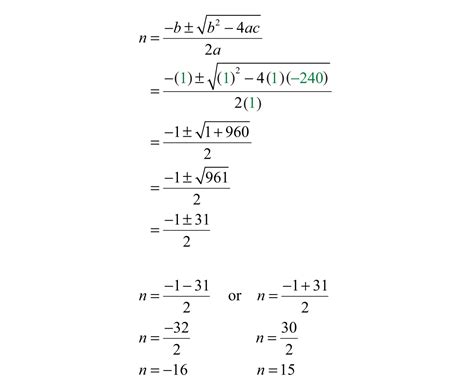
The quadratic equation is a fundamental concept in algebra, representing a second-degree polynomial equation in a single variable. Solving quadratic equations is essential in various fields, including physics, engineering, and finance. This comprehensive guide provides an in-depth explanation of the quadratic formula and presents a robust Java implementation to solve quadratic equations, handling all possible scenarios for the roots.
Understanding the Quadratic Formula
A quadratic equation is expressed in the general form:
$$ ax^2 + bx + c = 0 $$
where:
- a, b, and c are coefficients with a ≠ 0.
- If a = 0, the equation becomes linear, not quadratic.
The quadratic formula provides the solutions (roots) of the quadratic equation:
$$ x = \frac{-b \pm \sqrt{b^2 - 4ac}}{2a} $$
The term under the square root, known as the discriminant (D), is calculated as:
$$ D = b^2 - 4ac $$
The discriminant determines the nature of the roots:
- If D > 0: Two distinct real roots.
- If D = 0: One real root (repeated).
- If D < 0: Two complex (imaginary) roots.
Implementing the Quadratic Formula in Java
Implementing the quadratic formula in Java involves several steps: reading user input, calculating the discriminant, determining the nature of the roots, and computing the roots accordingly. Below is a comprehensive Java program that encapsulates these steps with detailed explanations.
Complete Java Program
import java.util.InputMismatchException;
import java.util.Scanner;

public class QuadraticEquationSolver {
    public static void main(String[] args) {
        Scanner scanner = new Scanner(System.in);
        double a = 0, b = 0, c = 0;

        System.out.println("Quadratic Equation Solver");
        System.out.println("Equation format: ax\u00B2 + bx + c = 0");

        try {
            // Input for coefficient a
            while (true) {
                System.out.print("Enter coefficient a (a \u2260 0): ");
                a = scanner.nextDouble();
                if (a != 0) {
                    break;
                } else {
                    System.out.println("Coefficient a cannot be zero. Please enter a non-zero value.");
                }
            }

            // Input for coefficient b
            System.out.print("Enter coefficient b: ");
            b = scanner.nextDouble();

            // Input for coefficient c
            System.out.print("Enter coefficient c: ");
            c = scanner.nextDouble();

            // Calculate discriminant
            double discriminant = b * b - 4 * a * c;
            System.out.println("\nCalculating the roots...");

            // Determine the nature of roots and calculate accordingly
            if (discriminant > 0) {
                // Two distinct real roots
                double root1 = (-b + Math.sqrt(discriminant)) / (2 * a);
                double root2 = (-b - Math.sqrt(discriminant)) / (2 * a);
                System.out.printf("Discriminant (D) = %.2f%n", discriminant);
                System.out.println("The equation has two distinct real roots:");
                System.out.printf("Root 1 = %.2f%n", root1);
                System.out.printf("Root 2 = %.2f%n", root2);
            } else if (discriminant == 0) {
                // One real root (repeated)
                double root = -b / (2 * a);
                System.out.printf("Discriminant (D) = %.2f%n", discriminant);
                System.out.println("The equation has one real root (repeated):");
                System.out.printf("Root = %.2f%n", root);
            } else {
                // Two complex roots
                double realPart = -b / (2 * a);
                double imaginaryPart = Math.sqrt(-discriminant) / (2 * a);
                System.out.printf("Discriminant (D) = %.2f%n", discriminant);
                System.out.println("The equation has two complex roots:");
                System.out.printf("Root 1 = %.2f + %.2fi%n", realPart, imaginaryPart);
                System.out.printf("Root 2 = %.2f - %.2fi%n", realPart, imaginaryPart);
            }
        } catch (InputMismatchException e) {
            System.out.println("Invalid input! Please enter numeric values for coefficients.");
        } finally {
            scanner.close();
        }
    }
}
Explanation of the Code
-
Import Statements:
import java.util.InputMismatchException;import java.util.Scanner;- These imports bring in necessary classes for handling user input and exceptions.
-
Class Declaration:
public class QuadraticEquationSolver
Defines the main class of the program.
-
Main Method:
public static void main(String[] args)
The entry point of the program.
-
Scanner Initialization:
Scanner scanner = new Scanner(System.in);
Creates aScannerobject to read input from the user.
-
User Input for Coefficients:
- The program prompts the user to enter coefficients
a,b, andc. - Input validation ensures that coefficient
ais not zero, maintaining the equation's quadratic nature.
- The program prompts the user to enter coefficients
-
Calculating the Discriminant:
double discriminant = b * b - 4 * a * c;
Computes the discriminant to determine the nature of the roots.
-
Determining and Calculating Roots:
- Two Distinct Real Roots (D > 0):
Uses the quadratic formula to calculate both roots. - One Real Root (D = 0):
Calculates the single repeated root. - Two Complex Roots (D < 0):
Calculates both the real and imaginary parts of the complex roots.
- Two Distinct Real Roots (D > 0):
-
Exception Handling:
- Uses a
try-catchblock to handle non-numeric inputs gracefully, preventing the program from crashing.
- Uses a
-
Closing the Scanner:
scanner.close();
Ensures that the Scanner resource is properly closed after use.
Sample Output
Below is an example of how the program operates:
    Quadratic Equation Solver
    Equation format: ax² + bx + c = 0
    Enter coefficient a (a ≠ 0): 1
    Enter coefficient b: -3
    Enter coefficient c: 2

    Calculating the roots...
    Discriminant (D) = 1.00
    The equation has two distinct real roots:
    Root 1 = 2.00
    Root 2 = 1.00
Handling Different Scenarios
-
Two Distinct Real Roots (D > 0):
- Example: \( x^2 - 3x + 2 = 0 \)
- Calculation: \( D = (-3)^2 - 4(1)(2) = 1 \)
- Roots: \( x_1 = 2 \), \( x_2 = 1 \)
-
One Real Root (Repeated) (D = 0):
- Example: \( x^2 - 2x + 1 = 0 \)
- Calculation: \( D = (-2)^2 - 4(1)(1) = 0 \)
- Root: \( x = 1 \) (repeated)
-
Two Complex Roots (D < 0):
- Example: \( x^2 + 2x + 5 = 0 \)
- Calculation: \( D = (2)^2 - 4(1)(5) = -16 \)
- Roots: \( x_1 = -1 + 2i \), \( x_2 = -1 - 2i \)
Additional Enhancements
To further improve the robustness and user-friendliness of the quadratic equation solver, consider implementing the following enhancements:
-
Exception Handling for Invalid Inputs:
- Extend the
try-catchblock to handle specific exceptions, providing more detailed error messages. - Use input validation techniques to ensure that the entered coefficients are within acceptable ranges.
- Extend the
-
Loop for Solving Multiple Equations:
- Allow users to solve multiple quadratic equations in a single run by implementing a loop that continues until the user decides to exit.
-
Graphical User Interface (GUI):
- Develop a GUI using JavaFX or Swing to provide a more interactive and intuitive user experience.
- Display the roots and equation details in a user-friendly format.
-
Unit Testing:
- Create unit tests using frameworks like JUnit to verify the correctness of the root calculations under various scenarios.
-
Visualization of the Parabola:
-
Integrate graphing libraries to visualize the quadratic equation's parabola, highlighting the roots.
-
Conclusion
This comprehensive Java program effectively solves quadratic equations by implementing the quadratic formula. It handles all possible scenarios for the roots, including distinct real roots, repeated real roots, and complex roots. By incorporating best practices such as input validation, exception handling, and clear user prompts, the program ensures reliability and ease of use.
Further enhancements like developing a GUI, adding unit tests, and visualizing the equation can significantly improve the program's functionality and user experience. This implementation serves as a solid foundation for anyone looking to understand or extend the capabilities of solving quadratic equations in Java.
References
Last updated January 8, 2025