
Creating a Very Short "Hello, World!" Example in Java
Java is a versatile and widely-used programming language known for its portability and robustness. Whether you're a beginner stepping into the world of programming or an experienced developer looking to refresh your skills, creating a "Hello, World!" program is a fundamental step. This guide provides a comprehensive overview of crafting a succinct "Hello, World!" example in Java, ensuring clarity and efficiency.
Understanding the Basics of Java
Java is an object-oriented programming language that emphasizes concepts like classes, objects, inheritance, and polymorphism. Its syntax is influenced by languages like C and C++, making it familiar to many programmers. Before diving into the "Hello, World!" example, it's essential to grasp some foundational aspects of Java:
1. Java Platform
Java operates on the principle of "Write Once, Run Anywhere" (WORA), thanks to the Java Virtual Machine (JVM). This means that Java code compiled on one platform can run seamlessly on any other platform that has a compatible JVM.
2. Java Syntax
The syntax of Java is designed to be clear and readable. It incorporates elements from C and C++ but removes certain complexities, such as pointers, to enhance security and simplicity.
Crafting the "Hello, World!" Program
The "Hello, World!" program is traditionally the first program written by individuals learning a new programming language. It serves as a simple demonstration of the language's syntax and the basic process of writing, compiling, and executing code.
Step-by-Step Breakdown
Let's dissect a very short "Hello, World!" program in Java:
1. Defining the Class
Java is inherently object-oriented, and every Java application must contain at least one class definition. The class serves as a blueprint for objects and encapsulates methods and variables.
Example:
java
public class HelloWorld {
    // Class content goes here
}
In this example, HelloWorld is the name of the class. By convention, class names in Java start with an uppercase letter and use camel case for readability.
2. The Main Method
The main method is the entry point of any Java application. It's where the program begins execution.
Signature:
java
public static void main(String[] args) {
    // Method content goes here
}
- public: An access modifier indicating that the method is accessible from other classes.
- static: Indicates that the method belongs to the class rather than an instance of the class.
- void: Specifies that the method does not return any value.
- String[] args: An array of String arguments that can be passed to the method from the command line.
3. Printing to the Console
To display text to the console, Java provides the System.out.println() method. This method prints the specified message followed by a newline character.
Example:
java
System.out.println("Hello, World!");
This line instructs the program to output the string "Hello, World!" to the console.
Complete "Hello, World!" Example
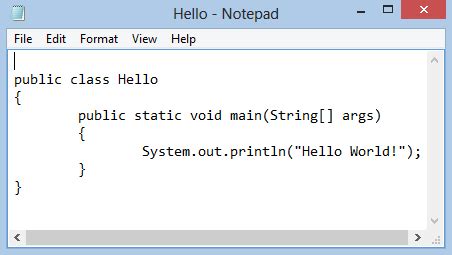
Combining all the elements discussed, here's a concise "Hello, World!" program in Java:
java
public class HelloWorld {
    public static void main(String[] args) {
        System.out.println("Hello, World!");
    }
}
This compact program efficiently demonstrates the fundamental structure and syntax of Java.
Compiling and Running the Program
To execute the Java program, follow these steps:
1. Writing the Code
Use a text editor or an Integrated Development Environment (IDE) like IntelliJ IDEA, Eclipse, or NetBeans to write the Java code. Save the file with a .java extension. The filename should match the class name. For the example above, save the file as HelloWorld.java.
2. Compiling the Code
Open the command line or terminal, navigate to the directory containing the HelloWorld.java file, and compile the code using the Java Compiler (javac):
bash
javac HelloWorld.java
If there are no syntax errors, this command generates a bytecode file named HelloWorld.class.
3. Running the Program
Execute the compiled Java program using the Java Virtual Machine (java):
bash
java HelloWorld
This command runs the HelloWorld class, and you should see the output:
Hello, World!
Exploring Variations
While the standard "Hello, World!" program serves its purpose well, exploring variations can deepen your understanding of Java's features.
1. Minimalist Approach
You can further shorten the program by omitting optional keywords without sacrificing clarity:
java
class Hello {
    public static void main(String[] args) {
        System.out.println("Hello, World!");
    }
}
Here, the public access modifier for the class is omitted, which is permissible if the class isn't accessed from other packages.
2. Single-Line Statement
For educational purposes, condensing the code into a single line showcases Java's syntax compactness:
java
public class HelloWorld { public static void main(String[] args) { System.out.println("Hello, World!"); } }
While functional, this approach is generally discouraged for real-world applications due to readability concerns.
Common Questions and Troubleshooting
1. Why Does Java Require a Class?
Java is designed around object-oriented principles. Every piece of code resides within a class, which groups related methods and variables, promoting modularity and reusability.
2. What If I Encounter Compilation Errors?
Common errors include:
- Syntax Errors: Missing semicolons, mismatched braces, or incorrect keyword usage.
- Class Name Mismatch: The filename must match the public class name.
- Incorrect Java Version: Ensure that the Java Development Kit (JDK) version is compatible with your code.
Review your code carefully, refer to error messages, and consult Java documentation or community forums for guidance.
3. How to Use an IDE Effectively?
Integrated Development Environments offer features like syntax highlighting, code completion, and debugging tools that streamline the coding process. Familiarizing yourself with these tools can enhance productivity and reduce errors.
Best Practices for Writing Java Code
Adhering to best practices not only improves code quality but also facilitates maintenance and collaboration:
1. Meaningful Class and Variable Names
Use descriptive names that convey the purpose of classes, methods, and variables. This enhances readability and maintainability.
2. Proper Indentation and Formatting
Consistent indentation and formatting make the code more readable and help in identifying logical structures and blocks.
3. Commenting and Documentation
Use comments to explain complex logic or important sections of the code. Comprehensive documentation assists others in understanding and utilizing your code effectively.
4. Error Handling
Implementing proper error handling ensures that the program can gracefully handle unexpected situations without crashing.
Extending Beyond "Hello, World!"
While the "Hello, World!" program is a starting point, Java offers a vast array of features and libraries to create complex and powerful applications. Exploring topics such as:
-
Object-Oriented Programming (OOP) concepts
-
Data Structures and Algorithms
-
Multithreading and Concurrency
-
Networking and Web Development
-
Database Integration
-
GUI Development
These areas provide a roadmap for advancing your Java programming skills, enabling you to develop sophisticated software solutions.
Summary
Creating a very short "Hello, World!" example in Java is a fundamental exercise that introduces you to the language's syntax and structure. By understanding the key components—class definition, main method, and output statements—you lay the groundwork for more advanced programming endeavors. Adhering to best practices and exploring Java's vast capabilities will further enhance your proficiency and open doors to diverse development opportunities.
Additional Resources
To continue your Java learning journey, consider the following resources:
Leveraging these resources will provide you with in-depth knowledge and support as you advance in Java programming.
Last updated December 31, 2024