
Unlock FPGA Design Power: Your Guide to Mastering Vivado 2019
Navigate the Vivado 2019 suite, from installation and basic workflows to advanced capabilities like HLS and IP integration.
Highlights: Mastering Vivado 2019
- Comprehensive Toolset: Vivado 2019 integrates design entry (HDL, Block Design), simulation, High-Level Synthesis (HLS), implementation (synthesis, place & route), debugging, and device programming in one environment.
- Structured Learning Path: Begin with installation and basic tutorials (like LED blinking), utilize official User Guides (especially UG910), progress to IP Integrator and HLS, and reinforce with hands-on projects using development boards.
- Leverage Key Resources: Utilize AMD/Xilinx documentation (User Guides, tutorials), third-party guides (like Digilent's), community forums (Reddit), and board-specific examples to accelerate your learning.
Understanding the Vivado 2019 Ecosystem
What is Vivado 2019?
Vivado Design Suite 2019, developed by Xilinx (now AMD), is a powerful and comprehensive software environment used for designing, implementing, and debugging hardware designs targeting Field-Programmable Gate Arrays (FPGAs) and System-on-Chips (SoCs). It offers an integrated workflow covering various stages of FPGA development.
Core Capabilities
Vivado 2019 provides a rich set of features designed to enhance productivity and enable complex designs:
- Design Entry: Supports traditional Hardware Description Languages (HDLs) like VHDL, Verilog, and SystemVerilog. It also features the IP Integrator, a graphical tool for creating block-level designs by connecting pre-existing or custom IP cores.
- Simulation: Includes a built-in HDL simulator supporting behavioral, functional, and timing simulations for VHDL, Verilog, and mixed-language designs (detailed in UG937 v2019.1).
- High-Level Synthesis (HLS): Vivado HLS (included in 2019 versions, later replaced by Vitis HLS) allows developers to create hardware designs from C, C++, or SystemC code, raising the abstraction level and potentially speeding up development.
- Implementation: Encompasses logic synthesis, placement, routing, and timing analysis to translate the hardware description into a physical implementation optimized for the target FPGA device. Features like incremental compile (detailed in UG904 v2019.2) and Abstract Shell help reduce iteration times.
- IP Integration & Packaging: The IP Integrator simplifies the creation of complex systems, especially those involving processors (like Zynq or MicroBlaze). The IP Packager (based on IP-XACT, UG1119 v2019.1) allows users to package their own designs as reusable IP blocks.
- Debugging and Verification: Offers integrated tools like the Integrated Logic Analyzer (ILA) for in-system hardware debugging and verification.
- Device Programming: Facilitates the generation of bitstream files and programming the target FPGA or SoC devices.
- Advanced Features (2019.x): Included enhancements like support for new devices and OS, improved quality of results (QoR) through features like Report QoR Assessment (RQA) and Suggestions (RQS), and support for Dynamic Function eXchange (DFX).
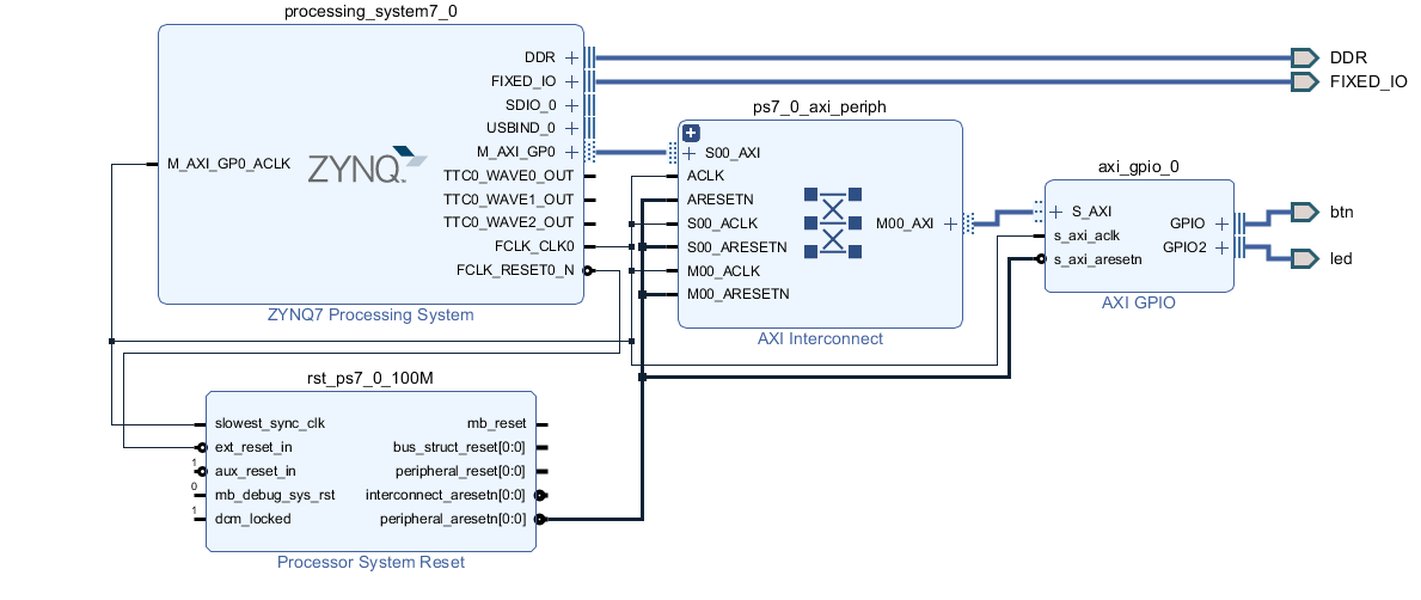
A typical Block Design created using Vivado's IP Integrator, showing interconnected IP cores.
Your Learning Path for Vivado 2019
A Step-by-Step Approach
Learning Vivado 2019 effectively involves a combination of understanding the tool's environment, utilizing official resources, and gaining hands-on experience. Here’s a suggested path:
1. Installation and Setup
Download Vivado 2019.x from the AMD/Xilinx archives. Be prepared for a large download (around 21GB) and significant disk space requirement (approx. 35GB for a full installation). Follow the installation guides carefully, noting any OS-specific requirements or patches (especially for Windows 10). Familiarize yourself with the different editions (e.g., System Edition, Lab Edition). The Lab Edition is useful for programming and debugging in a lab setting without needing a full license.
2. Familiarize Yourself with the GUI
Launch Vivado and explore the main interface components:
- Flow Navigator: Guides you through the design steps (Project Management, Simulation, Synthesis, Implementation, Programming).
- Project Manager: Manage source files (HDL, constraints), IP Catalog, and project settings.
- Sources Panel: View design hierarchy, add/create source files.
- Tcl Console: Execute commands for scripting and automation.
Start by creating a new project, targeting a specific FPGA part or development board.
3. Start with Basic HDL Projects
If you're new to FPGAs or HDLs, begin with simple "Hello World" style projects, such as blinking an LED or implementing a basic counter. Use VHDL or Verilog. Resources like Digilent's "Getting Started with Vivado" tutorial are excellent for this stage. Focus on understanding the basic flow: write HDL code, add constraints (XDC file for pin assignments and timing), simulate, synthesize, implement, generate bitstream, and program the board.
4. Explore Simulation
Learn to use the Vivado Simulator. Write testbenches for your basic designs to verify their functionality before implementing them on hardware. Understand how to view waveforms and debug HDL code within the simulator environment. Refer to the Logic Simulation Tutorial (UG937).
5. Dive into IP Integrator
Work through tutorials that use the IP Integrator to create block designs. This is crucial for building systems with processors (like Zynq or MicroBlaze) and connecting various peripherals using AXI interfaces. The Embedded Processor Hardware Design Tutorial (UG940) is a key resource here.
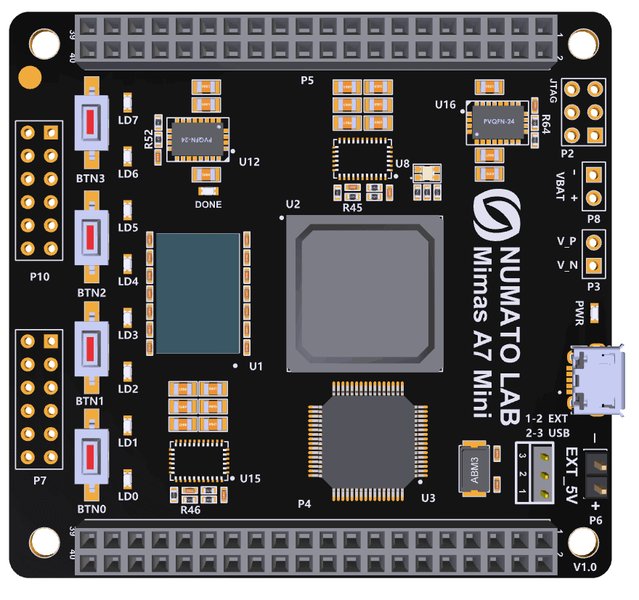
FPGA Development Boards like the Mimas A7 Mini are often used with Vivado for practical projects.
6. Learn High-Level Synthesis (HLS)
If your work involves accelerating algorithms or you prefer C/C++, explore Vivado HLS. Use tutorials (like the AMD "Getting Started with Vivado HLS" video) to understand how to convert C/C++ functions into RTL modules that can be integrated into your Vivado projects.
7. Understand Implementation and Timing
Study the implementation process: synthesis strategies, placement, routing, and timing analysis. Learn how to read timing reports, identify violations (setup/hold slack), and apply constraints or design modifications to meet timing requirements. Explore features like incremental compile (UG904) to speed up iterations.
8. Practice Hardware Debugging
Learn to use the Integrated Logic Analyzer (ILA) core to probe internal signals in your design running on the FPGA in real-time. This is essential for debugging complex hardware issues.
9. Utilize Resources and Community
Continuously refer to official AMD/Xilinx User Guides (UGs) and tutorials. Leverage resources from board manufacturers (e.g., Digilent). Engage with online communities like the FPGA subreddit (r/FPGA) for practical tips, troubleshooting advice, and project ideas.
Learning Path Mindmap
This mindmap visualizes the key stages and components involved in learning Vivado 2019:
(HDL / Block Design)"] id2c["Simulation
(Behavioral/Timing)"] id2d["Synthesis"] id2e["Implementation
(Place & Route)"] id2f["Timing Analysis"] id2g["Bitstream Generation"] id2h["Device Programming"] id3["Advanced Features"] id3a["IP Integrator"] id3b["High-Level Synthesis (HLS)"] id3c["Debugging (ILA)"] id3d["Incremental Compile"] id3e["Tcl Scripting"] id3f["IP Packaging"] id4["Resources"] id4a["AMD/Xilinx Docs (UGs)"] id4b["Official Tutorials"] id4c["Board-Specific Guides
(e.g., Digilent)"] id4d["Community Forums
(Reddit, Xilinx Forums)"] id4e["YouTube Tutorials"]
Vivado 2019 Tools and Features: A Closer Look
Vivado 2019 offers a suite of tools tailored for different aspects of FPGA development. Understanding these tools is key to leveraging the suite's full potential.
Key Tool Assessment
The following chart provides an opinionated assessment of various aspects of Vivado 2019, considering perspectives from both beginners and more experienced users. The scale ranges, with higher values indicating better performance or ease of use relative to the complexity of FPGA design.
Note: This chart represents a subjective evaluation. GUI Friendliness might seem lower for beginners due to the tool's complexity, while advanced users appreciate the control it offers. Documentation is generally rated highly, reflecting AMD/Xilinx's extensive guides.
Essential Resources for Learning
Navigating the vast amount of information requires focusing on key resources. The table below lists some of the most helpful documents and tutorials for learning Vivado 2019:
| Resource Type | Title / Link | Description |
|---|---|---|
| User Guide | UG910: Getting Started (2019.1) | Essential guide covering installation, licensing, GUI overview, and basic project flow. Ideal starting point for beginners. |
| Tutorial | UG937: Logic Simulation Tutorial (2019.1) | Provides step-by-step instructions on using the Vivado simulator for VHDL/Verilog designs. |
| Tutorial | UG940: Embedded Processor Hardware Design (2019.1) | Focuses on using IP Integrator to create processor-based systems (e.g., Zynq, MicroBlaze). |
| User Guide | UG904: Implementation (2019.2) | Details the synthesis and implementation stages, including strategies, timing analysis, and incremental compile flows. |
| Tutorial | UG1119: Creating and Packaging Custom IP (2019.1) | Explains how to use the IP Packager tool to create reusable IP blocks from your designs. |
| Third-Party Tutorial | Getting Started with Vivado (Digilent) | A practical, hands-on tutorial often recommended for beginners, usually using Digilent FPGA boards. Covers basic project creation and implementation. |
| Video Tutorial | Getting Started with Vivado HLS (AMD) | Introduces the concepts and workflow for using High-Level Synthesis to convert C/C++ code to hardware. |
Visual Learning: Simulating Designs in Vivado
Simulation is a critical step in FPGA design, allowing you to verify your logic before spending time on synthesis and implementation. Understanding how to use the Vivado simulator and write effective testbenches is fundamental. The video below provides a tutorial on simulating VHDL/Verilog code within the Vivado 2019.2 environment.
This tutorial demonstrates the process of creating a testbench file, associating it with your design source, running the simulation, and analyzing the resulting waveforms in the Vivado simulator interface. Mastering simulation early in your learning journey will save significant debugging time later.
Frequently Asked Questions (FAQ)
Is Vivado 2019 still relevant to learn in 2025?
While newer versions of Vivado (and the Vitis unified platform) exist with more features and device support, learning Vivado 2019 can still be very relevant. Many companies and academic institutions may still use established workflows based on this version. Furthermore, the core concepts, design flow (HDL, simulation, synthesis, implementation), and tools like IP Integrator are foundational and largely transferable to newer versions. Learning 2019 provides a solid base, especially if specific projects or hardware require it.
What are the main differences between Vivado editions in 2019?
In 2019, Vivado was typically available in editions like:
- Standard Edition: Offered a subset of devices and capabilities, often suitable for smaller FPGAs.
- Enterprise Edition: Provided support for the full range of devices and included advanced features like Partial Reconfiguration (Dynamic Function eXchange).
- WebPACK Edition (Free): Supported a limited number of smaller devices, suitable for beginners and academic use.
- Vivado HLS: Included for High-Level Synthesis capabilities.
- Vivado Lab Edition: A free, lightweight version primarily for programming devices and debugging in a lab environment, without the full synthesis and implementation tools.
Choosing an edition depended on the target FPGA device and the required features. A 30-day evaluation was often available for the Enterprise edition.
What prerequisite knowledge is helpful before learning Vivado?
While you can learn some concepts concurrently, having a foundational understanding in these areas is beneficial:
- Digital Logic Design: Understanding concepts like logic gates, flip-flops, state machines, timing, and basic computer architecture is crucial.
- Hardware Description Languages (HDLs): Basic knowledge of either VHDL or Verilog is highly recommended, as these are the primary ways to describe hardware in Vivado.
- Programming Concepts (Optional but helpful for HLS/Scripting): Familiarity with C/C++ is needed for HLS. Basic scripting knowledge (like Tcl, which Vivado uses extensively) can automate tasks.
How long does it typically take to learn Vivado?
The time required varies significantly based on your background and goals.
- Basics: Understanding the GUI, basic project flow, simulation, and implementing simple designs might take a few weeks of consistent effort.
- Intermediate Proficiency: Becoming comfortable with IP Integrator, basic timing constraints, and hardware debugging could take a few months.
- Advanced Topics: Mastering HLS, advanced timing closure techniques, complex system design, and scripting can take six months to a year or more of dedicated practice and project work.
Consistent hands-on practice with real projects is the fastest way to learn.
Where can I download Vivado 2019?
Older versions of Vivado, like 2019.1 or 2019.2, are typically available from the AMD/Xilinx download archives on their official website. You will likely need an AMD/Xilinx account to access these downloads. Search for "Vivado Archive" or navigate through the support/download sections of the AMD website.
Recommended Further Exploration
- How can I get started with Vivado IP Integrator specifically for Zynq processor designs?
- What are the best practices for debugging FPGA designs using the Vivado Integrated Logic Analyzer (ILA)?
- Can you provide an introduction to High-Level Synthesis (HLS) workflow in Vivado 2019?
- What are the key differences and improvements between Vivado 2019 and the latest Vivado versions?
References
 electrobinary.blogspot.com
Last updated May 5, 2025