
Unlocking LISTSERV Secrets: How Admins Can Retrieve Elusive SIGNOFF Records
Your detailed guide to accessing unsubscribe data for the 'BABU' list over the past six months using LISTSERV commands.
Key Insights at a Glance
- Primary Method: Administrators typically use the
GET listname LOGyymmcommand for each of the past six months to retrieve raw log files containing SIGNOFF (unsubscribe) activity. - No Single Direct Command: LISTSERV generally does not offer a singular command to directly extract a filtered list of SIGNOFF records for a specific list and timeframe.
- Post-Retrieval Analysis Essential: After obtaining the monthly log files, manual review or the use of text-processing scripts is necessary to identify and extract the specific SIGNOFF entries for the "BABU" list.
As an administrator of a LISTSERV mailing list, understanding user activity, including unsubscriptions (SIGNOFFs), is crucial for list management and analysis. This guide will walk you through the process of retrieving SIGNOFF records for a specific list, "BABU," focusing on activity within the last six months. While LISTSERV is powerful, obtaining this specific data requires a multi-step approach rather than a single command.
Understanding LISTSERV SIGNOFF Records
What Are SIGNOFF Records?
In LISTSERV terminology, a "SIGNOFF" event occurs when a user unsubscribes from a mailing list. Each time a user issues a SIGNOFF listname command, or is removed by an administrator, this action is typically recorded in the LISTSERV system's logs or changelogs. These records are vital for tracking list churn, auditing changes, and understanding subscriber engagement. A SIGNOFF record usually includes the user's email address, the list they unsubscribed from, and the timestamp of the action.
The Challenge: No Single Command for Time-Filtered SIGNOFF Lists
LISTSERV does not provide a dedicated, built-in command that allows an administrator to directly query and retrieve only SIGNOFF records for a specific list (e.g., "BABU") within a defined period (e.g., "the last 6 months") in a single operation. Instead, administrators need to retrieve broader log data and then parse it to find the relevant information.
Primary Method: Retrieving SIGNOFF Records via Log Files
The most common and reliable method for administrators to gather SIGNOFF data involves retrieving the monthly log files for the list in question. These logs contain a comprehensive record of list activities, including subscriptions, unsubscriptions, posts, and errors.
The GET listname LOGyymm Command
Command Syntax and Purpose
The core LISTSERV command used for this purpose is GET. The syntax for retrieving a monthly log file is:
GET listname LOGyymmWhere:
listnameis the name of the target list (in your case,BABU).LOGyymmspecifies the log file for a particular year (yy) and month (mm). For example,LOG2504would refer to the log file for April 2025.
This command is typically sent via email to the LISTSERV server address (e.g., listserv@yourserver.com) from an authorized administrator's email address.
Accessing Logs for the Last Six Months
To obtain SIGNOFF records for the list "BABU" over the last six months (from today's date, May 8, 2025, this would cover approximately November 2024 to April 2025), you will need to issue separate GET commands for each of those months. The LISTSERV server will then typically email these log files to you.
Here’s an example of the commands you would send (in the body of an email to the LISTSERV server):
GET BABU LOG2504
GET BABU LOG2503
GET BABU LOG2502
GET BABU LOG2501
GET BABU LOG2412
GET BABU LOG2411
Note: Adjust the yymm codes based on the current date and the exact six-month period you need to cover. Ensure your LISTSERV instance uses this log naming convention, as it's standard but can vary.
Essential: Administrative Privileges
It is crucial to remember that access to list logs using the GET command is restricted. You must be a recognized list owner or have appropriate administrative privileges on the LISTSERV server to successfully execute these commands and receive the log files.
Extracting SIGNOFF Data from Logs
What to Look For in the Logs
Once you have received the log files, you'll find they contain a chronological record of all list transactions. SIGNOFF entries will typically include keywords like "SIGNOFF," "UNSUBSCRIBE," or "DELETE" (if an admin removed the user), along with the user's email address and the timestamp. The exact format can vary slightly depending on the LISTSERV version and configuration.
Manual Review and Automated Processing
You will need to process these log files to isolate the SIGNOFF records for the "BABU" list:
- Manual Review: For smaller logs, you might be able to open them in a text editor and search for keywords related to unsubscriptions.
- Automated Processing: For larger logs or more frequent analysis, using command-line tools (like
grepon Unix/Linux/macOS orfindstron Windows) or writing simple scripts (e.g., in Python, Perl) can help automate the extraction of relevant lines. You would typically filter lines containing "SIGNOFF" and the list name "BABU" within the desired date range.
Visualizing Log Retrieval Approaches
Retrieving LISTSERV log data, especially for specific events like SIGNOFFs, can be approached in several ways, each with its own characteristics regarding precision, ease of use, and the nature of the output. The radar chart below provides an opinionated comparison of common methods an administrator might consider. The scores range from 1 (lowest) to 5 (highest) for each criterion.
This chart illustrates that while direct server log access offers the highest precision and granularity, it is the least user-friendly. The GET LOGyymm command followed by parsing strikes a balance, whereas a web interface, if available, generally offers better ease of use for common tasks. "Directness of Result" refers to how close the output is to the desired final list of SIGNOFFs without further processing.
Alternative Avenues for Accessing SIGNOFF Information
Besides the primary method of retrieving and parsing monthly log files, some LISTSERV installations may offer alternative ways to access or view SIGNOFF data, often through a web-based administrative interface.
Utilizing LISTSERV Web Interface
Many LISTSERV installations are equipped with a web interface that allows list owners and administrators to manage their lists, view reports, and access logs. If your LISTSERV server provides such an interface, it might offer features to view list activity reports or changelogs directly through your browser. These interfaces can sometimes provide filtering options by date or event type, potentially simplifying the process of finding SIGNOFF records.
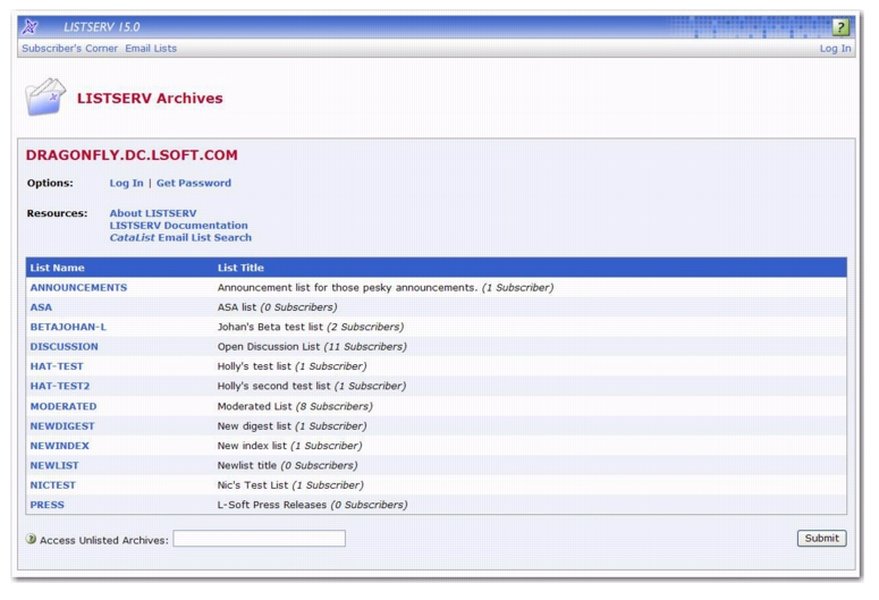
An example of a LISTSERV web interface, which may provide access to activity logs and reports.
Check your LISTSERV's documentation or explore its web portal to see if these features are available. This can be a more user-friendly way to access the information, though it might offer less raw data control than direct log file access.
Changelogs and Activity Reports
LISTSERV often maintains "changelog" files that specifically track changes to list subscriptions (subscribes, SIGNOFFs, etc.). Some systems allow administrators to request or view these changelogs or generate activity reports. These reports might directly list SIGNOFF events, potentially with options to filter by date or count occurrences. The availability and method of accessing these reports vary by LISTSERV version and local configuration.
The REPORT Command: A Note of Caution
Some LISTSERV environments might support a REPORT command or similar functionalities to generate summaries of list activity. However, the existence and capabilities of such a command are highly dependent on the specific LISTSERV software version and its configuration. It's not a universally standard command for retrieving detailed SIGNOFF lists for a specific period, so consult your server's documentation or support if you consider this route.
The following table compares the primary methods an administrator might use to gather SIGNOFF records:
| Method/Feature | Description | Relevance to SIGNOFF Retrieval for "BABU" (Last 6 Months) | Typical Access |
|---|---|---|---|
GET BABU LOGyymm |
Retrieves full monthly log files for the "BABU" list. | Primary method to obtain raw data containing all activities, including SIGNOFFs. Requires issuing commands for each of the 6 months and subsequent manual/scripted parsing. | Email command to LISTSERV server (admin privileges required). |
| LISTSERV Web Interface | Graphical interface for list management, often including log viewing and reporting tools. | May offer a more user-friendly way to view activity logs or generate reports that include SIGNOFFs. Filtering capabilities vary. | Web browser (admin login required). |
| Changelog Files/Activity Reports | Specific logs or system-generated reports detailing list events like subscriptions and unsubscriptions. | Can provide a more direct view of SIGNOFF records if accessible and filterable by date. Availability and access methods vary. | Via web interface or specific LISTSERV commands (if supported). |
| Direct Server Log Access | Accessing log files directly on the LISTSERV server's file system. | Provides complete raw data, offering maximum flexibility for analysis. However, requires server-level access and technical expertise. | Server filesystem access (system administrator privileges typically required). |
Mapping the SIGNOFF Retrieval Process
To help visualize the overall process of obtaining SIGNOFF records for your "BABU" list, the mindmap below outlines the key steps, considerations, and methods involved. It centralizes the task and branches out to the necessary actions and tools.
This mindmap summarizes that the core path involves using the GET command for multiple monthly logs, followed by careful analysis. Alternative routes like the web interface can simplify access if available. Always consider your specific LISTSERV environment's capabilities.
Frequently Asked Questions
What exactly is a SIGNOFF record in LISTSERV?
A SIGNOFF record is an entry in the LISTSERV logs that indicates a user has unsubscribed from a mailing list. It typically includes the user's email address, the name of the list they left, and the date and time of the unsubscription. This can happen when a user sends a SIGNOFF listname command, or if an administrator removes them from the list.
Why can't I get all SIGNOFF records for "BABU" for the last 6 months with one simple command?
LISTSERV's command structure is primarily designed for managing lists and distributing mail, with logging as a supporting function. While it logs events comprehensively, its command-line interface generally doesn't include advanced querying tools to filter specific event types (like SIGNOFFs) across multiple log files for a custom date range in a single step. Log retrieval is typically done on a per-file basis (e.g., monthly logs), requiring subsequent analysis by the administrator.
Do I need special permissions to use the GET listname LOGyymm command?
Yes, absolutely. The GET command to retrieve list logs is restricted to list owners or individuals with appropriate administrative privileges on the LISTSERV server. This is a security measure to protect list data and server resources. Commands sent from unauthorized email addresses will typically be rejected.
What format are the LISTSERV log files in, and how do I read them?
LISTSERV log files are typically plain text files. Each line usually represents a specific event or transaction, often with a timestamp, the list name, the user's email address (for relevant actions), and a description of the action (e.g., "SIGNOFF", "POST", "ADD"). You can open them with any standard text editor (like Notepad, TextEdit, VS Code, etc.) or use command-line tools for searching and filtering.
What if my LISTSERV instance doesn't store logs strictly on a monthly `LOGyymm` basis?
While LOGyymm is a very common convention for monthly logs, some LISTSERV installations might have different log rotation schemes, naming conventions, or retention policies. If the GET listname LOGyymm command doesn't work as expected, or if logs are structured differently (e.g., weekly, or with different naming patterns), you will need to consult your LISTSERV server's specific documentation, contact your LISTSERV hosting provider, or check with the server administrator to understand how logs are managed and how to retrieve them for the desired period.
Recommended Further Exploration
- How can I automate the process of analyzing LISTSERV logs to extract SIGNOFF records using scripts?
- Are there advanced reporting features in modern LISTSERV versions for tracking user activity beyond basic logs?
- What are the best practices for overall LISTSERV list administration, including log management and user data privacy?
- Can I get a detailed breakdown of the different types of entries found in LISTSERV log files and what they signify?
References

Last updated May 8, 2025