
Understanding Jenkins Shared Library: Loading the Vars Folder
A deep dive into how the Jenkins master programmatically loads the vars folder
Key Insights
- Automatic Global Variable Exposure: Groovy scripts in the vars folder are automatically recognized as global variables available to any pipeline.
- CPS Transformation and Consistency: The scripts go through Continuation-Passing Style (CPS) transformation to ensure reliable execution of the pipeline code.
- Configuration and Implicit Loading: Configuring the shared library in Jenkins (via Global Pipeline Libraries) and optionally using implicit loading simplifies their integration in pipelines.
Overview of Jenkins Shared Libraries
Jenkins Shared Libraries provide a powerful mechanism to promote code reuse and modularity across pipelines. By centralizing commonly used pipeline components, teams can maintain consistency, reduce duplication, and streamline pipeline development. A key feature of these libraries is the "vars" folder, which serves as the designated location for Groovy script files that define global variables and simple functions. When configured correctly, Jenkins automatically loads these files, making them accessible in any pipeline script that leverages the shared library.
The Role of the Vars Folder
The vars folder in a Jenkins shared library is a specially designated directory. Each Groovy script within this folder essentially becomes a global variable in the Jenkins environment. For instance, if a file named hello.groovy exists in the vars folder, then the function hello() is directly available in any pipeline that includes this shared library. This mechanism reduces the need for cumbersome imports in each Jenkinsfile and allows for a simplified, declarative approach to utilizing shared functionality.
Each file in the vars directory usually contains a single class, and the file name (minus the .groovy extension) acts as the variable name. Because these scripts are intended to run in a pipeline context, they are subjected to processing techniques that ensure they behave predictably in parallel and asynchronous executions.
Programmatic Loading Process by the Jenkins Master
When a pipeline is executed, understanding how the Jenkins master loads the vars folder is crucial. The process can be broken down into several systematic steps:
1. Configuration and Setup
Before any shared library functionality is available, the shared library must be configured in Jenkins:
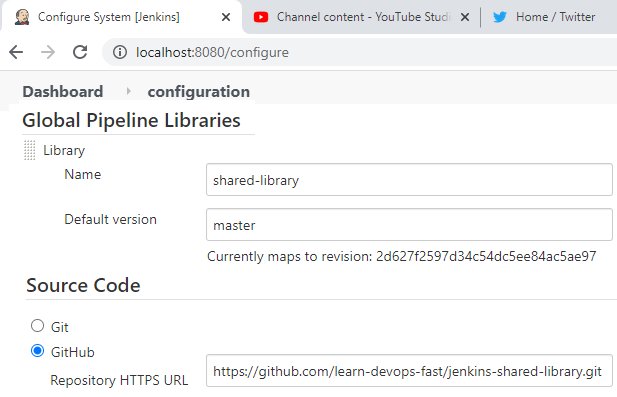
- Global Pipeline Libraries Configuration: Navigate to Manage Jenkins > Configure System, then locate the "Global Pipeline Libraries" section. Here, you specify the library name, which source control repository (e.g., Git) holds your shared library, and the default branch or version.
-
Repository Structure: Ensure that the shared library adheres to the proper directory structure. The folder structure usually includes:
- vars: Contains global variable Groovy scripts.
- src: Contains more complex Groovy classes that are not exposed as global variables.
- SCM Integration: The master fetches the shared library repository from the SCM system upon referencing it from the pipeline. This process ensures the latest version of shared code is accessible.
2. Loading via Pipeline Reference
In your Jenkinsfile, the shared library is typically loaded using the @Library annotation. For example:
@Library('your-shared-library-name') _
This explicit loading instructs the Jenkins master to:
- Fetch the repository from the specified SCM URL.
- Initialize the shared library.
- Include the library contents in the pipeline’s classpath.
When the shared library is loaded, Jenkins incorporates both the src and vars directories into the classpath. Whereas classes located in the src folder need explicit references, scripts under vars are automatically mapped to global variables.
3. CPS Transformation and Its Role
Jenkins employs a process known as Continuation-Passing Style (CPS) transformation to handle Groovy scripts within the shared library:
- What is CPS Transformation? CPS transformation converts Groovy code into a format that can manage long-running pipelines, asynchronous processes, and parallel executions reliably.
- Application to Vars Folder Files: When Jenkins loads a Groovy script from the vars directory, it applies CPS transformation. This process makes sure that the global variables, when executed, integrate seamlessly into the pipeline's execution flow, particularly accommodating Jenkins' pause/resume features.
- Consistency Across Pipelines: The transformation ensures that the behavior of the shared library's functions remains predictable across different pipeline runs.
4. Implicit Loading Behavior
Jenkins offers the convenience of "implicit loading" for shared libraries:
-
Configuration Option: In the Global Pipeline Libraries settings, there is an option for "Load implicitly." When enabled, shared libraries are automatically added to the classpath for every pipeline, eliminating the need for the explicit
@Libraryannotation. - Simplified Access: This means that any global variable defined in the vars folder becomes readily available to the pipeline, enhancing ease of use and preventing boilerplate code.
5. Programmatic Loading Using a ‘library’ Step
Beyond the explicit @Library annotation, Jenkins allows programmatic loading via the library step which provides additional flexibility:
This step can be used when administrative privileges to configure global libraries are limited or if a pipeline requires dynamic loading of different library versions. For instance, the following Jenkinsfile code snippet demonstrates this method:
library identifier: 'my-shared-library@master',
  retriever: modernSCM([$class: 'GitSCMSource', remote: 'https://your-git-repo.com/my-shared-library.git']),
  changelog: false
This command tells the Jenkins master to load the shared library from a remote Git repository, applying the same CPS transformation process, and integrating the contents of the vars folder as global variables.
Detailed Examination: The Mechanism of Loading the Vars Folder
The process in which the Jenkins master loads the vars folder can be divided into several technical and configuration-driven steps, each essential for ensuring seamless integration of the shared library into Jenkins pipelines.
Directory Structure Recognition
When the Jenkins master encounters a shared library, it recognizes the significance of the particular directories within the repository. The vars folder stands out because:
- Naming Convention: Each Groovy file inside this folder is automatically read as a global variable. The global variable’s name is identical to the file name (without the .groovy extension).
- Simplicity in Access: This mechanism dramatically simplifies the usage of shared libraries in pipelines, as the functions can be called by simply referencing their file name.
In contrast, files in the src directory are meant for more complex classes requiring explicit import statements.
Class Path Augmentation
Upon retrieving the shared library from its source control system, the Jenkins master proceeds to augment the pipeline’s class path. This step involves:
- Integrating Files: By adding the contents of both the src and vars directories to the class path, the master ensures that all Groovy scripts are available for execution.
- Global Accessibility: The global variables from the vars folder become accessible throughout all stages of the pipeline once the class path is updated.
This built-in mechanism allows for a finely tuned integration approach where a well-defined boundary exists between utility functions (global variables in vars) and more complex classes (defined in src).
CPS Transformation and Deferred Execution
One of the most critical aspects of this process is the application of the CPS transformation on the Groovy scripts:
- Ensuring Reliability: By transforming the code into a CPS-compliant format, Jenkins better handles the asynchronous nature of pipelines. This prevents issues related to state management during execution pauses and resumes.
- Uniform Transformation Process: All scripts located in the vars folder are subjected to the same uniform transformation process, thereby eliminating discrepancies or unexpected behavior.
This transformation is vital for long-running pipelines, which might encounter multiple interrupts or branching logic during their execution. It guarantees that the global variable methods remain consistent and reliable, irrespective of the pipeline’s complexity.
Configuration Options & Best Practices
Successfully integrating and loading a shared library in Jenkins involves adherence to best practices and optimal configuration settings. Below is a comprehensive table summarizing key configuration aspects:
| Configuration Aspect | Description | Best Practice |
|---|---|---|
| Global Pipeline Libraries | Set up in Jenkins under Manage Jenkins > Configure System, specifying the library name, SCM URL, branch, and credentials. | Enable "Load implicitly" if you want automatic availability across pipelines. |
| Directory Structure | The shared library should include a 'vars' directory for Groovy scripts and a 'src' directory for complex classes. | Maintain clear separation between casual global variable functions and detailed classes requiring explicit imports. |
| CPS Transformation | All files in the 'vars' directory undergo CPS transformation to ensure consistency in the pipeline. | Ensure scripts are written in a CPS-friendly manner to avoid transformation issues. |
| Library Loading | Use the @Library annotation or the library step for explicit or programmatic loading of shared libraries. | Choose the appropriate loading method based on your project's needs or administrative constraints. |
| SCM Integration | Jenkins fetches shared library code from a remote repository on demand. | Keep the shared library repository accessible, updated, and version-controlled to minimize disruptions. |
Following these configuration options and best practice guidelines allows organizations to leverage Jenkins shared libraries effectively. It simplifies the incorporation of standardized global variables and ensures that the Jenkins master efficiently processes the scripts in the vars folder.
Real-world Usage Scenario
Consider a scenario where a team frequently deploys applications across multiple environments. Instead of repeating common deployment logic in every Jenkinsfile, they encapsulate the logic in a shared library’s vars folder. A script like deployApp.groovy could contain all the necessary steps to deploy an application. With the shared library loaded (either implicitly or using the @Library annotation), developers can simply call deployApp() in their pipelines.
This not only streamlines the pipeline scripts but also centralizes management. Updates to deployment logic can be made in one place—the shared library—affecting all pipelines that reference the global variable. As a result, consistency is maintained across deployments and troubleshooting becomes more straightforward due to the standardization of processes.
Advantages of Programmatic Library Loading
Programmatic loading of shared libraries, particularly the vars folder, offers several advantages:
- Modularity and Reuse: Centralization of common tasks into global variables that are accessible to all pipelines.
- Maintenance Efficiency: Updating a single shared library script influences all pipelines that depend on it, thereby reducing redundancy and potential errors.
-
Flexibility: Using either the explicit
@Libraryannotation or the programmaticlibrarystep offers flexibility to suit various project and environment constraints. - Robust Pipeline Execution: The CPS transformation process guarantees that script execution remains robust even across complex and long-running pipelines.
These benefits demonstrate why Jenkins shared libraries, and the automatic loading of the vars folder, have become an essential part of CI/CD best practices in modern software engineering workflows.
References
- Jenkins Shared Library - PhoenixNAP
- How to Improve Your Jenkins Builds with Shared Libraries - Altimetrik
- Unlocking Efficiency: A Guide to Transitioning to Jenkins Shared Libraries - Medium
- Jenkins Shared Libraries Documentation - Jenkins.io
- Jenkins Shared Libraries Part 1 - ITNEXT
Recommended Topics for Further Exploration
Last updated March 5, 2025