
Unlocking Next-Generation AI: The Quest for Intelligent, Local, and Versatile Assistants on macOS
Discover leading AI projects blending local long-term memory, multi-model capabilities, and native macOS ARM performance.
The demand for sophisticated AI assistants that operate locally, remember user interactions over the long term, and flexibly leverage various AI models is rapidly growing. For macOS users, particularly those on ARM-based Apple Silicon, the desire for native, high-performance applications adds another layer to this quest. This response explores the landscape of AI projects striving to meet these advanced requirements, highlighting key developments and leading examples as of May 2025.
Key Insights: The Future of Personal AI on Your Mac
- Local Long-Term Memory is Crucial: Projects are increasingly focusing on enabling AI to remember past interactions and user preferences locally, enhancing personalization and privacy without constant cloud reliance. Technologies like Retrieval Augmented Generation (RAG) and specialized memory layers (e.g., Mem0, Kernel Memory) are pivotal.
- Multi-Model Flexibility Offers Power: The ability to use or switch between different AI models (e.g., various LLMs for text, diffusion models for images) or specialized AI agents within a single portal allows users to tackle diverse tasks more effectively. Platforms like Ollama and Anything-llm champion this approach.
- Native macOS ARM Apps Deliver Performance: For Apple Silicon Mac users, native ARM applications ensure optimal performance, efficiency, and seamless integration. Several AI tools like macai and dedicated productivity assistants are being developed or optimized for this architecture.
The Pillars of an All-Purpose AI Portal
Crafting a truly all-purpose AI involves integrating several complex capabilities. For users seeking a powerful, private, and personalized experience on their macOS ARM devices, three features stand out as particularly important.
1. Empowering AI with Local Long-Term Memory
Local long-term memory allows an AI to retain information from past interactions, user preferences, and specific data directly on the user's device. This is fundamental for creating truly personalized and context-aware AI assistants that learn and adapt over time. It also enhances privacy by reducing the need to send sensitive data to cloud servers.
Key Technologies and Approaches:
- Memory Layers: Specialized systems like Mem0 are designed as dedicated memory layers for AI agents, enabling multi-level memory retention (user, session, agent-specific) and personalization.
- Semantic Memory SDKs: Tools like LangMem SDK provide frameworks for AI agents to manage both short-term and long-term semantic memory, ensuring consistent and contextually relevant interactions.
- Kernel Memory Solutions: Services such as Kernel Memory offer efficient indexing of datasets through custom continuous data pipelines, supporting Retrieval Augmented Generation (RAG) along with synthetic and semantic memory processing locally.
- Retrieval Augmented Generation (RAG): This technique allows LLMs to access and incorporate information from external knowledge bases (which can be stored locally) to provide more accurate and contextually rich responses. Projects like Anything-llm leverage RAG extensively.
- Activity Recording: Applications like Rewind.ai take a unique approach by locally recording user activity (what you’ve seen, said, or heard) to build a comprehensive, searchable personal memory.
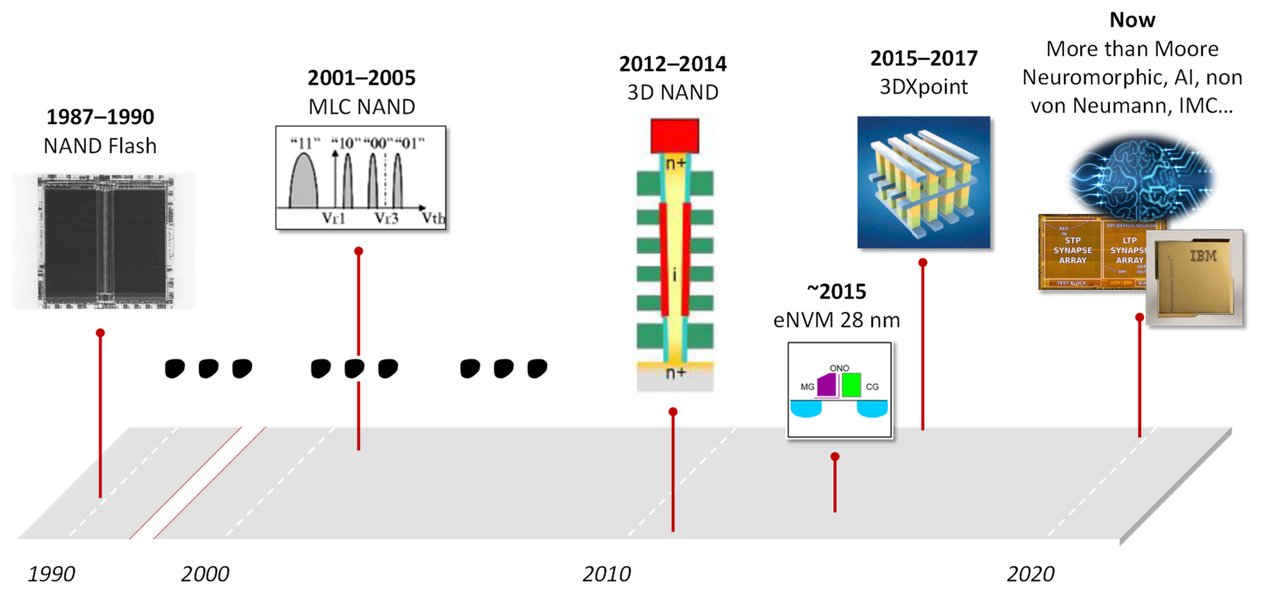
Conceptual illustration of different emerging memory technologies relevant to advanced AI systems.
2. Harnessing the Power of Diverse AI Models and Agents
No single AI model excels at every task. An all-purpose AI portal benefits immensely from the ability to integrate or switch between various AI models (e.g., different large language models for text generation, specialized models for image creation or coding) or deploy multiple AI agents that can collaborate or work independently.
Platforms and Frameworks Enabling Multi-Model/Agent Capabilities:
- Local Model Runners: Ollama is a prominent project that allows users to easily install and run a wide array of open-source LLMs (like Llama 2, Mixtral, Gemma) locally on their macOS devices.
- Multi-Provider Clients: Applications like macai serve as native macOS clients that can connect to and switch between various AI service providers (e.g., OpenAI's ChatGPT, Anthropic's Claude, Google's Gemini, xAI's Grok).
- Comprehensive AI Workspaces: Anything-llm offers an all-in-one desktop application that supports multiple AI models/agents, features no-code agent builders, and allows for sophisticated orchestration of AI capabilities locally.
- Multi-Agent Systems (MAS): Frameworks are emerging where several intelligent agents can operate collaboratively. Memory solutions like Mem0 support such systems by providing individualized memory for agents.
- Productivity Hubs with AI Agents: Tools like Taskade enable users to build and train AI workflows composed of different AI agents, focusing on task automation and productivity.
3. Optimizing for macOS ARM: The Native App Advantage
With the shift to Apple Silicon (M1, M2, M3, and newer ARM-based chips), native macOS ARM applications offer superior performance, energy efficiency, and tighter integration with the operating system. For demanding AI tasks, this native support is crucial for a smooth user experience.
AI Projects with macOS ARM Focus:
- Native Chat Clients: macai is a prime example of a native macOS AI chat application optimized for ARM Macs.
- Local LLM Platforms: Ollama provides excellent support for running models efficiently on Apple Silicon.
- Dedicated AI Assistants: Simular AI Agent for Mac and Omnipilot are designed as AI assistants specifically for macOS, offering native ARM support.
- Productivity and Developer Tools: Taskade, Pieces for Developers, and even image generation tools like DiffusionBee offer native macOS apps that run well on ARM architecture.
- Emerging Applications: Many new AI tools are being developed with macOS ARM as a primary target, reflecting the platform's growing importance in the creative and developer communities.
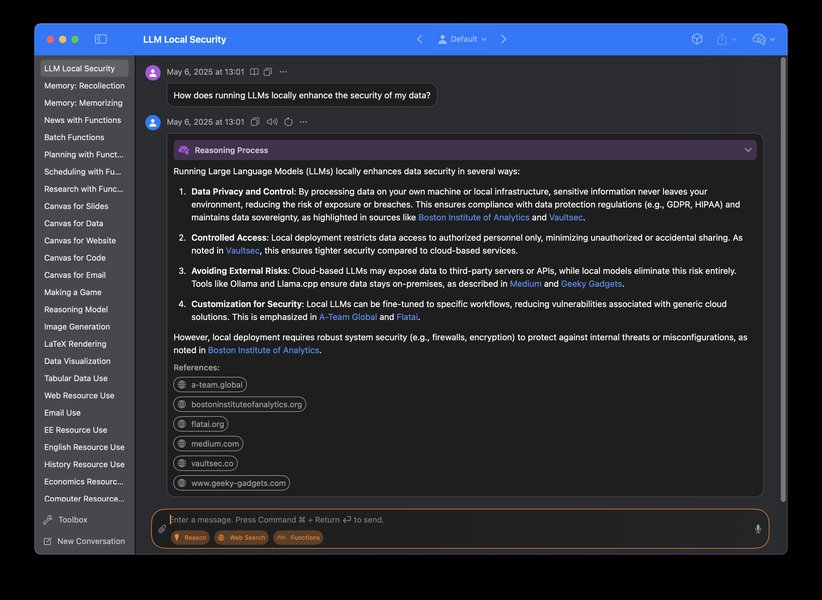
Example of a native macOS application (Sidekick) providing access to multiple AI models, illustrating the desired user experience on ARM Macs.
Leading Projects at the Intersection
While the ideal "all-purpose AI portal" perfectly integrating all three advanced features might still be an evolving concept, several projects developed by talented teams and open-source communities are making significant strides. Below are some notable examples that strongly align with one or more of the specified criteria.
Featured AI Projects
Anything-llm (by Mintplex-Labs)
A powerful open-source, all-in-one desktop application (also available via Docker) that excels in providing a customizable AI workspace. It features built-in Retrieval Augmented Generation (RAG) for robust local long-term memory with your own documents, supports multiple AI models and agents, and includes a no-code agent builder. It is compatible with macOS, including ARM architecture via its desktop and Docker distributions.
Ollama
Ollama simplifies running powerful open-source large language models (like Llama 3, Mistral, Phi-3) locally. It offers a native macOS ARM application, ensuring excellent performance. While not an "AI portal" with a GUI for managing diverse non-LLM agents in the same vein as Anything-LLM, it's a foundational tool for accessing various state-of-the-art models locally, which can then be integrated into other applications or custom portals. Data and model states are stored locally, contributing to de-facto long-term memory for interactions within those models.
macai (by Renset)
A native macOS ARM application designed as an AI chat client. It supports a wide array of AI models by connecting to different providers (ChatGPT, Claude, Gemini, Grok, Perplexity, and local models via Ollama or other LM Studio compatible APIs). While its inherent long-term memory might be session-based or dependent on local chat history storage, its strength lies in multi-model access within a polished macOS interface.
Rewind.ai
Rewind.ai is a unique macOS ARM application focused on creating a personalized local long-term memory by capturing, storing, and making searchable everything the user sees, says, or hears on their device. It then uses AI to help users find information and summarize content based on this vast personal archive. While its multi-model aspect is more about internal AI agents processing this data, its local memory capabilities are exceptionally strong.
Pieces for Developers
Tailored for developers, Pieces is a native macOS (ARM compatible) AI portal that enhances workflow efficiency. It includes a "Long-Term Memory Agent" to capture and resurface historical workflow details (code snippets, notes, interactions) stored locally. It supports integration with various AI tools, facilitating multi-agent operations within development tasks.
Comparative Overview of Selected Projects
The following table provides a summary of how some of these leading projects align with the key criteria. Note that "Local Long-Term Memory" can vary in depth and implementation, and "Multi-Model/Agent" support can range from switching between LLMs to orchestrating complex agent workflows.
| Project / App | Local Long-Term Memory | Multi AI Models/Agents | Native macOS ARM App | Primary Focus |
|---|---|---|---|---|
| Anything-llm | Yes (Strong via RAG with local documents, vector DBs) | Yes (Multiple LLMs, no-code agent builder) | Yes (Desktop app, Docker compatible) | Customizable AI workspace, document-based Q&A |
| Ollama | Yes (Local model storage and data persistence) | Yes (Supports a wide range of local LLMs) | Yes (Native macOS ARM) | Running open-source LLMs locally |
| macai | Partial (Session-based, chat history) | Yes (Connects to multiple cloud & local AI providers/models) | Yes (Native macOS ARM) | Multi-provider AI chat client |
| Rewind.ai | Yes (Core feature - comprehensive local activity recording) | Yes (Internal AI agents for recall/summarization) | Yes (Native macOS ARM) | Personalized AI memory assistant |
| Mem0 | Yes (Core offering - advanced memory layer) | Yes (Designed for multi-agent systems) | Integrates with apps (SDK/Service, not standalone GUI app) | Intelligent memory for AI agents |
| Pieces for Developers | Yes (Long-Term Memory Agent for workflow) | Yes (Integrates various AI tools) | Yes (Native macOS ARM) | Developer productivity & workflow AI |
Visualizing Project Strengths: A Comparative Analysis
To better understand how these projects stand in relation to each other across key attributes, the following radar chart offers a visual comparison. The scores are based on a qualitative assessment of their primary features and focus areas. Dimensions include: Local Memory Depth (how comprehensive and persistent local memory is), Model/Agent Versatility (flexibility in using different AIs), macOS Native Experience (quality of the native ARM app), Privacy Focus (emphasis on local data and processing), and Ease of Use (accessibility for non-technical users).
This chart illustrates that projects often have different strengths. For example, Rewind.ai excels in local memory depth and privacy, while Anything-llm and macai offer strong model/agent versatility. Ollama provides a solid native experience for running local models with good ease of use.
Mapping the Ecosystem: AI Portal Features
The landscape of AI tools meeting these advanced criteria is interconnected. Core features like local memory, multi-model support, and macOS ARM nativity are being addressed by various specialized components and more comprehensive portal-like applications. The mindmap below visualizes these relationships.
(macOS ARM, Local LTM, Multi-Model)"] id1["Core Feature: Local Long-Term Memory"] id1_1["Memory Layers (Mem0, Kernel Memory)"] id1_2["Retrieval Augmented Generation (RAG)"] id1_3["Semantic Memory SDKs (LangMem)"] id1_4["Activity Recording (Rewind.ai)"] id1_5["Project Example: Anything-llm"] id2["Core Feature: Multi-Model/Agent Support"] id2_1["Local Model Runners (Ollama)"] id2_2["Multi-Provider Clients (macai)"] id2_3["AI Workspaces (Anything-llm)"] id2_4["Productivity Hubs (Taskade)"] id3["Core Feature: macOS ARM Native App"] id3_1["Native Chat Clients (macai)"] id3_2["Local LLM Platforms (Ollama)"] id3_3["Personalized Memory Apps (Rewind.ai)"] id3_4["Developer Tools (Pieces)"] id3_5["AI Assistants (Simular AI)"] id4["Key Integrated Projects"] id4_1["Anything-llm
(LTM, Multi-Agent, macOS Compatible)"] id4_2["Ollama
(Multi-Model Local, macOS Native, Local Data)"] id4_3["macai
(Multi-Model Access, macOS Native)"] id4_4["Rewind.ai
(Exceptional LTM, macOS Native)"]
This mindmap illustrates how foundational technologies for memory and model management are leveraged by user-facing applications, particularly those optimized for the macOS ARM environment, to create more powerful and personalized AI experiences.
Exploring Native macOS AI Tools
The development of generative AI tools specifically for macOS has accelerated, offering users powerful capabilities directly within their familiar operating environment. The following video provides an overview of several native generative AI tools available for Mac users, showcasing the types of applications that align with the criteria of local operation and macOS integration.
This video discusses various macOS native generative AI tools, relevant for understanding the ecosystem of AI applications on Apple Silicon.
Watching this can provide context on how developers are leveraging the Mac platform to build AI-powered applications, some of which may incorporate or move towards local memory and multi-model features.
Frequently Asked Questions (FAQ)
What are the main benefits of local long-term memory in an AI?
Local long-term memory significantly enhances AI by:
- Personalization: The AI can remember past interactions, user preferences, and specific details, leading to more tailored and relevant responses.
- Contextual Understanding: It allows the AI to maintain context over extended conversations or projects, improving coherence and reducing the need for users to repeat information.
- Privacy and Security: Storing data locally reduces reliance on cloud services, giving users more control over their information and minimizing potential data breaches.
- Offline Accessibility: With memory stored locally, the AI can often function or retain key information even without an internet connection.
- Efficiency: Accessing local memory can be faster than retrieving data from remote servers, potentially speeding up response times.
How does using multiple AI models or agents enhance an AI portal?
Integrating multiple AI models or agents provides several advantages:
- Task Specialization: Different AI models are optimized for different tasks (e.g., one for creative writing, another for coding, a third for image analysis). A multi-model portal can leverage the best model for each specific job.
- Improved Accuracy and Capability: By combining the strengths of various models, the overall system can achieve higher accuracy and a broader range of capabilities than a single model could offer.
- Resilience and Flexibility: If one model is unavailable or performs poorly for a certain query, the system can switch to an alternative model.
- Customization: Users can choose their preferred model for certain tasks or experiment with different AI "personalities" or styles.
- Complex Workflows: Multiple AI agents can collaborate on complex tasks, breaking them down into manageable sub-tasks, similar to how a team of human specialists would work.
Why is a native macOS ARM app preferred for these advanced AI tools?
Native macOS ARM applications offer significant benefits for advanced AI tools:
- Performance: Native apps are compiled specifically for Apple Silicon's ARM architecture, allowing them to take full advantage of the hardware's capabilities for faster processing and responsiveness, which is crucial for computationally intensive AI tasks.
- Energy Efficiency: Optimized ARM apps consume less power, leading to better battery life on MacBooks.
- System Integration: Native apps can integrate more seamlessly with macOS features, services, and APIs (e.g., Metal for GPU acceleration, Core ML for on-device machine learning).
- User Experience: They typically adhere more closely to macOS design guidelines, providing a more familiar and polished user interface.
- Stability and Reliability: Direct hardware access and optimization can lead to more stable and reliable application performance.
Are these leading AI projects typically open-source or commercial?
The landscape includes a mix of both open-source and commercial projects:
- Open-Source: Many foundational tools and innovative projects like Ollama, Anything-llm, and memory layers like Mem0 (often with GitHub repositories) are open-source. This fosters community collaboration, transparency, and customization.
- Commercial: Some polished applications and specialized services like Rewind.ai or certain features within larger platforms may be commercial, often offering subscription models or one-time purchases. These typically come with dedicated support and a more streamlined user experience.
- Hybrid Models: Some projects might offer a core open-source version with optional commercial add-ons, enterprise features, or cloud services.
The trend for tools focusing on local processing and privacy often aligns well with open-source principles, but high-quality, user-friendly applications also thrive in the commercial space.
Recommended Further Exploration
- How does Retrieval Augmented Generation (RAG) improve local AI memory?
- What are the best open-source multi-agent AI frameworks for local deployment?
- Compare performance of AI models on macOS ARM vs Intel Macs.
- What are the privacy implications of using local AI versus cloud-based AI assistants?
References
Last updated May 11, 2025