
Mastering the Blueprint: How to Sustain and Advance Your Design System's Layout Architecture
Unlock the secrets to keeping your design system's layout rules robust, consistent, and future-proof for unparalleled user experiences.
Essential Insights: Key Takeaways
- Solid Foundations are Paramount: Robust documentation and clearly defined foundational principles, such as grid systems (e.g., 4-point or 8-point grids) and spacing scales, are crucial for ensuring consistency and providing a shared understanding across teams.
- Embrace Continuous Adaptation: Layout rules are not static; they must evolve iteratively. This involves actively incorporating user feedback, adapting to technological advancements, and staying aligned with emerging design trends to maintain relevance and effectiveness.
- Collaborative Governance is Key: The successful maintenance and evolution of layout rules hinge on strong governance frameworks, proactive cross-functional collaboration between designers, developers, and product managers, and transparent communication processes.
Understanding Layout Rules in Design Systems
Layout rules within a design system are the fundamental architectural guidelines that dictate how visual elements are organized and arranged on a screen or page. These rules encompass critical concepts such as grids (e.g., column, modular, baseline grids), spacing (defining consistent gaps and margins, often using systems like the 8-point or 4-point grid), alignment (ensuring elements are visually connected), and hierarchy (guiding the user's eye through purposeful arrangement and sizing). Effective layout composition aims to enhance readability, usability, and overall visual appeal.
The importance of well-defined layout rules cannot be overstated. They are the bedrock of consistency across multiple products and platforms, ensuring a cohesive user experience. By providing a shared language and standardized approach, these rules streamline the design and development process, boost efficiency, improve scalability, and make interfaces more predictable and intuitive for users. Systems like Google's Material Design and Apple's Human Interface Guidelines heavily emphasize structured layout principles for these reasons.
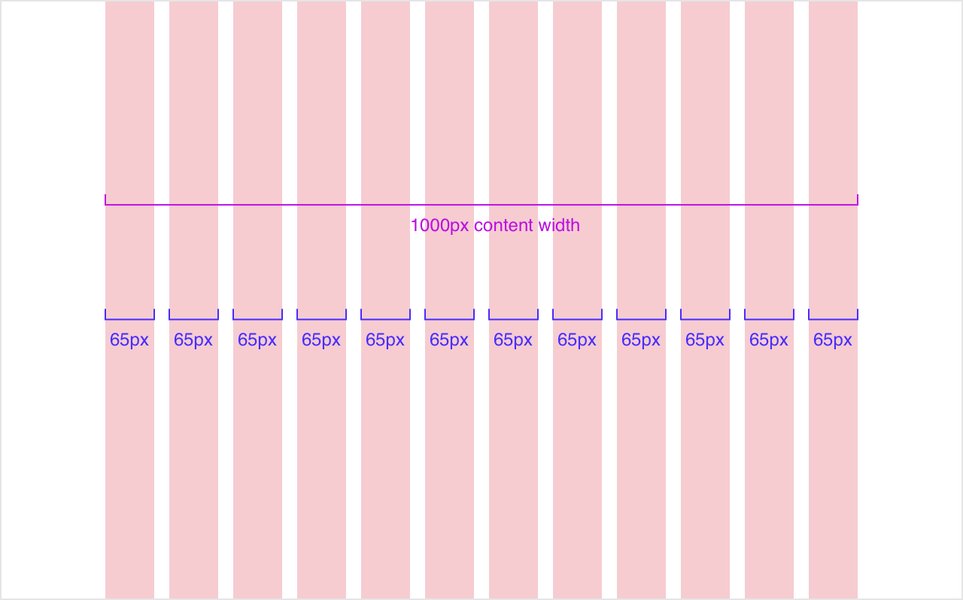
Responsive grids adapt content presentation across various screen sizes, a core aspect of modern layout rules.
Strategies for Maintaining Layout Rules
Maintaining the integrity and consistency of layout rules is an ongoing effort that requires diligence and structured processes. This ensures that the design system remains a reliable source of truth for all teams.
Robust Documentation and Clear Guidelines
The Single Source of Truth
Comprehensive and accessible documentation is the cornerstone of effective layout rule maintenance. This involves creating a centralized repository (e.g., using tools like Zeroheight, Figma, or custom wikis) that clearly outlines all layout principles. This documentation should include:
- Detailed explanations of grid systems (e.g., 4pt/8pt rules, column structures).
- Specifics on spacing scales and their application.
- Alignment principles and best practices.
- Visual examples and use-case scenarios.
- Rationale behind each rule to foster understanding.
- Code snippets or references for developers.
- Version control to track changes and updates systematically.
Clear guidelines ensure that all team members, regardless of their tenure, can understand and apply layout rules consistently, reducing ambiguity and errors.
Consistent Application of Foundational Principles
Enforcing Grids & Spacing
Foundational principles like grid systems and spacing scales must be applied uniformly across all components and interfaces. This often involves utilizing:
- Modular Grid Frameworks: Implementing systems like the 4-point or 8-point grid, where all dimensions, padding, and margins are multiples of a base unit (e.g., 4px or 8px). This creates visual harmony and simplifies responsive design.
- Responsive Breakpoints: Defining clear breakpoints for how layouts adapt to different screen sizes and devices.
- Modern CSS Techniques: Leveraging CSS Flexbox and Grid to create flexible and adaptive layouts that are easier to maintain than older, more rigid methods.
- Design Tool Features: Utilizing features like Auto Layout in Figma to build components that inherently respect spacing and alignment rules.
Governance and Collaborative Oversight
Shared Responsibility and Control
A well-defined governance model is crucial for maintaining layout rules. This typically includes:
- Clear Ownership: Designating a dedicated team or a steering committee responsible for the design system, including its layout rules.
- Review Processes: Establishing formal review cycles for any proposed changes or additions to layout rules, involving representatives from design, development, and product management.
- Communication Plans: Systematically communicating updates, changes, and best practices to all relevant stakeholders.
- Cross-functional Collaboration: Fostering an environment where designers and developers work closely to ensure layout rules are both aesthetically sound and technically feasible.
Regular Audits and Performance Analysis
Ensuring Compliance and Effectiveness
Periodic audits and analysis help ensure that layout rules are being correctly implemented and are still effective. This involves:
- Compliance Checks: Regularly reviewing products and components to identify any deviations from the established layout guidelines.
- Usability Testing: Gathering user feedback on the clarity, intuitiveness, and overall effectiveness of layouts.
- Performance Metrics: Analyzing how layouts affect user engagement, task completion rates, and accessibility.
- Feedback Collection: Actively soliciting input from designers and developers regarding any pain points or inconsistencies they encounter with the layout rules.
Leveraging Tools for Enforcement
Automation and Standardization
Utilizing appropriate tools can significantly aid in the consistent application and maintenance of layout rules:
- Design Software: Tools like Figma, Sketch, or Adobe XD allow for the creation of reusable components and templates that embed layout rules (e.g., constraints, auto-layout, component properties).
- Code Frameworks and Libraries: Developing UI component libraries where layout rules are programmatically enforced.
- Automated Linting and Testing: Implementing tools in the development pipeline that can automatically check for layout inconsistencies or violations of spacing rules.
Strategies for Evolving Layout Rules
A design system is a living entity. Its layout rules must evolve to stay relevant, accommodate new requirements, and leverage emerging best practices. Evolution should be a deliberate and managed process.
Iterative Adaptation and Continuous Improvement
Embracing Change Incrementally
Layout rules should not be set in stone indefinitely. The design system must allow for evolution based on new insights, technological advancements, and changing user needs. This means:
- Adopting an iterative approach where rules are refined over time rather than undergoing massive, infrequent overhauls.
- Creating a culture that views the design system as a product that continuously improves.
Incorporating User Feedback and Usage Data
Learning from Real-World Application
The evolution of layout rules should be informed by how they perform in real-world scenarios. This involves:
- Establishing feedback loops for designers, developers, and end-users to report issues or suggest improvements.
- Analyzing usability testing results to identify areas where layouts might be causing confusion or inefficiency.
- Using analytics to understand how users interact with different layout patterns.
Staying Abreast of Technological Advances and Design Trends
Future-Proofing Your System
The digital landscape is constantly changing. To remain effective, layout rules must adapt by:
- Monitoring new UI/UX trends and evaluating their applicability.
- Incorporating new CSS capabilities (e.g., advanced grid systems, container queries) that offer more flexibility and control.
- Considering updates from major design philosophies like Material Design (e.g., Material You/Material 3 adaptations) or Fluent Design.
- Adapting to new device form factors and interaction paradigms.
Ensuring Scalability and Accessibility
Growing Responsibly
As products and teams grow, layout rules must scale accordingly and prioritize inclusivity:
- Designing rules that can accommodate increasing complexity in interfaces without breaking consistency.
- Regularly updating guidelines to reflect the latest accessibility standards (e.g., WCAG), ensuring sufficient touch target sizes, logical content flow for screen readers, and appropriate color contrast within layout structures.
- Considering modular updates, for example, expanding a 4-point grid system to handle more intricate UI elements or information densities.
Effective Change Management and Versioning
Managing Transitions Smoothly
When evolving layout rules, especially if changes are significant, a clear change management process is vital:
- Versioning: Treating updates to layout rules like software versions, allowing teams to manage migration.
- Communication: Proactively communicating upcoming changes, their rationale, and their impact to all stakeholders.
- Migration Support: Providing clear guidance, documentation, and potentially tools or scripts to help teams adopt new or updated layout rules.
- Backward Compatibility: Where feasible, maintaining backward compatibility or providing clear deprecation timelines to minimize disruption.
- Archiving: Keeping records of outdated versions for reference purposes.
Visualizing Layout Rule Management: A Mindmap
To better understand the interconnected processes of maintaining and evolving layout rules, the following mindmap illustrates the key strategies and considerations involved. It highlights how foundational maintenance activities support ongoing evolution, ensuring a robust and adaptable design system.
in Design Systems"] id1["Maintenance Strategies"] id1_1["Robust Documentation
& Clear Guidelines"] id1_2["Consistent Application
of Foundational Principles
(Grids, Spacing, Alignment)"] id1_3["Strong Governance
& Collaborative Oversight"] id1_4["Regular Audits
& Performance Analysis"] id1_5["Leveraging Tools
for Enforcement"] id2["Evolution Strategies"] id2_1["Iterative Adaptation
& Continuous Improvement"] id2_2["Incorporating User Feedback
& Usage Data"] id2_3["Adoption of New Technologies
& Design Trends"] id2_4["Focus on Scalability
& Enhanced Accessibility"] id2_5["Effective Change Management
& Systematic Versioning"]
This mindmap shows distinct yet related paths for maintaining current standards and proactively evolving them to meet future demands. Both are essential for the long-term health of a design system.
Balancing Stability and Growth: Maintenance vs. Evolution in Layout Rules
Understanding the different focuses of maintenance and evolution can help teams allocate resources and efforts effectively. The table below contrasts these two crucial aspects concerning various features of layout rule management:
| Feature | Maintenance Focus (Ensuring Stability & Consistency) | Evolution Focus (Driving Growth & Relevance) |
|---|---|---|
| Documentation | Ensuring clarity, accuracy, and accessibility of current rules and guidelines. Keeping examples up-to-date. | Updating with new patterns, documenting rationale for changes, version history, and future considerations. |
| Grid & Spacing Systems | Enforcing consistent application of established systems (e.g., 8-point grid) across all platforms. | Adapting systems for new device categories, incorporating flexible grid technologies (e.g., CSS Grid, container queries), refining spacing scales for better hierarchy. |
| Audits & Reviews | Identifying deviations from current standards, ensuring compliance, and correcting inconsistencies. | Assessing the ongoing relevance of rules against new product requirements, user needs, and emerging best practices. |
| User Feedback | Collecting data on the usability and clarity of current layouts implemented with existing rules. | Using insights from user research and A/B testing to drive significant improvements and innovations in layout approaches. |
| Technology & Trends | Applying established and well-supported technologies to ensure consistent and reliable layout implementation. | Exploring, piloting, and integrating new technologies, tools, and design paradigms that enhance layout flexibility, performance, or aesthetics. |
| Accessibility | Ensuring current layouts meet defined accessibility standards (e.g., WCAG compliance for color contrast, focus order). | Proactively updating rules to incorporate emerging accessibility best practices and address a wider range of user needs. |
| Team Training | Onboarding new members to current layout rules and ensuring existing team members adhere to them. | Educating the team on new layout principles, tools, and the rationale behind evolutionary changes. |
Both maintenance and evolution are critical. Maintenance provides the stable foundation, while evolution ensures the design system remains a valuable and forward-looking asset.
Key Pillars for Robust Layout Rule Management
The effectiveness of managing a design system's layout rules depends on several interconnected factors. The radar chart below visualizes the perceived importance of these pillars, comparing their impact on maintaining system stability versus fostering system growth and innovation. A higher score indicates greater importance for that aspect.
This chart illustrates that while aspects like Documentation Quality and Governance Strength are vital for stability, factors such as Adaptability to Trends, User-Centricity, and Scalability Planning are more heavily weighted towards fostering growth and innovation within the design system's layout rules.
Visualizing Layout Principles in Action
Understanding the fundamental concepts of layout, particularly spacing and grids, is crucial for both maintaining and evolving a design system. The video below from the "Let's Build a Design System" series provides a clear breakdown of how Material Design approaches spacing, which is a core element of any layout system. It demonstrates how these foundational rules contribute to consistency and predictability in UI design.
This exploration of Material Design's spacing fundamentals highlights the importance of a systematic approach to layout. Such principles, when well-documented and consistently applied, form the backbone of a robust design system, enabling teams to build intuitive and aesthetically pleasing interfaces efficiently.
Frequently Asked Questions (FAQ)
What are the biggest challenges in maintaining and evolving layout rules?
Common challenges include:
- Balancing Consistency with Flexibility: Strict rules ensure consistency but can stifle innovation or fail to address unique edge cases. Finding the right balance is key.
- Ensuring Adoption and Compliance: Getting all teams to consistently adhere to the layout rules can be difficult, especially in large or distributed organizations.
- Keeping Documentation Current: As the system evolves, documentation can quickly become outdated if not diligently maintained.
- Managing Governance Overhead: Establishing and running review processes, facilitating collaboration, and communicating changes require significant effort.
- Resistance to Change: Teams may become comfortable with existing rules and resist updates, even if they are beneficial.
- Tooling and Integration: Ensuring design tools and development workflows seamlessly support the layout rules can be technically challenging.
How often should a design system’s layout rules be formally reviewed or updated?
There's no one-size-fits-all answer, but a general guideline is:
- Minor Adjustments: Can be ongoing as part of regular maintenance and feedback loops.
- Formal Reviews: It's often beneficial to conduct comprehensive reviews quarterly or semi-annually. This allows for a structured assessment of the rules' effectiveness and relevance.
- Trigger-Based Updates: Significant updates might also be triggered by major product redesigns, the adoption of new core technologies, substantial shifts in design trends, or critical user feedback indicating problems with existing layouts.
The key is to have a process for continuous monitoring and a schedule for more in-depth reviews to ensure the layout rules remain effective and don't become a bottleneck.
What is the role of developers in the maintenance and evolution of layout rules?
Developers play a crucial role throughout the lifecycle of layout rules:
- Feasibility Assessment: They provide essential insights into the technical feasibility and performance implications of proposed layout rules.
- Implementation: Developers translate layout rules into reusable code components and CSS, ensuring they are implemented accurately and efficiently.
- Identifying Limitations and Opportunities: They can highlight technical constraints or suggest alternative approaches that leverage new web technologies (e.g., CSS Grid, Flexbox, container queries).
- Tooling and Automation: Developers can help build or integrate tools for linting, testing, and enforcing layout consistency in the development pipeline.
- Feedback on Practicality: They offer valuable feedback on how easy or difficult layout rules are to apply in practice, contributing to their refinement.
- Performance Optimization: Ensuring that layouts are not only visually correct but also performant is a key developer concern.
Effective collaboration between designers and developers is essential for creating layout rules that are both aesthetically pleasing and technically sound.
How can we ensure new team members quickly understand and apply layout rules?
Effective onboarding is key:
- Comprehensive Documentation: Clear, concise, and easily accessible documentation with plenty of visual examples and use cases.
- Onboarding Sessions: Dedicated training sessions that walk new members through the layout principles, tools, and processes.
- Templates and Starters: Providing pre-built templates or starter files in design tools (like Figma) and code repositories that already incorporate the layout rules.
- Mentorship and Pairing: Assigning a mentor or encouraging pair designing/programming with experienced team members.
- Interactive Playgrounds: If possible, provide a sandbox environment where new members can experiment with layout components and rules without affecting live projects.
- Clear "Do's and Don'ts": Highlighting common pitfalls and best practices.
- Access to Experts: Making it easy for new members to ask questions and get support from the design system team or senior designers/developers.
Recommended Further Exploration
- How do different grid systems (e.g., 8-point vs. 12-column) impact responsive design in complex web applications?
- What are the best practices for versioning layout components and styles within a design system library?
- How can automated visual regression testing be integrated to enforce layout consistency in development pipelines?
- Explore detailed case studies of successful design system layout evolution in large-scale enterprise products.
References
Last updated May 7, 2025