
Multi-GPU Setups for Deep Learning Applications
Enhancing Performance and Scalability Through Parallel GPU Architectures
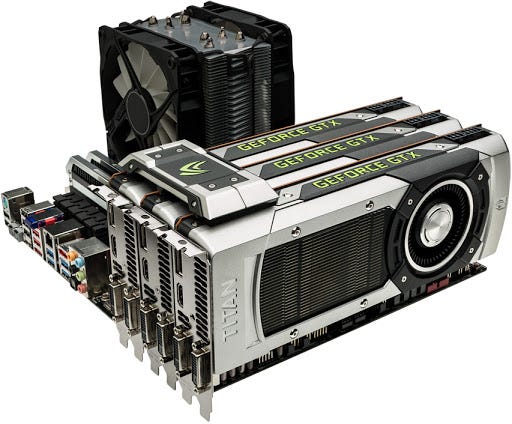
Highlights
- Accelerated Training: Multi-GPU configurations dramatically reduce training time for complex models.
- Optimized Resource Utilization: Careful hardware selection, interconnect technologies, and workload distribution maximize performance.
- Flexible Architectural Strategies: From data parallelism to model parallelism, modern frameworks enable tailored solutions for diverse deep learning tasks.
Overview
In the realm of deep learning, the escalating complexity of neural networks and the magnitude of datasets necessitate the deployment of powerful computational systems. Multi-GPU setups have emerged as a key enabler for accelerating these deep learning processes by distributing computational workloads across several Graphics Processing Units (GPUs). This approach not only speeds up training times but also enhances model capabilities by facilitating the training of more intricate architectures.
By leveraging modern parallel processing techniques, multi-GPU configurations allow for simultaneous calculations that significantly lower the time taken to fine-tune and deploy advanced models. This technological progression is vital for researchers and practitioners aiming to push the boundaries of artificial intelligence in areas such as natural language processing, computer vision, and large-scale data analysis.
Hardware Considerations
Choosing the Right GPUs
Selecting appropriate GPUs is the foundational step in building a multi-GPU system. Several factors are essential in this decision-making process:
Memory Capacity (VRAM)
Deep learning models, particularly large language models (LLMs) and complex convolutional neural networks (CNNs), require substantial memory to store intermediate results and parameters. High-end GPUs typically offer ample VRAM—24 GB or more for demanding tasks—whereas cost-effective options with lower VRAM (8 GB or 12 GB) may be ideal for more common generative AI tasks.
Computational Performance
It is crucial to consider the type of cores available within a GPU, such as CUDA cores and Tensor Cores. These specialized cores are designed to handle the parallel arithmetic operations common in deep learning, offering significant improvements in Floating-point Operations Per Second (FLOPS) and overall training efficiency.
Interconnect Technologies
For multi-GPU communication, modern interconnects such as NVLink provide high-bandwidth, low-latency communication channels between GPUs. For instance, third-generation NVLink can achieve speeds up to 112 GB/s, facilitating seamless data sharing and reducing bottlenecks during intensive training processes.
System and Infrastructure Requirements
Motherboard, CPU, and RAM
A well-balanced multi-GPU system involves not only the GPUs themselves but also a robust supporting architecture:
Motherboard
The motherboard should offer multiple PCIe slots with sufficient lanes (preferably at least x8 per GPU) to ensure that all GPUs work at optimum speeds. Compatibility with the chosen GPUs is non-negotiable; hence, confirming that the board supports the desired configuration is pivotal.
CPU and RAM
A powerful multi-core CPU complements the GPU setup by managing data transfers and workload distributions effectively. Additionally, adequate system RAM—typically between 1 to 2 times the total GPU VRAM—is necessary to ensure smooth data processing and model training.
Power Supply and Cooling
As GPUs consume significant energy, opting for a robust power supply with ample wattage is essential. Moreover, effective cooling solutions, including both airflow systems and liquid cooling options, are critical to maintaining optimal operating temperatures and ensuring system stability during prolonged training sessions.
Software Frameworks and Setup
Distributed Training and Parallelism
Modern deep learning frameworks such as TensorFlow and PyTorch have integrated native support for multi-GPU training, which includes mechanisms for both data parallelism and model parallelism:
Data Parallelism
This strategy involves splitting the training dataset into smaller subsets and processing each subset on a different GPU simultaneously. After computing the gradients, the system aggregates the results to update the model uniformly. This approach is particularly effective for reducing overall training time and is widely implemented in models that can be tiled across multiple GPUs.
Model Parallelism
In situations where the deep learning model itself is extremely large, model parallelism comes into play. Here, the neural network is divided across multiple GPUs, allowing each GPU to process a portion of the network. This method ensures that the memory limitations of a single GPU are not a barrier to training exceptionally large models.
Distributed Data Parallel (DDP)
Specifically available in frameworks like PyTorch, Distributed Data Parallel (DDP) distributes the model across multiple processing nodes, ensuring efficient gradient updates and synchronization. This architectural strategy is indispensable in maintaining a balance between scalability and performance.
Driver Installation and Library Support
To maximize GPU performance, it is essential to install the appropriate drivers and libraries. The CUDA Toolkit and associated libraries (such as cuDNN and cuBLAS) optimize the deep learning performance by tapping into GPU acceleration. These tools provide critical support for tasks such as convolution and matrix multiplication, which are at the core of deep learning computations.
Benchmarking and Performance Optimization
Once the system is configured, the next step involves benchmarking the setup under typical deep learning workloads. Proper benchmarking can help to identify issues such as memory bottlenecks, uneven workload distributions, or insufficient interconnect bandwidth. Based on these insights, practitioners can optimize batch sizes, learning rates, and other hyperparameters to fully leverage the benefits of a multi-GPU environment.
Implementation Strategies and Use Cases
Practical Deployment Models
Multi-GPU setups are versatile and can be implemented in various operational environments:
Centralized GPU Servers
In this configuration, a single server is equipped with multiple GPUs. The centralized management approach is ideal for organizations that require having dedicated systems for heavy-duty training tasks. These systems are typically optimized for stability and high performance over long periods.
GPU Clusters
For large-scale deployments, GPU clusters consist of multiple nodes, each containing multiple GPUs. Clustered environments, connected via high-speed networks and specialized interconnect solutions, support distributed deep learning applications at scale. They are indispensable for research environments and large organizations with complex AI tasks.
Orchestration with Kubernetes
Container orchestration platforms like Kubernetes, when integrated with GPU support, allow for dynamic resource allocation and management. This enables scalable deep learning deployments in cloud or hybrid environments and ensures optimal utilization of GPU resources amidst varying workloads.
Examples in Deep Learning Applications
Multi-GPU configurations are particularly useful in several deep learning domains:
- Training Large Language Models (LLMs): Distributed training across multiple GPUs expedites the process of building and refining LLMs, where intricate data patterns and massive parameter sizes require considerable computational power.
- Computer Vision Tasks: Deep convolutional neural networks benefit from multi-GPU parallelism, which facilitates faster processing of large image datasets and improves the efficiency of tasks such as object detection and semantic segmentation.
- Generative Adversarial Networks (GANs): GAN training involves complex processes that can be significantly accelerated by distributing tasks across multiple GPUs, helping to achieve higher fidelity in generated images.
Configuring and Monitoring Multi-GPU Setups
Best Practices for Setup and Maintenance
Ensuring a smooth operation of multi-GPU configurations in deep learning involves attention to several setup and ongoing maintenance considerations:
System Configuration
The initial setup requires the installation of all necessary drivers, deep learning frameworks, and supporting libraries. Hardware components should be tested individually as well as collectively to verify compatibility and performance consistency. The calibration of hardware, especially in ensuring that the power supply, cooling system, and interconnects are all operating as expected, is critical for sustained performance.
Workload Management
Efficiently distributing tasks to multiple GPUs ensures balanced utilization and prevents overload on any single GPU. Tools integrated within deep learning frameworks allow dynamic allocation and load balancing, which are beneficial for managing both data parallelism and model parallelism effectively.
Performance Monitoring
Continuous monitoring helps in tuning the performance parameters. Software tools that track GPU utilization, temperature, memory usage, and power consumption are essential in identifying potential issues early on. Such monitoring facilitates proactive system maintenance and minimizes downtimes during training cycles.
Performance Benchmarking Table
Below is an illustrative HTML table summarizing key performance metrics observed in a multi-GPU setup:
| Metric | Single GPU | Multi-GPU (4 GPUs) |
|---|---|---|
| Training Speed | Baseline Speed | Up to 4× Faster |
| Memory Bandwidth | Standard (varies by GPU) | Enhanced via Interconnect |
| Scalability | Limited to Single GPU | Highly Scalable with DDP |
| Efficiency | Dependent on workload | Optimal Resource Utilization |
Integration with Deep Learning Frameworks
Setting Up a Multi-GPU Environment
Major frameworks such as TensorFlow and PyTorch provide robust tools for configuring multi-GPU environments. Within these frameworks, developers have access to built-in modules specifically designed for distributed training:
TensorFlow
TensorFlow utilizes distribution strategies that enable models to automatically scale across multiple GPUs. This includes strategies like MirroredStrategy, which easily replicates the model on each available GPU and synchronizes training through efficient gradient aggregation.
PyTorch
PyTorch provides features such as DistributedDataParallel (DDP) that allow for seamless distribution of the deep learning workload across multiple GPUs. Its flexible approach supports both data and model parallelism, enabling developers to choose practices best suited for their specific application needs.
These frameworks not only support multi-GPU training but also offer extensive documentation and community-supported plugins and tools that help optimize GPU utilization, manage memory allocation, and monitor performance metrics in real time.
Additional Considerations
Cost Efficiency and Scalability
Although multi-GPU setups often involve higher initial investments, the reduction in training time and increase in productivity can justify the cost in many deployments. Balancing cost and performance is key; using a mix of high-end GPUs for demanding tasks and consumer-grade GPUs for lighter workloads can be a strategic approach.
As research and development in deep learning continue to evolve, the scalability of multi-GPU systems ensures that the infrastructure can adapt to future model complexities and data volumes. This foresight in design allows organizations to scale computational resources without frequently overhauling the entire hardware setup.
Community and Enterprise Developments
With rapid technological advancements, multi-GPU deployment strategies are continuously refined through community collaboration and enterprise-driven solutions. Open-source projects, user forums, and corporate research contribute to advancements in GPU resource management, interconnect bandwidth improvements, and efficiency optimizations—which further boost the capability of multi-GPU deep learning environments.
References
- Multi-GPU Deep Learning Guide - AI Pathly
- Best GPUs for AI - CenturyTech
- Top GPUs for Deep Learning 2025 - Database Mart
- Critical Specs for Deep Learning GPUs - Atlantic
- Deep Learning GPU Recommendations - Cherry Servers
- Multi-GPU Linux Setup - Towards Data Science
- Scaling Deep Learning with PyTorch - Medium
- Multi-GPU Guide - Run:AI
- Deep Learning Using Multiple GPUs - NASA HECC
- Multi-GPU Machine Setup Guide - Hugging Face Forums
Recommended Related Queries
Last updated March 3, 2025